
Understanding Global and Application Scope in Kotlin Android

Introduction
When building Android applications with Kotlin, understanding coroutine scopes is crucial for managing asynchronous operations effectively. Two commonly discussed scopes are GlobalScope and Application Scope. While they might seem similar, they serve different purposes and have distinct implications for your app’s architecture and lifecycle management.
What is GlobalScope?
GlobalScope is a predefined coroutine scope in Kotlin that launches coroutines at the top level of the application. Coroutines launched in GlobalScope are not bound to any specific lifecycle and will continue running until they complete or the application process is killed.
Characteristics of GlobalScope
Lifecycle Independent: Coroutines launched here are not tied to any Activity, Fragment, or ViewModel lifecycle
Application-wide: Lives as long as the application process
No Automatic Cancellation: You must manually cancel coroutines to prevent memory leaks
Not Recommended: The Kotlin team discourages its use in most scenarios
Example of GlobalScope
GlobalScope.launch {
    val data = fetchDataFromNetwork()
    // This continues even if the Activity is destroyed
    updateUI(data) // Potential crash if Activity is gone!
}
Problems with GlobalScope
Memory Leaks: Coroutines continue running even after the UI component is destroyed
Crash Risk: Attempting to update destroyed UI components leads to crashes
Resource Waste: Operations continue unnecessarily in the background
Testing Difficulty: Hard to control and test coroutines launched globally
What is Application Scope?
Application Scope (often implemented as a custom scope tied to the Application class) is a structured approach to managing coroutines at the application level. Unlike GlobalScope, it provides better lifecycle management and cancellation control.
Creating an Application Scope
class MyApplication : Application() {
    val applicationScope = CoroutineScope(SupervisorJob() + Dispatchers.Default)

    override fun onTerminate() {
        super.onTerminate()
        applicationScope.cancel() // Clean cancellation
    }
}
Benefits of Application Scope
Structured Concurrency: All coroutines are children of a parent job
Controlled Cancellation: Can cancel all coroutines when needed
Better Testing: Easier to inject and test
Resource Management: Proper cleanup on application termination
Data Flow Comparison
Here’s how data flows differently in each scope:
GlobalScope Data Flow
User Action → GlobalScope.launch() → Network Call → Data Processing
                    ↓
            No lifecycle binding
                    ↓
    Continues even after Activity destroyed
                    ↓
        Potential crash or memory leak
Application Scope Data Flow
User Action → Application Scope → Network Call → Data Processing
                    ↓
          Supervised by Application
                    ↓
        Cancelled when app terminates
                    ↓
          Clean resource management
Architecture Diagrams
Lifecycle Relationships
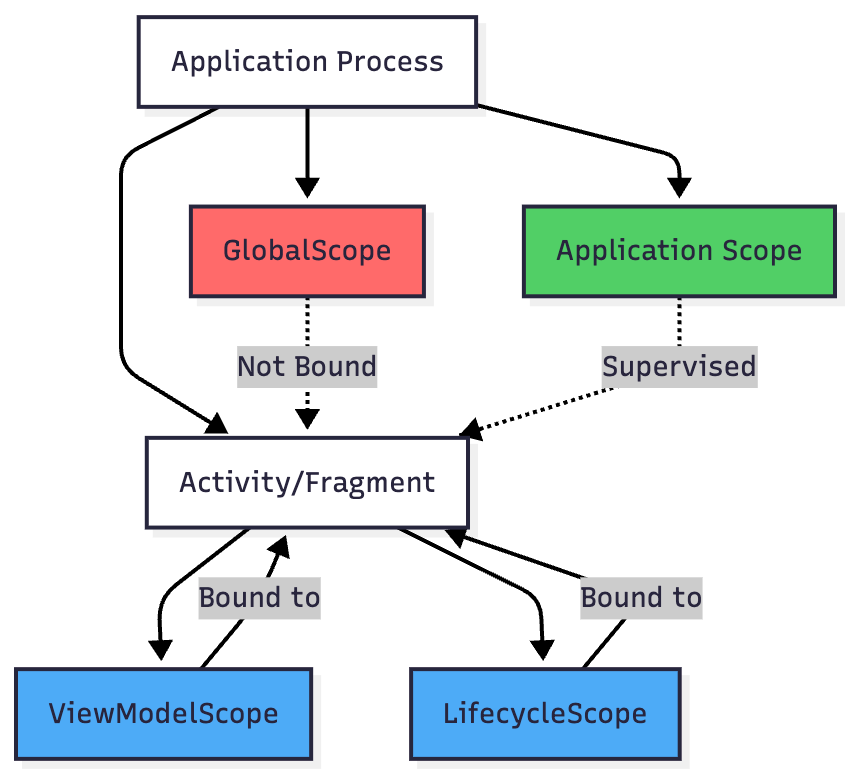
Coroutine Hierarchy

Data Flow: Repository Pattern with Scopes

Best Practices
When to Use Application Scope
App-level Data Synchronization: Periodic sync operations that should outlive individual screens
Dependency Injection: Initializing app-wide dependencies
Background Workers: Long-running tasks that need to complete regardless of UI state
Caching Operations: Maintaining app-level caches
class MyApplication : Application() {
    val applicationScope = CoroutineScope(SupervisorJob() + Dispatchers.Default)

    fun startPeriodicSync() {
        applicationScope.launch {
            while (isActive) {
                syncData()
                delay(3600000) // Every hour
            }
        }
    }
}
When NOT to Use GlobalScope
UI Operations: Use ViewModelScope or LifecycleScope
Activity/Fragment Operations: Use lifecycleScope
ViewModel Operations: Use viewModelScope
Recommended Scope Hierarchy

Practical Implementation
Setting Up Application Scope
class MyApplication : Application() {
    // Application-level scope with SupervisorJob
    val applicationScope = CoroutineScope(
        SupervisorJob() + Dispatchers.Default
    )

    // Dependency injection container
    lateinit var appContainer: AppContainer

    override fun onCreate() {
        super.onCreate()
        appContainer = AppContainer(applicationScope)
    }

    override fun onTerminate() {
        super.onTerminate()
        applicationScope.cancel()
    }
}
Repository with Application Scope
class UserRepository(
    private val apiService: ApiService,
    private val database: UserDatabase,
    private val applicationScope: CoroutineScope
) {
    // Use application scope for background operations
    fun syncUsers() {
        applicationScope.launch {
            try {
                val users = apiService.fetchUsers()
                database.userDao().insertAll(users)
            } catch (e: Exception) {
                Log.e(”Sync”, “Failed to sync users”, e)
            }
        }
    }

    // Expose Flow for UI observation
    fun observeUsers(): Flow<List<User>> {
        return database.userDao().observeAll()
    }
}
ViewModel Using Application Scope Indirectly
class UserViewModel(
    private val repository: UserRepository
) : ViewModel() {

    // UI state using viewModelScope
    val users = repository.observeUsers()
        .stateIn(
            scope = viewModelScope,
            started = SharingStarted.WhileSubscribed(5000),
            initialValue = emptyList()
        )

    // Trigger background sync (uses application scope internally)
    fun syncUsers() {
        repository.syncUsers()
    }
}
Conclusion
While GlobalScope might seem convenient, it’s an anti-pattern in modern Android development. Instead, use structured concurrency with appropriate scopes:
Application Scope: For app-wide operations that need controlled lifecycle management
ViewModelScope: For ViewModel operations that should cancel when the ViewModel is cleared
LifecycleScope: For Activity/Fragment operations tied to the UI lifecycle
By understanding and correctly implementing these scopes, you’ll build more robust, maintainable, and leak-free Android applications.
Key Takeaways
✅ DO: Use custom Application Scope with SupervisorJob
✅ DO: Match scope to component lifecycle
✅ DO: Use structured concurrency
❌ DON’T: Use GlobalScope for regular operations
❌ DON’T: Launch coroutines without lifecycle awareness
❌ DON’T: Forget to cancel long-running operations