
Understanding Gap Buffers in Jetpack Compose: The 60-Year-Old Algorithm Powering Modern Android UI
How a simple data structure from the 1960s makes your Android apps blazingly fast


Introduction: A Time-Traveling Algorithm
Imagine if I told you that the same computer science trick that made text editors fast in the 1960s is secretly making your modern Android apps smooth today. Sounds wild, right? But it’s true!
Jetpack Compose, Google’s modern UI toolkit for Android, uses a battle-tested concept called a Gap Buffer to achieve lightning-fast UI updates. Let’s break this down so clearly that even a 5-year-old could understand it. 🚀
Part 1: The Gap Buffer - Explaining Like You’re Five 👶
The Toy Block Analogy
Imagine you have 10 toy blocks in a row spelling “HELLO WORLD”:
[H][E][L][L][O][ ][W][O][R][L][D]Now, you want to change “HELLO” to “HELLO THERE”. Using a normal approach, you’d have to:
Pick up ALL the blocks from “WORLD” onwards
Slide them to the right
Put in “THERE”
Put back all the blocks
That’s exhausting! You touched every single block just to add one word.
The Magic Gap Solution 🎩✨
Now imagine we add an invisible “magic gap” that can move around:
[H][E][L][L][O][___GAP___][W][O][R][L][D]When you want to type after “HELLO”, the gap is already there! You just fill it:
[H][E][L][L][O][ ][T][H][E][R][E][___GAP___][W][O][R][L][D]You only touched the blocks you needed to! That’s the genius of a gap buffer.
The Technical Picture
Let’s visualize how a gap buffer actually works:

Simple Code Example
Here’s a baby-simple gap buffer implementation:
class SimpleGapBuffer(initialCapacity: Int = 16) {
    private var buffer = CharArray(initialCapacity)
    private var gapStart = 0
    private var gapEnd = initialCapacity

    // Insert at current position (the gap!)
    fun insert(char: Char) {
        if (gapStart == gapEnd) expandGap()
        buffer[gapStart++] = char
    }

    // Delete before cursor
    fun delete() {
        if (gapStart > 0) {
            gapStart--
        }
    }

    // Move cursor - this moves the gap!
    fun moveCursor(newPosition: Int) {
        while (gapStart < newPosition) {
            buffer[gapStart++] = buffer[gapEnd++]
        }
        while (gapStart > newPosition) {
            buffer[--gapEnd] = buffer[--gapStart]
        }
    }

    private fun expandGap() {
        val newCapacity = buffer.size * 2
        val newBuffer = CharArray(newCapacity)
        // Copy left side
        buffer.copyInto(newBuffer, 0, 0, gapStart)
        // Copy right side to end
        val rightSize = buffer.size - gapEnd
        buffer.copyInto(newBuffer, newCapacity - rightSize, gapEnd)

        gapEnd = newCapacity - rightSize
        buffer = newBuffer
    }
}
Key Insights
- Insertions/deletions at the gap = **O(1)** → Super fast! ⚡
- Moving the gap = **O(n)** → Slow, but you do it rarely
- Most typing happens in one spot, so you stay fast most of the time!
Part 2: Jetpack Compose’s Secret Weapon — The Slot Table 🎯
From Text Editing to UI Updates
Now here’s where it gets interesting. The Compose team thought: ”If gap buffers make text editing fast, what if we use the same idea for UI updates?”
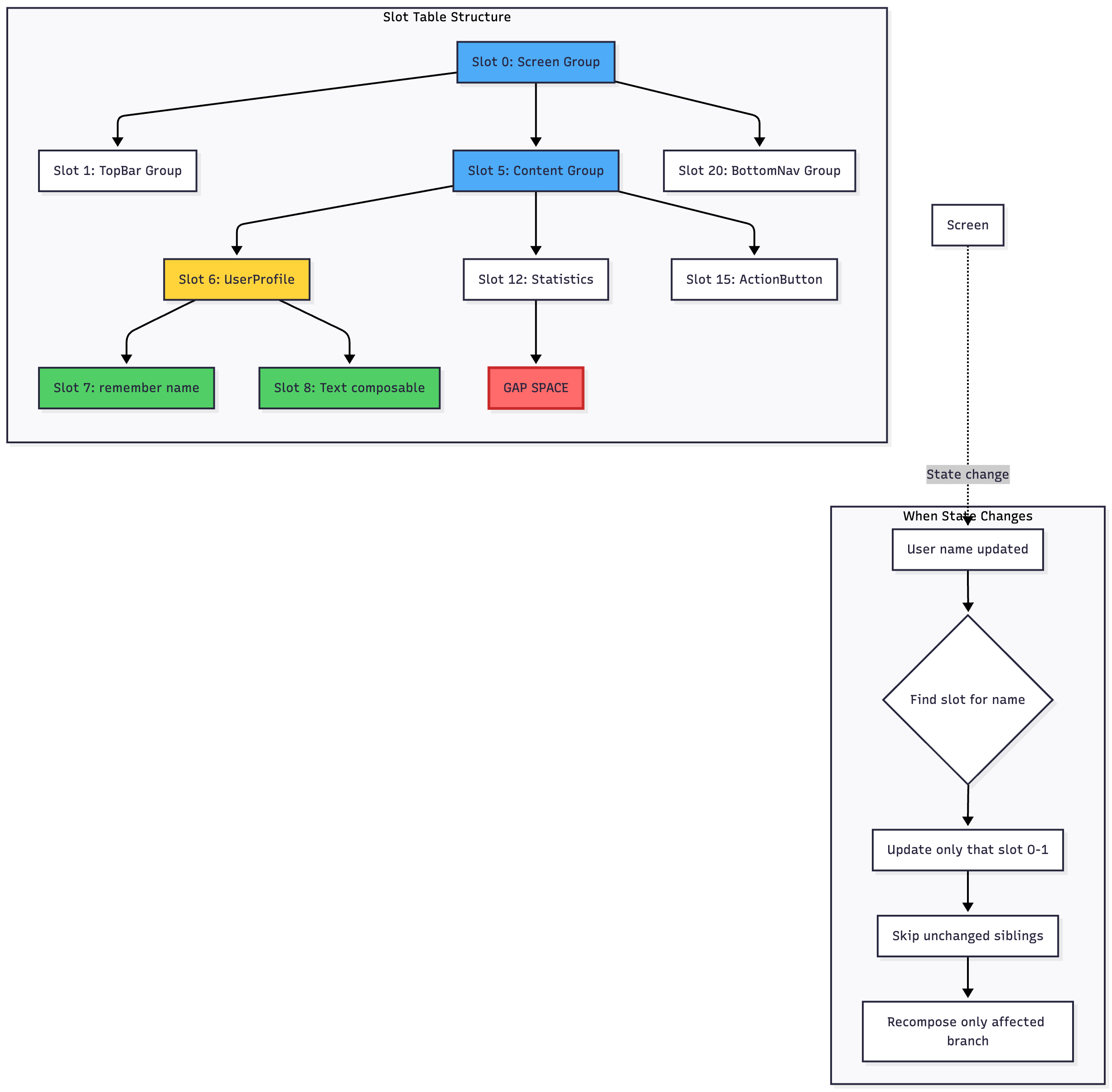
The Building Block Analogy (Again!) Think of your app’s UI as a tower of LEGO blocks:
🏠 Screen
├─ 📋 TopBar
├─ 📝 Content
│  ├─ 👤 UserProfile
│  ├─ 📊 Statistics
│  └─ 🔘 ActionButton
└─ 🔽 BottomNav
When you update the user’s name, you only need to change the UserProfile block. You don’t rebuild the entire tower!
The Slot Table: Gap Buffer for UI
Compose stores your UI tree in something called a Slot Table - essentially a gap buffer for composables:
How Compose Uses This for Speed
Let’s see the magic in action with a real example:
@Composable
fun UserProfile(userName: String) {
    // Slot 0: Group start
    Column {
        // Slot 1: remember {} creates a stable slot
        val formattedName = remember(userName) {
            userName.uppercase()
        }

        // Slot 2: Text composable
        Text(formattedName)

        // Slot 3: Another Text composable
        Text(”Last seen: Today”)

        // Slot 4: Button composable
        Button(onClick = {}) {
            Text(”Follow”)
        }
    }
    // Slot 5: Group end
}
What happens when userName changes?
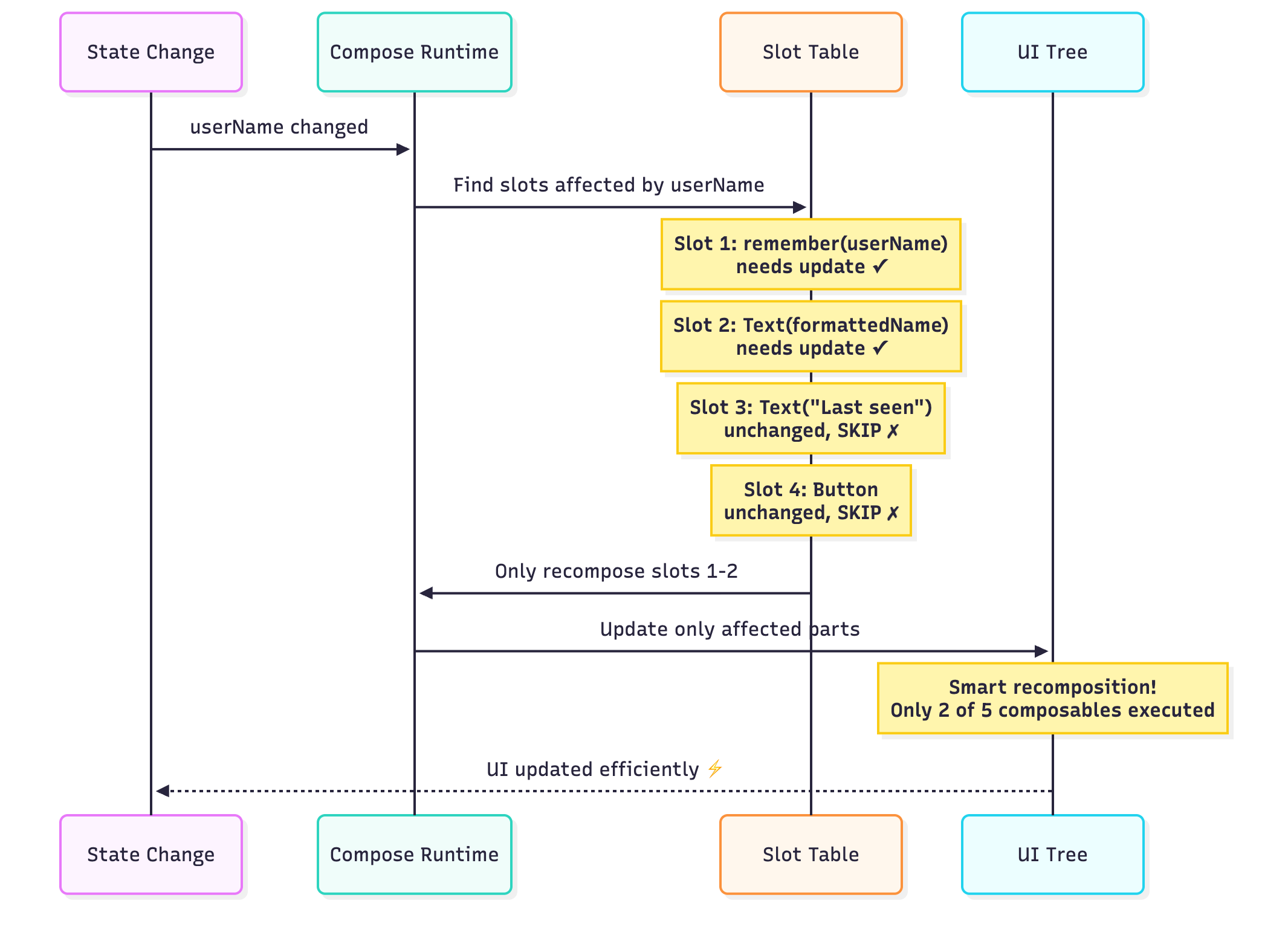
The Result:
✅ Slots 1-2 update (they depend on
userName)⏭️ Slots 3-4 are skipped entirely (no dependencies changed)
🚀 The gap in the slot table moves to where changes happen
This is O(1) for most updates! Just like the gap buffer for text.
Part 3: Real-World Performance Tips 💪
The Golden Rules
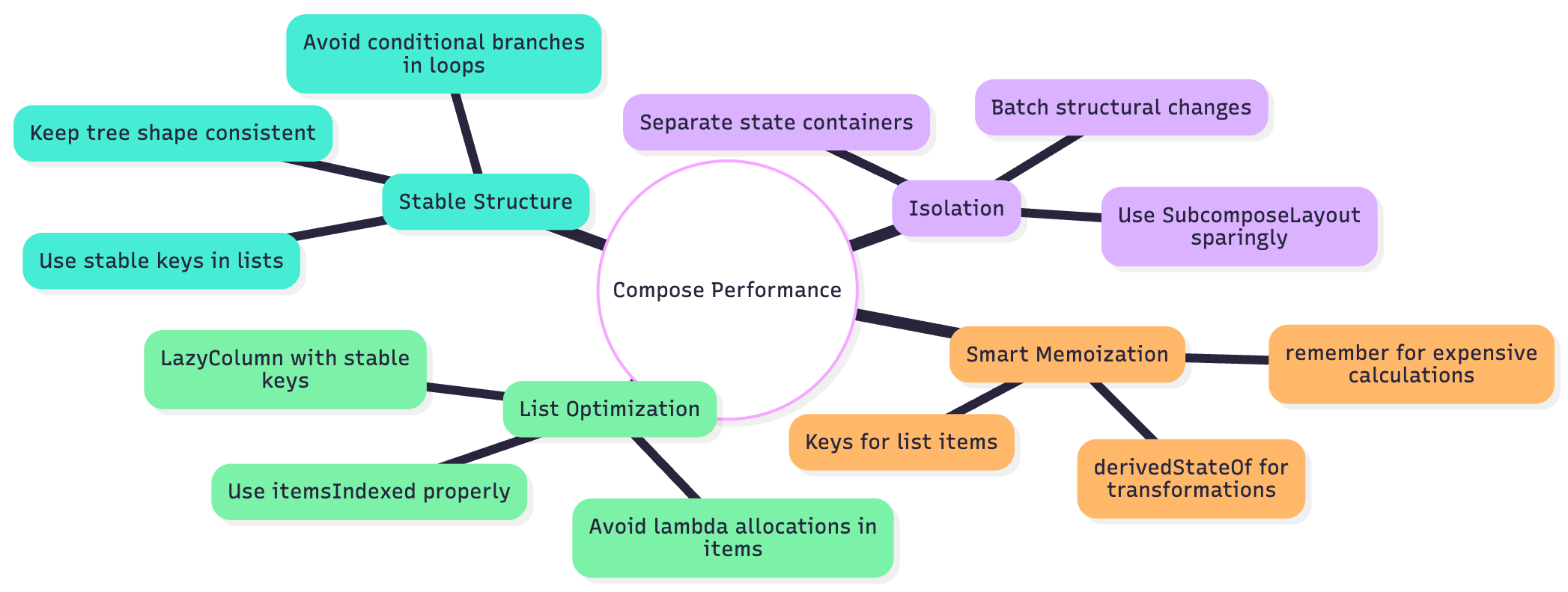
Rule 1: Keep Your Structure Stable 🏗️
Bad Example (Structure keeps changing):
@Composable
fun BadExample(showDetails: Boolean) {
    Column {
        Text(”Title”)

        // 😱 Structure changes on every toggle!
        if (showDetails) {
            Text(”Detail 1”)
            Text(”Detail 2”)
            Button(onClick = {}) { Text(”Action”) }
        }

        Text(”Footer”)
    }
}
Every time showDetails toggles, the slot table needs to rebuild. The gap moves around constantly!
Good Example (Stable structure):
@Composable
fun GoodExample(showDetails: Boolean) {
    Column {
        Text(”Title”)

        // ✅ Structure is stable, just visibility changes
        AnimatedVisibility(visible = showDetails) {
            Column {
                Text(”Detail 1”)
                Text(”Detail 2”)
                Button(onClick = {}) { Text(”Action”) }
            }
        }

        Text(”Footer”)
    }
}
Now the slot table stays stable. The gap doesn’t move!
Rule 2: Use remember Wisely 🧠
Think of remember as creating a bookmark in the slot table:
@Composable
fun ExpensiveCalculation(items: List<Item>) {
    // 😱 BAD: Recalculates on every recomposition
    val total = items.sumOf { it.price * it.quantity }

    // ✅ GOOD: Cached in slot table until items change
    val total = remember(items) {
        items.sumOf { it.price * it.quantity }
    }

    // 🚀 EVEN BETTER: For derived state
    val total = remember {
        derivedStateOf {
            items.sumOf { it.price * it.quantity }
        }
    }.value

    Text(”Total: $$total”)
}
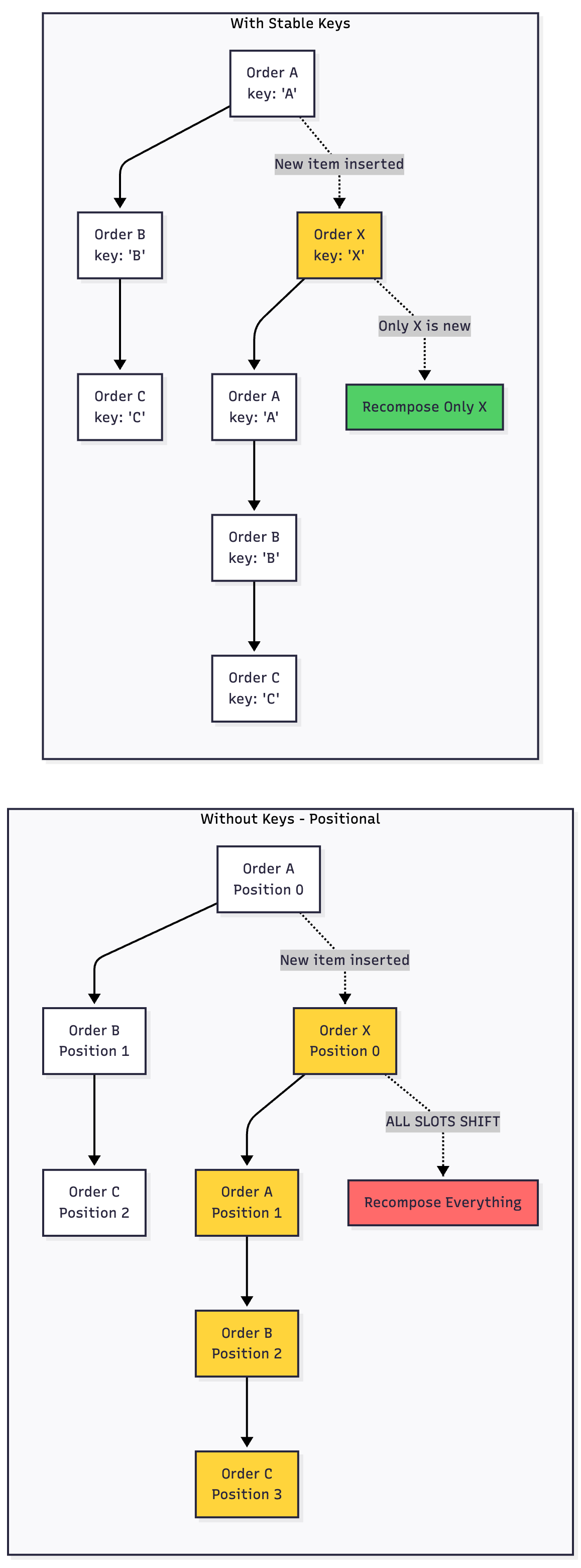
Rule 3: Stable Keys in Lists 🔑
The Pizza Order Analogy:
Imagine a restaurant where orders keep coming in:
// 😱 Without keys - Compose can’t track which is which
@Composable
fun PizzaOrders(orders: List<Order>) {
    LazyColumn {
        items(orders) { order ->
            OrderCard(order)
        }
    }
}

// ✅ With keys - Compose knows exactly what changed
@Composable
fun PizzaOrders(orders: List<Order>) {
    LazyColumn {
        items(
            items = orders,
            key = { it.id } // Stable identity!
        ) { order ->
            OrderCard(order)
        }
    }
}
Rule 4: Batch Your Changes 📦
kotlin
@Composable
fun DynamicList(viewModel: MyViewModel) {
    val items by viewModel.items.collectAsState()

    LazyColumn(
        key = { items[it].id }
    ) {
        items(items.size) { index ->
            // ✅ Stable parent with key
            ItemCard(items[index])
        }
    }

    // 😱 BAD: Adding items one by one
    Button(onClick = {
        repeat(10) { viewModel.addItem() }
    }) { Text(”Add 10 Items”) }

    // ✅ GOOD: Batch the updates
    Button(onClick = {
        viewModel.addItemsBatch(10)
    }) { Text(”Add 10 Items (Batched)”) }
}

class MyViewModel : ViewModel() {
    private val _items = MutableStateFlow<List<Item>>(emptyList())
    val items = _items.asStateFlow()

    // This triggers 10 recompositions!
    fun addItem() {
        _items.value = _items.value + Item()
    }

    // This triggers only 1 recomposition!
    fun addItemsBatch(count: Int) {
        _items.value = _items.value + List(count) { Item() }
    }
}
Part 4: Real-World Example - TextField 📝
Fun fact: Jetpack Compose’s TextField actually uses a gap buffer internally for text editing! Let’s see how it all connects:

Two gap buffers working together:
Text buffer - Handles the actual characters you type
Slot table - Handles the UI updates for the TextField composable
@Composable
fun SmartTextField() {
    var text by remember { mutableStateOf(”“) }

    TextField(
        value = text,
        onValueChange = { newText ->
            // Internal gap buffer handles text manipulation
            // Slot table handles UI recomposition
            text = newText
        },
        // These decorations are in separate slots
        // They won’t recompose when text changes!
        label = { Text(”Enter name”) },
        leadingIcon = { Icon(Icons.Default.Person, null) },
        // This will recompose with text
        trailingIcon = {
            if (text.isNotEmpty()) {
                IconButton(onClick = { text = “” }) {
                    Icon(Icons.Default.Clear, null)
                }
            }
        }
    )
}
Part 5: The Complete Mental Model 🧩
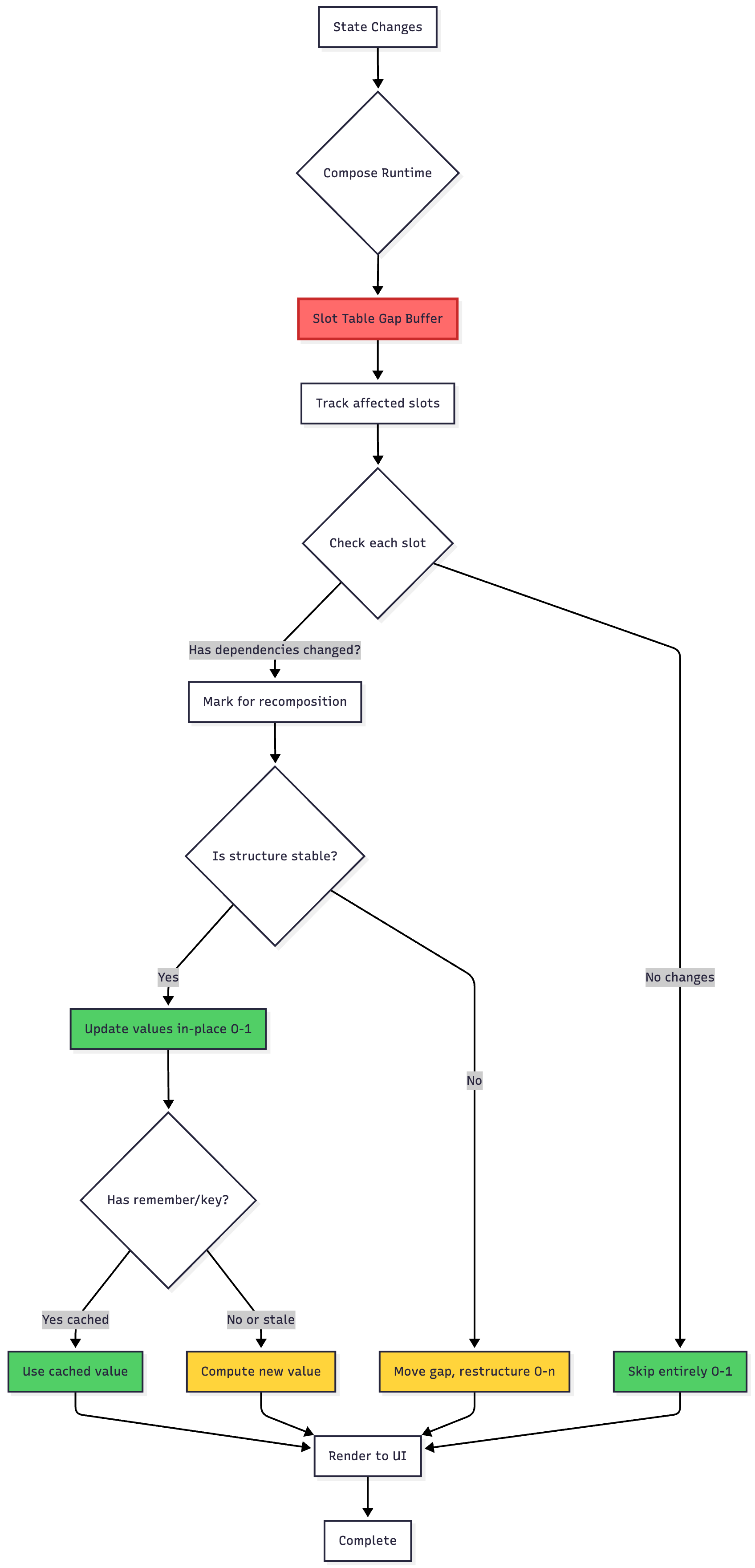
Let’s put it all together with one comprehensive diagram:
Quick Wins Checklist ✅
Before you write your next Compose screen, remember these:
// ✅ DO: Stable structure
@Composable
fun GoodScreen(data: Data) {
    Column {
        Header()  // Always present
        AnimatedVisibility(data.showContent) {
            Content(data)  // Stable conditional
        }
        Footer()  // Always present
    }
}

// ❌ DON’T: Unstable structure
@Composable
fun BadScreen(data: Data) {
    Column {
        if (data.showHeader) Header()  // Conditionally present
        Content(data)
        if (data.showFooter) Footer()  // Conditionally present
    }
}

// ✅ DO: Stable keys in lists
LazyColumn {
    items(
        items = myList,
        key = { it.id }
    ) { item ->
        ItemRow(item)
    }
}

// ❌ DON’T: No keys
LazyColumn {
    items(myList) { item ->
        ItemRow(item)
    }
}

// ✅ DO: Remember expensive work
val filteredList = remember(query, items) {
    items.filter { it.name.contains(query) }
}

// ❌ DON’T: Recalculate every time
val filteredList = items.filter { it.name.contains(query) }

// ✅ DO: derivedStateOf for transformations
val totalPrice = remember {
    derivedStateOf {
        cart.items.sumOf { it.price }
    }
}.value

// ❌ DON’T: Direct calculation
val totalPrice = cart.items.sumOf { it.price }
The Evolution: What’s Next? 🔮
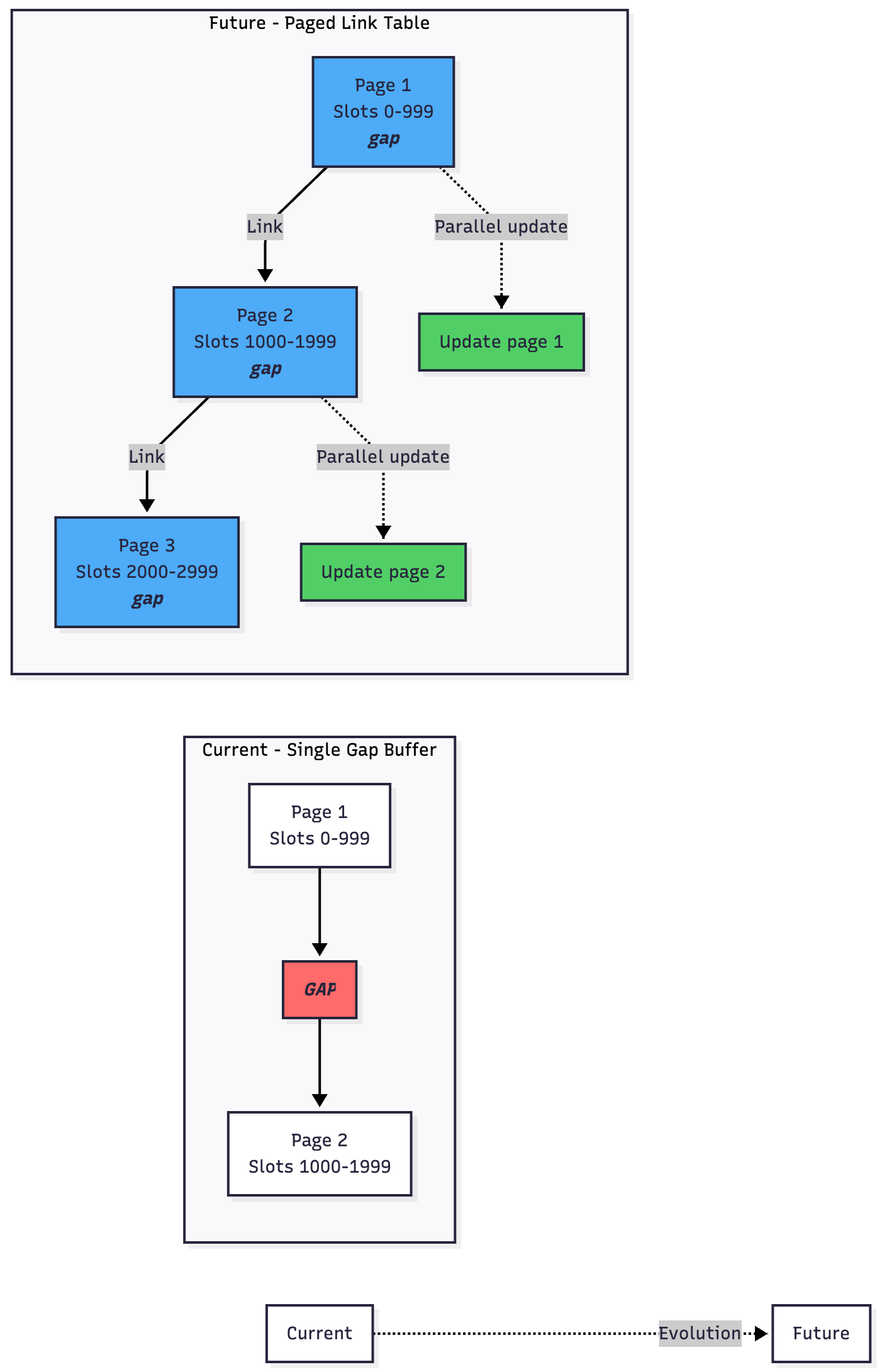
The Compose team is working on evolving the Slot Table toward a paged “link table” system. Think of it as:
Current: One big gap buffer
Future: Multiple smaller gap buffers linked together
Why?
Better memory efficiency for huge UI trees
Easier to parallelize updates
Keeps the O(1) benefits while reducing O(n) gap movement costs
Summary: The Big Picture 🎯
Let’s recap what we learned:
Gap Buffers = Smart arrays with a movable empty space for fast local edits (O(1) time)
Slot Table = Compose’s gap buffer for UI trees, enabling fast recomposition
Performance Keys:
Keep structure stable
Use
rememberandderivedStateOfProvide stable keys in lists
Batch structural changes
Real Impact:
TextField uses gap buffers for text
Compose runtime uses slot tables for UI
Together = blazingly fast Android apps! ⚡
Think Like This:
Most changes happen near each other (cursor, UI updates)
Keep the “gap” close to where changes happen
Skip what doesn’t change
Cache what’s expensive
Final Thoughts 💭
A 60-year-old algorithm isn’t outdated—it’s battle-tested and proven. The fact that Jetpack Compose uses gap buffers is a testament to the timeless nature of good computer science fundamentals.
Your Action Items:
Review your Compose code for structural stability
Add keys to your LazyColumns and LazyRows
Use
rememberfor expensive calculationsProfile your app with Compose Layout Inspector
The beauty of Compose isn’t just that it’s modern—it’s that it builds on solid, time-tested foundations while adding modern innovations on top.
Now go build some blazingly fast Android apps! 🚀
Additional Resources 📚
Original Gap Buffer Paper: “Data Structures and Algorithms” (1984)
Did this help you understand Compose better? Share your “aha!” moment in the comments below! 👇
#AndroidDev #JetpackCompose #Kotlin #ComputerScience #PerformanceOptimization #MobileEngineering