
Understanding flatMap vs flatMapLatest: A Deep Dive


Introduction
When working with reactive streams in RxJS, Kotlin Flow, or similar reactive programming libraries, understanding the difference between flatMap and flatMapLatest is crucial for building responsive and efficient applications. These operators handle asynchronous operations differently, and choosing the wrong one can lead to race conditions, unnecessary API calls, or poor user experience.
The Core Difference
flatMap (also known as mergeMap in RxJS) processes all emissions concurrently and merges all results, regardless of timing.
flatMapLatest (also known as switchMap in RxJS) cancels previous operations when a new emission occurs, only keeping the latest one active.
Visual Comparison
flatMap Behavior
Input Stream:    --A-------B----C------->
                   |       |    |
                   v       v    v
Async Ops:      ---A1--     B1--  C1--->
                   ---A2--  ---B2-- ---C2->

Output Stream:  ---A1--A2--B1--B2-C1-C2->
                (all operations complete)
flatMapLatest Behavior
Input Stream:    --A-------B----C------->
                   |       |    |
                   v       ✗    v
Async Ops:      ---A1--   (cancelled)  C1--->
                   ---A2-✗ (cancelled)  ---C2->

Output Stream:  ------------C1-----C2-->
                (only latest completes)
Real-World Examples
Example 1: Search Autocomplete
Problem: User types in a search box, and each keystroke triggers an API call.
Using flatMap (❌ Wrong Choice)
searchBox
    .flatMap { query ->
        searchAPI(query)
    }
    .collect { results ->
        displayResults(results)
    }
What happens:
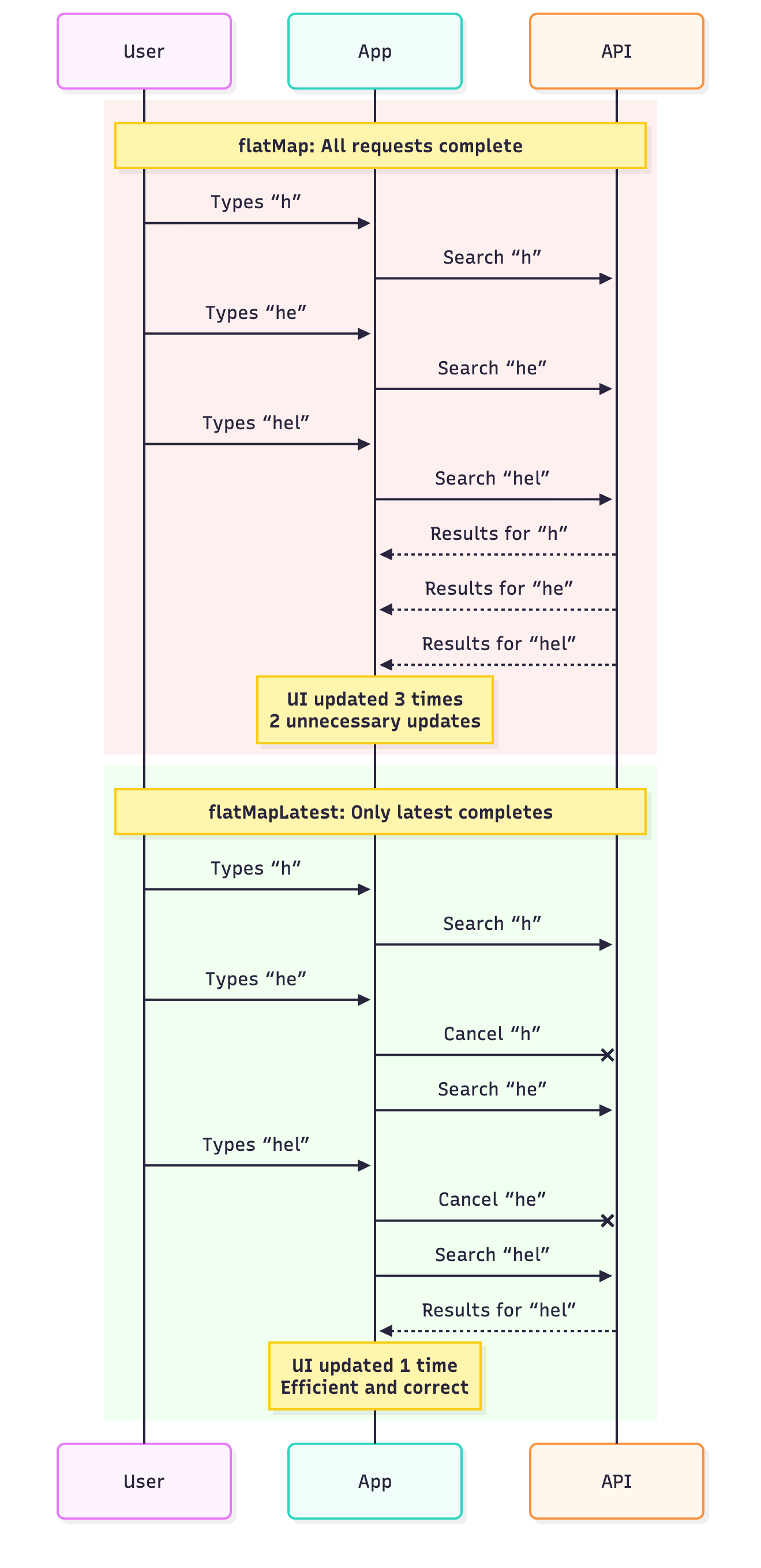
User types “react”
5 API calls fire: “r”, “re”, “rea”, “reac”, “react”
All 5 calls complete and update UI
Results appear out of order (slower requests finish last)
Wasted network requests and confusing UX
Using flatMapLatest (✅ Correct Choice)
searchBox
    .debounce(300) // Wait for user to stop typing
    .flatMapLatest { query ->
        searchAPI(query)
    }
    .collect { results ->
        displayResults(results)
    }
What happens:
User types “react”
Only the final “react” query executes
Previous incomplete requests are cancelled
Clean, efficient, correct results
Example 2: Location Updates
Problem: App tracks user location and fetches nearby restaurants.
Using flatMapLatest (❌ Wrong Choice)
locationStream$
    .pipe(
        switchMap(location =>
            fetchNearbyRestaurants(location)
        )
    )
    .subscribe(restaurants => {
        displayRestaurants(restaurants);
    });
What happens:
GPS updates rapidly as user moves
Each location update cancels the previous restaurant fetch
Results never complete if user is in motion
UI stays empty or outdated
Using flatMap (✅ Correct Choice)
locationStream$
    .pipe(
        throttleTime(5000), // Only fetch every 5 seconds
        mergeMap(location =>
            fetchNearbyRestaurants(location)
        )
    )
    .subscribe(restaurants => {
        displayRestaurants(restaurants);
    });
What happens:
Location updates are throttled
All API calls complete
User gets comprehensive results
Example 3: File Upload Queue
Problem: User selects multiple files to upload.
Using flatMapLatest (❌ Wrong Choice)
fileSelections$
    .pipe(
        switchMap(file => uploadFile(file))
    )
    .subscribe(result => {
        showUploadStatus(result);
    });
What happens:
Each new file selection cancels previous upload
Only the last file ever uploads
Previous uploads are lost
Using flatMap (✅ Correct Choice)
fileSelections$
    .pipe(
        mergeMap(file => uploadFile(file), 3) // Max 3 concurrent
    )
    .subscribe(result => {
        showUploadStatus(result);
    });
What happens:
All files upload (up to 3 at a time)
No uploads are cancelled
Efficient concurrent processing
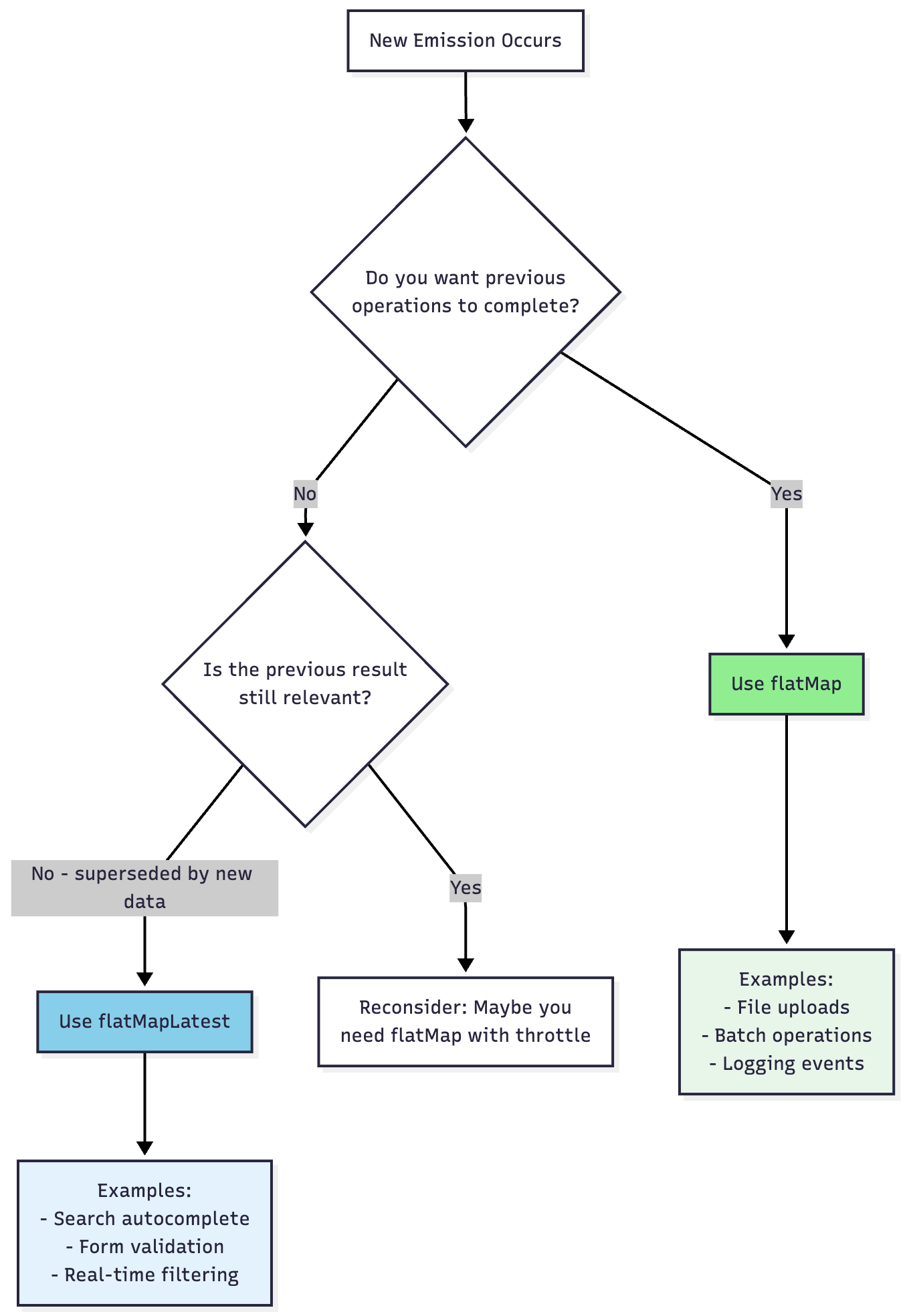
Decision Flow Diagram
Code Comparison: Complete Examples
Search Autocomplete (Full Implementation)
// Using Flow in Kotlin
class SearchViewModel : ViewModel() {
    private val searchQuery = MutableStateFlow(”“)

    // ✅ Correct: Using flatMapLatest
    val searchResults = searchQuery
        .debounce(300)
        .filter { it.length >= 2 }
        .flatMapLatest { query ->
            flow {
                emit(searchRepository.search(query))
            }.catch { error ->
                emit(emptyList())
            }
        }
        .stateIn(
            scope = viewModelScope,
            started = SharingStarted.WhileSubscribed(5000),
            initialValue = emptyList()
        )

    fun onSearchQueryChanged(query: String) {
        searchQuery.value = query
    }
}
Performance Comparison
When to Use What
Use flatMap when:
All operations must complete - File uploads, payment processing
Order doesn’t matter - Analytics events, log entries
Results should accumulate - Loading multiple resources
Parallel processing is desired - Batch API requests
No operation should be cancelled - Critical workflows
Use flatMapLatest when:
Only latest result matters - Search, filtering, autocomplete
Previous results become stale - Real-time data queries
Cancellation saves resources - Expensive API calls
Sequential consistency needed - Form validation chains
Racing conditions must be avoided - User-driven queries
Common Pitfalls
Pitfall 1: Using flatMap for Search
// ❌ Wrong: Race conditions and wasted requests
searchInput
    .flatMap { query -> searchAPI(query) }
    .collect { results -> display(results) }

// ✅ Correct: Clean cancellation
searchInput
    .flatMapLatest { query -> searchAPI(query) }
    .collect { results -> display(results) }
Pitfall 2: Using flatMapLatest for Independent Operations
// ❌ Wrong: Only last file uploads
fileQueue$
    .pipe(switchMap(file => uploadFile(file)))
    .subscribe(result => console.log(result));

// ✅ Correct: All files upload
fileQueue$
    .pipe(mergeMap(file => uploadFile(file), 3))
    .subscribe(result => console.log(result));
Conclusion
Choosing between flatMap and flatMapLatest comes down to one key question: Should new emissions cancel previous operations?
flatMap: Let everything run to completion (parallel, accumulating)
flatMapLatest: Cancel previous, keep only the latest (sequential, replacing)
Understanding this distinction will help you write more efficient, bug-free reactive code and create better user experiences.
Quick Reference
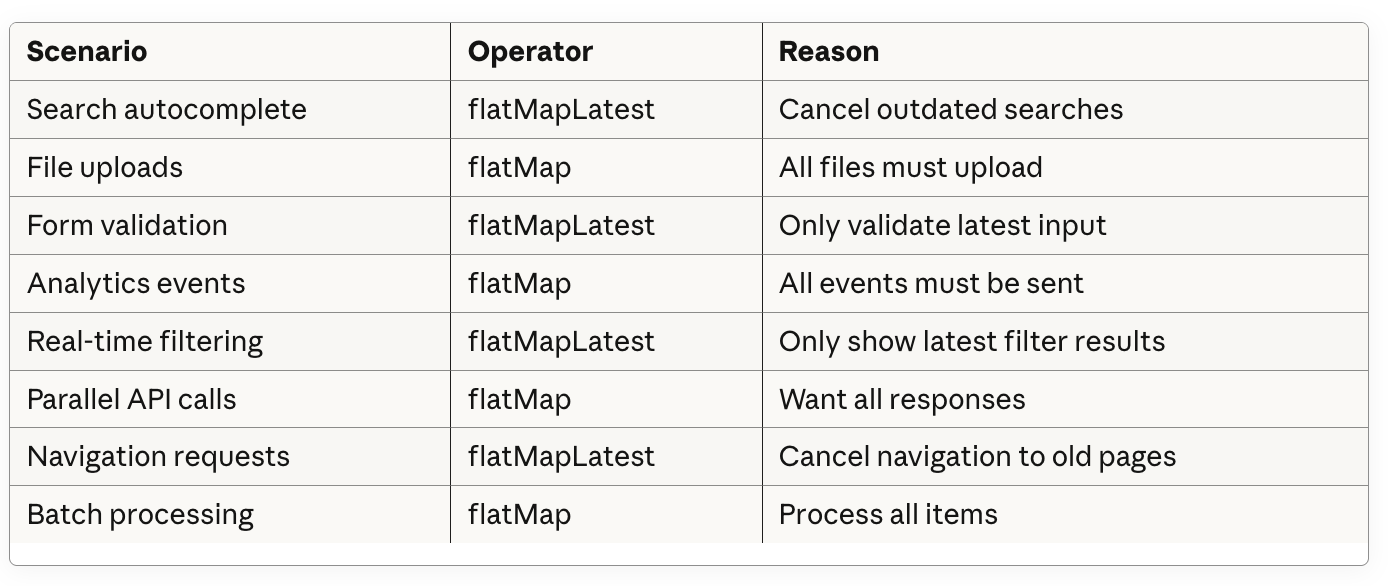
Remember: When in doubt, consider whether completing previous operations adds value or causes problems. That’s your answer.