
The Complete Guide to Offline-First Architecture in Android

Introduction
In today’s mobile landscape, network reliability can no longer be taken for granted. Users access apps from trains, basements, rural areas, flights, and crowded venues where connectivity is intermittent at best. Yet most Android applications still follow a traditional architecture that treats network failures as exceptional cases rather than the norm.
This guide explores how Offline-First Architecture fundamentally changes the way we build Android apps, creating resilient applications that work seamlessly regardless of network conditions.
The Problem with Traditional Architecture
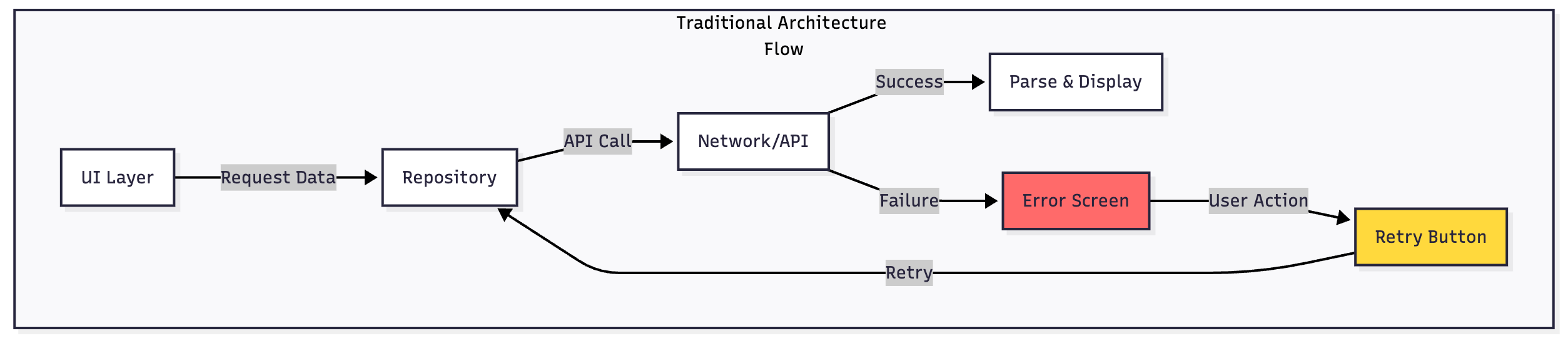
Traditional Android apps typically follow a straightforward but fragile pattern:
The UI requests data from a repository, which immediately queries a remote API. When the network fails—whether due to weak signal, timeout, or complete disconnection—the entire flow collapses. Users are greeted with error screens, retry buttons, and a broken experience. This approach assumes constant connectivity, which no longer reflects reality.
The fundamental flaw is treating the network as the single source of truth. Every data request becomes a potential point of failure, and one socket timeout can render your entire application unusable.
Understanding Offline-First Architecture
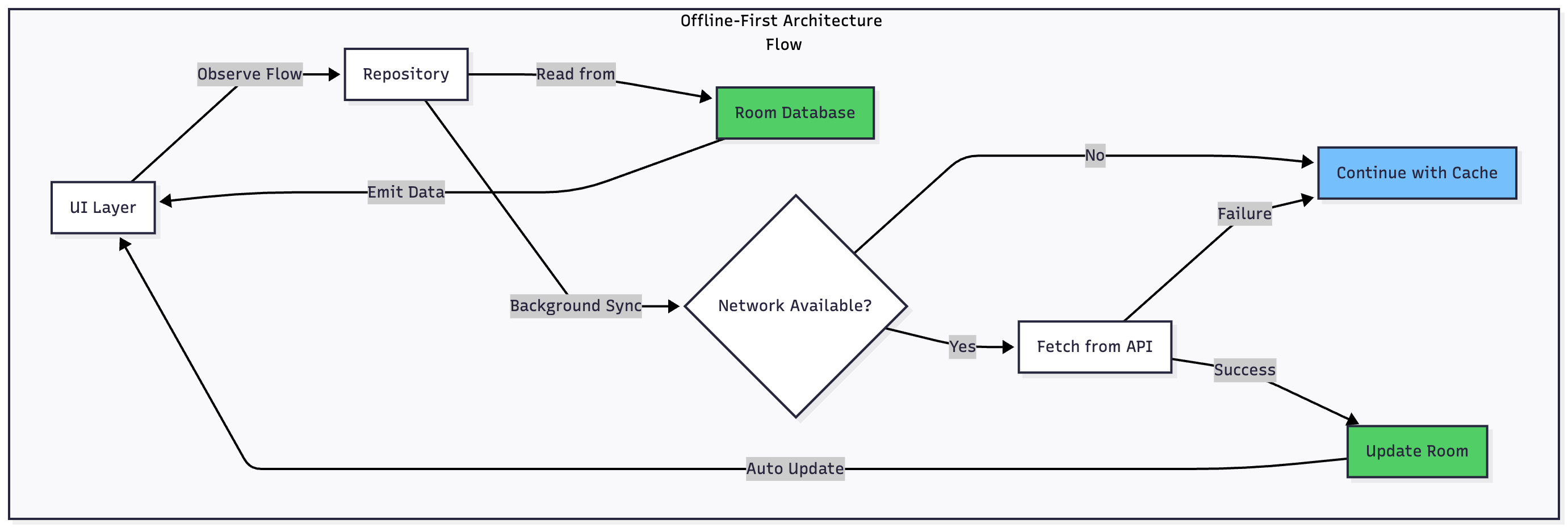
Offline-First Architecture inverts this traditional model by making a crucial shift: your local database becomes the single source of truth, and the network becomes merely a synchronization mechanism.
This paradigm shift has profound implications. Instead of your UI waiting on network calls, it immediately displays data from local storage. Network requests happen in the background, updating the local cache when successful. Users never experience a “loading” state that depends on connectivity—they see data instantly, whether online or offline.
The Core Components
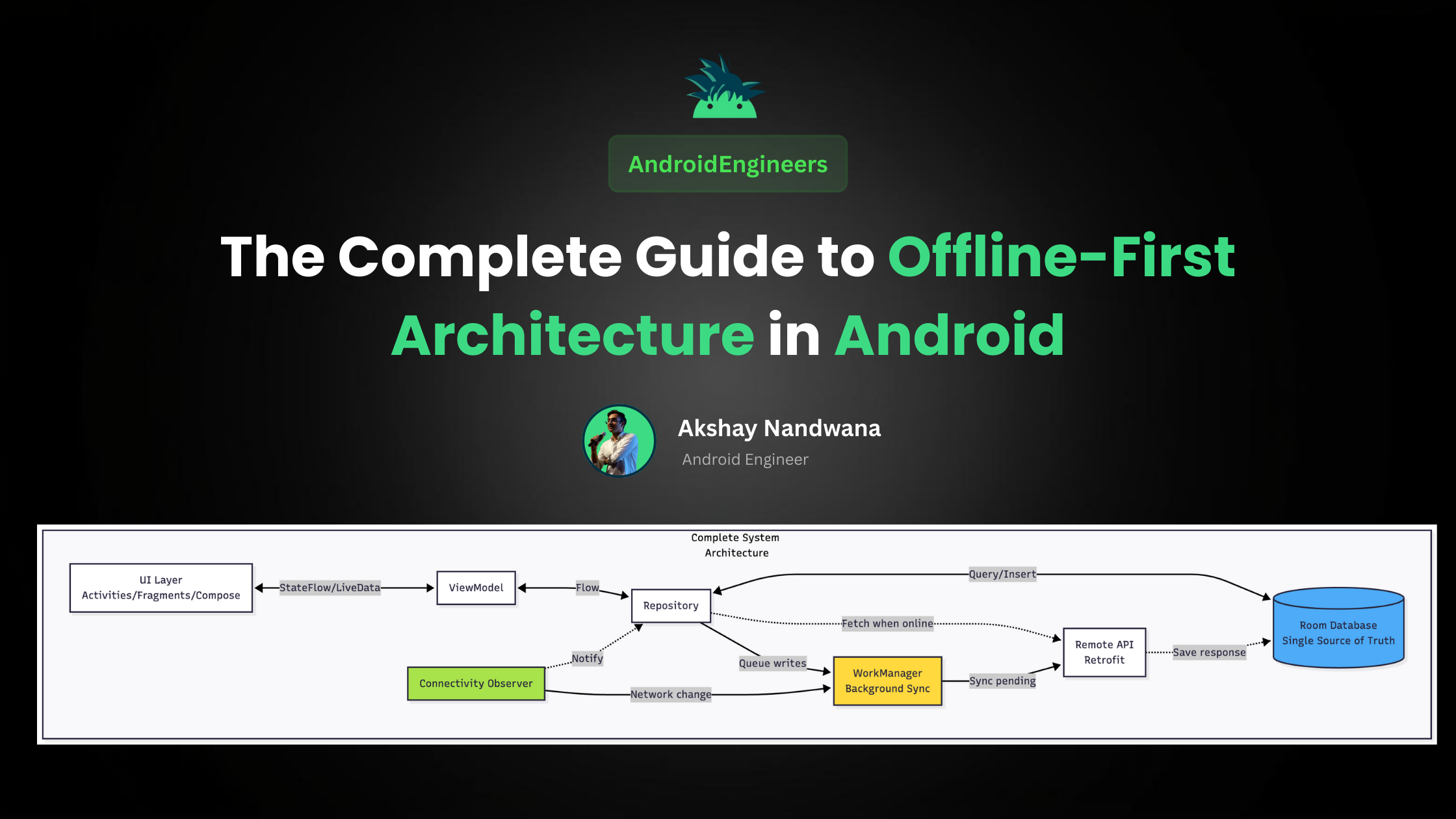
Building an effective offline-first system requires orchestrating several Android components:
Room Database serves as your persistent local storage and single source of truth. All data reads happen from Room, ensuring instant access regardless of network state.
Repository Pattern acts as the abstraction layer between your data sources. It manages the logic of when to read from local storage, when to sync with the network, and how to handle conflicts.
Kotlin Flow provides reactive data streams that automatically update your UI when local data changes. Your UI observes these flows and responds to changes without manual refresh logic.
WorkManager handles background synchronization reliably, even when your app isn’t running. It respects system constraints like battery life and network availability.
Connectivity Observer monitors network state changes and triggers synchronization when connectivity returns.
Retrofit and OkHttp manage your API calls with proper error handling, caching headers, and retry logic.
The Offline-First Data Flow
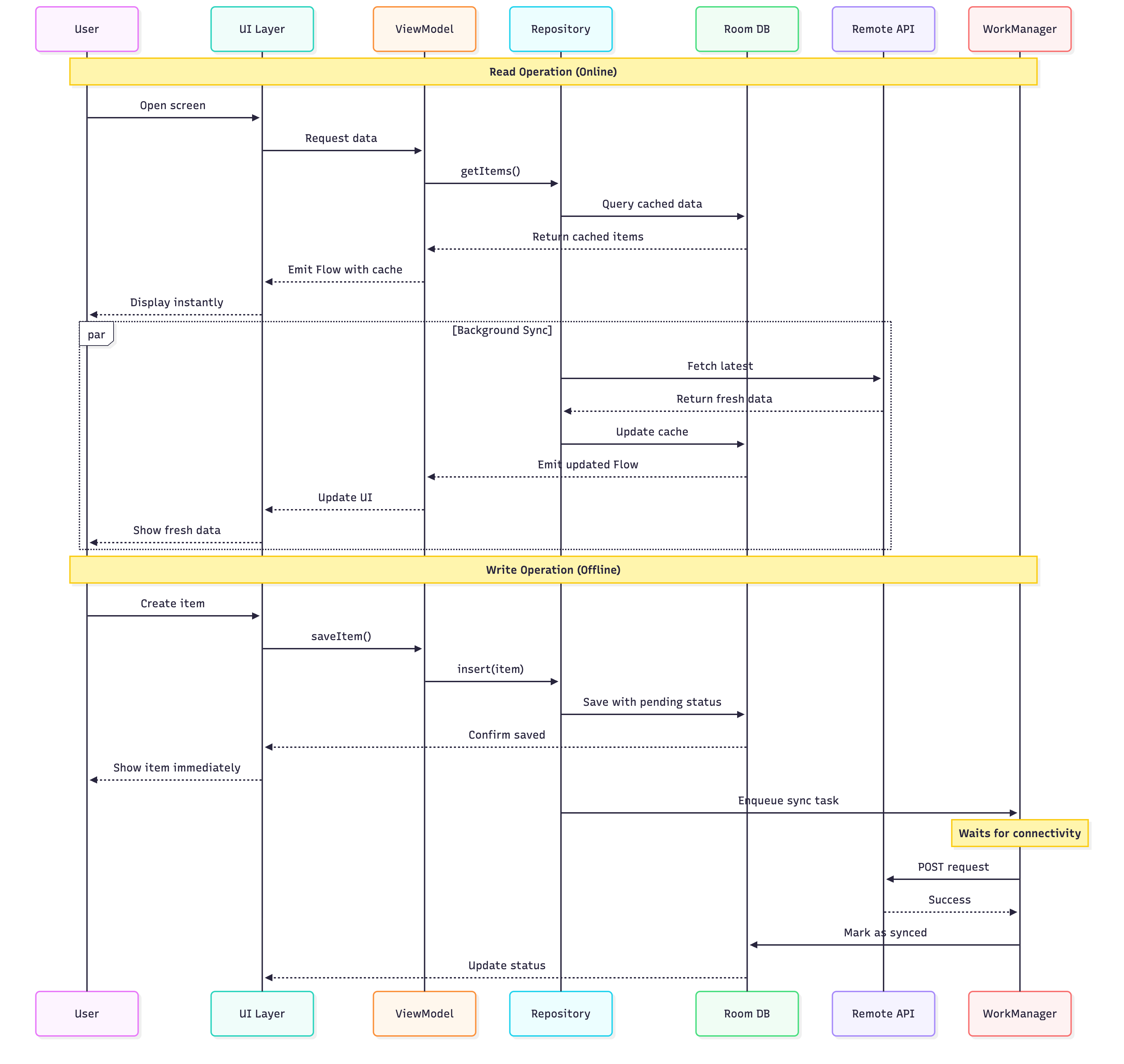
Let me walk you through how data moves through an offline-first system:
Reading Data
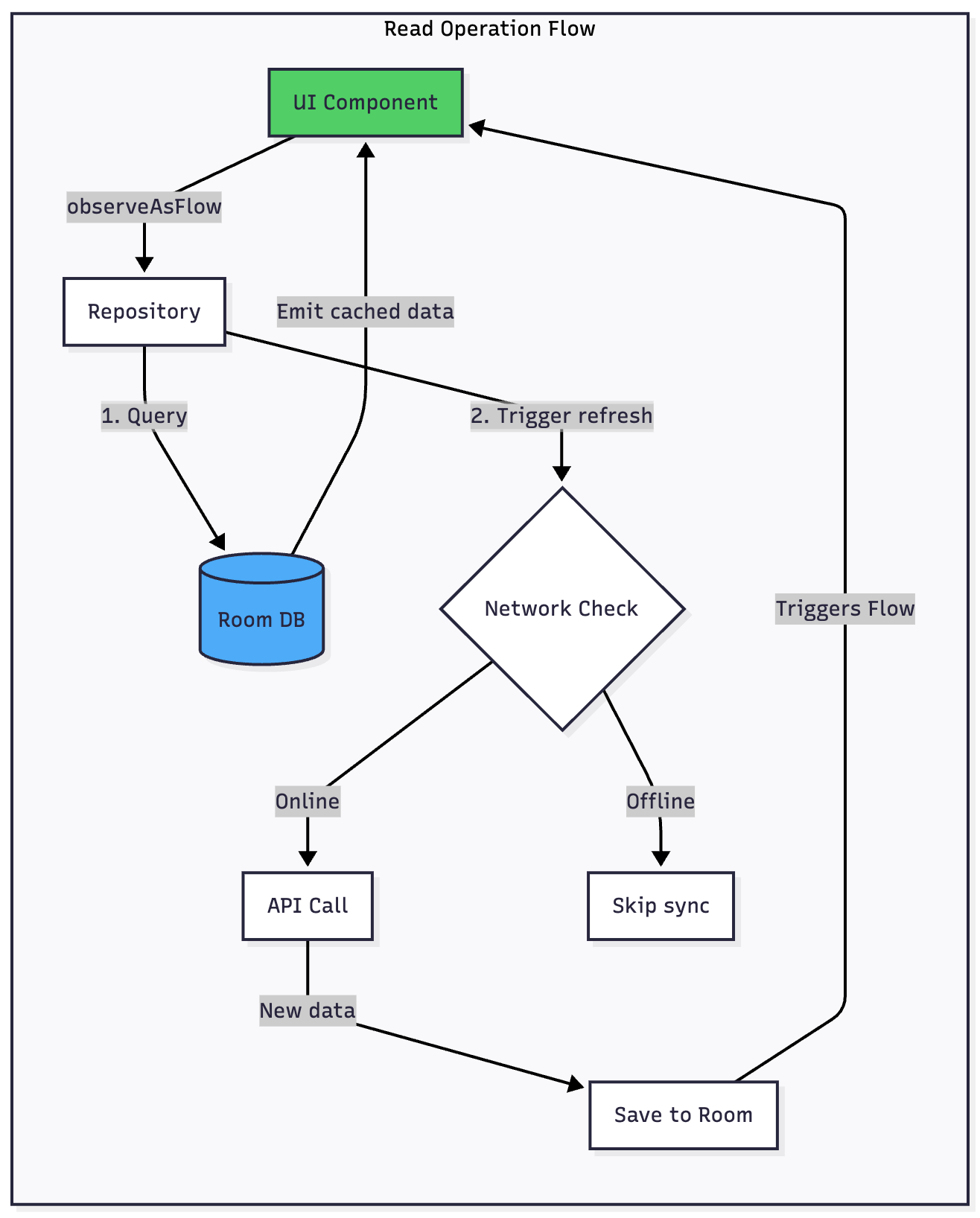
When your UI needs data, it observes a Flow from Room. The repository immediately emits whatever data exists locally—even if it’s slightly stale. Your user sees content instantly with zero loading time.
In the background, the repository checks if a network refresh is needed. If online, it fetches fresh data from the API. When new data arrives, it’s saved to Room, which automatically triggers the Flow to emit updated data. Your UI updates seamlessly without any explicit refresh logic.
If the network is unavailable, nothing breaks. The user continues working with cached data, completely unaware that a network request failed.
Writing Data
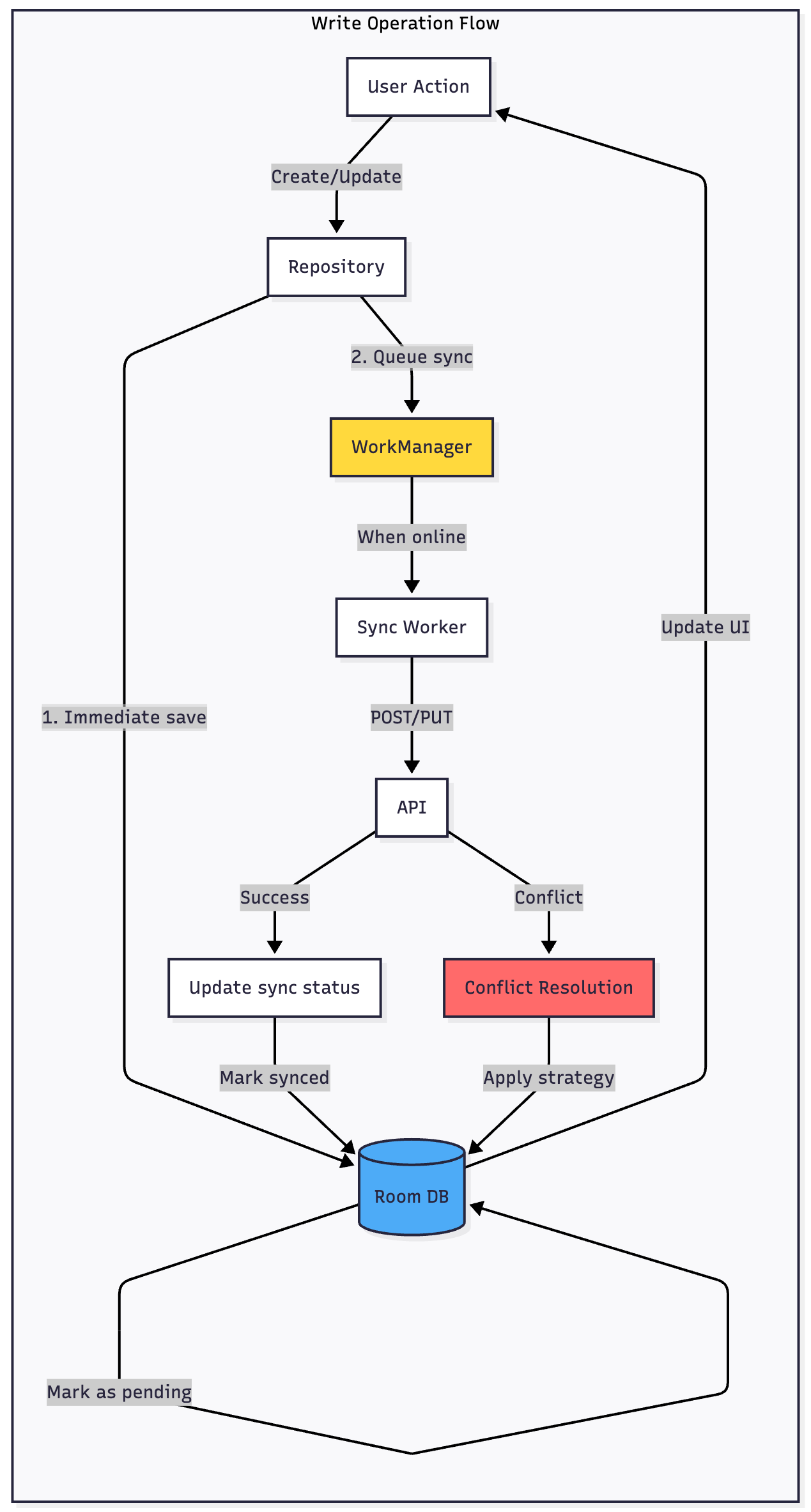
Writes follow a different but equally elegant pattern. When a user creates or modifies data, you immediately save it to Room and mark it as “pending sync.” Your UI updates instantly, showing the change to the user with no delay.
The actual network POST or PUT request is queued using WorkManager, which guarantees delivery when connectivity allows. The user can continue using your app, create more changes, even close it—WorkManager ensures all pending changes eventually sync.
When the network request succeeds, you update the local record to remove the “pending” flag. If it fails with a conflict, you implement your chosen conflict resolution strategy.
Data Refresh Strategies: When and How to Sync
One of the most critical decisions in offline-first architecture is determining when to refresh cached data. Refresh too often and you waste bandwidth and battery. Refresh too rarely and users see stale content.
The Refresh Decision Tree
When a user opens a screen, your app should follow a smart decision process. First, check if cached data exists. If not, you must fetch from the network—there’s no choice. If cache exists, immediately display it to the user while evaluating whether a background refresh is needed.
The age of cached data determines your refresh strategy. Data less than five minutes old is considered fresh and requires no background refresh. Users see instant content with confidence it’s current.
Data between five and thirty minutes old enters a judgment zone. Check network availability—if online, trigger a background refresh. If offline, continue showing the cache without any error messages.
Data older than thirty minutes should be marked as potentially stale in your UI. A subtle indicator like a refresh timestamp or a different color scheme helps manage user expectations. Still perform a background refresh if connectivity allows.
Time-Based Refresh Policies
Different data types warrant different refresh policies. User-generated content and feeds benefit from aggressive refresh—check every five to fifteen minutes when the app is active. Static content like settings or reference data can use much longer intervals, perhaps refreshing only on app start or manual user action.
Implement exponential backoff for failed refreshes. If a refresh fails, don’t immediately retry. Wait thirty seconds, then a minute, then five minutes. This prevents battery drain from repeated failed network attempts.
Pull-to-Refresh and Manual Sync
Always offer users manual control through pull-to-refresh gestures. Even if cached data is fresh, users should be able to force a sync when they know something has changed. This manual sync bypasses age checks and immediately fetches from the server.
When a manual refresh is triggered, show a loading indicator but keep displaying cached content underneath. Only replace the content when fresh data arrives successfully. If the refresh fails, show a subtle error message but don’t disrupt what’s already on screen.
Synchronization Strategies: Keeping Data in Sync
Synchronization is more than just pushing and pulling data—it’s about maintaining consistency between client and server while handling the messy reality of distributed systems.
Bidirectional Sync Architecture
True offline-first apps need bidirectional sync. Data flows both directions: downloads from server to client, and uploads from client to server. These flows must be coordinated to prevent conflicts and data loss.
Implement a sync engine that runs independently of your UI. This engine periodically checks for pending uploads, processes them with appropriate error handling, then checks for server changes and downloads new data.
Sync Priorities and Ordering
Not all sync operations are equal. User-created content (posts, comments, edits) demands immediate synchronization with aggressive retry logic. These operations should never be lost, even if they take hours to sync during poor connectivity.
Less critical operations like reading receipts, view counts, or analytics can use lazy synchronization. Queue these with lower priority and allow them to fail silently if network conditions are poor.
Maintain strict ordering for operations on the same entity. If a user creates an item then immediately edits it, both operations must reach the server in that exact order. Use sequence numbers or timestamps to enforce ordering.
Handling Network Transitions
Network state constantly changes on mobile devices. Your sync engine must gracefully handle these transitions without bombarding the server or confusing users.
When connectivity is lost mid-sync, pause operations cleanly. Don’t leave the database in an inconsistent state—either complete the current transaction or roll it back completely.
When connectivity returns, don’t immediately sync everything. Implement a brief delay (2-5 seconds) to ensure the connection is stable. Mobile devices often briefly connect to networks before disconnecting again.
Batch sync operations when possible. Instead of making 50 individual API calls, combine related operations into fewer requests. This improves reliability and reduces battery consumption.
Conflict-Free Data Types
Some conflicts can be avoided entirely through clever data modeling. Consider using conflict-free replicated data types (CRDTs) for certain scenarios.
Counters can increment independently on client and server, then be merged by summing both values. Sets can be merged by taking the union. Last-write-wins timestamps work for fields where the most recent value is definitively correct.
For complex objects, separate frequently-changing fields from stable ones. User profile names change rarely and can use last-write-wins, while profile view counts change constantly and can use additive counters.
Cache Management: Storage and Cleanup
Local storage isn’t infinite. Effective cache management balances instant access with reasonable storage limits.
Database Schema for Metadata
Every cached entity needs metadata to support intelligent cache management. Include these fields in your Room entities:
A cachedAt timestamp records when data was last fetched from the server. This drives age-based refresh decisions.
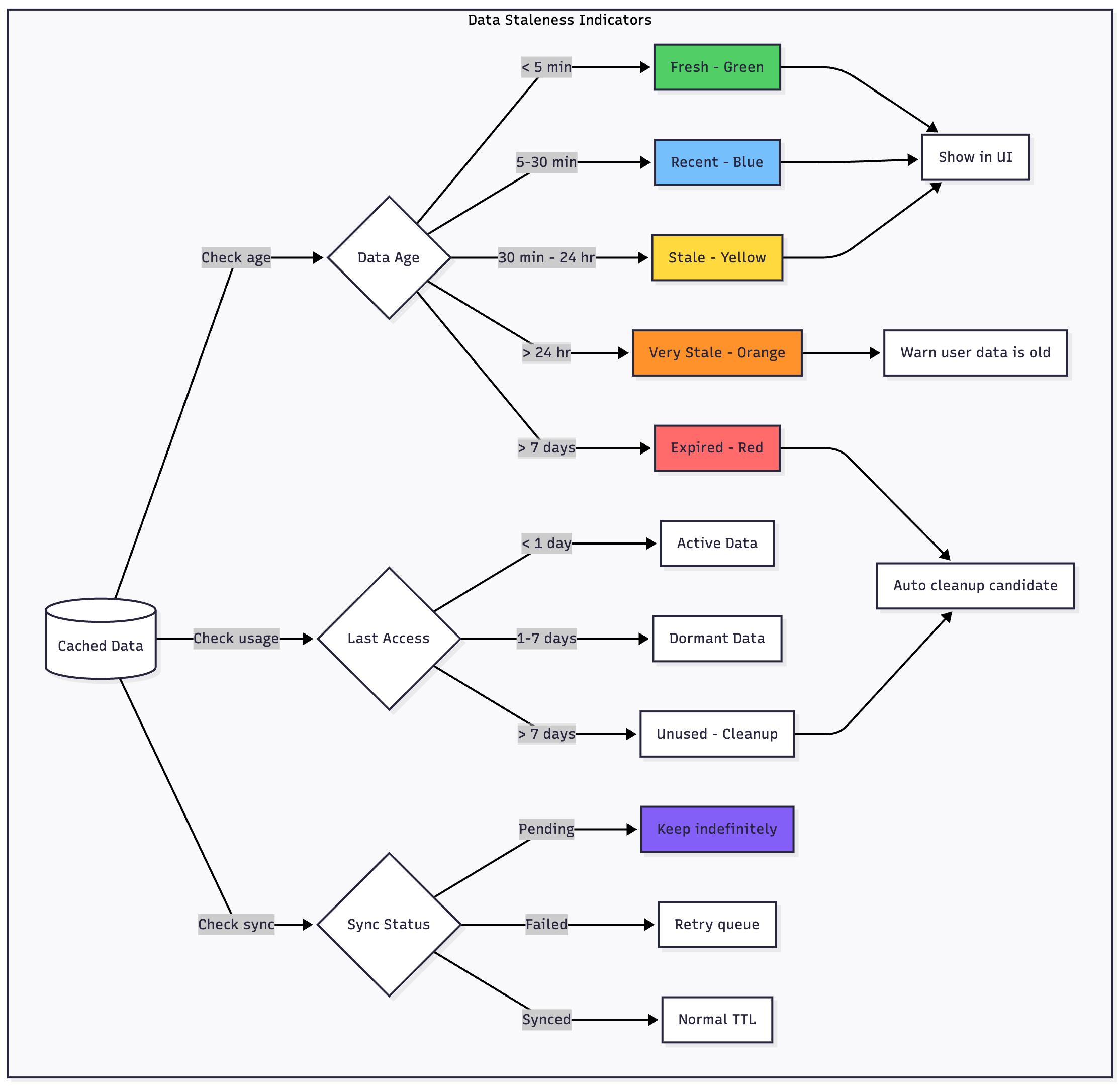
A lastAccessedAt timestamp tracks when users last viewed this data. Unused data becomes a cleanup candidate.
A syncStatus enum indicates whether data is fresh from the server, pending upload, currently syncing, or conflicted.
A ttl (time-to-live) value can specify custom expiration per item. Some content expires quickly while other content remains valid for weeks.
An isPinned flag lets users explicitly mark important items to survive aggressive cleanup.
Cleanup Triggers and Timing
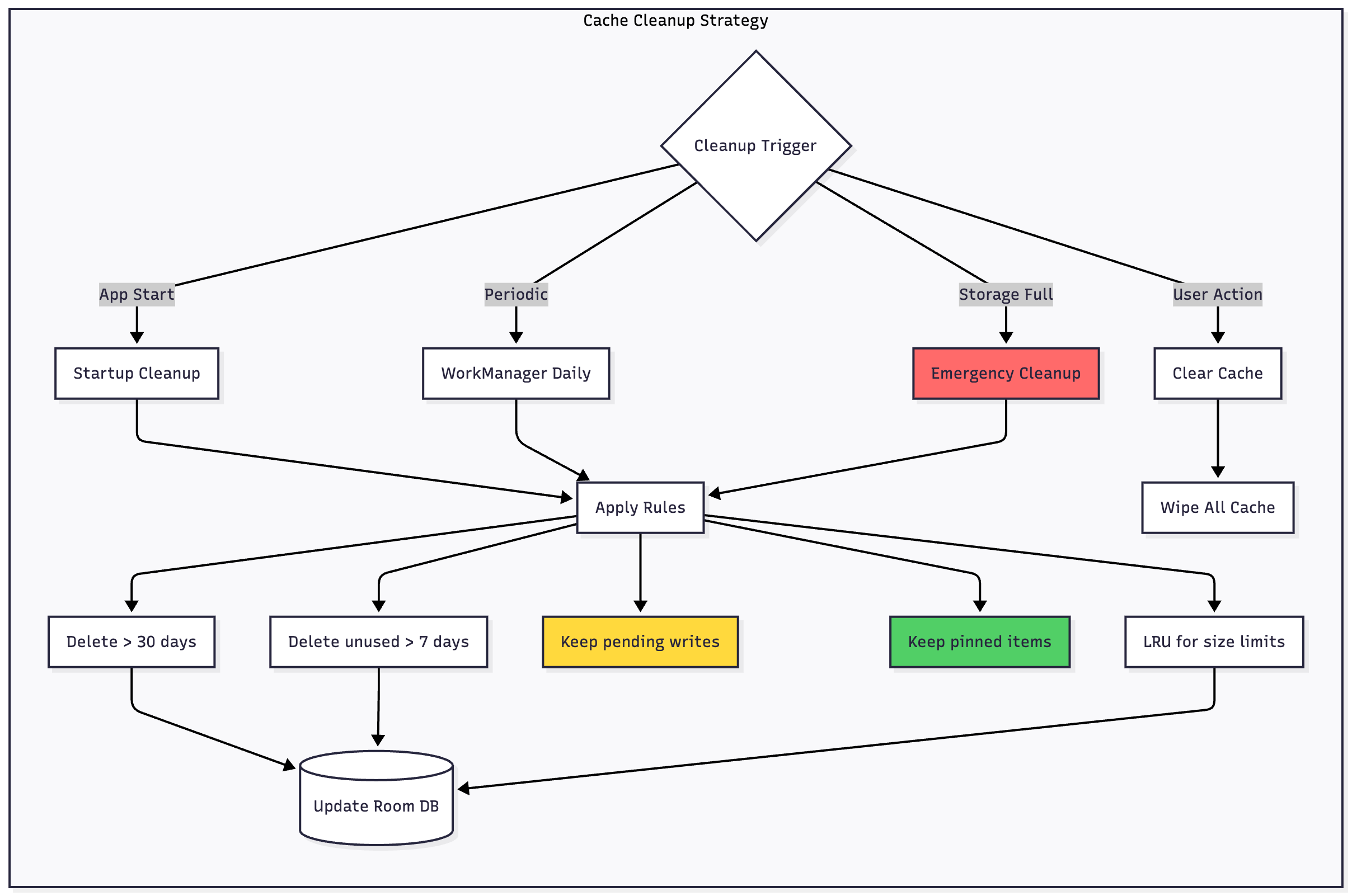
Run cache cleanup at strategic moments to maintain optimal storage without disrupting users:
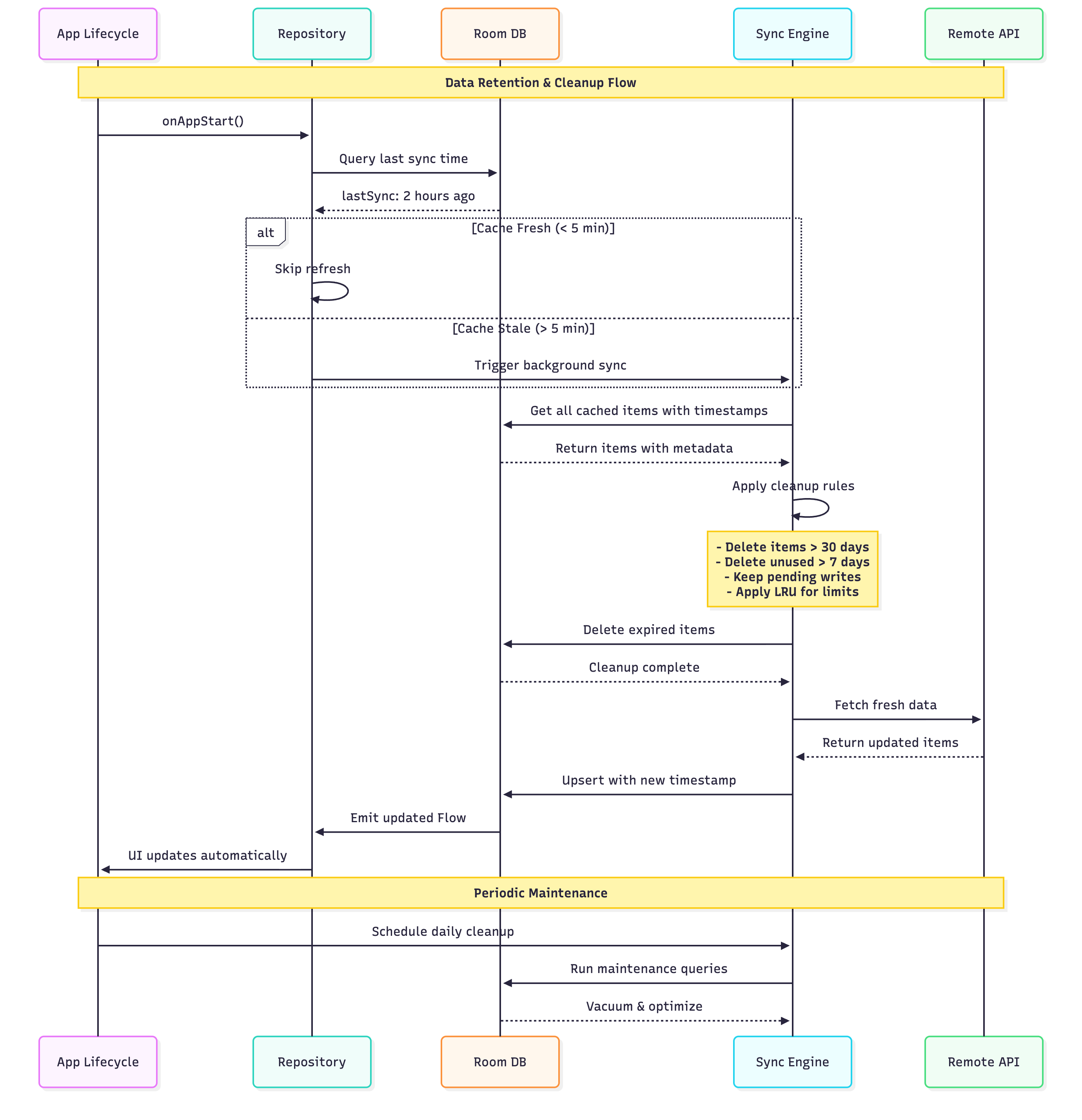
On app start, perform lightweight cleanup during initialization. Remove obviously expired data before users navigate the app.
Daily scheduled maintenance using WorkManager performs comprehensive cleanup when users aren’t actively using the app—typically late night or early morning hours.
Storage pressure response triggers emergency cleanup when device storage runs critically low. The system may force your app to release resources immediately.
Manual user action allows users to clear cache through settings, useful when troubleshooting or recovering space manually.
Cleanup Rules and Policies
Implement a prioritized cleanup strategy that removes least valuable data first:
Age-based deletion removes data untouched for 30+ days. Historical content users haven’t revisited likely isn’t needed in cache.
Access-based deletion removes data not accessed in 7+ days, regardless of age. If users aren’t viewing it, don’t keep it cached.
Size-based limits implement LRU (Least Recently Used) eviction when cache exceeds predefined limits—perhaps 100MB for text data or 500MB including images.
Type-based policies apply different rules to different content types. Feed items expire quickly; user-created content persists longer.
Critical data protection absolutely never deletes pending writes, conflicted items, or user-pinned content. These survive even aggressive cleanup.
Progressive Cleanup Strategy
Don’t delete everything at once. Implement graduated cleanup that becomes progressively more aggressive:
First pass removes obviously expired content—items older than 30 days that users haven’t accessed recently.
Second pass applies LRU eviction if storage pressure continues, removing least recently accessed items.
Third pass in emergency situations can remove all non-critical cache, keeping only pending writes and essential app data.
This graduated approach prevents overly aggressive cleanup that would unnecessarily hurt user experience.
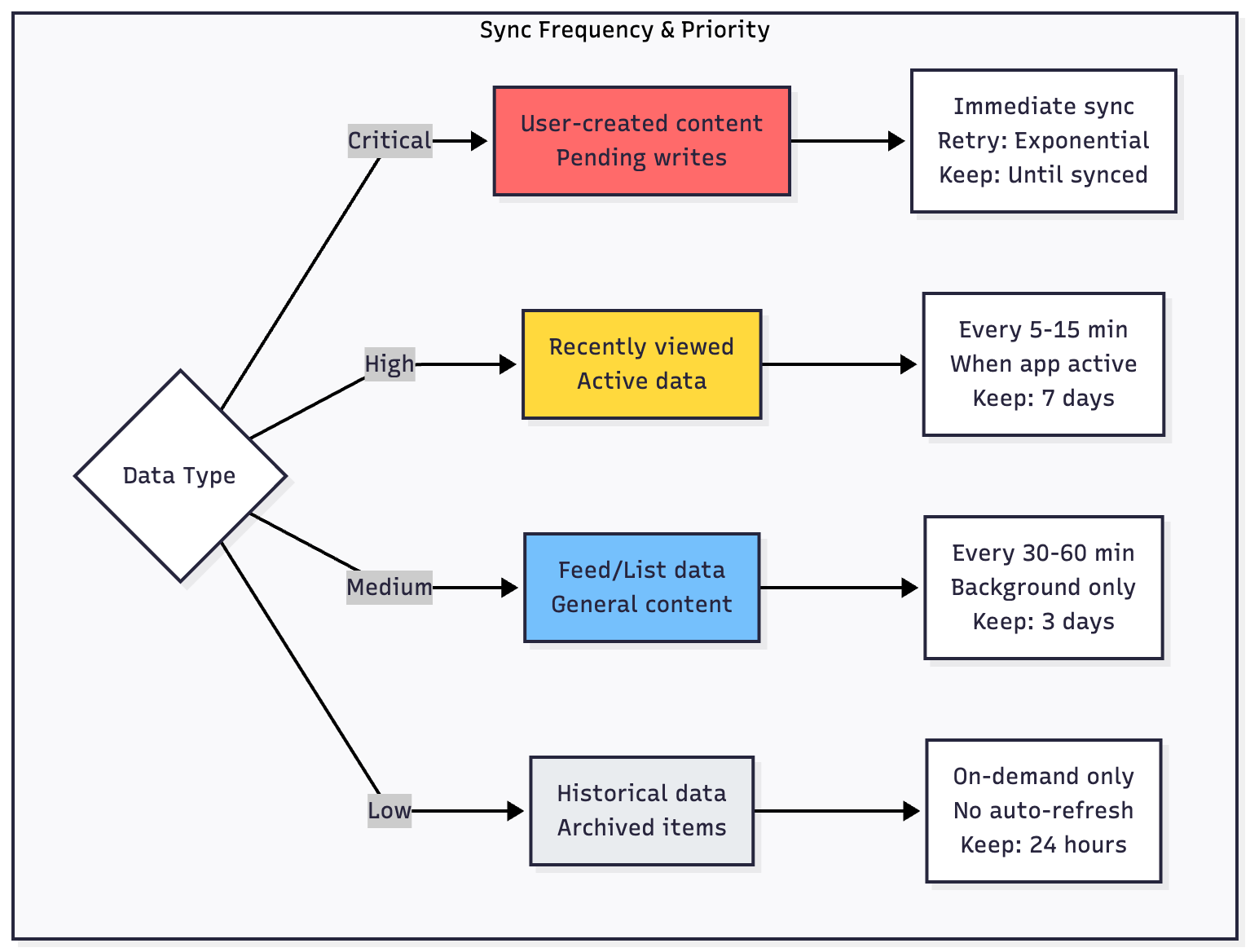
Data Retention Policies: How Long to Keep Data
Data retention balances user experience with practical storage and legal considerations.
Content-Type-Based Retention
Different content types deserve different retention policies:
User-created content (posts, notes, photos) should persist indefinitely in local cache, or at least until successfully synced to the server. After sync, you can apply longer retention—perhaps 90 days or more.
Feed and list data (social feeds, news articles, product listings) typically needs only short retention. Seven days is often sufficient—users rarely scroll back further anyway.
Reference data (settings, configuration, static content) can persist indefinitely since it’s small and changes infrequently.
Messages and notifications need medium retention aligned with user expectations. Thirty days balances accessibility with storage constraints.
Media files (images, videos, audio) require special handling. Cache thumbnails aggressively but only keep full-resolution files for recent or explicitly saved items.
User Behavior Patterns
Tailor retention to actual usage patterns. Analytics can reveal that users typically only access last 48 hours of feed content but frequently revisit user profiles for weeks.
Implement smart retention that keeps recently accessed items longer. If a user repeatedly views certain content, extend its cache lifetime automatically.
Legal and Compliance Considerations
Some data must be deleted promptly for compliance reasons. User data subject to GDPR or similar regulations needs clear expiration and deletion mechanisms.
Implement a data expiration framework that respects both user privacy settings and legal requirements. When users delete their account or request data removal, ensure local caches are completely wiped.
Balancing Performance and Storage
Cache size directly impacts app performance. Overly large databases slow query performance and increase app startup time.
Monitor cache size metrics in production. If most users accumulate gigabytes of cached data, your retention policies are too aggressive. If users frequently experience cache misses, policies are too conservative.
Aim for cache hit rates above 80% for frequently accessed data while keeping total storage under reasonable limits—typically 100-500MB depending on your app’s content type.
Data Staleness: Indicating Freshness to Users
Users need to understand when they’re viewing cached data versus fresh content from the server.

Visual Staleness Indicators
Implement subtle UI indicators that communicate data freshness:
Fresh data (less than 5 minutes old) needs no indicator—display normally with full confidence.
Recent data (5-30 minutes old) can show a small timestamp like “Updated 15 minutes ago” in a discrete location.
Stale data (30 minutes to 24 hours old) deserves a more visible timestamp or a subtle yellow accent to indicate age.
Very stale data (over 24 hours) should clearly warn users—use an orange or amber color and explicit “Last updated yesterday” messaging.
Offline mode when completely disconnected should show a banner or status bar indicator clarifying that all content is cached.
Refresh Status Communication
During background refresh operations, show transient indicators:
A small loading spinner in the toolbar or action bar indicates sync is occurring without blocking the UI.
Success indicators can briefly appear when new content arrives—a subtle animation or color pulse draws attention to updates.
Failure indicators should be informative but not alarming. “Couldn’t refresh—showing cached content” is honest without being dramatic.
User Control and Transparency
Give users explicit control over freshness:
Show last sync timestamp prominently in settings or on main screens.
Provide a manual “Refresh now” action in menus or through pull-to-refresh gestures.
Allow users to configure sync frequency in settings—some users on limited data plans may prefer less frequent syncing.
Display sync status for pending uploads—users deserve to know their changes are queued and will eventually sync.
Implementation Strategy
Let’s examine the practical architecture for implementing this system.
Room Database Setup
Your Room entities should include metadata fields for synchronization tracking. Each record needs a sync status (synced, pending, or conflicted), a last modified timestamp, and optionally a server timestamp for conflict resolution.
Create a DAO with methods that return Flows for reactive updates. Your queries should surface both synced and pending items, allowing users to see their changes immediately.
Add cleanup queries to your DAO—methods that efficiently delete expired items based on your retention policies. Use database triggers where appropriate to automatically update metadata.
Repository Implementation
Your repository exposes Flows that the UI observes. When getItems() is called, you immediately return a Flow from Room while triggering a background refresh based on cache age.
The refresh logic checks connectivity, evaluates cache freshness, fetches from the API if appropriate, and saves results to Room. Any errors are logged but don’t propagate to the UI—the user continues seeing cached data.
For write operations, immediately insert to Room with pending status, then enqueue a WorkManager task for actual synchronization.
Implement a sync coordinator that manages sync priority, batching, and ordering. This coordinator ensures related operations sync in the correct sequence.
WorkManager Synchronization
Create Worker classes for each sync operation (create, update, delete). These workers retrieve pending items from Room, attempt the network request with appropriate retry logic, and update sync status based on results.
Configure WorkManager with appropriate constraints—require network connectivity, but allow any network type. Set reasonable backoff policies for retries using exponential backoff.
Implement a periodic sync worker that runs daily for cache maintenance—cleanup expired items, sync any lingering pending operations, and perform database optimization.
Connectivity Monitoring
Create a ConnectivityObserver that monitors network state changes using ConnectivityManager and NetworkCallback.
When connectivity is lost, pause non-critical sync operations but keep the app fully functional using cached data.
When connectivity returns, trigger a sync check after a brief stabilization delay. Don’t assume the connection is stable immediately—wait a few seconds before attempting network operations.
Conflict Resolution
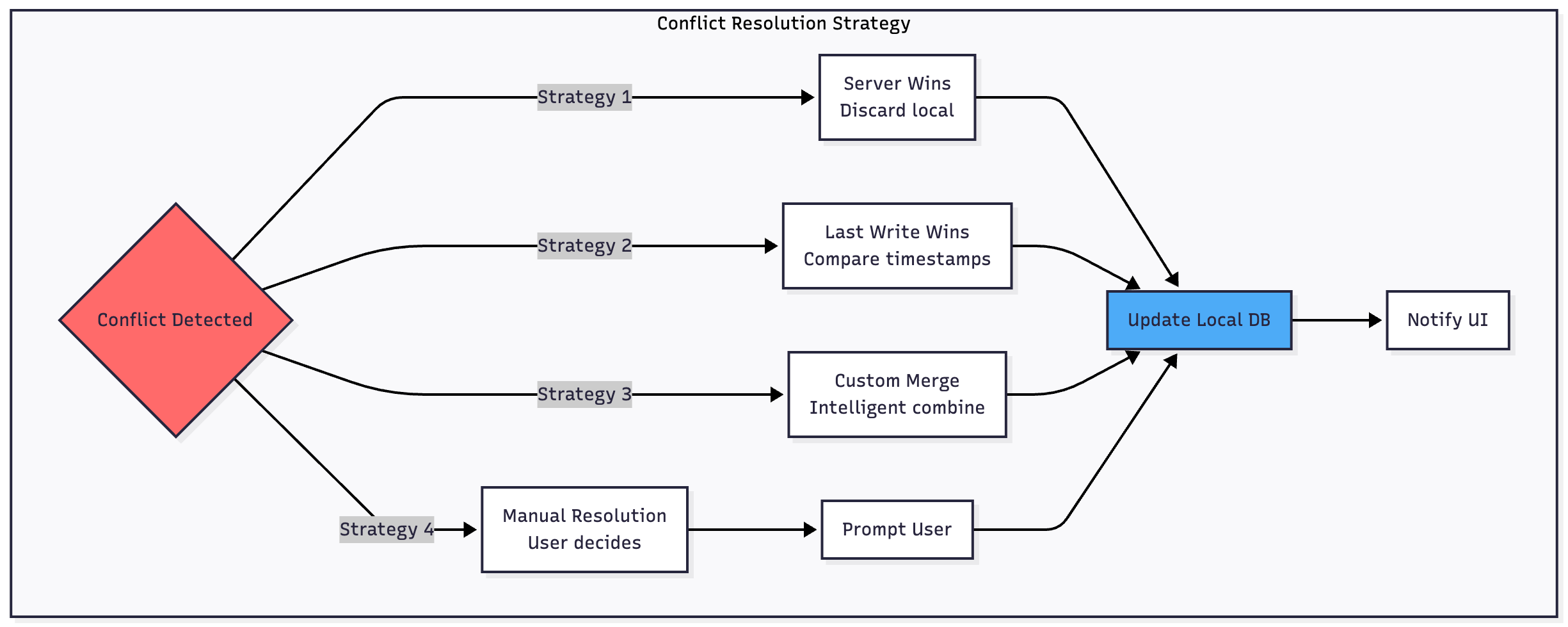
Conflicts arise when both client and server modify the same data. You need a strategy:
Server Wins is simplest—discard local changes and accept server data. This works for collaborative scenarios where the latest server state is authoritative.
Last Write Wins compares timestamps and keeps the most recent change. This requires accurate time synchronization and works well for single-user data.
Custom Merge Logic attempts to intelligently combine changes, preserving non-conflicting modifications from both sides. This is complex but provides the best user experience for structured data.
Mark conflicted items clearly in your database and optionally surface them to users for manual resolution when automatic strategies fail.

Handling Edge Cases
Several edge cases require careful consideration:
Authentication tokens must be cached locally and refreshed proactively. If a token expires while offline, queue operations with a “requires auth” flag and retry after reauthentication.
Large datasets need pagination both from the API and Room. Implement cursor-based pagination that works seamlessly online and offline.
Media files require separate handling—cache thumbnails aggressively but stream full media when online. Queue uploads using WorkManager with appropriate size constraints.
Schema migrations must handle cases where users upgrade while offline. Design migrations that don’t require server interaction and can reconcile differences on next sync.
Partial responses from paginated APIs need careful handling. Don’t delete all cached items when fetching page 1—merge new data with existing cache intelligently.
Testing Offline-First Architecture
Testing is crucial because offline scenarios are difficult to reproduce reliably:
Use Android’s Network Profiler to simulate various network conditions during development. Test not just offline vs online, but also slow connections, high latency, and packet loss.
Write unit tests that mock your data sources and verify that UI updates correctly regardless of network state.
Create integration tests that exercise the full synchronization flow, including conflict resolution and retry logic.
Implement UI tests that verify graceful degradation—the app should never crash or show confusing errors due to network issues.
Test cache cleanup thoroughly to ensure it doesn’t inadvertently delete important data or cause performance problems.
Monitoring and Analytics
Track key metrics in production:
Monitor sync success rates—what percentage of pending operations eventually succeed? High failure rates indicate synchronization logic issues.
Measure time to sync—how long do changes remain pending? This impacts user trust in your app.
Track conflict frequency—frequent conflicts suggest your conflict resolution strategy needs refinement or users need better guidance.
Log cache hit rates—are users actually benefiting from offline caching, or are most requests happening online anyway?
Monitor cache size distribution—understand typical storage usage across your user base to tune retention policies.
Track staleness metrics—how often do users see very stale data? This might indicate sync frequency is too low.
Benefits and Trade-offs
The benefits of offline-first architecture are substantial:
Users experience instant load times because data comes from local storage. Even slow networks feel fast.
Your app provides uninterrupted functionality regardless of network conditions. Users in areas with poor connectivity finally get a usable experience.
Reduced server load results from fewer redundant API calls. Clients only sync when data actually changes.
Better battery life emerges from efficient sync strategies instead of constant polling or repeated failed requests.
However, there are trade-offs:
Increased complexity in your codebase—synchronization logic, conflict resolution, cache management, and state management require careful design.
Storage requirements grow as you cache more data locally. You need strategies for cache eviction and cleanup.
Eventual consistency means users might briefly see stale data. Your UI should indicate sync status when relevant.
Testing complexity increases dramatically. You must verify behavior across many network conditions and sync states.
Debugging challenges arise from asynchronous operations and distributed state. Issues may only appear in specific sync scenarios.

When to Use Offline-First
Offline-first architecture makes sense when:
Your users frequently experience poor connectivity—think emerging markets, rural areas, commuters, or mobile workers.
Your app involves content creation or data entry where users can’t afford to lose work due to network issues.
You’re building for reliability and user trust—users should never feel frustrated by your app’s network handling.
Your data model supports eventual consistency—real-time collaboration systems may require different approaches.
Your app handles user-generated content that must never be lost, even during extended offline periods.
Don’t use offline-first when:
Real-time accuracy is critical—stock trading, live sports scores, or time-sensitive auctions need immediate server truth.
Your app is entirely read-only with no user-generated content—simple caching might suffice.
Storage constraints are severe and caching isn’t feasible—perhaps on very low-end devices.
Your data changes so frequently that cache is almost always stale—though even here, showing stale data beats showing errors.
Conclusion
Offline-first architecture represents a fundamental shift in how we think about mobile applications. Rather than treating network failures as edge cases, we design systems where connectivity is variable and unreliable by default.
The tools needed—Room, WorkManager, Kotlin Flow—are already part of the modern Android stack. What’s required is a change in mindset: stop treating the network as your source of truth and start building applications that work regardless of connectivity.
But offline-first is more than just technical implementation. It requires thoughtful decisions about refresh strategies, cache management, data retention, and user communication. Get these operational details right, and your app becomes reliable, fast, and trustworthy.
In 2025, offline-first isn’t a premium feature for niche use cases. It’s becoming the baseline expectation for any serious Android application. Users in emerging markets, commuters, travelers, and anyone who’s ever lost signal in a building expect apps that just work.
The question isn’t whether to implement offline-first architecture, but when you’ll start—and how you’ll manage the cache that makes it all possible.