
The Complete Guide to Kotlin Coroutine Dispatchers: From Basics to Advanced
includes 10+ complete, runnable code examples & diagrams


Introduction
Kotlin Coroutines have revolutionized asynchronous programming in the Kotlin ecosystem. At the heart of coroutines lies a powerful concept: Dispatchers. Understanding dispatchers is crucial for writing efficient, responsive, and well-performing applications.
In this comprehensive guide, we’ll explore everything about dispatchers, from the basics to advanced concepts like parallelism and thread pool configurations.
What Are Dispatchers?
Think of dispatchers as traffic controllers for your coroutines. Just as a traffic controller decides which lane a vehicle should use, a dispatcher determines which thread or thread pool your coroutine will execute on.
import kotlinx.coroutines.*

fun main() = runBlocking {
    launch(Dispatchers.Default) {
        println(”Running on: ${Thread.currentThread().name}”)
    }
}
// Output: Running on: DefaultDispatcher-worker-1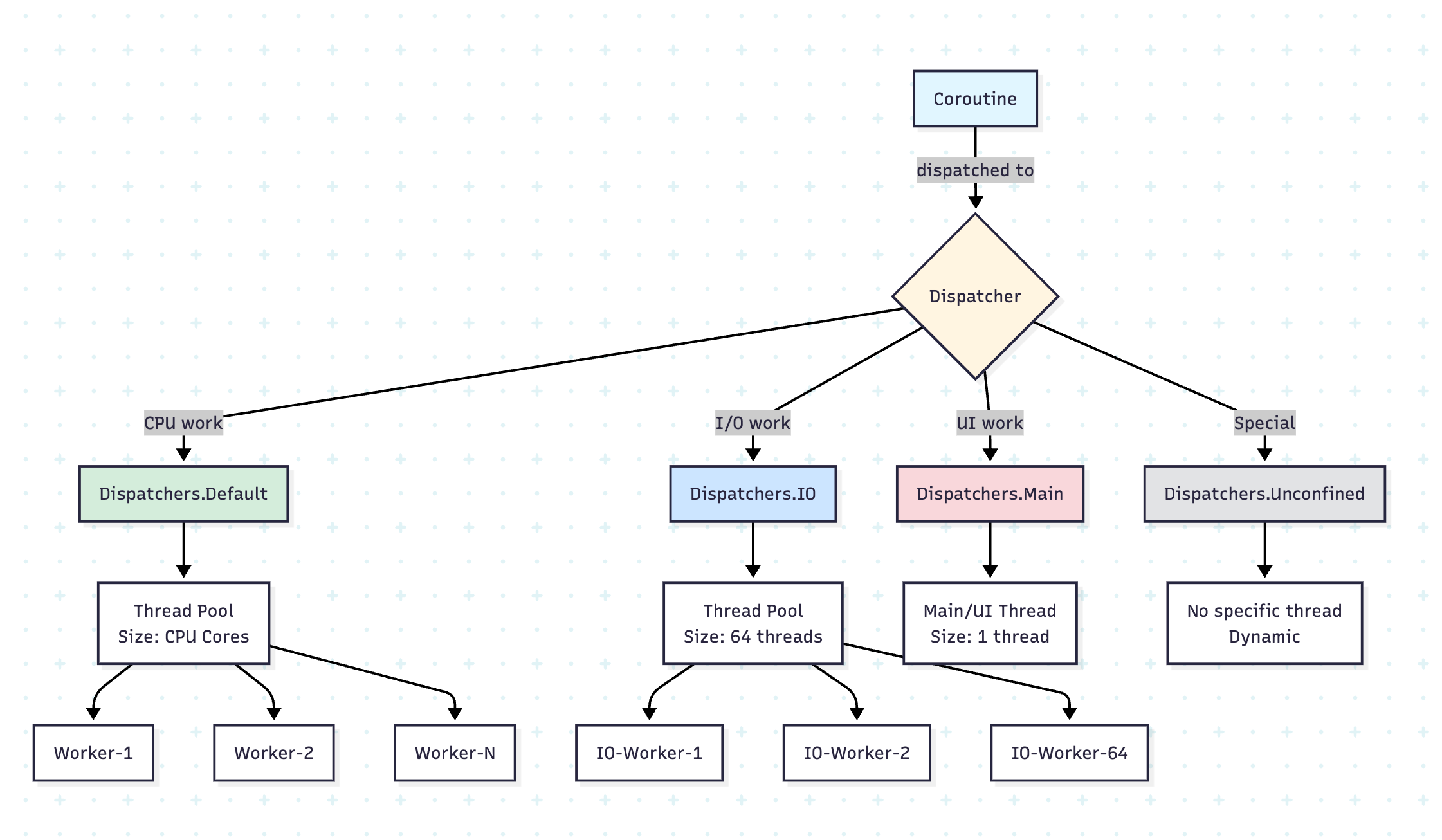
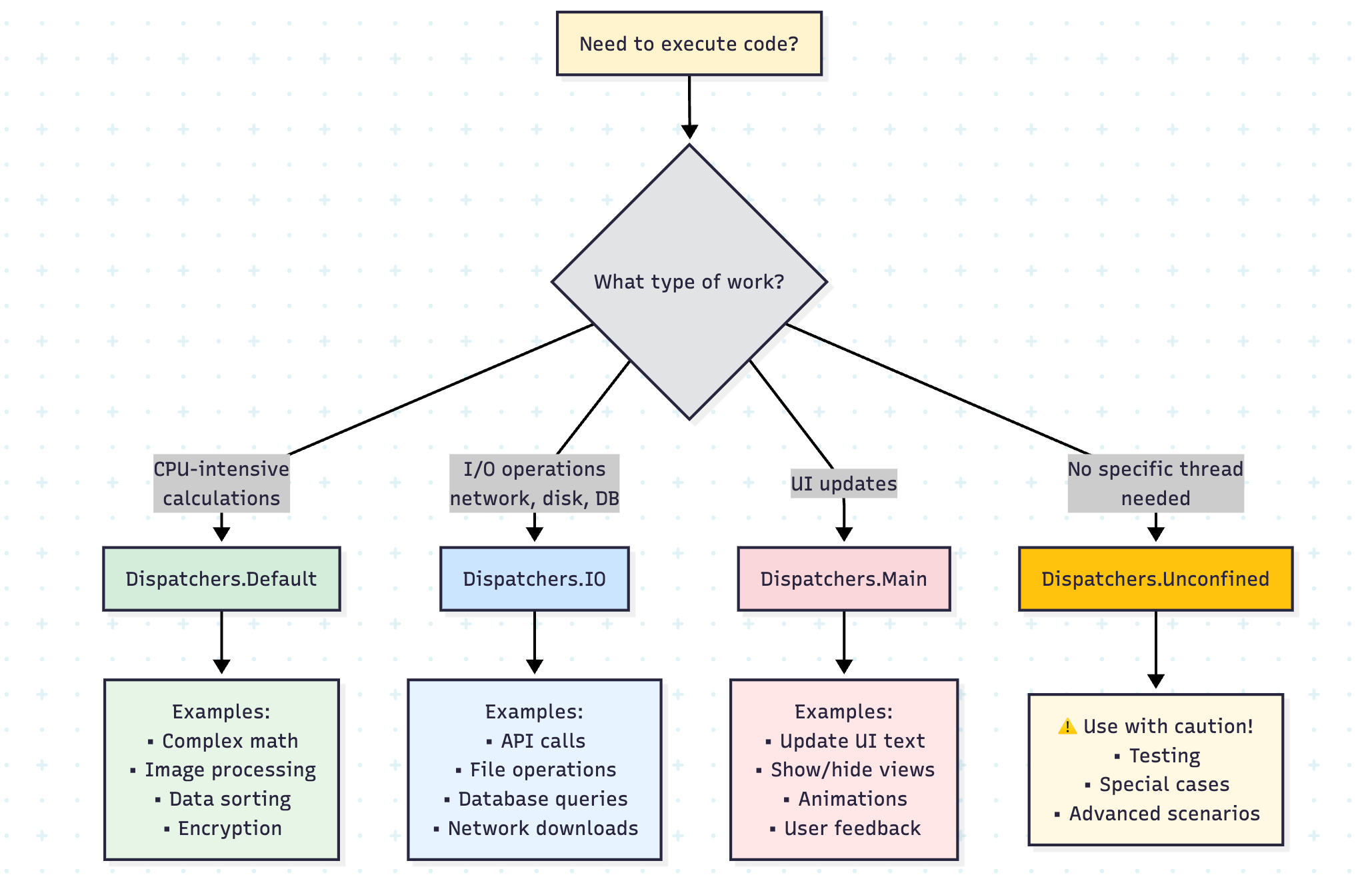
The Four Main Dispatchers
1. Dispatchers.Default
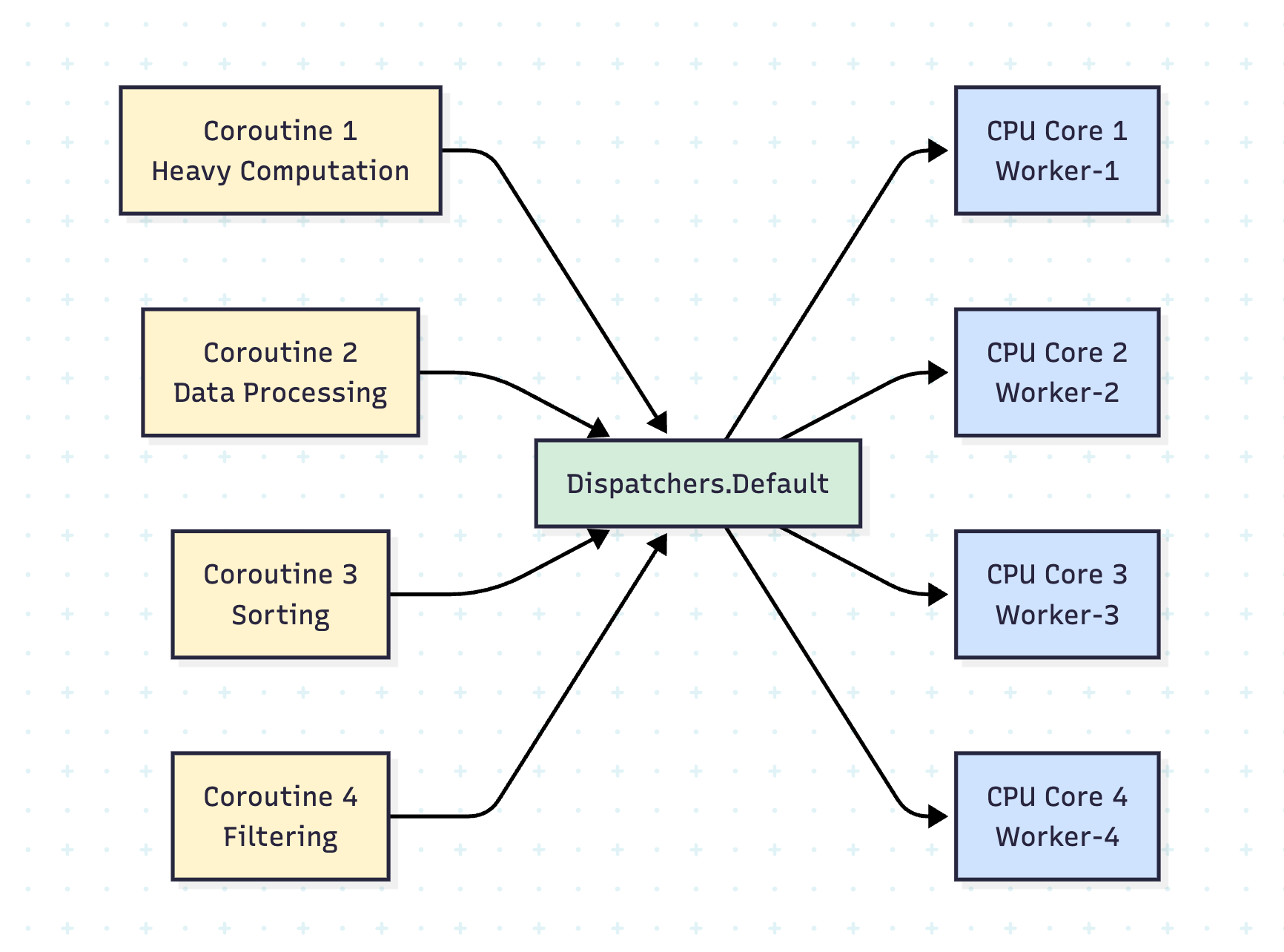
Purpose: CPU-intensive work
Thread Pool Size: Number of CPU cores (minimum 2)
Use Cases: Complex calculations, data processing, sorting, filtering large collections
Real-Life Scenario: Image Processing
import kotlinx.coroutines.*
import kotlin.system.measureTimeMillis

data class Image(val pixels: IntArray, val width: Int, val height: Int)

suspend fun applyGrayscaleFilter(image: Image): Image = withContext(Dispatchers.Default) {
    val newPixels = IntArray(image.pixels.size)

    for (i in image.pixels.indices) {
        val pixel = image.pixels[i]
        val r = (pixel shr 16) and 0xFF
        val g = (pixel shr 8) and 0xFF
        val b = pixel and 0xFF
        val gray = (0.299 * r + 0.587 * g + 0.114 * b).toInt()
        newPixels[i] = (gray shl 16) or (gray shl 8) or gray
    }

    Image(newPixels, image.width, image.height)
}

fun main() = runBlocking {
    val image = Image(IntArray(1920 * 1080) { it }, 1920, 1080)

    val time = measureTimeMillis {
        val processedImage = applyGrayscaleFilter(image)
        println(”Image processed: ${processedImage.pixels.size} pixels”)
    }

    println(”Processing time: $time ms”)
}
Example: Parallel Data Processing
suspend fun processLargeDataset(data: List<Int>): List<Int> = withContext(Dispatchers.Default) {
    data.map { item ->
        // Simulate heavy computation
        var result = item
        repeat(1000) {
            result = (result * 2) % 1000000
        }
        result
    }
}

fun main() = runBlocking {
    val dataset = List(10000) { it }

    val time = measureTimeMillis {
        val results = processLargeDataset(dataset)
        println(”Processed ${results.size} items”)
    }

    println(”Time taken: $time ms”)
}
2. Dispatchers.IO
Purpose: I/O-bound operations (disk, network, database)
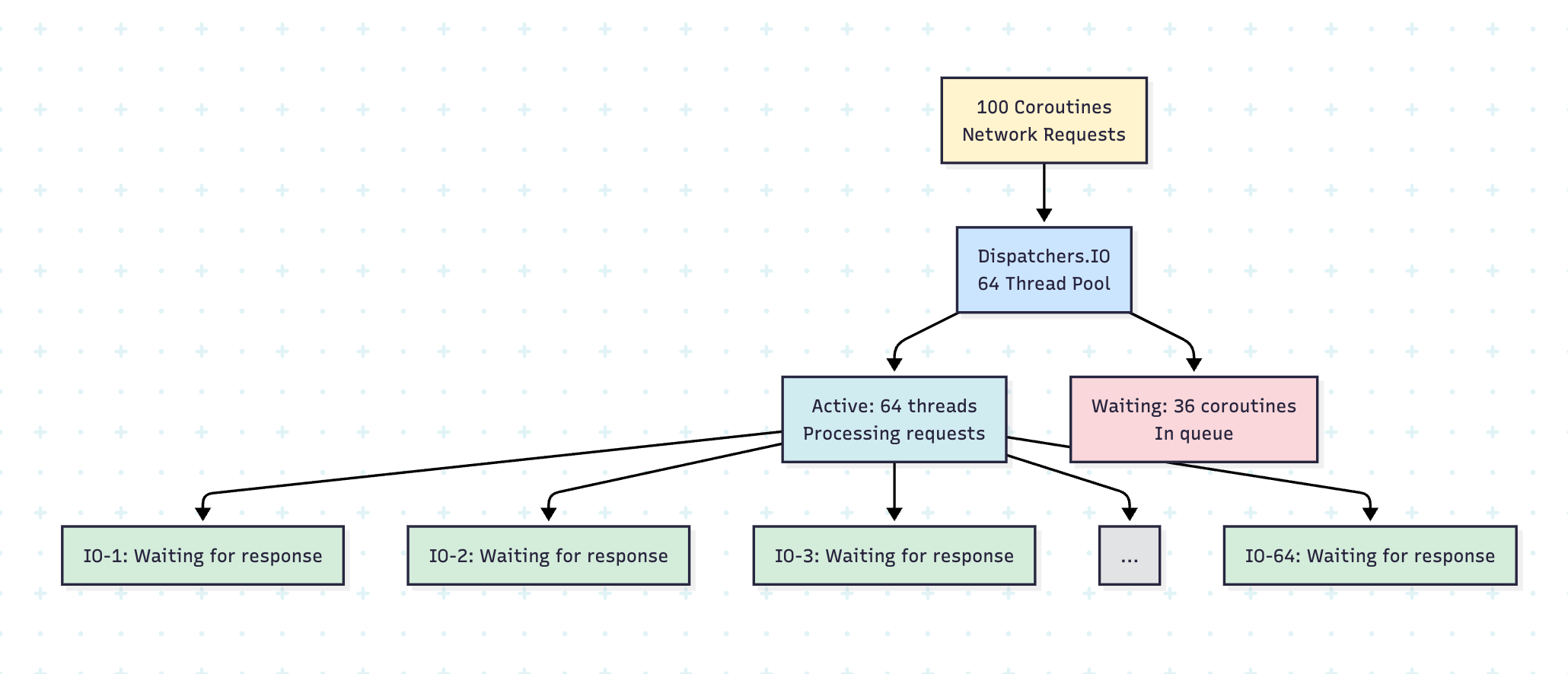
Thread Pool Size: 64 threads (or configured via kotlinx.coroutines.io.parallelism)
Use Cases: File operations, network requests, database queries
Why 64 Threads?
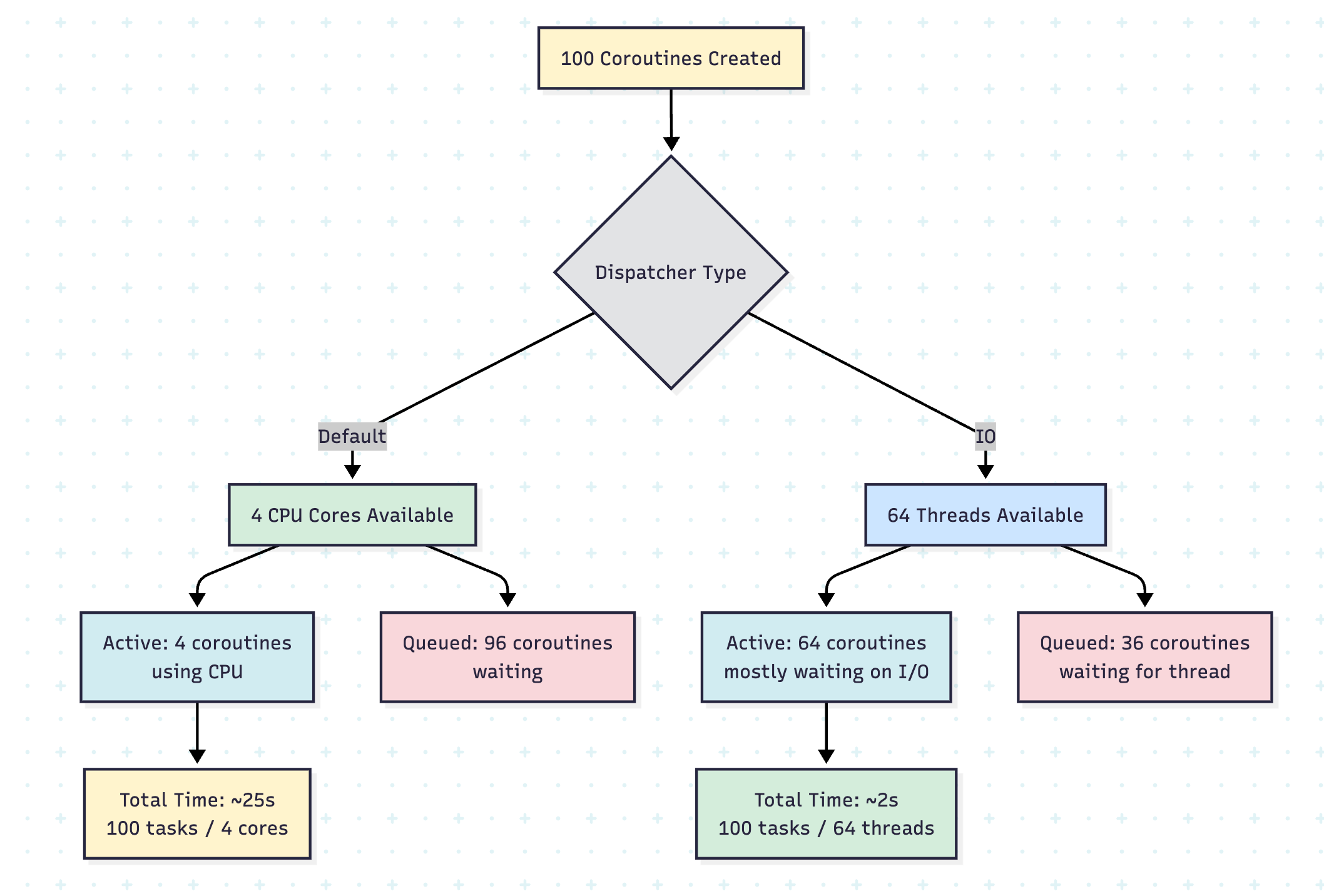
The IO dispatcher uses a larger thread pool because I/O operations spend most of their time waiting (blocked on network, disk, etc.) rather than actively consuming CPU. This allows many operations to run concurrently without overwhelming the CPU.
// You can configure the parallelism level
System.setProperty(”kotlinx.coroutines.io.parallelism”, “128”)
Real-Life Scenario: Downloading Multiple Files
import kotlinx.coroutines.*
import java.io.File
import java.net.URL
import kotlin.system.measureTimeMillis

data class DownloadTask(val url: String, val destination: String)

suspend fun downloadFile(task: DownloadTask): Result<String> = withContext(Dispatchers.IO) {
    try {
        println(”Downloading ${task.url} on ${Thread.currentThread().name}”)

        // Simulate download
        delay(1000) // Network delay
        val content = URL(task.url).readText()

        File(task.destination).writeText(content)
        Result.success(”Downloaded: ${task.destination}”)
    } catch (e: Exception) {
        Result.failure(e)
    }
}

suspend fun downloadMultipleFiles(tasks: List<DownloadTask>) = coroutineScope {
    tasks.map { task ->
        async { downloadFile(task) }
    }.awaitAll()
}

fun main() = runBlocking {
    val tasks = List(50) { index ->
        DownloadTask(
            url = “https://api.example.com/data/$index”,
            destination = “file_$index.txt”
        )
    }

    val time = measureTimeMillis {
        val results = downloadMultipleFiles(tasks)
        println(”Completed ${results.count { it.isSuccess }} downloads”)
    }

    println(”Total time: $time ms”)
}
Example: Database Operations
data class User(val id: Int, val name: String, val email: String)

class UserRepository {
    suspend fun fetchUser(id: Int): User = withContext(Dispatchers.IO) {
        // Simulate database query
        delay(100)
        println(”Fetching user on: ${Thread.currentThread().name}”)
        User(id, “User $id”, “user$id@example.com”)
    }

    suspend fun saveUser(user: User): Boolean = withContext(Dispatchers.IO) {
        // Simulate database write
        delay(150)
        println(”Saving user on: ${Thread.currentThread().name}”)
        true
    }

    suspend fun fetchAllUsers(ids: List<Int>): List<User> = coroutineScope {
        ids.map { id ->
            async(Dispatchers.IO) { fetchUser(id) }
        }.awaitAll()
    }
}

fun main() = runBlocking {
    val repository = UserRepository()

    // Fetch multiple users concurrently
    val userIds = (1..20).toList()

    val time = measureTimeMillis {
        val users = repository.fetchAllUsers(userIds)
        println(”Fetched ${users.size} users”)
    }

    println(”Time taken: $time ms”)
    // With 20 concurrent IO operations, takes ~100ms instead of 2000ms
}
3. Dispatchers.Main
Purpose: UI updates and main thread operations
Availability: Android, JavaFX, Swing applications
Thread: Single main/UI thread
Real-Life Scenario: Android App with API Call
class UserViewModel {
    private val repository = UserRepository()

    fun loadUserProfile(userId: Int) {
        viewModelScope.launch {
            try {
                // Show loading on main thread
                updateUI { showLoading(true) }

                // Fetch data on IO thread
                val user = withContext(Dispatchers.IO) {
                    repository.fetchUser(userId)
                }

                // Update UI on main thread
                updateUI {
                    showLoading(false)
                    displayUser(user)
                }
            } catch (e: Exception) {
                // Handle error on main thread
                updateUI { showError(e.message) }
            }
        }
    }

    private fun updateUI(block: () -> Unit) {
        // This would run on Dispatchers.Main in real Android app
        block()
    }

    private fun showLoading(isLoading: Boolean) {
        println(”Loading: $isLoading”)
    }

    private fun displayUser(user: User) {
        println(”Displaying user: ${user.name}”)
    }

    private fun showError(message: String?) {
        println(”Error: $message”)
    }
}
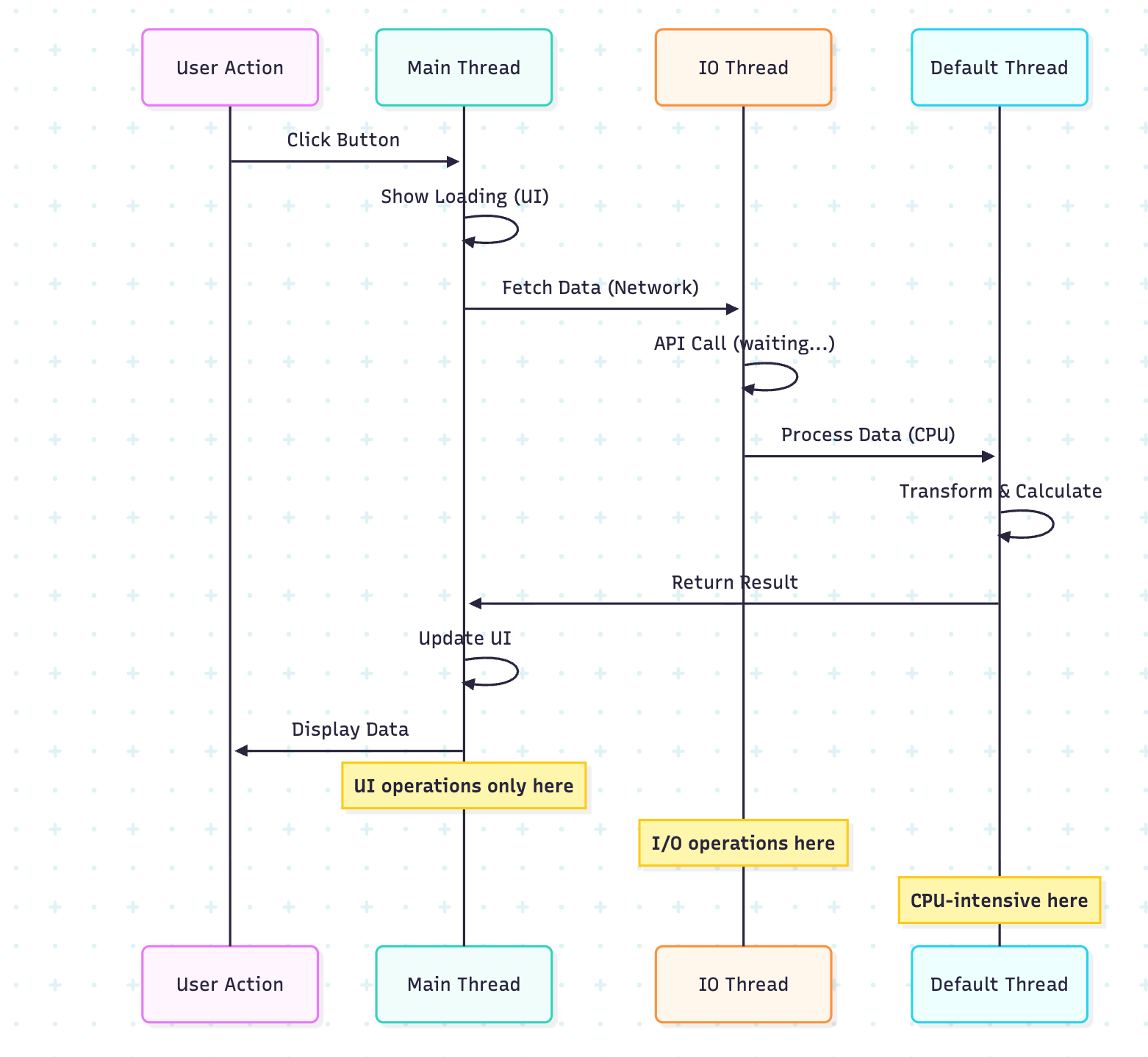
Example: Combining Dispatchers
class DataSyncService {
    suspend fun syncData() {
        // Step 1: Fetch data from network (IO)
        val remoteData = withContext(Dispatchers.IO) {
            println(”Fetching from network: ${Thread.currentThread().name}”)
            delay(1000)
            listOf(”data1”, “data2”, “data3”)
        }

        // Step 2: Process data (CPU-intensive - Default)
        val processedData = withContext(Dispatchers.Default) {
            println(”Processing data: ${Thread.currentThread().name}”)
            remoteData.map { it.uppercase().repeat(1000) }
        }

        // Step 3: Save to database (IO)
        withContext(Dispatchers.IO) {
            println(”Saving to database: ${Thread.currentThread().name}”)
            delay(500)
            println(”Saved ${processedData.size} items”)
        }

        // Step 4: Update UI (Main - simulated here)
        println(”UI updated on main thread”)
    }
}

fun main() = runBlocking {
    val service = DataSyncService()
    service.syncData()
}
4. Dispatchers.Unconfined
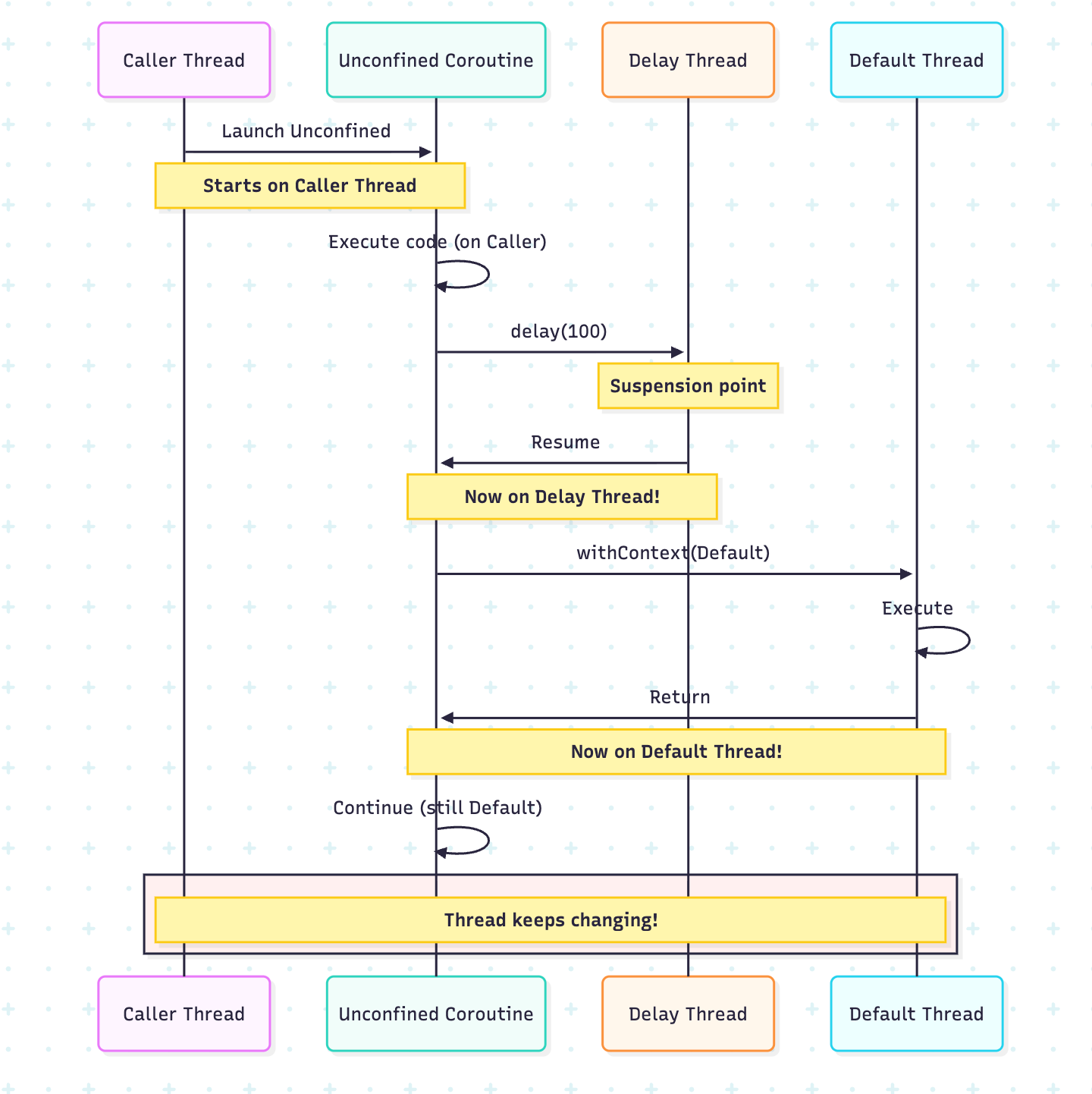
Purpose: A Special dispatcher that doesn’t confine a coroutine to any specific thread.
Behavior: Starts in the caller thread, resumes in whatever thread the suspending function uses
Use Cases: Very specific scenarios, generally NOT recommended for regular use
Understanding Unconfined Behavior
fun main() = runBlocking {
    println(”Main thread: ${Thread.currentThread().name}”)

    launch(Dispatchers.Unconfined) {
        println(”1. Unconfined - Start: ${Thread.currentThread().name}”)

        delay(100)
        println(”2. Unconfined - After delay: ${Thread.currentThread().name}”)

        withContext(Dispatchers.Default) {
            println(”3. Inside Default: ${Thread.currentThread().name}”)
        }

        println(”4. Unconfined - After withContext: ${Thread.currentThread().name}”)
    }

    delay(200)
}

/* Output (example):
Main thread: main
1. Unconfined - Start: main
2. Unconfined - After delay: kotlinx.coroutines.DefaultExecutor
3. Inside Default: DefaultDispatcher-worker-1
4. Unconfined - After withContext: DefaultDispatcher-worker-1
*/
When to Use Unconfined (Rare Cases)
class EventProcessor {
    suspend fun processEvent(event: String) = withContext(Dispatchers.Unconfined) {
        // Use unconfined for immediate processing without thread switching overhead
        // Only suitable when no specific thread is required
        println(”Processing $event immediately on ${Thread.currentThread().name}”)
    }
}

fun main() = runBlocking {
    val processor = EventProcessor()

    launch(Dispatchers.Default) {
        processor.processEvent(”Event1”)
    }

    launch(Dispatchers.IO) {
        processor.processEvent(”Event2”)
    }
}Warning: An Unconfined dispatcher can lead to a stack overflow in certain situations and makes debugging harder. Use with caution!
Parallelism Deep Dive
Understanding Parallelism Limits
The parallelism parameter controls the maximum number of threads in the thread pool.
// For Dispatchers.Default
System.setProperty(”kotlinx.coroutines.scheduler.core.pool.size”, “8”)
System.setProperty(”kotlinx.coroutines.scheduler.max.pool.size”, “128”)

// For Dispatchers.IO
System.setProperty(”kotlinx.coroutines.io.parallelism”, “64”)
Real-Life Scenario: Parallel Web Scraping
import kotlinx.coroutines.*
import kotlin.system.measureTimeMillis

data class ScrapedData(val url: String, val title: String, val contentLength: Int)

class WebScraper {
    suspend fun scrapeWebsite(url: String): ScrapedData = withContext(Dispatchers.IO) {
        println(”Scraping $url on ${Thread.currentThread().name}”)
        delay(500) // Simulate network request

        ScrapedData(
            url = url,
            title = “Title from $url”,
            contentLength = (1000..5000).random()
        )
    }

    suspend fun scrapeMultipleSites(urls: List<String>): List<ScrapedData> = coroutineScope {
        urls.map { url ->
            async(Dispatchers.IO) {
                scrapeWebsite(url)
            }
        }.awaitAll()
    }
}

fun main() = runBlocking {
    val scraper = WebScraper()
    val urls = List(100) { “https://example.com/page$it” }

    val time = measureTimeMillis {
        val results = scraper.scrapeMultipleSites(urls)
        println(”Scraped ${results.size} websites”)
        println(”Total content: ${results.sumOf { it.contentLength }} characters”)
    }

    println(”Time taken: $time ms”)
    println(”With 64 parallel IO operations, much faster than sequential!”)
}
Limiting Parallelism with Semaphore
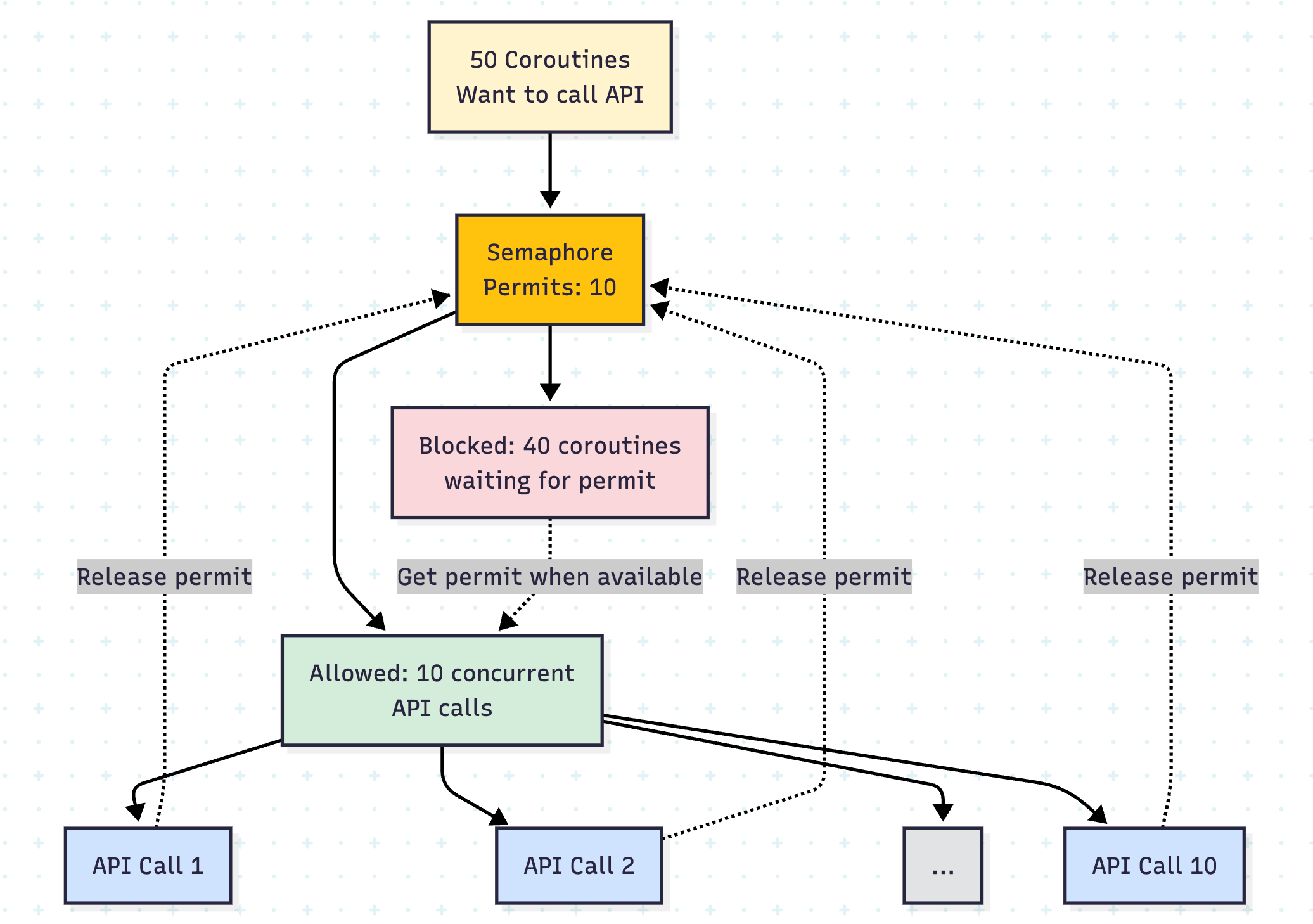
Sometimes you want to limit concurrent operations even further:
import kotlinx.coroutines.*
import kotlinx.coroutines.sync.Semaphore
import kotlinx.coroutines.sync.withPermit
import kotlin.system.measureTimeMillis

class RateLimitedApiClient {
    private val maxConcurrentRequests = 10
    private val semaphore = Semaphore(maxConcurrentRequests)

    suspend fun makeApiCall(id: Int): String = semaphore.withPermit {
        withContext(Dispatchers.IO) {
            println(”API call $id on ${Thread.currentThread().name}”)
            delay(1000) // Simulate API call
            “Response $id”
        }
    }

    suspend fun batchApiCalls(count: Int): List<String> = coroutineScope {
        (1..count).map { id ->
            async { makeApiCall(id) }
        }.awaitAll()
    }
}

fun main() = runBlocking {
    val client = RateLimitedApiClient()

    val time = measureTimeMillis {
        val results = client.batchApiCalls(50)
        println(”Completed ${results.size} API calls”)
    }

    println(”Time taken: $time ms”)
    println(”Limited to 10 concurrent requests despite 64 available IO threads”)
}
Custom Dispatchers
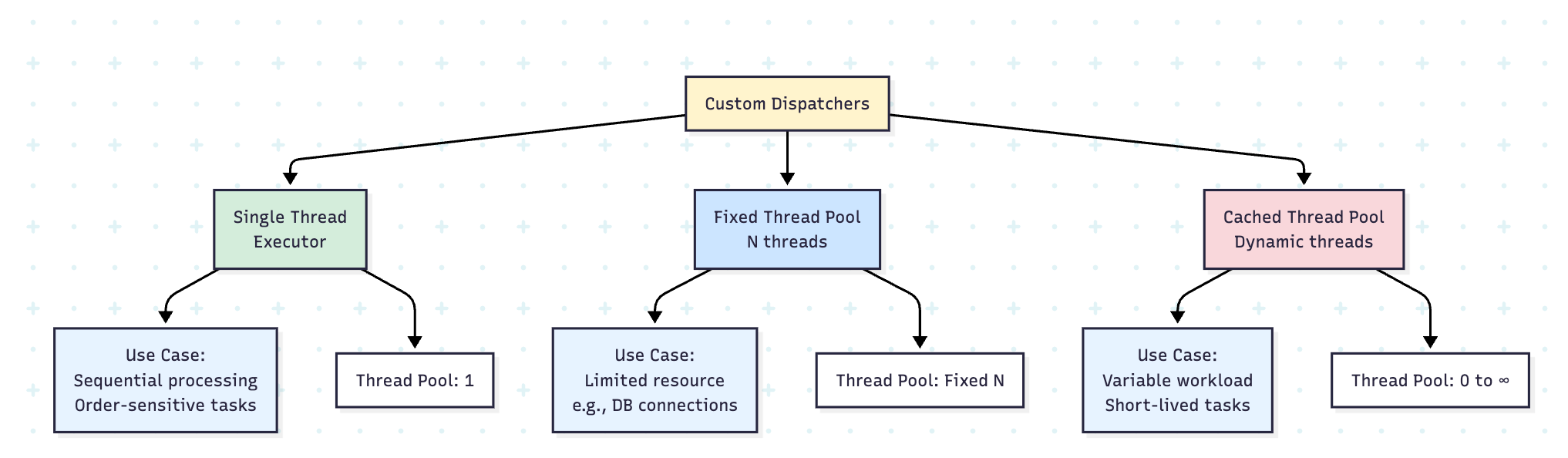
You can create custom dispatchers for specific needs:
import java.util.concurrent.Executors

class CustomDispatchers {
    // Single-threaded dispatcher for sequential processing
    val singleThread = Executors.newSingleThreadExecutor().asCoroutineDispatcher()

    // Fixed thread pool
    val fixedThreadPool = Executors.newFixedThreadPool(4).asCoroutineDispatcher()

    // Cached thread pool (creates threads as needed)
    val cachedThreadPool = Executors.newCachedThreadPool().asCoroutineDispatcher()

    fun close() {
        singleThread.close()
        fixedThreadPool.close()
        cachedThreadPool.close()
    }
}

fun main() = runBlocking {
    val dispatchers = CustomDispatchers()

    try {
        // Use single-threaded dispatcher for order-sensitive operations
        withContext(dispatchers.singleThread) {
            repeat(5) { i ->
                launch {
                    println(”Task $i on ${Thread.currentThread().name}”)
                    delay(100)
                }
            }
        }

        delay(1000)

    } finally {
        dispatchers.close()
    }
}
Real-Life Scenario: Database Connection Pool
import kotlinx.coroutines.*
import java.util.concurrent.Executors

class DatabaseService {
    // Custom dispatcher with limited threads matching DB connection pool
    private val dbDispatcher = Executors.newFixedThreadPool(5).asCoroutineDispatcher()

    data class QueryResult(val data: List<String>)

    suspend fun executeQuery(query: String): QueryResult = withContext(dbDispatcher) {
        println(”Executing ‘$query’ on ${Thread.currentThread().name}”)
        delay(200) // Simulate query execution
        QueryResult(listOf(”result1”, “result2”))
    }

    suspend fun executeBatchQueries(queries: List<String>): List<QueryResult> = coroutineScope {
        queries.map { query ->
            async { executeQuery(query) }
        }.awaitAll()
    }

    fun shutdown() {
        dbDispatcher.close()
    }
}

fun main() = runBlocking {
    val dbService = DatabaseService()

    try {
        val queries = List(20) { “SELECT * FROM table WHERE id = $it” }

        val time = measureTimeMillis {
            val results = dbService.executeBatchQueries(queries)
            println(”Executed ${results.size} queries”)
        }

        println(”Time: $time ms (limited by 5 DB connections)”)

    } finally {
        dbService.shutdown()
    }
}
Best Practices and Guidelines
1. Choose the Right Dispatcher
// ❌ Wrong: CPU-intensive work on IO dispatcher
suspend fun processData(data: List<Int>) = withContext(Dispatchers.IO) {
    data.map { it * it * it * it } // CPU-intensive
}

// ✅ Correct: CPU-intensive work on Default dispatcher
suspend fun processData(data: List<Int>) = withContext(Dispatchers.Default) {
    data.map { it * it * it * it }
}

// ❌ Wrong: Network call on Default dispatcher
suspend fun fetchData() = withContext(Dispatchers.Default) {
    // Network call - will block a CPU thread!
}

// ✅ Correct: Network call on IO dispatcher
suspend fun fetchData() = withContext(Dispatchers.IO) {
    // Network call - uses IO thread that can wait
}
2. Don’t Block Dispatcher Threads
// ❌ Wrong: Blocking call without withContext
suspend fun badExample() {
    Thread.sleep(1000) // Blocks the thread!
}

// ✅ Correct: Use delay for coroutines
suspend fun goodExample() {
    delay(1000) // Suspends without blocking
}

// ✅ Correct: Use withContext for blocking calls
suspend fun blockingOperation() = withContext(Dispatchers.IO) {
    Thread.sleep(1000) // OK on IO dispatcher
}
3. Structured Concurrency
class DataProcessor {
    suspend fun processAllData(items: List<String>): List<String> = coroutineScope {
        // All child coroutines will complete before returning
        items.map { item ->
            async(Dispatchers.Default) {
                processItem(item)
            }
        }.awaitAll()
    }

    private suspend fun processItem(item: String): String {
        delay(100)
        return item.uppercase()
    }
}

fun main() = runBlocking {
    val processor = DataProcessor()
    val items = listOf(”apple”, “banana”, “cherry”)

    try {
        val results = processor.processAllData(items)
        println(”Results: $results”)
    } catch (e: Exception) {
        println(”Error occurred: ${e.message}”)
        // All child coroutines are automatically cancelled
    }
}
Performance Comparison
import kotlinx.coroutines.*
import kotlin.system.measureTimeMillis

suspend fun performanceTest() {
    val data = List(1000) { it }

    // Sequential processing
    val sequentialTime = measureTimeMillis {
        data.forEach { item ->
            delay(10)
            // process item
        }
    }
    println(”Sequential: $sequentialTime ms”)

    // Parallel with Default dispatcher
    val parallelDefaultTime = measureTimeMillis {
        coroutineScope {
            data.map { item ->
                async(Dispatchers.Default) {
                    delay(10)
                    // process item
                }
            }.awaitAll()
        }
    }
    println(”Parallel (Default): $parallelDefaultTime ms”)

    // Parallel with IO dispatcher
    val parallelIOTime = measureTimeMillis {
        coroutineScope {
            data.map { item ->
                async(Dispatchers.IO) {
                    delay(10)
                    // process item
                }
            }.awaitAll()
        }
    }
    println(”Parallel (IO): $parallelIOTime ms”)
}

fun main() = runBlocking {
    performanceTest()
}

/* Expected output:
Sequential: ~10000 ms
Parallel (Default): ~1250 ms (limited by CPU cores)
Parallel (IO): ~200 ms (can have 64 concurrent operations)
*/
Conclusion
Understanding dispatchers is fundamental to writing efficient Kotlin coroutines. Here’s a quick reference:
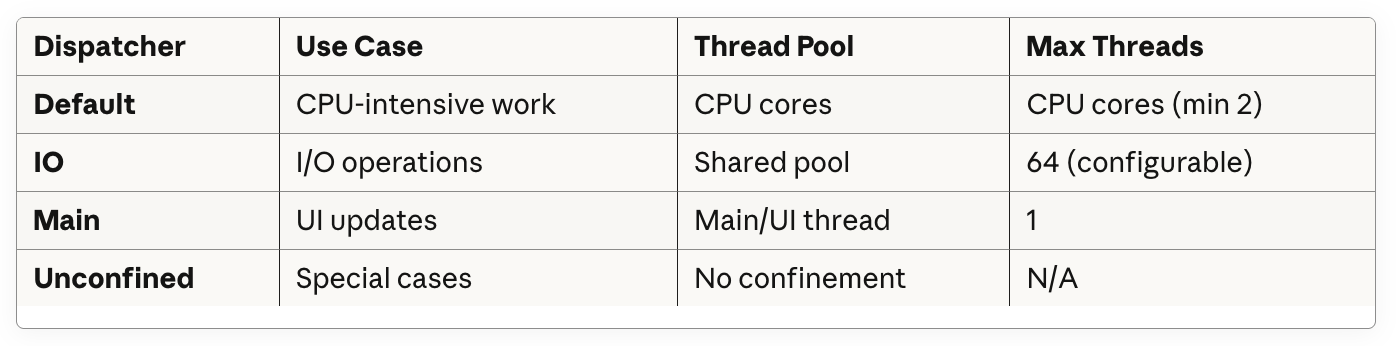
Key Takeaways:
Use
Dispatchers.Defaultfor CPU-bound operationsUse
Dispatchers.IOfor I/O-bound operations (network, disk, database)Use
Dispatchers.Mainfor UI updatesAvoid
Dispatchers.Unconfinedunless you have a very specific use caseNever block dispatcher threads - use
delay()instead ofThread.sleep()The 64-thread limit on IO dispatcher allows high concurrency for waiting operations
Create custom dispatchers when you need fine-grained control
Use structured concurrency with
coroutineScopefor proper cancellation handling
By mastering dispatchers, you’ll write more efficient, responsive, and maintainable Kotlin applications!
Have questions or want to share your dispatcher experiences? Let me know in the comments below!
Don't forget to check the roadmaps
https://www.androidengineers.in/roadmap