
Memory Leaks in Jetpack Compose: A Technical Deep Dive


Memory leaks in Jetpack Compose can be subtle and challenging to diagnose. Unlike traditional View-based Android development, Compose’s declarative nature and recomposition mechanism introduce unique patterns that can inadvertently cause memory retention. This article explores the technical underpinnings of memory leaks in Compose, their root causes, and strategies for prevention.
Understanding Compose’s Memory Model
Jetpack Compose operates on a composition tree that represents the UI hierarchy. During recomposition, Compose intelligently updates only the parts of the UI that have changed. However, this mechanism relies on careful memory management of composable functions, remembered state, and lifecycle-aware components.
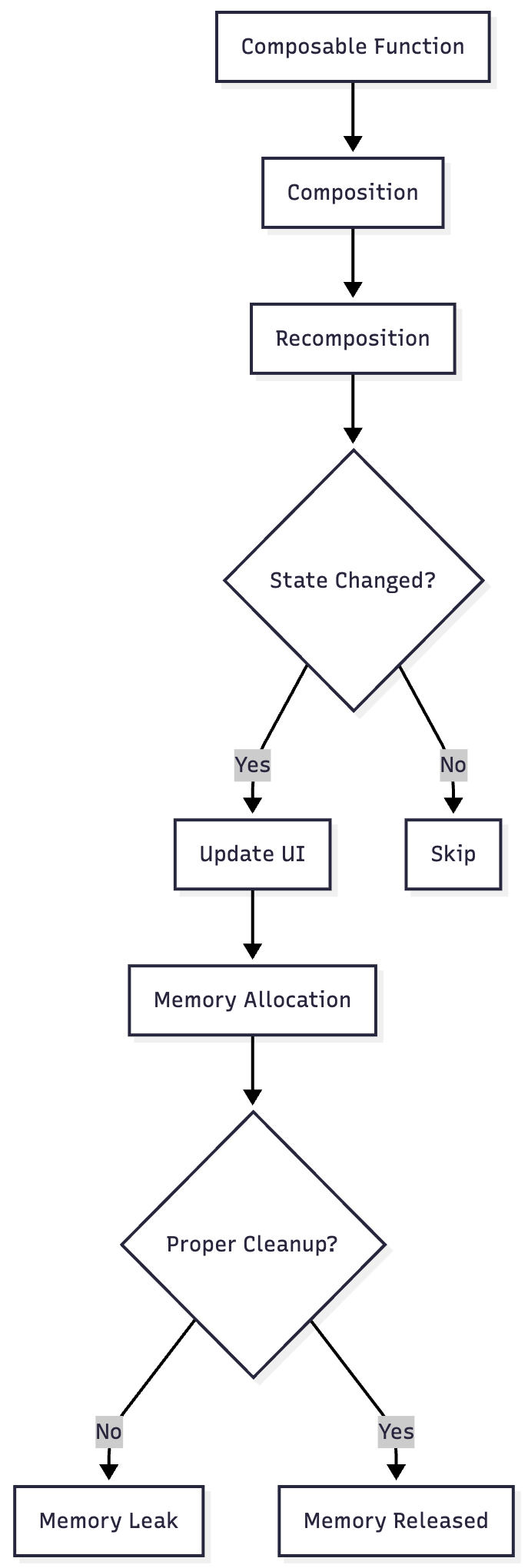
Common Memory Leak Patterns
1. Lambda Captures in remember Blocks
One of the most common sources of memory leaks occurs when lambdas capture references that outlive the composable’s lifecycle.
@Composable
fun LeakyComposable(viewModel: MyViewModel) {
    val context = LocalContext.current

    // PROBLEM: This lambda captures context
    val callback = remember {
        { data: String ->
            Toast.makeText(context, data, Toast.LENGTH_SHORT).show()
        }
    }

    LaunchedEffect(Unit) {
        viewModel.registerCallback(callback) // Callback never unregistered
    }
}
Why this leaks: The remember block creates a callback that holds a reference to the context. If the callback is registered with the ViewModel but never unregistered, it keeps the entire composition context alive even after the composable leaves the composition.
Solution:
@Composable
fun FixedComposable(viewModel: MyViewModel) {
    val context = LocalContext.current

    DisposableEffect(Unit) {
        val callback: (String) -> Unit = { data ->
            Toast.makeText(context, data, Toast.LENGTH_SHORT).show()
        }
        viewModel.registerCallback(callback)

        onDispose {
            viewModel.unregisterCallback(callback)
        }
    }
}
2. ViewModel Retention Through Composable References
ViewModels are scoped to lifecycle owners and should outlive individual recompositions. However, storing composable-specific references in ViewModels can prevent garbage collection.
class LeakyViewModel : ViewModel() {
    // PROBLEM: Storing composable lambda
    private var onDataChanged: (@Composable () -> Unit)? = null

    fun setComposableCallback(callback: @Composable () -> Unit) {
        onDataChanged = callback
    }
}

@Composable
fun ProblematicScreen(viewModel: LeakyViewModel) {
    viewModel.setComposableCallback {
        Text(”This is problematic”)
    }
}
Why this leaks: The composable lambda captures the entire composition context. Since the ViewModel outlives the composition, it prevents the composition from being garbage collected.
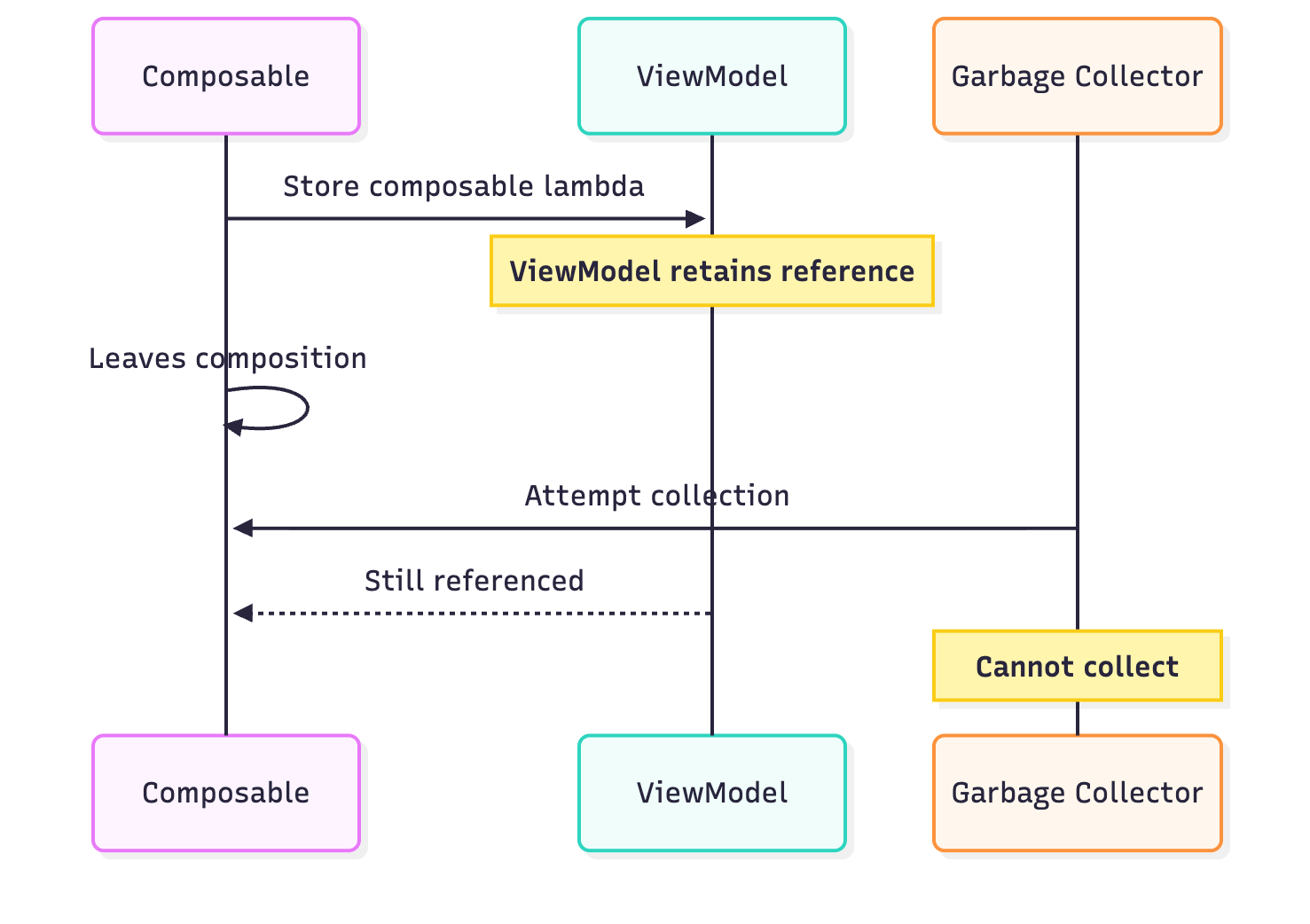
Solution: Never store composable functions or composition-scoped objects in ViewModels. Use state flows or callback interfaces instead.
class FixedViewModel : ViewModel() {
    private val _dataState = MutableStateFlow<String>(”“)
    val dataState: StateFlow<String> = _dataState.asStateFlow()

    fun updateData(data: String) {
        _dataState.value = data
    }
}

@Composable
fun FixedScreen(viewModel: FixedViewModel) {
    val data by viewModel.dataState.collectAsState()
    Text(text = data)
}
3. Coroutine Scope Mismanagement
Launching coroutines without proper scope management can lead to leaks when the composition exits.
@Composable
fun CoroutineLeakExample() {
    val scope = rememberCoroutineScope()

    // PROBLEM: Long-running operation without cancellation
    Button(onClick = {
        scope.launch {
            while (true) {
                delay(1000)
                // Perform work
            }
        }
    }) {
        Text(”Start Task”)
    }
}
Why this leaks: The coroutine continues running even after the composable leaves the composition, keeping references to the scope and potentially the entire composition context.
Solution:
@Composable
fun FixedCoroutineExample() {
    var isActive by remember { mutableStateOf(false) }

    LaunchedEffect(isActive) {
        if (isActive) {
            while (isActive) {
                delay(1000)
                // Perform work
            }
        }
    }

    DisposableEffect(Unit) {
        onDispose {
            isActive = false
        }
    }

    Button(onClick = { isActive = !isActive }) {
        Text(if (isActive) “Stop Task” else “Start Task”)
    }
}
4. CompositionLocal Providers with Static References
CompositionLocal values that hold static or long-lived references can prevent composition garbage collection.
// PROBLEM: Static reference held by CompositionLocal
object AppContext {
    lateinit var currentComposition: @Composable () -> Unit
}

val LocalAppCallback = compositionLocalOf<() -> Unit> {
    error(”No callback provided”)
}

@Composable
fun ProblematicProvider(content: @Composable () -> Unit) {
    CompositionLocalProvider(
        LocalAppCallback provides {
            AppContext.currentComposition = content // Leaks composition
        }
    ) {
        content()
    }
}
5. remember Without Proper Keys
Using remember without appropriate keys can cause stale references to persist across recompositions.
@Composable
fun LeakyRememberExample(itemId: String) {
    // PROBLEM: Remembered object doesn’t update when itemId changes
    val expensiveObject = remember {
        ExpensiveResource(itemId)
    }

    // If itemId changes, old ExpensiveResource is still referenced
}
Solution:
@Composable
fun FixedRememberExample(itemId: String) {
    val expensiveObject = remember(itemId) {
        ExpensiveResource(itemId)
    }

    DisposableEffect(itemId) {
        onDispose {
            expensiveObject.cleanup()
        }
    }
}
Detection and Diagnosis
Using Memory Profiler
The Android Studio Memory Profiler can help identify compose-related leaks:
Capture a heap dump after navigating away from a composable screen
Look for instances of
CompositionImplor your composable functionsAnalyze the reference chain to identify what’s preventing garbage collection
LeakCanary Integration
LeakCanary can detect compose leaks with proper configuration:
// In your Application class
class MyApplication : Application() {
    override fun onCreate() {
        super.onCreate()

        if (BuildConfig.DEBUG) {
            LeakCanary.config = LeakCanary.config.copy(
                retainedVisibleThreshold = 3
            )
        }
    }
}
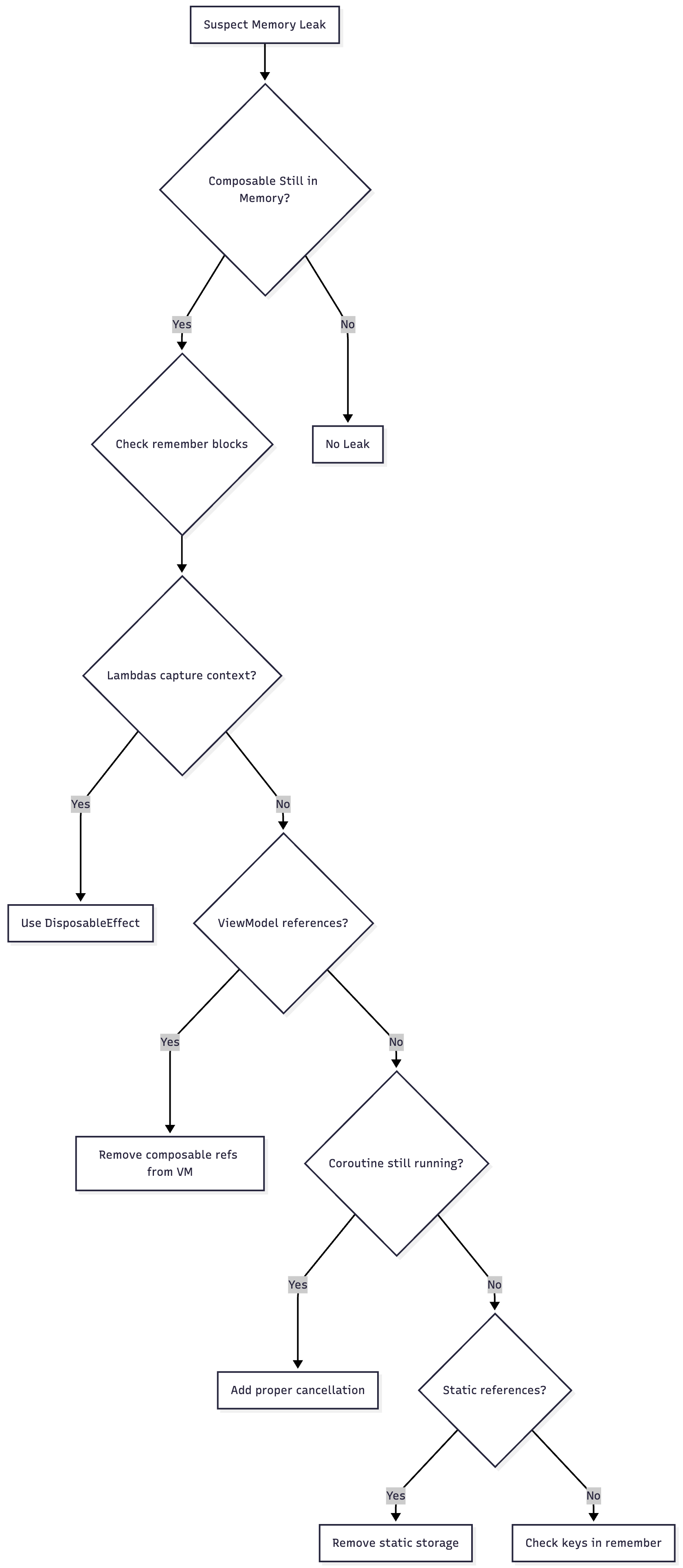
Memory Leak Flow Chart
Best Practices for Prevention
1. Use DisposableEffect for Resource Management
@Composable
fun ResourceManagementExample(resourceId: String) {
    DisposableEffect(resourceId) {
        val resource = acquireResource(resourceId)

        onDispose {
            resource.release()
        }
    }
}
2. Prefer State Flows Over Direct References
class SafeViewModel : ViewModel() {
    private val _uiState = MutableStateFlow(UiState())
    val uiState: StateFlow<UiState> = _uiState.asStateFlow()

    fun updateState(transform: (UiState) -> UiState) {
        _uiState.update(transform)
    }
}
3. Use rememberCoroutineScope Carefully
@Composable
fun SafeCoroutineUsage() {
    val scope = rememberCoroutineScope()

    Button(onClick = {
        scope.launch {
            try {
                // Short-lived operation
                val result = suspendingOperation()
                // Update state
            } catch (e: CancellationException) {
                // Handle cancellation gracefully
            }
        }
    }) {
        Text(”Execute”)
    }
}
4. Implement Proper Key Management
@Composable
fun DynamicContentExample(items: List<Item>) {
    items.forEach { item ->
        key(item.id) {
            ItemComposable(item)
        }
    }
}
5. Use derivedStateOf for Computed Values
@Composable
fun ComputedValueExample(items: List<Item>) {
    val expensiveComputation by remember {
        derivedStateOf {
            items.filter { it.isValid }.sortedBy { it.priority }
        }
    }

    LazyColumn {
        items(expensiveComputation) { item ->
            ItemRow(item)
        }
    }
}
Architecture Patterns to Prevent Leaks
Unidirectional Data Flow
// ViewModel
class ScreenViewModel : ViewModel() {
    private val _state = MutableStateFlow(ScreenState())
    val state: StateFlow<ScreenState> = _state.asStateFlow()

    fun onEvent(event: ScreenEvent) {
        when (event) {
            is ScreenEvent.LoadData -> loadData()
            is ScreenEvent.UpdateItem -> updateItem(event.item)
        }
    }
}

// Composable
@Composable
fun Screen(viewModel: ScreenViewModel = viewModel()) {
    val state by viewModel.state.collectAsState()

    ScreenContent(
        state = state,
        onEvent = viewModel::onEvent
    )
}

@Composable
fun ScreenContent(
    state: ScreenState,
    onEvent: (ScreenEvent) -> Unit
) {
    // Pure composable function - no memory leak risk
}
Effect Handler Pattern
@Composable
fun EffectHandlerExample(
    sideEffect: Flow<SideEffect>,
    onNavigate: (String) -> Unit
) {
    LaunchedEffect(Unit) {
        sideEffect.collect { effect ->
            when (effect) {
                is SideEffect.Navigate -> onNavigate(effect.route)
                is SideEffect.ShowToast -> {
                    // Handle without capturing context in ViewModel
                }
            }
        }
    }
}
Conclusion
Memory leaks in Jetpack Compose require careful attention to the lifecycle of composable functions, proper scope management, and separation of concerns between ViewModels and UI layer. By understanding the composition lifecycle, using appropriate effect handlers, and following unidirectional data flow patterns, you can build robust Compose applications that manage memory efficiently.
Key takeaways:
Always clean up resources in
DisposableEffectNever store composable references in ViewModels
Use proper keys with
rememberandkeycomposablesManage coroutine lifecycles carefully
Leverage state flows for communication between layers
Profile regularly using Memory Profiler and LeakCanary
thanks for the blog