Jetpack Compose has revolutionized UI development on Android by shifting from an imperative view hierarchy to a declarative, state-driven model. Under the hood, the work to render your UI is broken down into three distinct phases:
Composition: What UI to show (building the UI tree).
Layout: Where to place the UI (measuring and positioning the tree).
Drawing: How to render it (painting pixels on the screen).
The heart of the Layout phase is an interface called MeasurePolicy. Whenever you use standard layouts like Box, Column, or Row, or when you create your own custom layout, you are interacting with a MeasurePolicy.
In this blog post, we’ll dive deep into what MeasurePolicy is, how it orchestrates the measurement and placement of child composables, and how you can harness it to build custom layouts.
What is MeasurePolicy?
At its core, MeasurePolicy is a functional interface that defines the rules for how a layout should measure its children, determine its own size, and position those children within its bounds.
Here is a simplified look at the shape of the interface:
fun interface MeasurePolicy {

    fun MeasureScope.measure(

        measurables: List<Measurable>,

        constraints: Constraints

    ): MeasureResult

    // ... intrinsic measurement methods ...

}
Because it is a fun interface, you can implement the core measure logic directly as a trailing lambda when invoking the Layout composable.
The Core Concept: Measure and Place
The measure function is where the magic happens. It takes two primary arguments:
measurables: List<Measurable>: A list containing all the child elements of the layout. At this stage, they are Measurable objects—meaning they can be measured, but haven’t been yet.
constraints: Constraints: The size limits dictated by the parent layout (e.g., minimum/maximum width and height).
The “No Negotiation” Rule
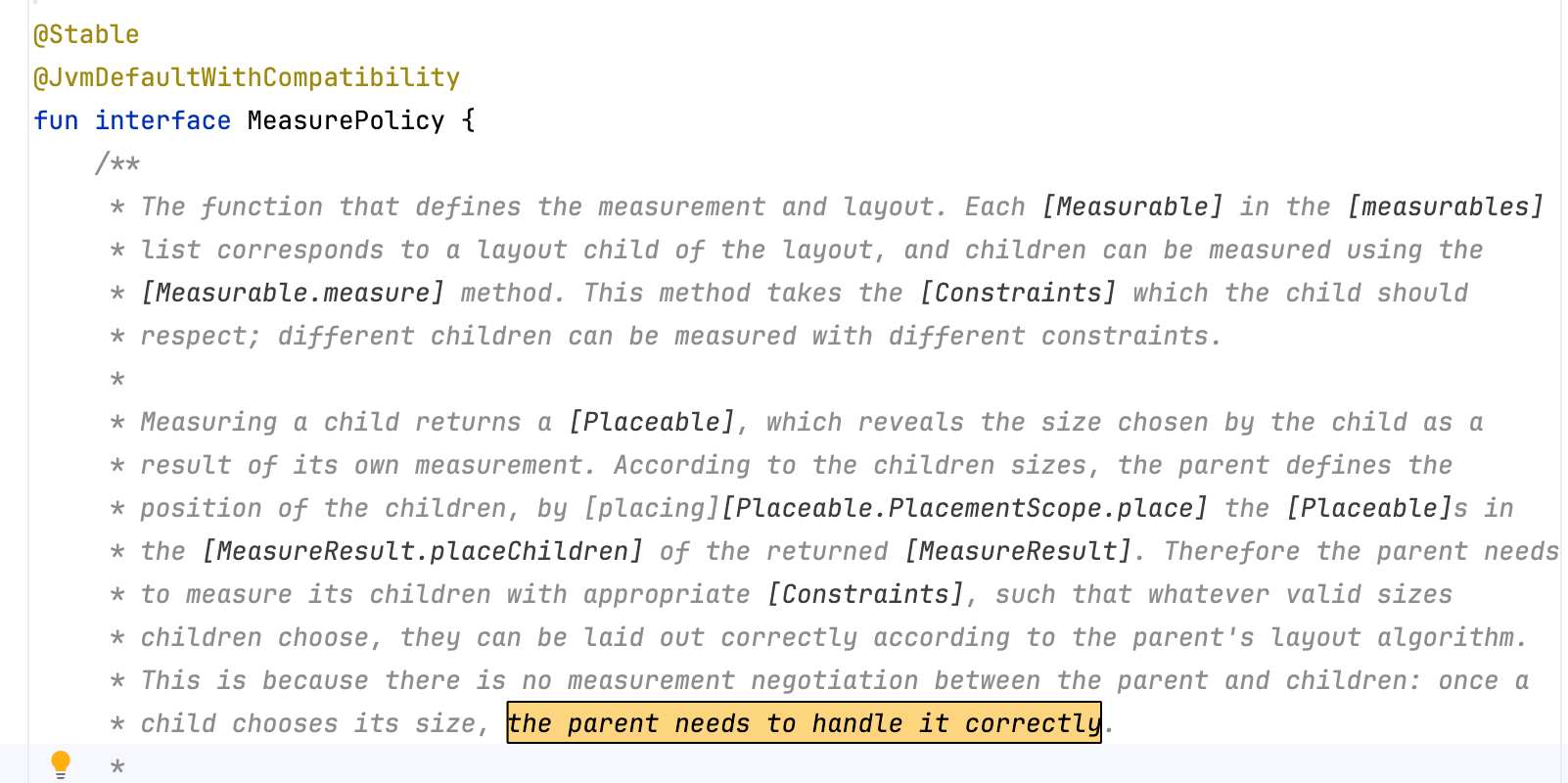
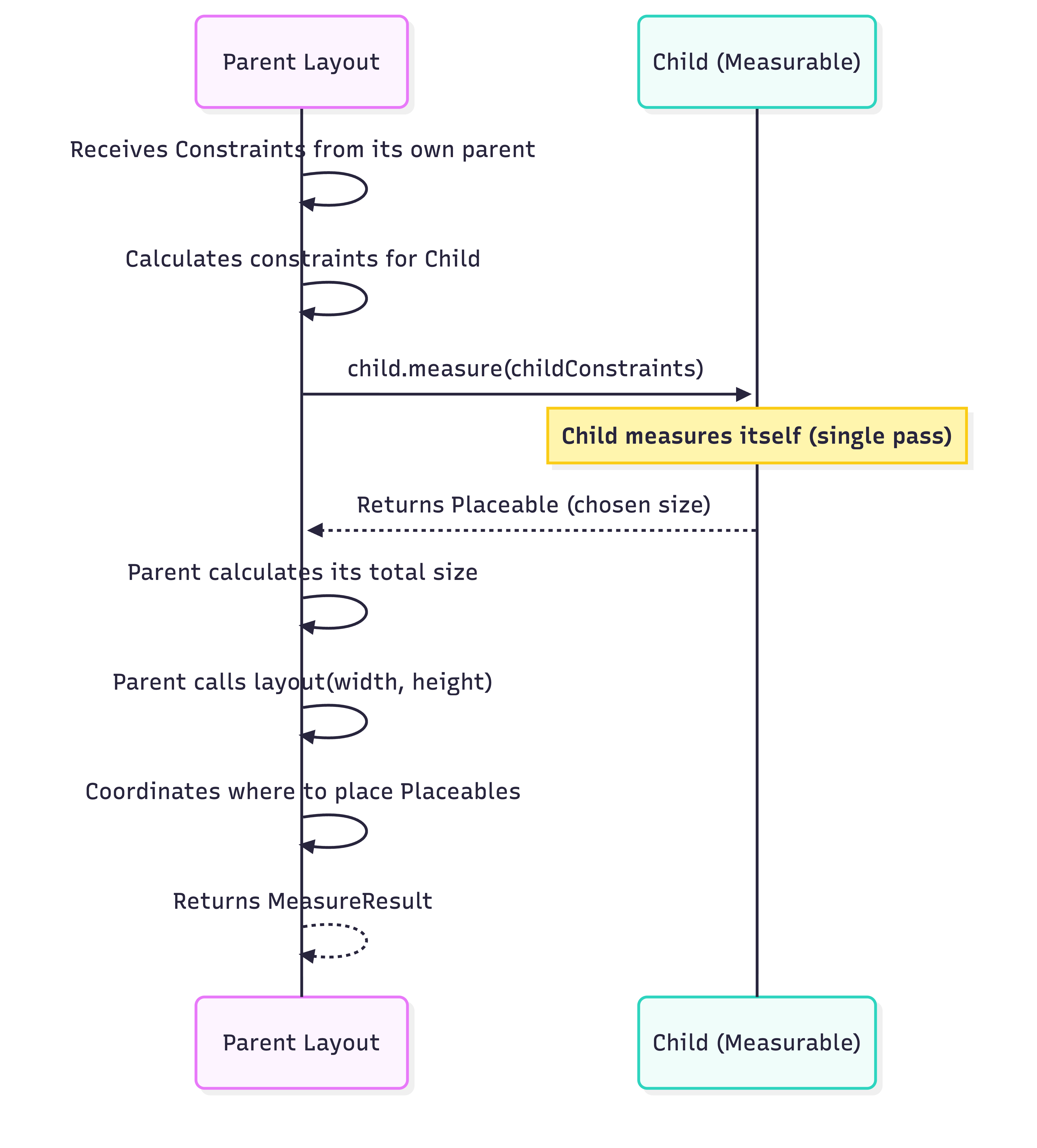
A crucial concept in Jetpack Compose is single-pass measurement. A parent measures each of its children exactly once. As the documentation notes:
“There is no measurement negotiation between the parent and children: once a child chooses its size, the parent needs to handle it correctly.”
Here is how the parent-child interaction plays out:
From Measurable to Placeable
When you tell a Measurable to measure itself using measurables[i].measure(constraints), it returns a Placeable.
A Measurable is a child before it has a concrete size.
A Placeable is a child after it has been measured. It now knows its precise width and height, and is ready to be placed on the screen.
Once all children are measured, the parent passes its own calculated total dimensions to layout(width, height) { ... }, which creates the final MeasureResult and allows you to place the children using placeable.placeRelative(x, y).
Example: Building a Custom VerticalStack
Let’s solidify this with an example. Suppose we want to create a simplified version of Column called VerticalStack.
@Composable
fun VerticalStack(
    modifier: Modifier = Modifier,
    content: @Composable () -> Unit
) {
    Layout(
        modifier = modifier,
        content = content
    ) { measurables, constraints ->
        // 1. Measure phase
        // Measure all children with the constraints provided by our parent.
        // We relax the height constraints so children can be their natural height.
        val childConstraints = constraints.copy(minHeight = 0)
        val placeables = measurables.map { measurable ->
            measurable.measure(childConstraints)
        }

        // 2. Size Calculation phase
        // The width of our layout is the width of the widest child.
        val layoutWidth = placeables.maxOfOrNull { it.width } ?: 0
        // The height of our layout is the sum of all children's heights.
        val layoutHeight = placeables.sumOf { it.height }

        // Ensure our layout size respects the constraints passed to us
        val finalWidth = layoutWidth.coerceIn(constraints.minWidth, constraints.maxWidth)
        val finalHeight = layoutHeight.coerceIn(constraints.minHeight, constraints.maxHeight)

        // 3. Placement phase
        layout(finalWidth, finalHeight) {
            var currentY = 0

            placeables.forEach { placeable ->
                // Place each child at the current Y coordinate, X = 0
                placeable.placeRelative(x = 0, y = currentY)

                // Increment current Y by the child's height for the next child
                currentY += placeable.height
            }
        }
    }
}
In this implementation, the trailing lambda is our MeasurePolicy. We successfully divided the logic into Measuring children, Sizing the parent, and Placing the children.
For 90% of custom layouts, overriding the measure function is enough. However, Jetpack Compose layouts are strictly single-pass. This strictness becomes a hurdle when a parent needs to know the size of a child before deciding how to measure it.
For example, imagine a Row where you want all items to be exactly as tall as the tallest item. Because of single-pass measurement, you can’t measure them once to find the tallest, and then re-measure them all with that height.
To solve this, MeasurePolicy includes Intrinsic Measurement methods:
minIntrinsicWidth
minIntrinsicHeight
maxIntrinsicWidth
maxIntrinsicHeight
These methods allow a parent layout to query the theoretical size of a layout under certain constraints without actually exhausting the single-pass measure call.
When Intrinsic Defaults Fail
By default, the base MeasurePolicy attempts to calculate intrinsics by approximating them through the standard measure method. However, this approximation will freeze or crash for custom layouts that dynamically calculate sizes in non-standard ways.
If you are writing a complex custom layout that might be used inside an IntrinsicSize modifier (e.g., Modifier.height(IntrinsicSize.Max)), you should explicitly override these methods in your MeasurePolicy implementation to return correct theoretical values based on the layout logic.
Summary
The MeasurePolicy is the backbone of the Jetpack Compose rendering pipeline. By understanding how it works, you unlock the ability to:
Break free from standard Row, Column, and Box constraints.
Build highly optimized custom layouts.
Understand how Compose achieves its incredible UI performance through strict single-pass measurement.
Leverage intrinsic measurements when sibling composables need to adapt to each other’s dimensions.
The next time you type Layout(...) {}, you’ll know exactly how your trailing lambda is transforming a list of abstract measurements into pixel-perfect on-screen views!