
Deep Dive: How Internet Calling Apps Work Under the Hood
An architect-level exploration of VoIP applications, push notifications, and real-time communication on Android

As mobile engineers, we often use apps like WhatsApp, Zoom, Google Meet, or Telegram for voice and video calls without thinking about the complex machinery underneath.
In this article, we’ll dissect the complete architecture of internet calling applications—from how your phone knows a call is incoming while the app is closed, to how audio packets traverse the internet in real-time.
Table of Contents
The Big Picture: VoIP Overview
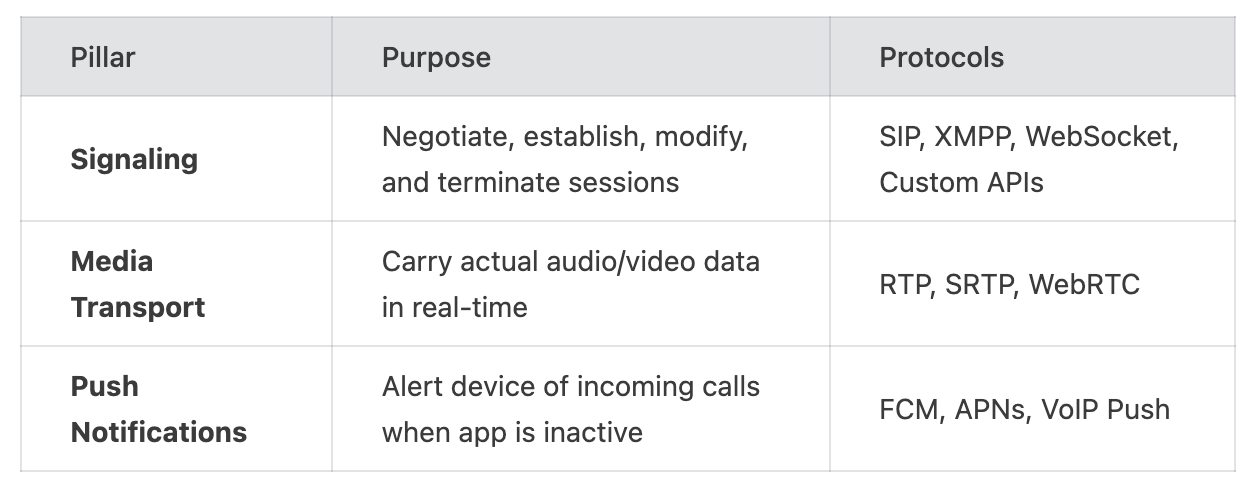
The Three Pillars of Internet Calling
How Does Your Phone Know a Call Is Coming?
Signaling: The Handshake Protocol
Media Transport: Moving Audio & Video
NAT Traversal: The Hidden Challenge
Android Implementation Deep Dive
Architecture Diagram
Security Considerations
Conclusion
The Big Picture: VoIP Overview
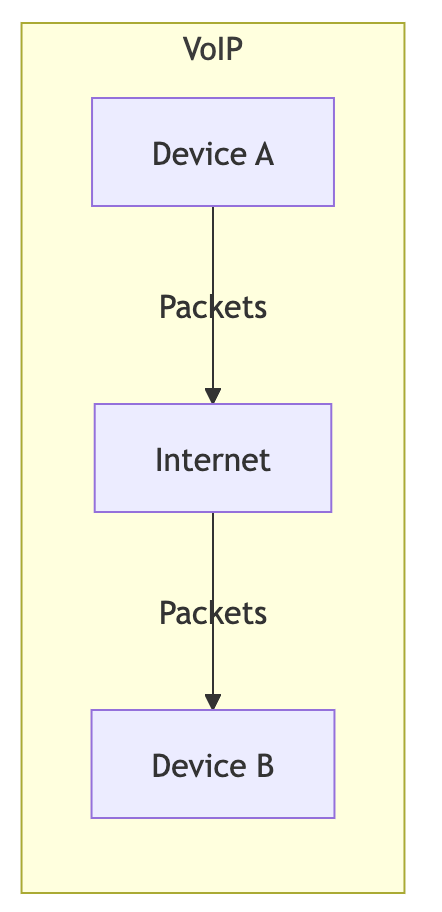
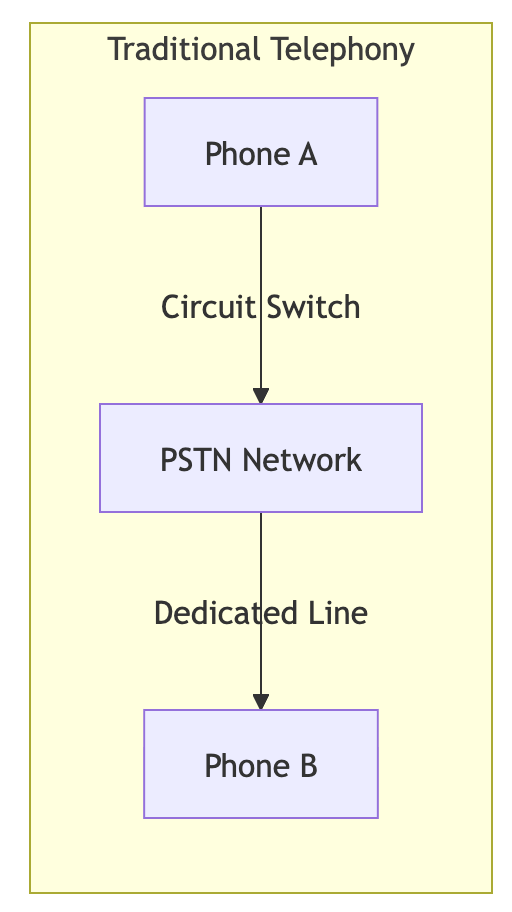
Voice over Internet Protocol (VoIP) is the technology that enables voice and video communication over the internet instead of traditional telephone networks. Unlike PSTN (Public Switched Telephone Network), which uses circuit-switched connections, VoIP uses packet-switched networks—breaking audio into small packets and sending them over IP networks
Key Characteristics of VoIP:
Packet-based: Audio is digitized, compressed, and sent as IP packets
Stateless by nature: Requires additional protocols to maintain call state
Latency-sensitive: Real-time communication requires sub-150ms latency
Bandwidth-efficient: Uses codecs like Opus, AAC, or G.711 for compression
The Three Pillars of Internet Calling
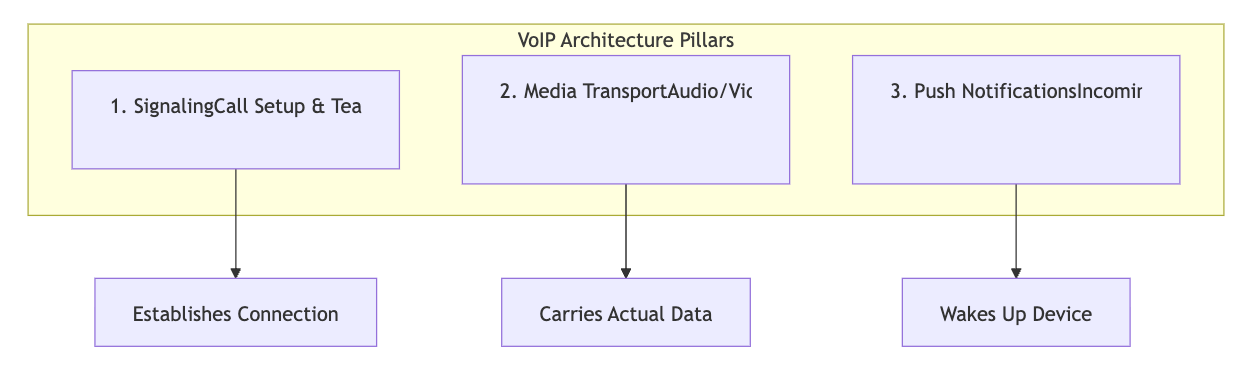
Every internet calling application is built on three fundamental pillars:
How Does Your Phone Know a Call Is Coming?
This is perhaps the most intriguing part of VoIP architecture. When your phone is in your pocket with the screen off and the app is not running, how does it ring?
The Challenge
Mobile operating systems are designed to save battery. They aggressively kill background processes and restrict network access. A naive implementation that keeps a persistent socket connection would:
Drain battery rapidly
Be killed by the OS within minutes
Violate app store guidelines
The Solution: Push Notifications
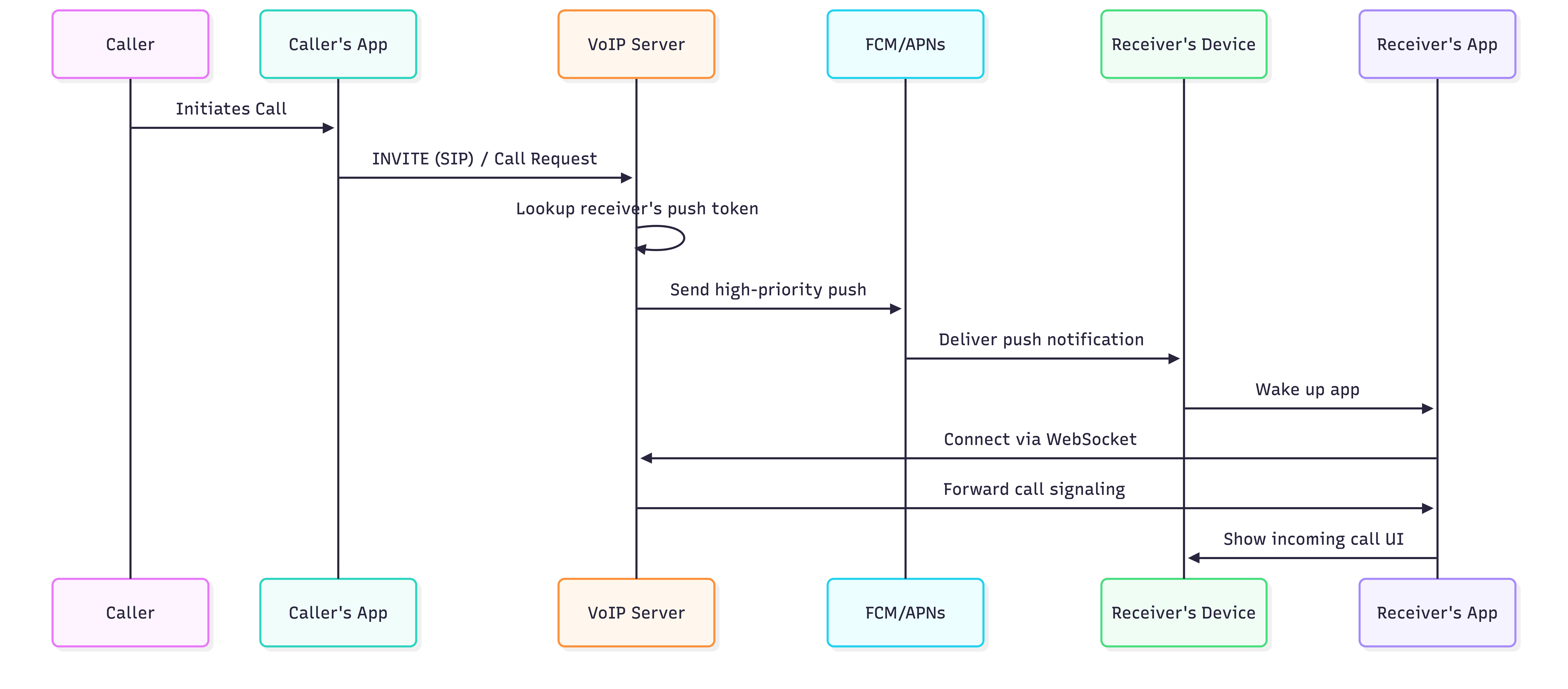
Push Notification Types for Calls
1. Firebase Cloud Messaging (FCM) - Android
// High-priority data message for calls
{

  “to”: “device_push_token”,

  “priority”: “high”,

  “data”: {

    “type”: “incoming_call”,

    “caller_id”: “user_123”,

    “caller_name”: “John Doe”,

    “call_id”: “call_abc123”,

    “room_id”: “room_xyz”,

    “timestamp”: “1699900000”

  }

}
IMPORTANT
For calls, you MUST use data messages with priority: high, not notification messages. Notification messages may not wake the app reliably.
2. VoIP Push (iOS)
Apple provides a special push notification type specifically for VoIP apps. Unlike regular push notifications:
Always delivered immediately
Always wakes the app
Requires using CallKit framework
3. Android’s Foreground Service Requirement
Starting from Android 10+, when a high-priority FCM message arrives:
class CallFirebaseMessagingService : FirebaseMessagingService() {
override fun onMessageReceived(remoteMessage: RemoteMessage) {

        val data = remoteMessage.data

        if (data[”type”] == “incoming_call”) {

            // Must start foreground service within 10 seconds

            val intent = Intent(this, IncomingCallService::class.java).apply {

                putExtra(”caller_id”, data[”caller_id”])

                putExtra(”call_id”, data[”call_id”])

            }

            if (Build.VERSION.SDK_INT >= Build.VERSION_CODES.O) {

                startForegroundService(intent)

            } else {

                startService(intent)

            }

        }

    }

}
Signaling: The Handshake Protocol
Signaling is the process of coordinating communication. Before any audio flows, both parties must agree on:
Session parameters: Codecs, encryption keys, media ports
Network information: IP addresses, NAT traversal candidates
Call state: Ringing, answered, rejected, ended
Common Signaling Protocols
1. SIP (Session Initiation Protocol)
The industry standard for VoIP signaling. Used by enterprise systems, Ooma, and many PBX systems.
INVITE sip:bob@biloxi.example.com SIP/2.0
Via: SIP/2.0/UDP pc33.atlanta.example.com;branch=z9hG4bK776asdhds

Max-Forwards: 70

To: Bob <sip:bob@biloxi.example.com>

From: Alice <sip:alice@atlanta.example.com>;tag=1928301774

Call-ID: a84b4c76e66710@pc33.atlanta.example.com

CSeq: 314159 INVITE

Contact: <sip:alice@pc33.atlanta.example.com>

Content-Type: application/sdp

Content-Length: 142

v=0

o=alice 2890844526 2890844526 IN IP4 pc33.atlanta.example.com

s=Session SDP

c=IN IP4 pc33.atlanta.example.com

t=0 0

m=audio 49170 RTP/AVP 0

a=rtpmap:0 PCMU/8000
2. WebRTC Signaling (Custom)
WebRTC doesn’t specify a signaling protocol—it’s up to the application. Most use:
WebSocket for real-time bidirectional communication
REST APIs for initial setup
Custom JSON messages for session negotiation
// Typical WebRTC signaling message
data class SignalingMessage(

    val type: String,        // “offer”, “answer”, “ice-candidate”

    val callId: String,

    val fromUserId: String,

    val toUserId: String,

    val payload: Any         // SDP or ICE candidate

)

// SDP Offer

{

  “type”: “offer”,

  “callId”: “call_123”,

  “fromUserId”: “alice”,

  “toUserId”: “bob”,

  “payload”: {

    “sdp”: “v=0\no=- 4611731400430051336 2 IN IP4 127.0.0.1...”,

    “type”: “offer”

  }

}
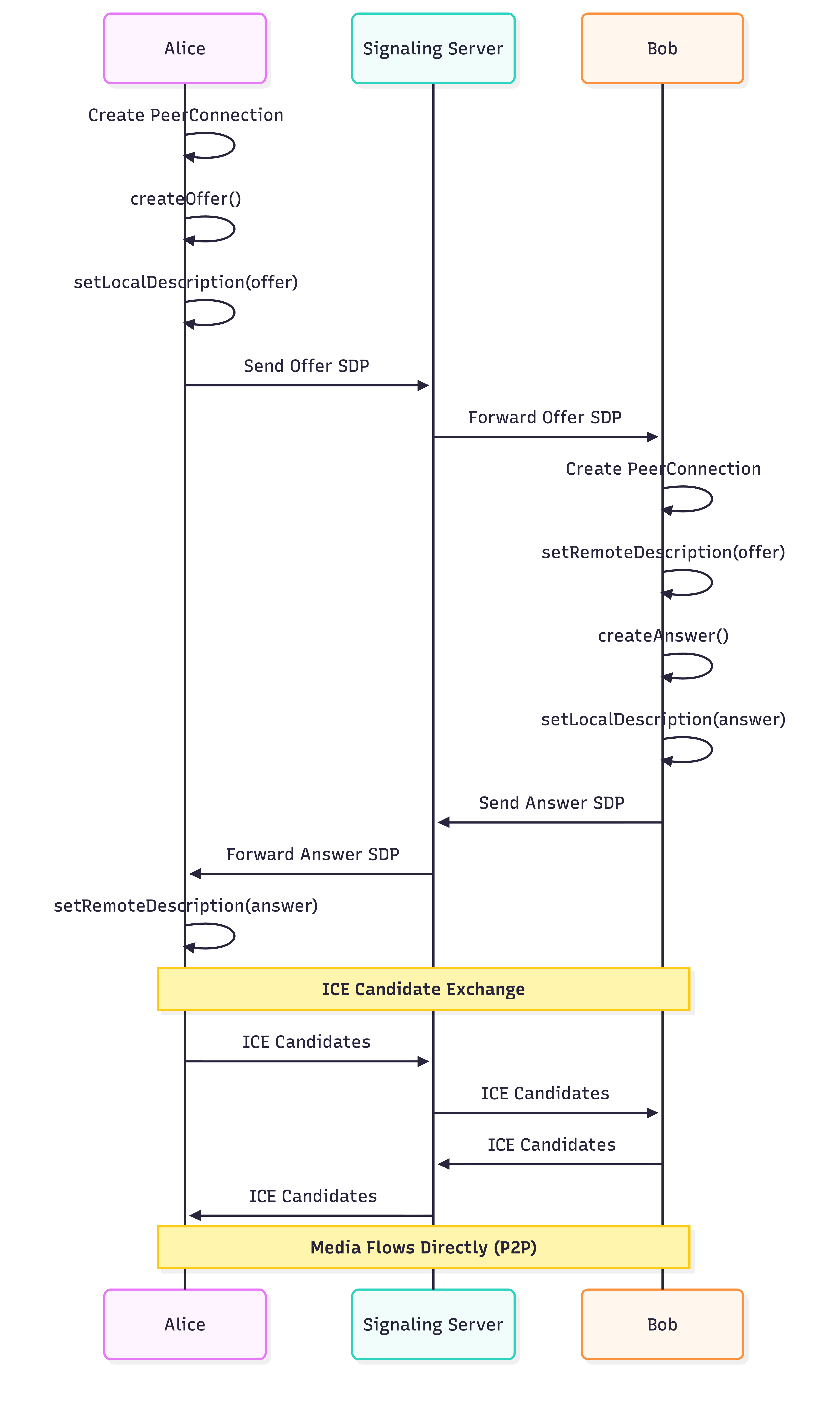
The Offer/Answer Model
WebRTC uses an offer/answer model based on SDP (Session Description Protocol):
Media Transport: Moving Audio & Video
Once signaling establishes the session, the actual audio/video data needs to flow between devices.
RTP (Real-time Transport Protocol)
RTP is the workhorse of media transport. Each audio frame is encapsulated in an RTP packet:
0                   1                   2                   3
    0 1 2 3 4 5 6 7 8 9 0 1 2 3 4 5 6 7 8 9 0 1 2 3 4 5 6 7 8 9 0 1
   +-+-+-+-+-+-+-+-+-+-+-+-+-+-+-+-+-+-+-+-+-+-+-+-+-+-+-+-+-+-+-+-+
   |V=2|P|X|  CC   |M|     PT      |       Sequence Number         |
   +-+-+-+-+-+-+-+-+-+-+-+-+-+-+-+-+-+-+-+-+-+-+-+-+-+-+-+-+-+-+-+-+
   |                           Timestamp                           |
   +-+-+-+-+-+-+-+-+-+-+-+-+-+-+-+-+-+-+-+-+-+-+-+-+-+-+-+-+-+-+-+-+
   |           Synchronization Source (SSRC) identifier            |
   +=+=+=+=+=+=+=+=+=+=+=+=+=+=+=+=+=+=+=+=+=+=+=+=+=+=+=+=+=+=+=+=+
   |            Contributing Source (CSRC) identifiers             |
   |                             ....                              |
   +-+-+-+-+-+-+-+-+-+-+-+-+-+-+-+-+-+-+-+-+-+-+-+-+-+-+-+-+-+-+-+-+
   |                         Payload Data                          |
   +-+-+-+-+-+-+-+-+-+-+-+-+-+-+-+-+-+-+-+-+-+-+-+-+-+-+-+-+-+-+-+-+
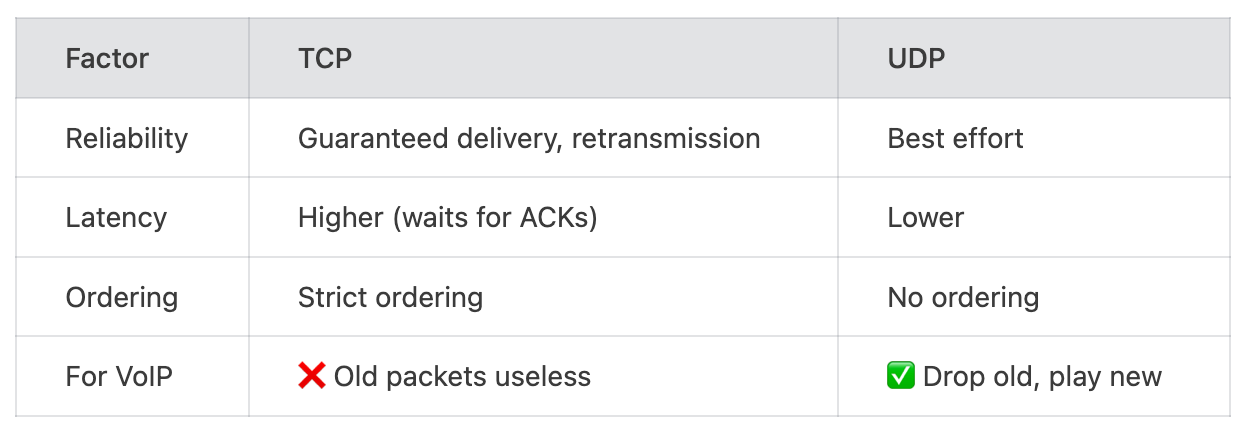
Why UDP, Not TCP?
VoIP uses UDP because:
TIP
A retransmitted audio packet that arrives 500ms late is useless for real-time conversation. It’s better to drop it and continue with fresh audio.
Audio Codecs
// Common codec configurations
data class AudioCodecConfig(

    val name: String,

    val sampleRate: Int,

    val bitrate: IntRange,

    val frameSize: Int

)

val OPUS = AudioCodecConfig(

    name = “opus”,

    sampleRate = 48000,

    bitrate = 6..510,  // kbps

    frameSize = 20     // ms

)

val G711_ULAW = AudioCodecConfig(

    name = “PCMU”,

    sampleRate = 8000,

    bitrate = 64..64,

    frameSize = 20

)
NAT Traversal: The Hidden Challenge
Most devices sit behind NAT (Network Address Translation), meaning they have private IP addresses that aren’t directly reachable from the internet. This is a major challenge for peer-to-peer communication.
The Problem

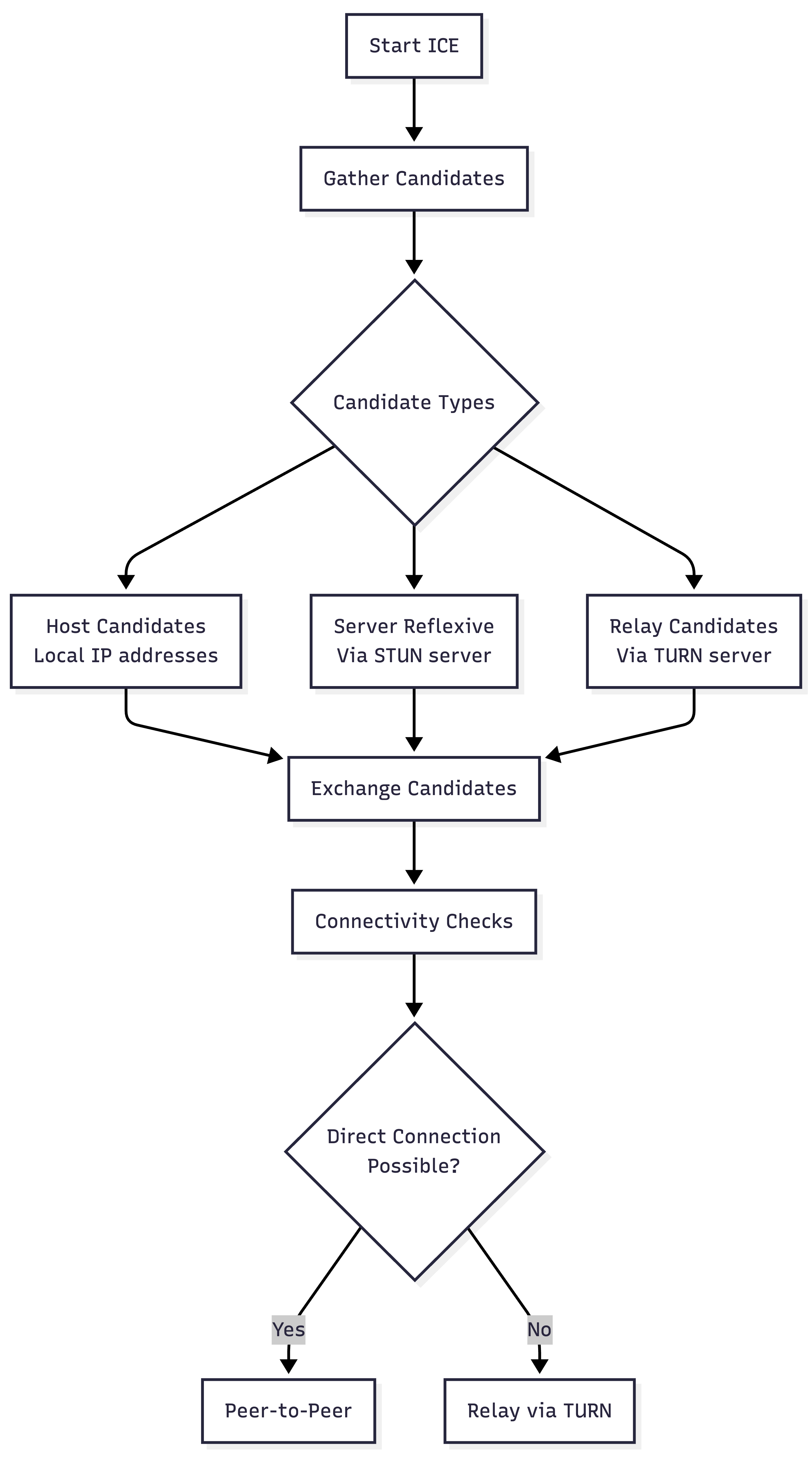
ICE Framework (Interactive Connectivity Establishment)
ICE is a framework that systematically discovers the best path between two peers:
STUN (Session Traversal Utilities for NAT)
STUN servers help discover public IP addresses:
// STUN request flowclass StunClient {

    suspend fun discoverPublicAddress(stunServer: String): InetSocketAddress {

        // 1. Send binding request to STUN server

        val request = StunMessage(

            type = MessageType.BINDING_REQUEST,

            transactionId = generateTransactionId()

        )

        // 2. STUN server sees our public IP and port

        // 3. Server reflects this back in response

        val response = sendAndReceive(stunServer, request)

        // 4. Extract XOR-MAPPED-ADDRESS attribute

        return response.getMappedAddress()

    }

}
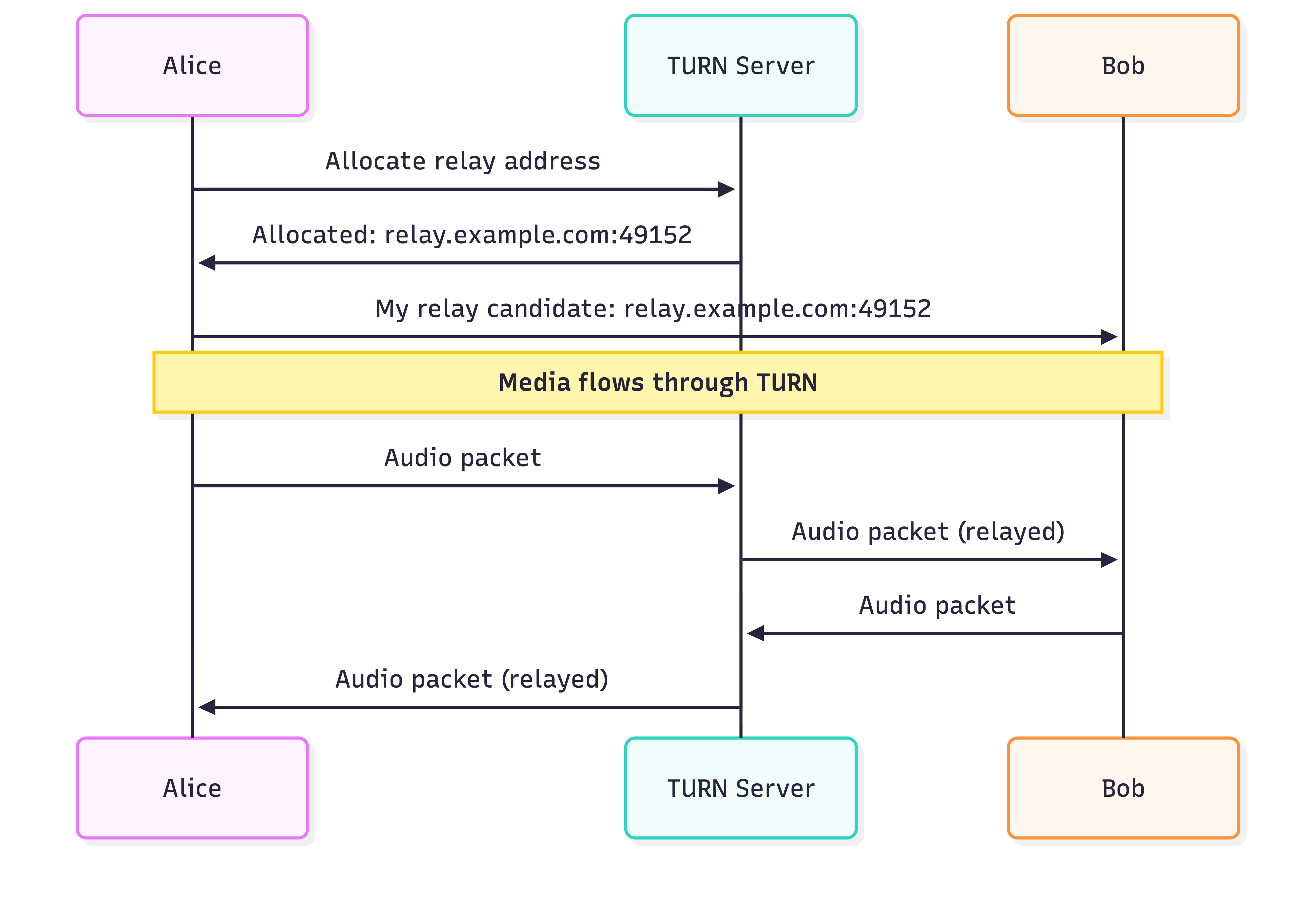
TURN (Traversal Using Relays around NAT)
When direct connection fails, TURN servers relay media:
WARNING
TURN relaying adds latency and costs money (bandwidth). Apps try to avoid it by attempting direct connection first. Approximately 10-15% of calls require TURN.
Android Implementation Deep Dive
Now let’s look at how to implement this on Android.
ConnectionService API
Android 6.0+ provides the ConnectionService API for integrating with the system dialer:
class VoIPConnectionService : ConnectionService() {
override fun onCreateOutgoingConnection(

        connectionManagerPhoneAccount: PhoneAccountHandle,

        request: ConnectionRequest

    ): Connection {

        val connection = VoIPConnection(applicationContext).apply {

            setConnectionProperties(Connection.PROPERTY_SELF_MANAGED)

            setCallerDisplayName(

                request.extras.getString(”caller_name”),

                TelecomManager.PRESENTATION_ALLOWED

            )

            setAddress(

                request.address,

                TelecomManager.PRESENTATION_ALLOWED

            )

            setInitializing()

        }

        // Start actual call setup

        initiateCall(request, connection)

        return connection

    }

    override fun onCreateIncomingConnection(

        connectionManagerPhoneAccount: PhoneAccountHandle,

        request: ConnectionRequest

    ): Connection {

        val connection = VoIPConnection(applicationContext).apply {

            setConnectionProperties(Connection.PROPERTY_SELF_MANAGED)

            setRinging()

        }

        return connection

    }

}

class VoIPConnection(private val context: Context) : Connection() {

    private var peerConnection: PeerConnection? = null

    override fun onAnswer() {

        setActive()

        // Start media flow

        peerConnection?.let { pc ->

            pc.createAnswer(/* ... */)

        }

    }

    override fun onReject() {

        setDisconnected(DisconnectCause(DisconnectCause.REJECTED))

        destroy()

        // Send rejection to server

    }

    override fun onDisconnect() {

        setDisconnected(DisconnectCause(DisconnectCause.LOCAL))

        destroy()

        // Clean up WebRTC resources

        peerConnection?.close()

    }

}
Complete Call Flow Implementation
class CallManager @Inject constructor(
private val webRtcClient: WebRtcClient,

    private val signalingClient: SignalingClient,

    private val audioManager: CallAudioManager

) {

    private var currentCallState: CallState = CallState.Idle

    sealed class CallState {

        object Idle : CallState()

        data class Outgoing(val callId: String, val remoteUserId: String) : CallState()

        data class Incoming(val callId: String, val callerInfo: CallerInfo) : CallState()

        data class Connected(val callId: String) : CallState()

    }

    // Step 1: Initiate outgoing call

    suspend fun startCall(remoteUserId: String): Result<String> {

        val callId = UUID.randomUUID().toString()

        currentCallState = CallState.Outgoing(callId, remoteUserId)

        // Create WebRTC peer connection

        webRtcClient.createPeerConnection()

        // Add local audio track

        webRtcClient.addLocalAudioTrack()

        // Create and set local offer

        val offer = webRtcClient.createOffer()

        webRtcClient.setLocalDescription(offer)

        // Send offer via signaling

        signalingClient.sendOffer(

            callId = callId,

            toUserId = remoteUserId,

            sdp = offer.description

        )

        // Gather and send ICE candidates

        webRtcClient.onIceCandidate { candidate ->

            signalingClient.sendIceCandidate(callId, remoteUserId, candidate)

        }

        return Result.success(callId)

    }

    // Step 2: Handle incoming call (from push notification)

    suspend fun handleIncomingCall(callId: String, callerInfo: CallerInfo) {

        currentCallState = CallState.Incoming(callId, callerInfo)

        // Connect to signaling server

        signalingClient.connect()

        // Get the offer from server

        val offer = signalingClient.getOffer(callId)

        // Create peer connection

        webRtcClient.createPeerConnection()

        // Set remote description (the offer)

        webRtcClient.setRemoteDescription(offer)

        // Show incoming call UI

        showIncomingCallNotification(callerInfo)

    }

    // Step 3: Answer the call

    suspend fun answerCall() {

        val state = currentCallState as? CallState.Incoming ?: return

        // Add local audio track

        webRtcClient.addLocalAudioTrack()

        // Create answer

        val answer = webRtcClient.createAnswer()

        webRtcClient.setLocalDescription(answer)

        // Send answer via signaling

        signalingClient.sendAnswer(state.callId, answer.description)

        // Start audio

        audioManager.startAudio()

        currentCallState = CallState.Connected(state.callId)

    }

    // Step 4: Handle remote answer (for outgoing calls)

    suspend fun handleRemoteAnswer(answer: SessionDescription) {

        webRtcClient.setRemoteDescription(answer)

        audioManager.startAudio()

        val state = currentCallState as? CallState.Outgoing ?: return

        currentCallState = CallState.Connected(state.callId)

    }

    // Step 5: Handle ICE candidates from remote

    fun handleRemoteIceCandidate(candidate: IceCandidate) {

        webRtcClient.addIceCandidate(candidate)

    }

    // Step 6: End call

    fun endCall() {

        val callId = when (val state = currentCallState) {

            is CallState.Outgoing -> state.callId

            is CallState.Incoming -> state.callId

            is CallState.Connected -> state.callId

            else -> null

        }

        callId?.let { signalingClient.sendHangup(it) }

        webRtcClient.close()

        audioManager.stopAudio()

        currentCallState = CallState.Idle

    }

}
WebRTC Client Wrapper
class WebRtcClient @Inject constructor(
 private val context: Context

) {

    private var peerConnectionFactory: PeerConnectionFactory? = null

    private var peerConnection: PeerConnection? = null

    private var localAudioTrack: AudioTrack? = null

    private val iceServers = listOf(

        PeerConnection.IceServer.builder(”stun:stun.l.google.com:19302”).createIceServer(),

        PeerConnection.IceServer.builder(”turn:your-turn-server.com:3478”)

            .setUsername(”username”)

            .setPassword(”password”)

            .createIceServer()

    )

    fun initialize() {

        val options = PeerConnectionFactory.InitializationOptions.builder(context)

            .setEnableInternalTracer(true)

            .createInitializationOptions()

        PeerConnectionFactory.initialize(options)

        peerConnectionFactory = PeerConnectionFactory.builder()

            .setAudioDeviceModule(JavaAudioDeviceModule.builder(context).createAudioDeviceModule())

            .createPeerConnectionFactory()

    }

    fun createPeerConnection() {

        val config = PeerConnection.RTCConfiguration(iceServers).apply {

            sdpSemantics = PeerConnection.SdpSemantics.UNIFIED_PLAN

            continualGatheringPolicy = PeerConnection.ContinualGatheringPolicy.GATHER_CONTINUALLY

        }

        peerConnection = peerConnectionFactory?.createPeerConnection(

            config,

            object : PeerConnection.Observer {

                override fun onIceCandidate(candidate: IceCandidate) {

                    iceCandidateCallback?.invoke(candidate)

                }

                override fun onIceConnectionChange(state: PeerConnection.IceConnectionState) {

                    when (state) {

                        PeerConnection.IceConnectionState.CONNECTED -> {

                            // Call is connected!

                        }

                        PeerConnection.IceConnectionState.FAILED -> {

                            // Connection failed

                        }

                        else -> {}

                    }

                }

                override fun onTrack(transceiver: RtpTransceiver) {

                    // Remote audio track received

                    val track = transceiver.receiver.track()

                    if (track is AudioTrack) {

                        track.setEnabled(true)

                    }

                }

                // ... other callbacks

            }

        )

    }

    fun addLocalAudioTrack() {

        val audioConstraints = MediaConstraints().apply {

            mandatory.add(MediaConstraints.KeyValuePair(”googEchoCancellation”, “true”))

            mandatory.add(MediaConstraints.KeyValuePair(”googNoiseSuppression”, “true”))

        }

        val audioSource = peerConnectionFactory?.createAudioSource(audioConstraints)

        localAudioTrack = peerConnectionFactory?.createAudioTrack(”audio0”, audioSource)

        peerConnection?.addTrack(localAudioTrack, listOf(”stream0”))

    }

    suspend fun createOffer(): SessionDescription = suspendCoroutine { continuation ->

        val constraints = MediaConstraints().apply {

            mandatory.add(MediaConstraints.KeyValuePair(”OfferToReceiveAudio”, “true”))

        }

        peerConnection?.createOffer(object : SdpObserver {

            override fun onCreateSuccess(sdp: SessionDescription) {

                continuation.resume(sdp)

            }

            override fun onCreateFailure(error: String) {

                continuation.resumeWithException(Exception(error))

            }

            // ...

        }, constraints)

    }

    // Similar implementations for createAnswer, setLocalDescription, setRemoteDescription...

}
Audio Management
class CallAudioManager @Inject constructor(
private val context: Context

) {

    private val audioManager = context.getSystemService(Context.AUDIO_SERVICE) as AudioManager

    private var audioFocusRequest: AudioFocusRequest? = null

    @RequiresApi(Build.VERSION_CODES.O)

    fun startAudio() {

        // Request audio focus

        audioFocusRequest = AudioFocusRequest.Builder(AudioManager.AUDIOFOCUS_GAIN_TRANSIENT)

            .setAudioAttributes(

                AudioAttributes.Builder()

                    .setUsage(AudioAttributes.USAGE_VOICE_COMMUNICATION)

                    .setContentType(AudioAttributes.CONTENT_TYPE_SPEECH)

                    .build()

            )

            .setAcceptsDelayedFocusGain(false)

            .build()

        audioManager.requestAudioFocus(audioFocusRequest!!)

        // Set mode to voice communication

        audioManager.mode = AudioManager.MODE_IN_COMMUNICATION

        // Enable speaker if needed

        audioManager.isSpeakerphoneOn = false

    }

    fun stopAudio() {

        audioFocusRequest?.let { audioManager.abandonAudioFocusRequest(it) }

        audioManager.mode = AudioManager.MODE_NORMAL

    }

    fun toggleSpeaker() {

        audioManager.isSpeakerphoneOn = !audioManager.isSpeakerphoneOn

    }

}
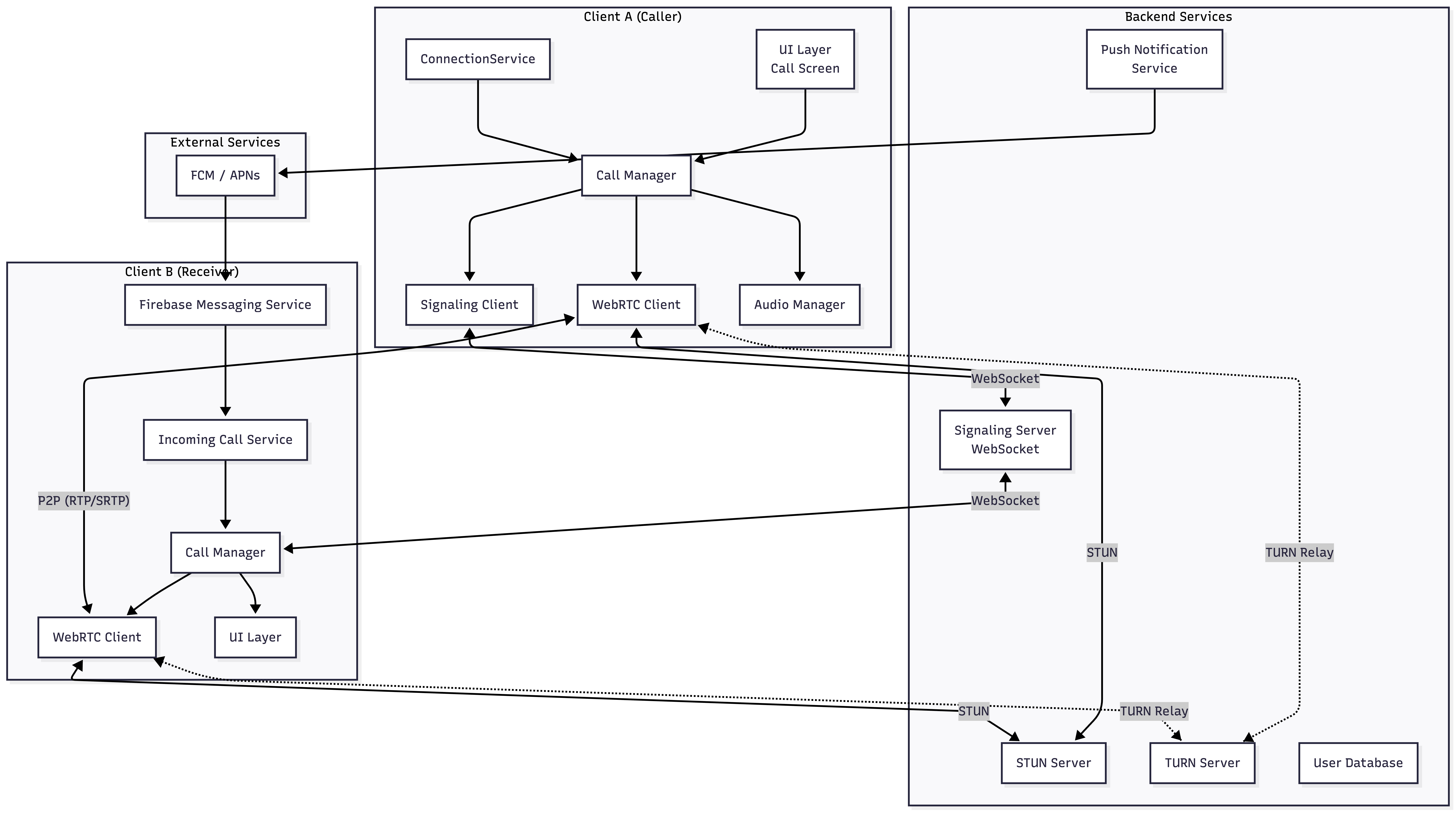
Architecture Diagram
Here’s the complete architecture of a VoIP calling application:
Security Considerations
VoIP security is critical. Here’s how modern apps protect calls:
1. Encrypted Signaling
// Use TLS for all signaling
val client = OkHttpClient.Builder()

    .sslSocketFactory(sslContext.socketFactory, trustManager)

    .build()

val webSocket = client.newWebSocket(

    Request.Builder()

        .url(”wss://signaling.example.com/ws”)  // WSS, not WS

        .build(),

    webSocketListener

)
2. SRTP (Secure RTP)
WebRTC automatically encrypts media using DTLS-SRTP:
DTLS Handshake → Derive SRTP Keys → Encrypt RTP packets3. Authentication
// JWT-based authentication for signaling
data class SignalingAuthRequest(

    val userId: String,

    val token: String,

    val deviceId: String

)
// Server validates token before allowing connection
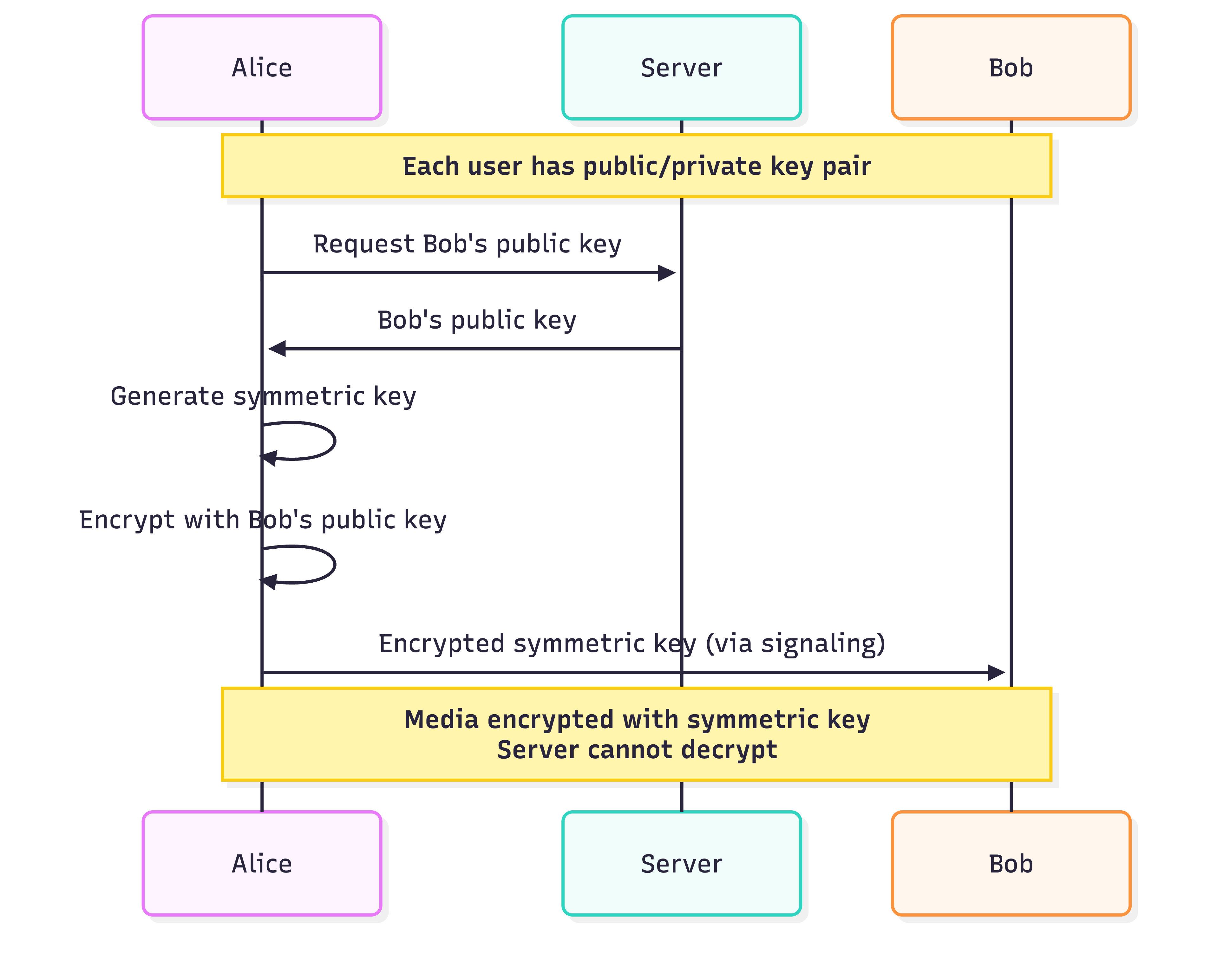
4. E2E Encryption (Optional)
For apps requiring end-to-end encryption (like Signal):
Conclusion
Building a reliable internet calling application requires orchestrating multiple complex systems:
Push notifications to wake devices and alert users of incoming calls
Signaling protocols to negotiate and establish sessions
WebRTC/RTP for real-time media transport
ICE/STUN/TURN for NAT traversal
Android-specific APIs like
ConnectionServicefor system integration
The beauty of modern VoIP is how these pieces work together seamlessly. When you tap “Call” in WhatsApp:
A push notification wakes your friend’s phone
WebSocket signaling sets up the session
ICE candidates find the optimal path
SRTP-encrypted audio flows in real-time
All within seconds
Understanding this architecture helps you build more reliable calling features, debug connectivity issues, and appreciate the engineering behind the apps we use daily.
Amazing...