
Deep Dive: Debounce in Kotlin Coroutines Flow
Mastering Rate-Limiting and Event Filtering in Reactive Streams


Introduction
Debouncing is a critical rate-limiting technique in reactive programming that filters out rapid, successive emissions and only processes values that have “settled” for a specified duration. In Kotlin’s coroutines Flow API, the debounce operator provides an elegant solution for handling scenarios like search-as-you-type, form validation, and API request throttling.
Understanding Debounce
The Core Concept
Debounce waits for a pause in emissions before letting a value through. When a new value arrives, it cancels any pending emission and starts a new timeout. Only if no new value arrives within the timeout period does the value get emitted downstream.
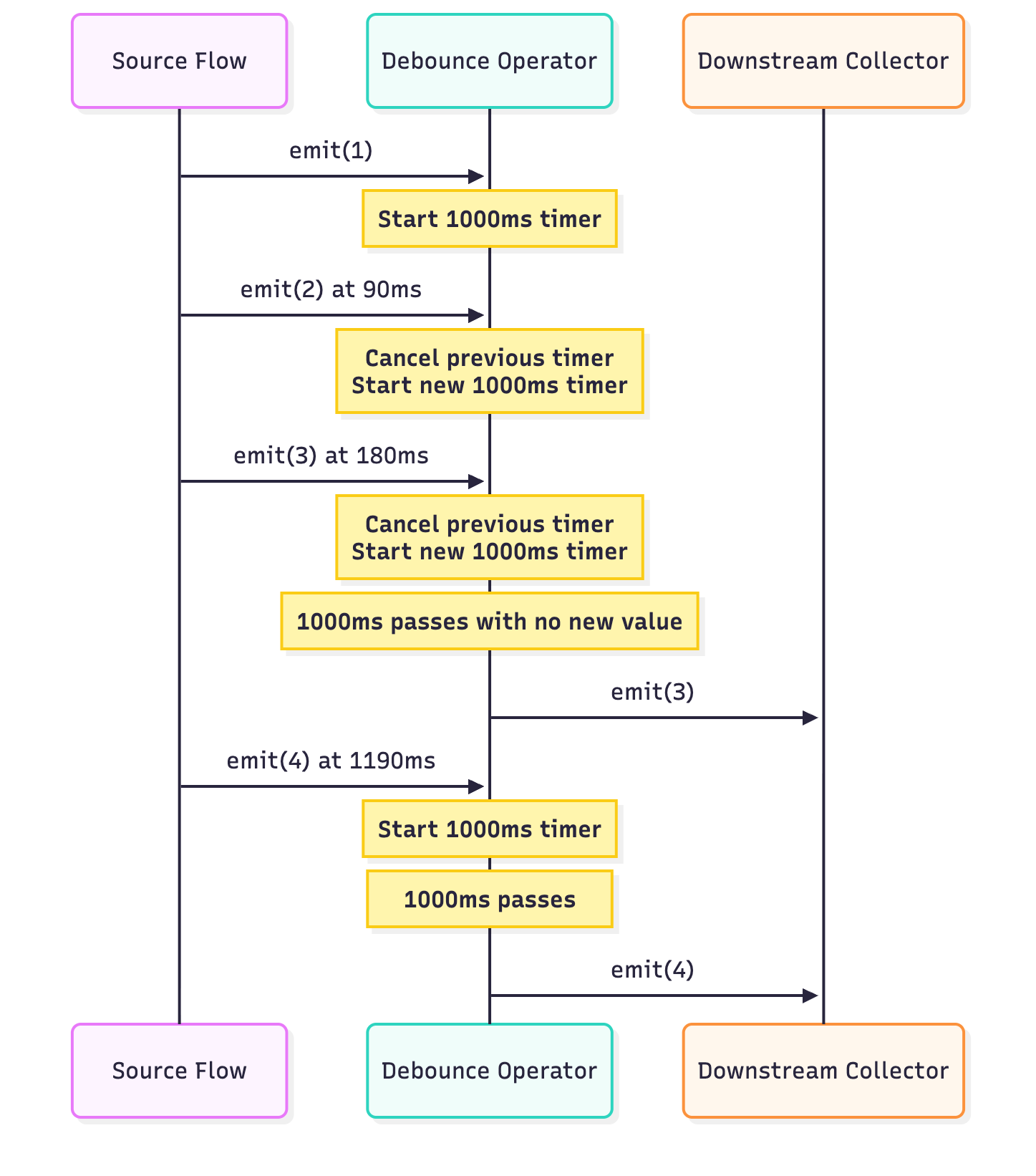
Real-World Example: Search Input
Consider a search box where users type queries. Without debouncing, every keystroke triggers an API call:
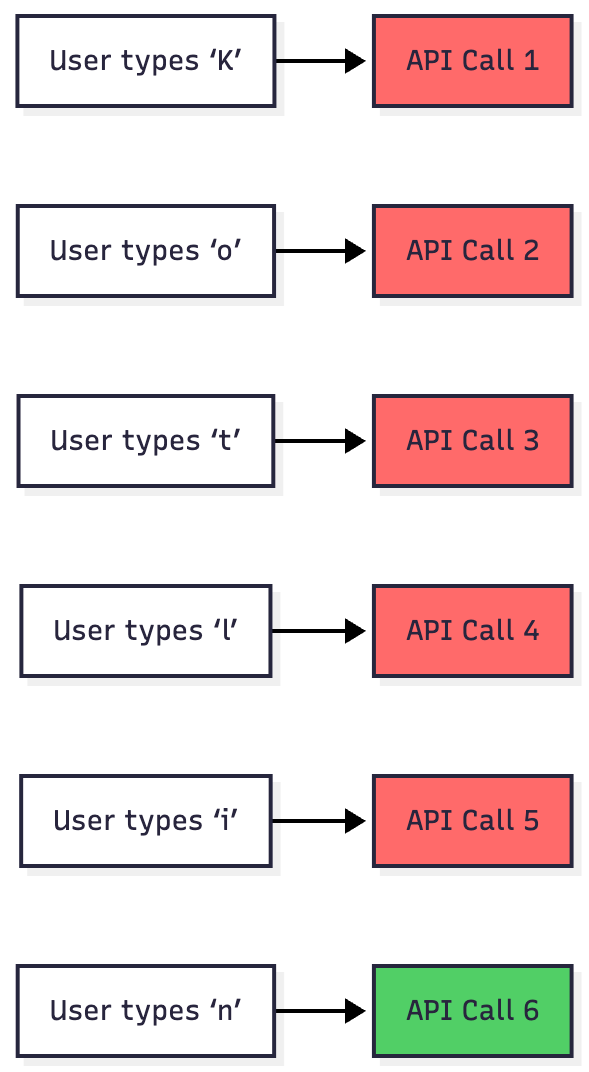
With debouncing, only the final search term triggers an API call after the user pauses typing.
Kotlin Flow Debounce API
Basic Debounce with Fixed Timeout
The simplest form accepts a timeout in milliseconds:
import kotlinx.coroutines.*
import kotlinx.coroutines.flow.*

fun main() = runBlocking {
    println(”Basic Debounce Example:”)
    flow {
        emit(1)
        delay(90)
        emit(2)
        delay(90)
        emit(3)
        delay(1010)  // Pause longer than debounce timeout
        emit(4)
        delay(1010)
        emit(5)
    }.debounce(1000)
        .collect { value ->
            println(”Collected: $value”)
        }
}
Expected Output:
Basic Debounce Example:
Collected: 3
Collected: 4
Collected: 5
Why this output?
Values 1 and 2 are superseded by value 3 before the timeout expires
Value 3 is emitted after 1000ms of no new values
Values 4 and 5 each have sufficient pauses after them
Duration-Based Debounce
For better readability and type safety, use Duration:
import kotlinx.coroutines.*
import kotlinx.coroutines.flow.*
import kotlin.time.Duration.Companion.milliseconds

fun main() = runBlocking {
    println(”Duration-Based Debounce:”)
    flow {
        emit(”typing...”)
        delay(50.milliseconds)
        emit(”still typing...”)
        delay(50.milliseconds)
        emit(”Kotlin”)
        delay(500.milliseconds)  // User paused
    }.debounce(300.milliseconds)
        .collect { value ->
            println(”Search query: $value”)
        }
}
Output:
Duration-Based Debounce:
Search query: Kotlin
Dynamic Debounce with Lambda
The most powerful variant allows you to specify timeout dynamically based on the emitted value:
import kotlinx.coroutines.*
import kotlinx.coroutines.flow.*
import kotlin.time.Duration.Companion.milliseconds

data class SearchQuery(val text: String, val priority: String)

fun main() = runBlocking {
    println(”Dynamic Debounce Example:”)
    flow {
        emit(SearchQuery(”K”, “low”))
        delay(50.milliseconds)
        emit(SearchQuery(”Ko”, “low”))
        delay(50.milliseconds)
        emit(SearchQuery(”URGENT: security”, “high”))
        delay(150.milliseconds)
        emit(SearchQuery(”Kotlin”, “low”))
        delay(600.milliseconds)
    }.debounce { query ->
        when (query.priority) {
            “high” -> 50.milliseconds  // Fast response for urgent queries
            else -> 300.milliseconds   // Normal debounce for regular queries
        }
    }.collect { query ->
        println(”Processing: ${query.text} [${query.priority}]”)
    }
}
Output:
Dynamic Debounce Example:
Processing: URGENT: security [high]
Processing: Kotlin [low]
Internal Implementation Deep Dive
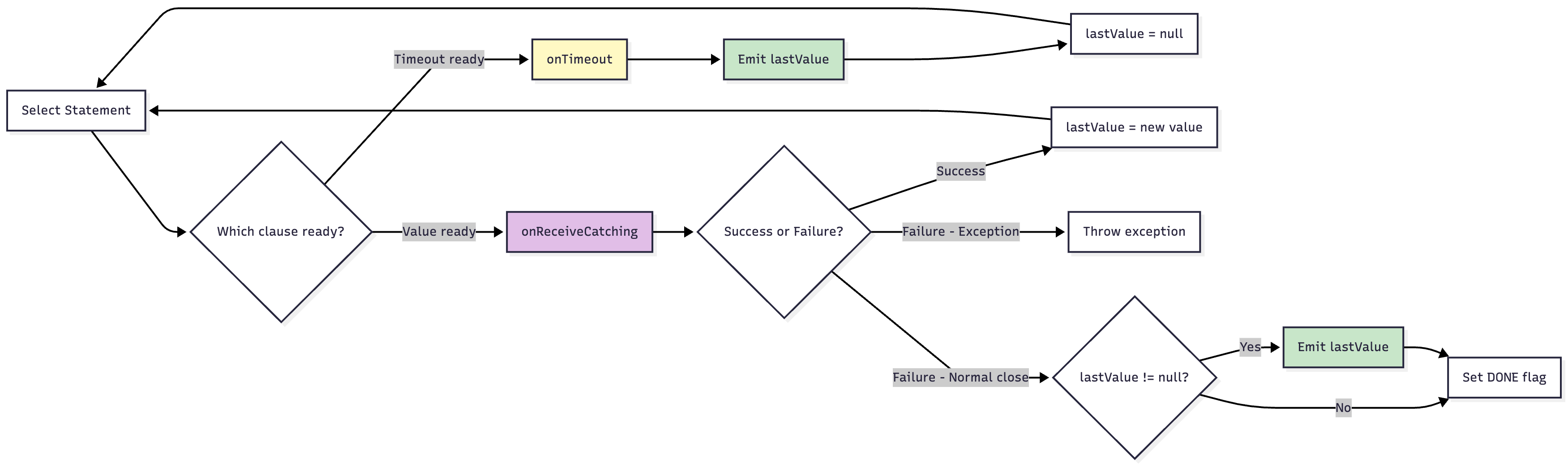
Architecture Overview
The debounce implementation uses several coroutine primitives:
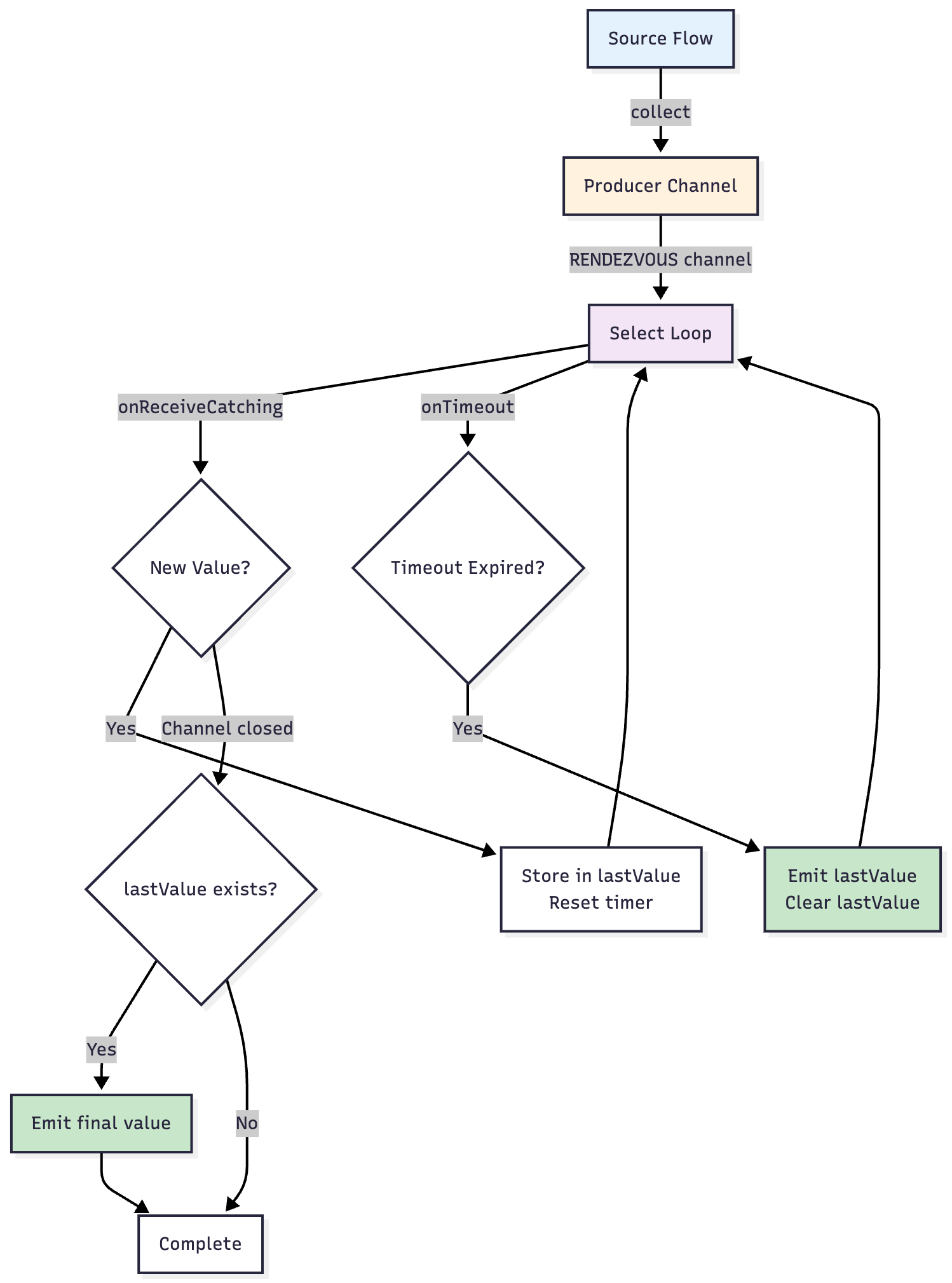
Key Components
Producer Channel: Collects all upstream values into a rendezvous channel
Select Expression: Multiplexes between receiving new values and timeout events
State Management: Tracks the last received value and its timeout
NULL Handling: Uses a sentinel value to handle nullable types
Step-by-Step Flow
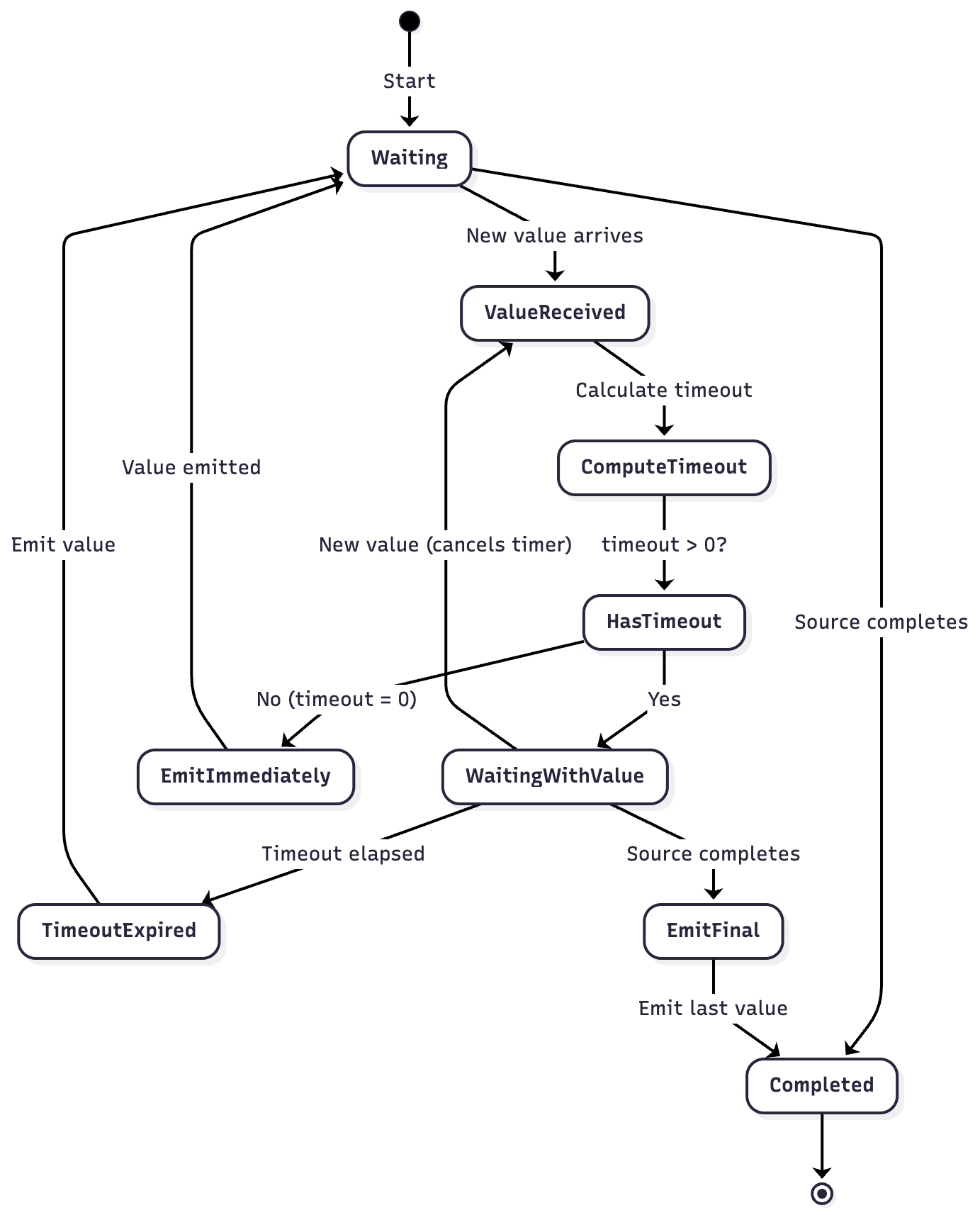
Data Flow Diagrams
Normal Operation Flow

Select Loop Mechanics
Practical Examples
Example 1: Search-as-You-Type
import kotlinx.coroutines.*
import kotlinx.coroutines.flow.*
import kotlin.time.Duration.Companion.milliseconds

class SearchBox {
    private val _searchQuery = MutableSharedFlow<String>()
    val searchResults = _searchQuery
        .debounce(300.milliseconds)
        .mapNotNull { query ->
            if (query.length >= 2) performSearch(query) else null
        }

    suspend fun onTextChanged(text: String) {
        _searchQuery.emit(text)
    }

    private suspend fun performSearch(query: String): List<String> {
        delay(100.milliseconds) // Simulate API call
        return listOf(”$query result 1”, “$query result 2”, “$query result 3”)
    }
}

fun main() = runBlocking {
    val searchBox = SearchBox()

    launch {
        searchBox.searchResults.collect { results ->
            println(”Search results: $results”)
        }
    }

    // Simulate user typing
    searchBox.onTextChanged(”K”)
    delay(50.milliseconds)
    searchBox.onTextChanged(”Ko”)
    delay(50.milliseconds)
    searchBox.onTextChanged(”Kot”)
    delay(50.milliseconds)
    searchBox.onTextChanged(”Kotlin”)
    delay(400.milliseconds) // Wait for debounce + search
}
Output:
Search results: [Kotlin result 1, Kotlin result 2, Kotlin result 3]
Example 2: Form Validation with Different Timeouts
import kotlinx.coroutines.*
import kotlinx.coroutines.flow.*
import kotlin.time.Duration.Companion.milliseconds

sealed class FormField {
    data class Email(val value: String) : FormField()
    data class Password(val value: String) : FormField()
    data class Username(val value: String) : FormField()
}

fun main() = runBlocking {
    println(”Form Validation Example:”)

    flow {
        emit(FormField.Email(”a”))
        delay(100.milliseconds)
        emit(FormField.Email(”ab”))
        delay(100.milliseconds)
        emit(FormField.Email(”abc@example.com”))
        delay(50.milliseconds)

        emit(FormField.Password(”pass”))
        delay(100.milliseconds)
        emit(FormField.Password(”password123”))
        delay(600.milliseconds)

        emit(FormField.Username(”user”))
        delay(700.milliseconds)
    }.debounce { field ->
        when (field) {
            is FormField.Email -> 500.milliseconds      // Email validation is expensive
            is FormField.Password -> 300.milliseconds   // Password strength check
            is FormField.Username -> 400.milliseconds   // Username availability check
        }
    }.collect { field ->
        when (field) {
            is FormField.Email -> println(”Validating email: ${field.value}”)
            is FormField.Password -> println(”Checking password strength: ${field.value}”)
            is FormField.Username -> println(”Checking username availability: ${field.value}”)
        }
    }
}
Output:
Form Validation Example:
Validating email: abc@example.com
Checking password strength: password123
Checking username availability: user
Example 3: Rate-Limiting API Calls
import kotlinx.coroutines.*
import kotlinx.coroutines.flow.*
import kotlin.time.Duration.Companion.milliseconds
import kotlin.time.Duration.Companion.seconds

data class SensorReading(val temperature: Double, val timestamp: Long)

fun main() = runBlocking {
    println(”Sensor Data Rate Limiting:”)

    // Simulate rapid sensor readings
    flow {
        repeat(20) { i ->
            val reading = SensorReading(
                temperature = 20.0 + (i % 5) * 0.5,
                timestamp = System.currentTimeMillis()
            )
            emit(reading)
            delay(50.milliseconds) // Sensor reads every 50ms
        }
    }
        .debounce(500.milliseconds) // Only send to server every 500ms of inactivity
        .collect { reading ->
            println(”Uploading to server: temp=${reading.temperature}°C”)
        }
}
Performance Considerations
Memory Usage

The debounce operator maintains constant space complexity regardless of emission rate:
One channel buffer (rendezvous = 0 capacity)
One reference to the latest value
One timer coroutine
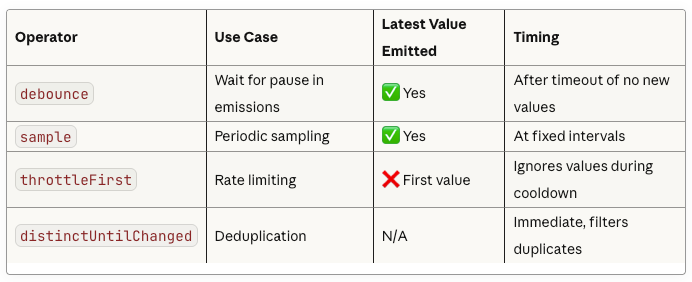
Comparison with Other Operators
Best Practices
1. Choose Appropriate Timeout Values
// Too short: May not filter enough
.debounce(50.milliseconds)  // ❌ User still typing

// Too long: Poor user experience
.debounce(2.seconds)  // ❌ Feels unresponsive

// Just right: Balances filtering and responsiveness
.debounce(300.milliseconds)  // ✅ Good for search
2. Handle Errors Gracefully
import kotlinx.coroutines.*
import kotlinx.coroutines.flow.*
import kotlin.time.Duration.Companion.milliseconds

fun main() = runBlocking {
    flow {
        emit(”valid”)
        delay(100.milliseconds)
        emit(”also valid”)
        delay(100.milliseconds)
        throw RuntimeException(”Network error”)
    }
        .debounce(300.milliseconds)
        .catch { e ->
            println(”Error caught: ${e.message}”)
            emit(”fallback value”)
        }
        .collect { value ->
            println(”Collected: $value”)
        }
}
3. Combine with Other Operators
import kotlinx.coroutines.*
import kotlinx.coroutines.flow.*
import kotlin.time.Duration.Companion.milliseconds

fun main() = runBlocking {
    println(”Combined Operators:”)

    flow {
        emit(”  kotlin  “)
        delay(100.milliseconds)
        emit(”  KOTLIN  “)
        delay(100.milliseconds)
        emit(”  kotlin  “)
        delay(100.milliseconds)
        emit(”  coroutines  “)
        delay(400.milliseconds)
    }
        .map { it.trim().lowercase() }
        .distinctUntilChanged()
        .debounce(300.milliseconds)
        .collect { value ->
            println(”Final: ‘$value’”)
        }
}
Output:
Combined Operators:
Final: ‘kotlin’
Final: ‘coroutines’
Common Pitfalls
Pitfall 1: Expecting Immediate Emission
// ❌ Wrong expectation
flow {
    emit(1)
    // Expecting immediate emission
}.debounce(1000.milliseconds)
// Value 1 emitted only after 1000ms of no new values
Pitfall 2: Zero Timeout Edge Case
// With timeout = 0, debounce becomes pass-through
flow {
    emit(1)
    emit(2)
    emit(3)
}.debounce(0.milliseconds)
// All values emitted immediately: 1, 2, 3
Pitfall 3: Confusing with Sample
// debounce: Waits for pause
// sample: Periodic sampling regardless of pauses
Conclusion
The debounce operator in Kotlin Coroutines Flow is a powerful tool for rate-limiting and filtering rapid emissions. Its implementation using channels, select expressions, and coroutines showcases the elegance of Kotlin’s structured concurrency model.
Key takeaways:
Debounce filters values followed by newer values within a timeout
The latest value is always emitted after the timeout
Dynamic timeouts allow fine-grained control per value
Internal implementation uses producer channels and select for efficient multiplexing
Constant space complexity makes it suitable for high-throughput scenarios
Understanding debounce deeply enables you to build responsive, efficient reactive applications that handle user input and data streams intelligently.
The dynamic debounce example with priority levels is really clever. I hadn't thought about adjusting timeouts based on the value itself, but that makes so much sense for urgent queries. It would definitly improve UX in scenerios where certain inputs need faster feedback than others. Also appreciate how you broke down the select expression mechanics, that part is usually tough to visualize.