
Complete Guide to Side Effects in Jetpack Compose

Introduction
In Jetpack Compose, side effects are operations that escape the scope of a composable function and affect the state of the app outside of the composition. Understanding side effects is crucial for building robust Compose applications that properly manage state, lifecycles, and external interactions.
What Are Side Effects?
A side effect in Compose is any operation that:
Modifies state outside the composable function
Interacts with external systems (databases, networks, etc.)
Launches coroutines
Subscribes to external data streams
Performs operations tied to the composable’s lifecycle
Compose provides several effect handlers to manage these scenarios safely and predictably.
Why Do We Need Side Effect Handlers?
Composable functions can be called multiple times during recomposition. Without proper side effect management:
Operations might execute repeatedly and unexpectedly
Resources might leak (unclosed connections, subscriptions)
Lifecycle-aware operations might not clean up properly
Performance could degrade significantly
Effect handlers ensure side effects run at the right time and clean up appropriately.
1. LaunchedEffect
Overview
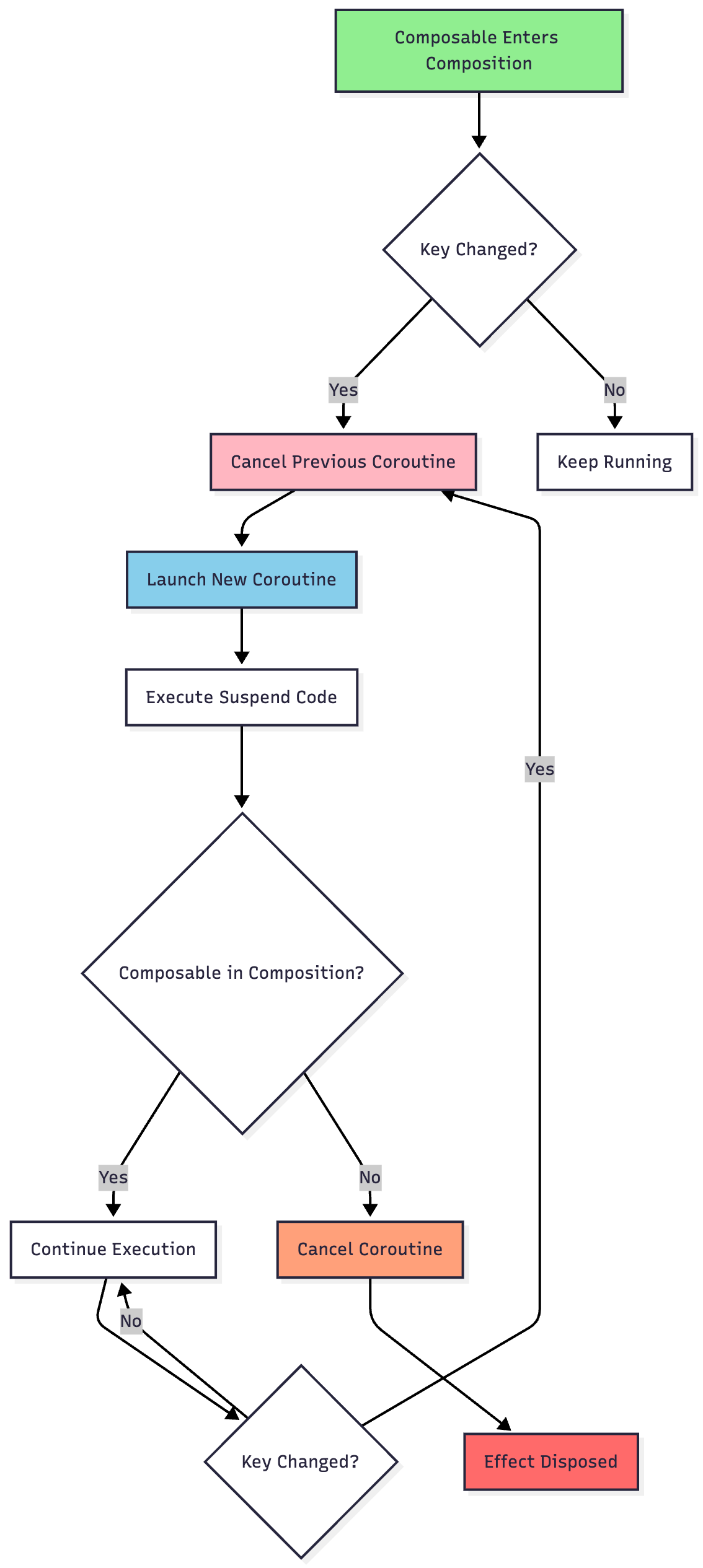
LaunchedEffect launches a coroutine that lives as long as the composable is in the composition. When the composable leaves the composition, the coroutine is cancelled.
Use Cases
Making network calls
Collecting flows
Performing animations
Any asynchronous operation tied to composable lifecycle
Syntax
LaunchedEffect(key) {
    // Coroutine code here
}
Key Behavior
The effect restarts when any key changes. If the composable leaves composition, the coroutine is cancelled.
Example
@Composable
fun UserProfile(userId: String) {
    var user by remember { mutableStateOf<User?>(null) }

    LaunchedEffect(userId) {
        user = userRepository.fetchUser(userId)
    }

    user?.let { UserCard(it) }
}
Multiple Keys
LaunchedEffect(userId, refreshTrigger) {
    // Relaunches when either userId OR refreshTrigger changes
    user = userRepository.fetchUser(userId)
}
2. rememberCoroutineScope
Overview
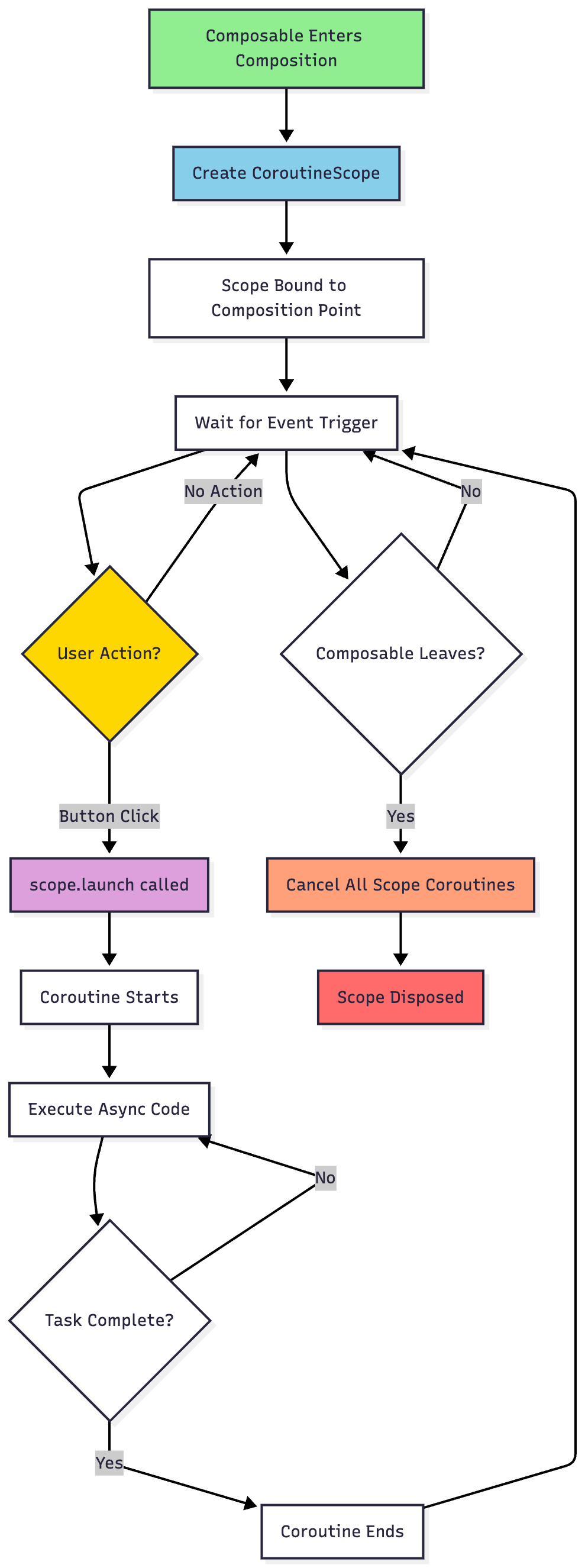
rememberCoroutineScope returns a coroutine scope bound to the composition point. Unlike LaunchedEffect, it doesn’t launch a coroutine immediately—you control when to launch.
Use Cases
Event handlers (button clicks)
User-triggered actions
Operations that should run on-demand, not automatically
Syntax
val scope = rememberCoroutineScope()
Example
@Composable
fun RefreshButton(onRefresh: suspend () -> Unit) {
    val scope = rememberCoroutineScope()

    Button(onClick = {
        scope.launch {
            onRefresh()
        }
    }) {
        Text(”Refresh”)
    }
}
Key Difference from LaunchedEffect
LaunchedEffect: Automatic execution when composed/keys changerememberCoroutineScope: Manual execution via event handlers
3. DisposableEffect
Overview
DisposableEffect is used when you need to clean up resources when the effect leaves the composition or when keys change.
Use Cases
Registering/unregistering listeners
Starting/stopping services
Adding/removing callbacks
Any operation requiring cleanup
Syntax
DisposableEffect(key) {
    // Setup code

    onDispose {
        // Cleanup code
    }
}
Example
@Composable
fun LocationTracker() {
    val context = LocalContext.current
    var location by remember { mutableStateOf<Location?>(null) }

    DisposableEffect(Unit) {
        val locationManager = context.getSystemService(Context.LOCATION_SERVICE) as LocationManager
        val listener = LocationListener { loc ->
            location = loc
        }

        locationManager.requestLocationUpdates(
            LocationManager.GPS_PROVIDER,
            1000L,
            10f,
            listener
        )

        onDispose {
            locationManager.removeUpdates(listener)
        }
    }

    Text(”Location: ${location?.latitude}, ${location?.longitude}”)
}

4. SideEffect
Overview
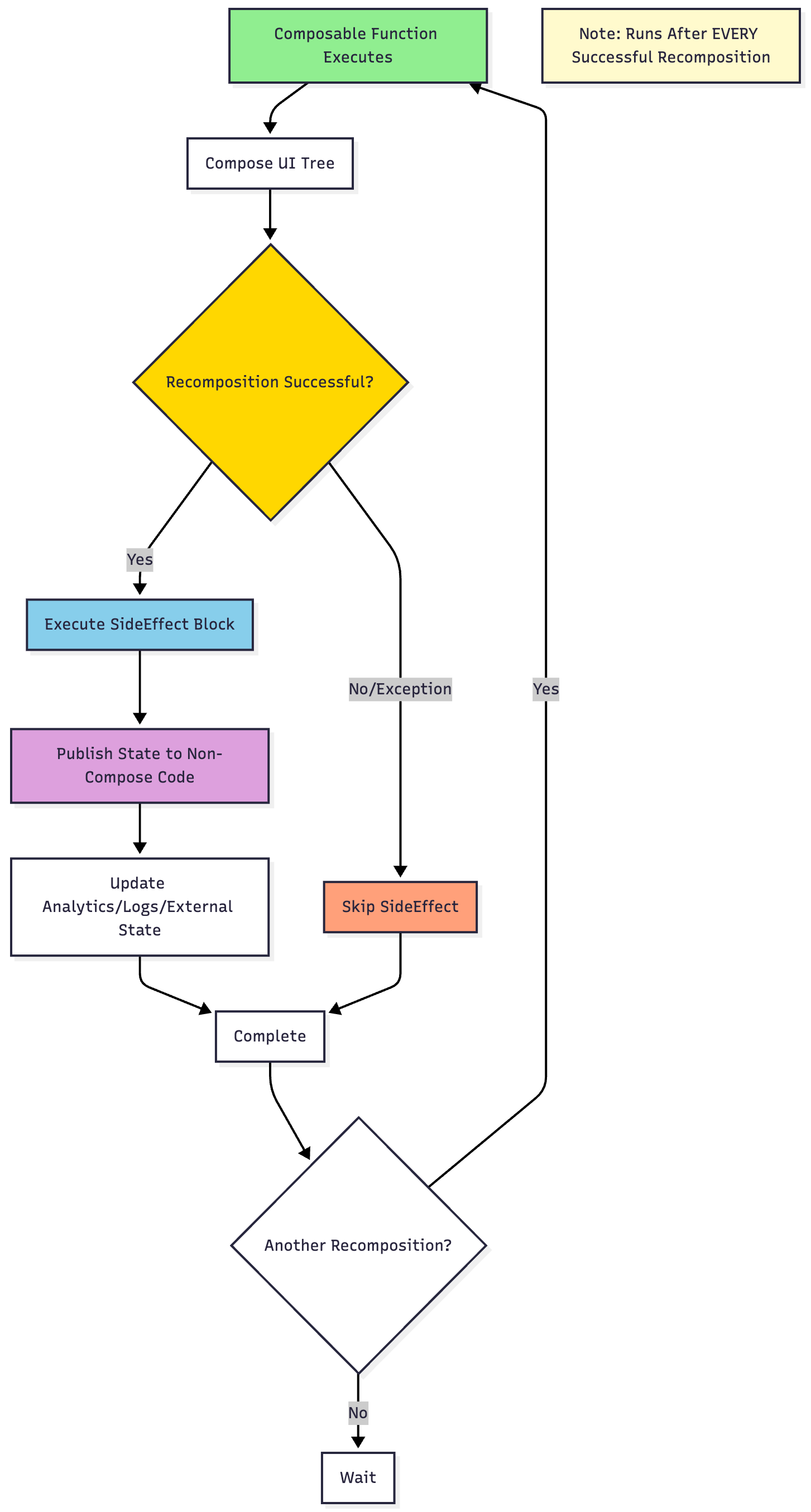
SideEffect publishes Compose state to non-Compose code. It runs after every successful recomposition.
Use Cases
Logging/analytics
Updating non-Compose objects with Compose state
Synchronizing with external state holders
Key Characteristic
NO cleanup mechanism—runs after every successful composition.
Syntax
SideEffect {
    // Code that runs after every recomposition
}
Example
@Composable
fun AnalyticsScreen(screenName: String) {
    SideEffect {
        analytics.logScreenView(screenName)
    }

    // Screen content
}
Warning
Use sparingly! Runs on every recomposition. For most cases, use other effect handlers.
5. produceState
Overview
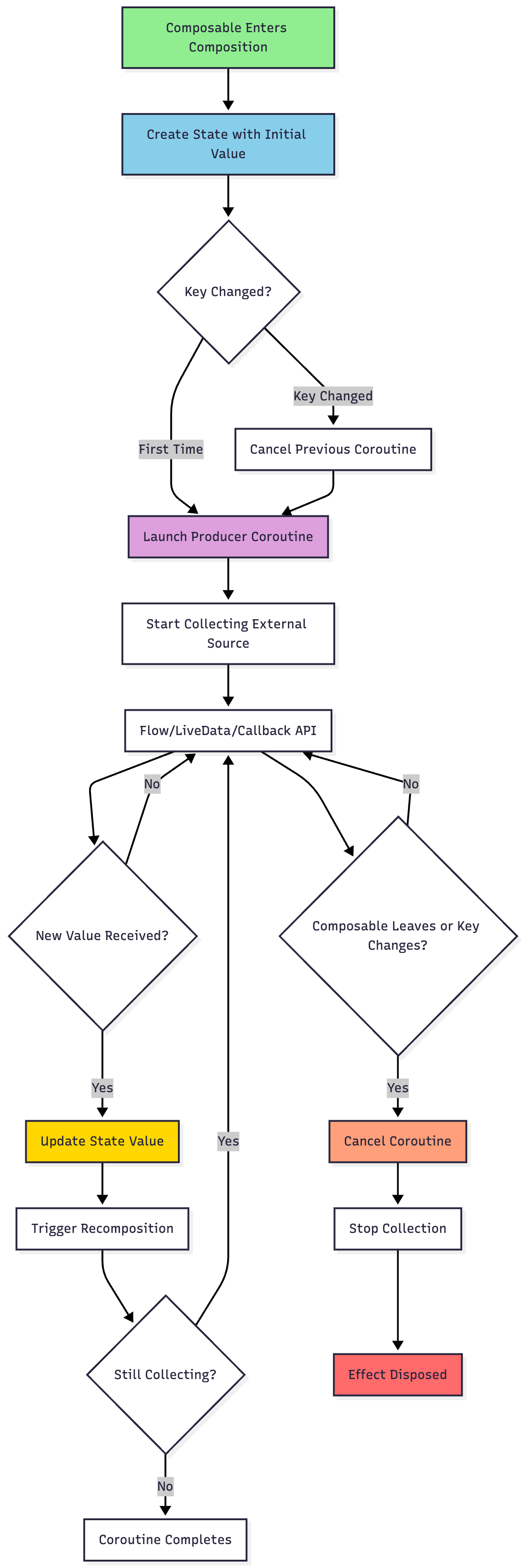
produceState converts non-Compose state into Compose state. It launches a coroutine and returns a State<T> that can be observed.
Use Cases
Converting Flow to State
Converting LiveData to State
Converting callback-based APIs to State
Syntax
val state = produceState(initialValue, keys...) {
    // Coroutine that updates value
    value = newValue
}
Example
@Composable
fun NewsScreen(newsRepository: NewsRepository) {
    val news by produceState<List<Article>>(initialValue = emptyList()) {
        newsRepository.getNewsFlow().collect { articles ->
            value = articles
        }
    }

    NewsList(news)
}
Flow Collection Example
@Composable
fun <T> Flow<T>.collectAsState(initial: T): State<T> {
    return produceState(initial, this) {
        collect { value = it }
    }
}
6. derivedStateOf
Overview
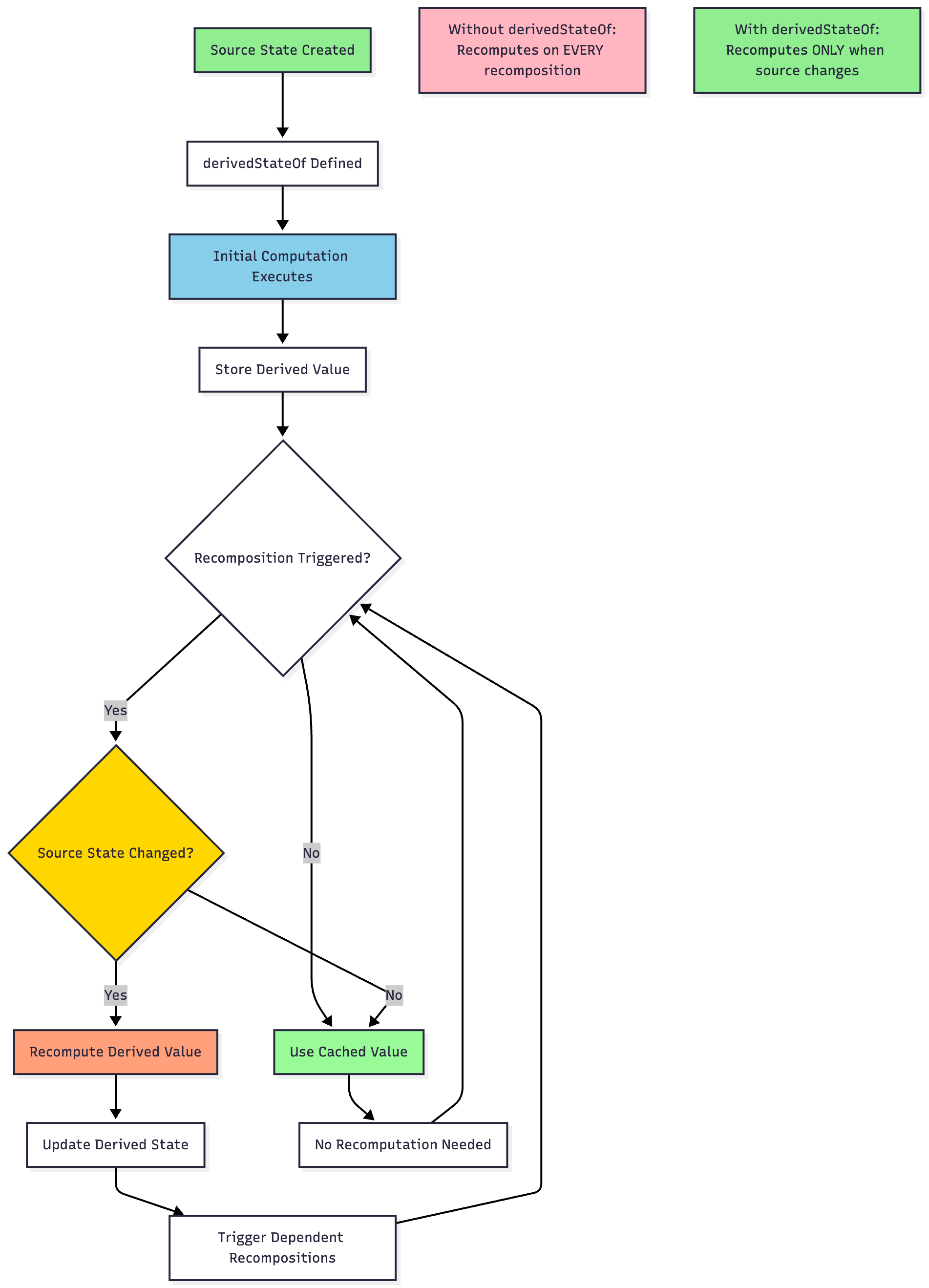
derivedStateOf creates a state object whose value is derived from other state objects. It recomputes only when source states change.
Use Cases
Computing expensive derived values
Filtering/transforming state
Preventing unnecessary recompositions
Syntax
val derivedValue by remember { derivedStateOf { computation } }
Example
@Composable
fun TodoList(todos: List<Todo>) {
    val completedCount by remember {
        derivedStateOf {
            todos.count { it.isCompleted }
        }
    }

    Text(”Completed: $completedCount / ${todos.size}”)

    // List content...
}
Performance Benefit
Without derivedStateOf, the computation would run on every recomposition. With it, computation only happens when todos changes.
7. snapshotFlow
Overview
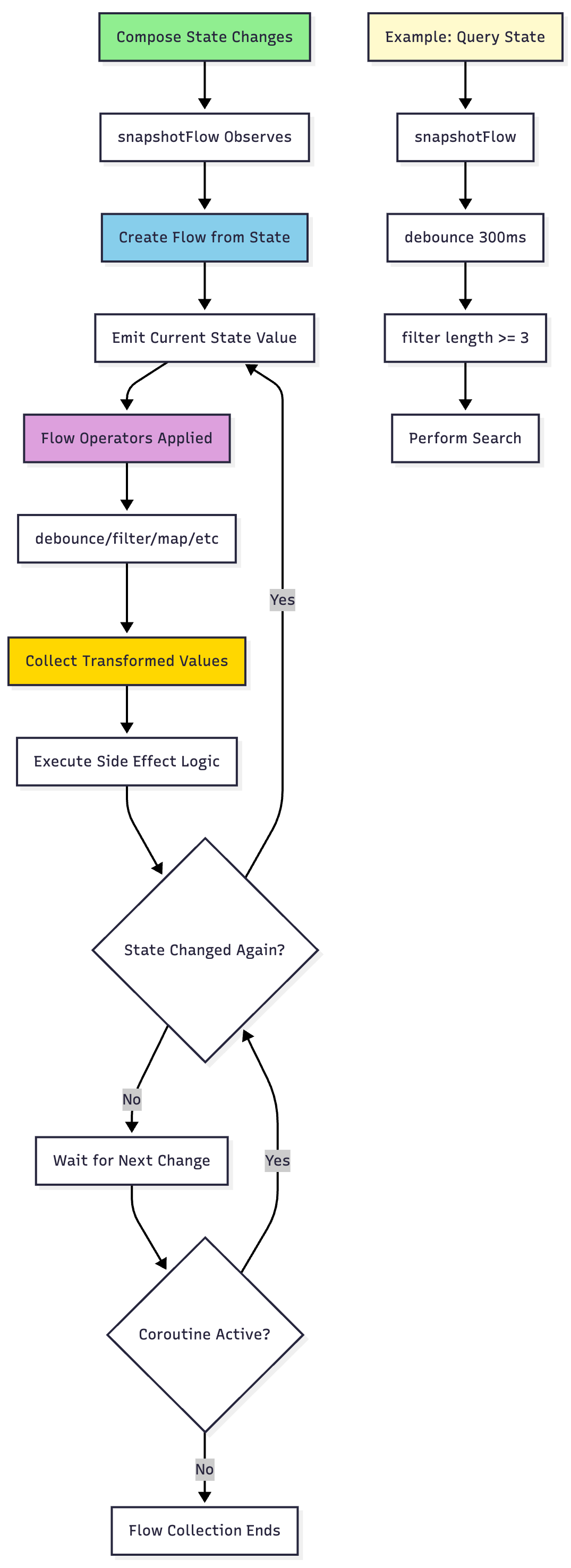
snapshotFlow converts Compose state into a Flow. It creates a Flow that emits whenever the observed state changes.
Use Cases
Reacting to state changes with Flow operators
Debouncing state changes
Combining multiple states
Syntax
val flow = snapshotFlow { stateValue }
Example
@Composable
fun SearchBox() {
    var query by remember { mutableStateOf(”“) }

    LaunchedEffect(Unit) {
        snapshotFlow { query }
            .debounce(300)
            .filter { it.length >= 3 }
            .collect { searchQuery ->
                performSearch(searchQuery)
            }
    }

    TextField(
        value = query,
        onValueChange = { query = it }
    )
}
8. rememberUpdatedState
Overview
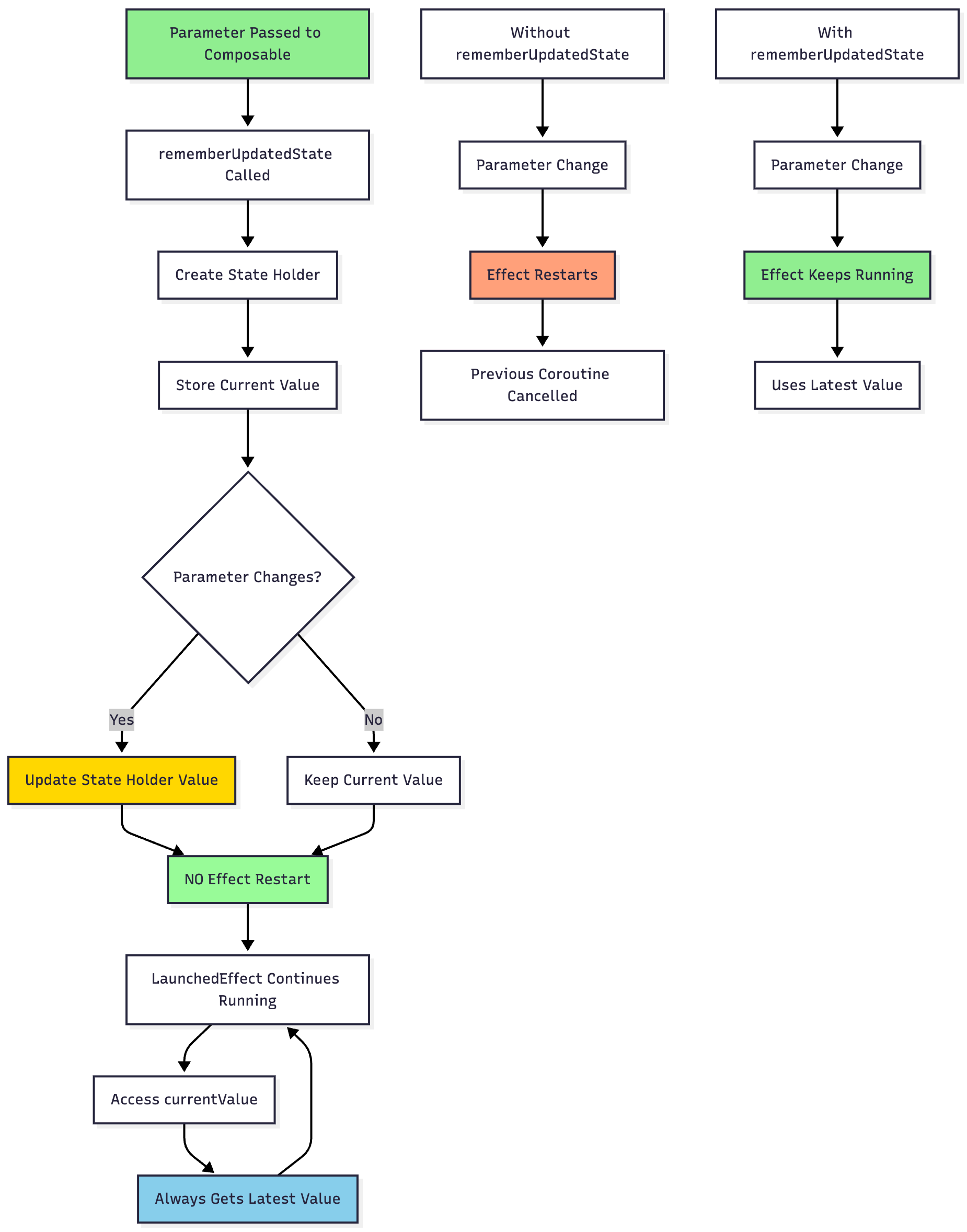
rememberUpdatedState creates a state that always holds the latest value but doesn’t cause the effect to restart when the value changes.
Use Cases
Capturing latest values in long-running effects
Event handlers that need current values
Preventing effect restart on parameter changes
Syntax
val currentValue by rememberUpdatedState(value)
Example
@Composable
fun Timer(onTimeout: () -> Unit) {
    val currentOnTimeout by rememberUpdatedState(onTimeout)

    LaunchedEffect(Unit) { // Only launches once
        delay(5000)
        currentOnTimeout() // Calls the latest version
    }
}
Why It Matters
// WITHOUT rememberUpdatedState
LaunchedEffect(onTimeout) { // Restarts every time onTimeout changes
    delay(5000)
    onTimeout()
}

// WITH rememberUpdatedState
LaunchedEffect(Unit) { // Only launches once
    delay(5000)
    currentOnTimeout() // Always latest version
}
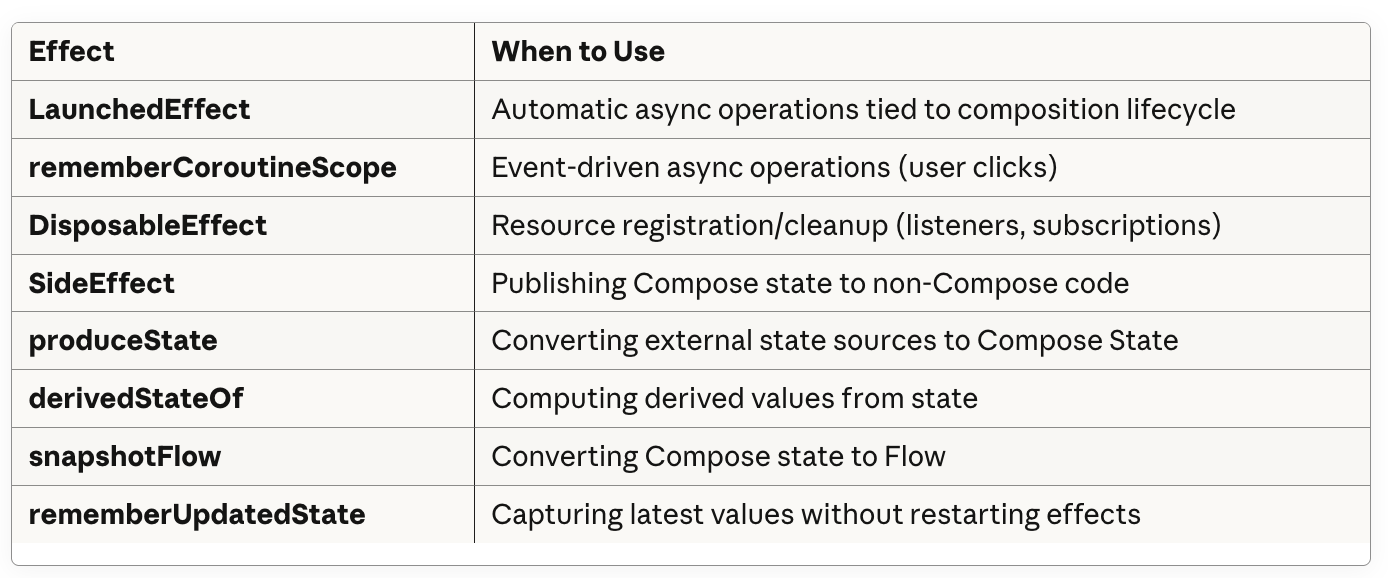
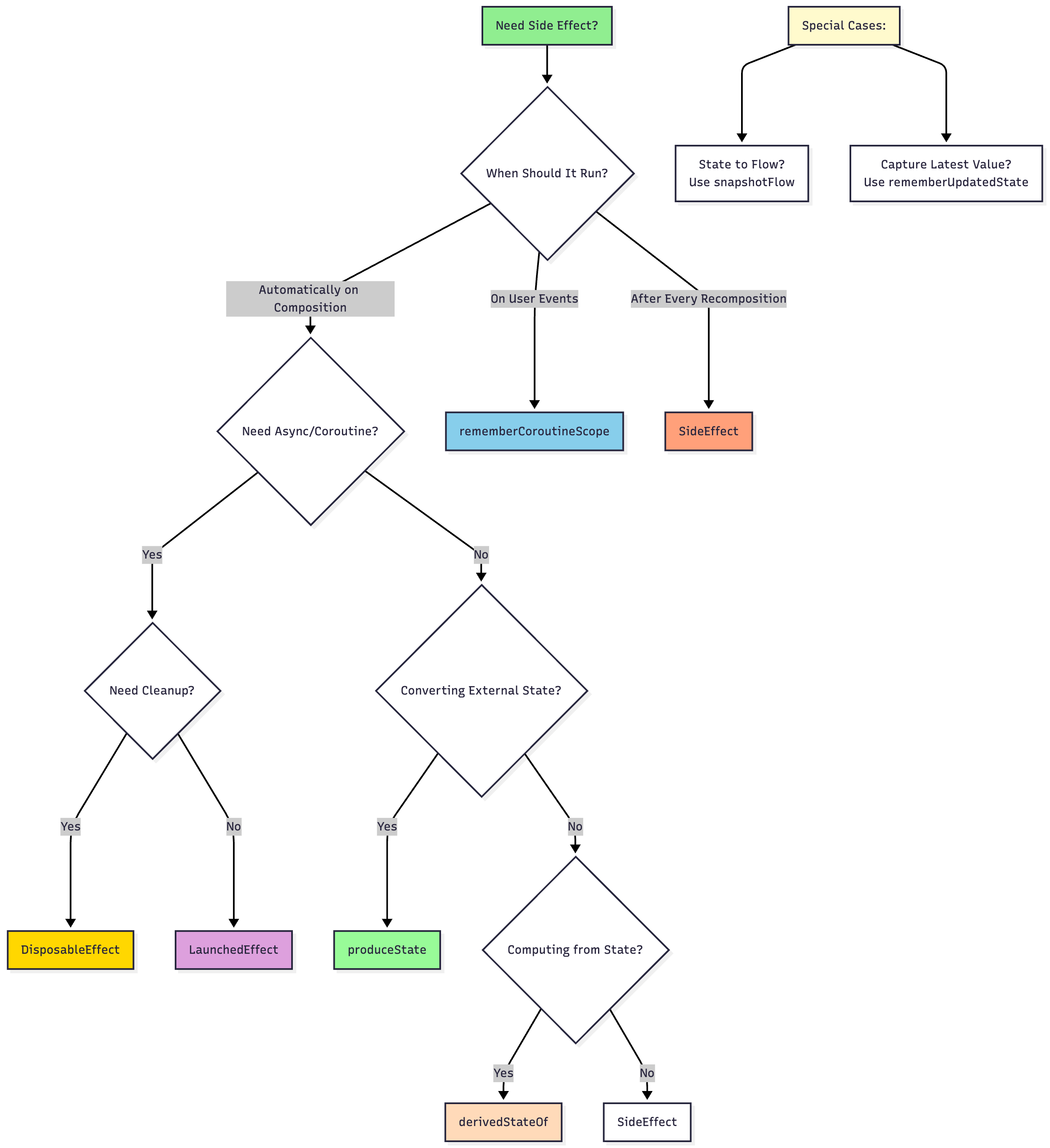
Choosing the Right Effect
Best Practices
1. Choose Keys Carefully
// ✅ Good - restarts when userId changes
LaunchedEffect(userId) { fetchUser(userId) }

// ❌ Bad - never restarts
LaunchedEffect(Unit) { fetchUser(userId) }

// ❌ Bad - restarts on every recomposition
LaunchedEffect(true) { fetchUser(userId) }
2. Always Clean Up
// ✅ Good - cleanup provided
DisposableEffect(Unit) {
    val listener = createListener()
    registerListener(listener)
    onDispose { unregisterListener(listener) }
}

// ❌ Bad - no cleanup, listener leaks
LaunchedEffect(Unit) {
    val listener = createListener()
    registerListener(listener)
}
3. Avoid Capturing Stale Values
// ✅ Good - uses rememberUpdatedState
val currentCallback by rememberUpdatedState(callback)
LaunchedEffect(Unit) {
    delay(1000)
    currentCallback()
}

// ❌ Bad - might use old callback
LaunchedEffect(Unit) {
    delay(1000)
    callback() // Stale closure
}
4. Use produceState for State Conversion
// ✅ Good - clean state conversion
val news by produceState(emptyList()) {
    newsFlow.collect { value = it }
}

// ❌ Verbose - manual state management
var news by remember { mutableStateOf(emptyList()) }
LaunchedEffect(Unit) {
    newsFlow.collect { news = it }
}
5. Optimize with derivedStateOf
// ✅ Good - only recomputes when items change
val total by remember { derivedStateOf { items.sumOf { it.price } } }

// ❌ Bad - recomputes on every recomposition
val total = items.sumOf { it.price }
Common Pitfalls
1. Infinite Recomposition Loop
// ❌ WRONG - creates infinite loop
@Composable
fun Counter() {
    var count by remember { mutableStateOf(0) }
    count++ // Triggers recomposition, which increments again, etc.
    Text(”Count: $count”)
}

// ✅ CORRECT - side effect in LaunchedEffect
@Composable
fun Counter() {
    var count by remember { mutableStateOf(0) }
    LaunchedEffect(Unit) {
        while(true) {
            delay(1000)
            count++
        }
    }
    Text(”Count: $count”)
}
2. Missing onDispose
// ❌ WRONG - listener never removed
@Composable
fun ListenerExample() {
    LaunchedEffect(Unit) {
        addListener(myListener)
    }
}

// ✅ CORRECT - listener properly cleaned up
@Composable
fun ListenerExample() {
    DisposableEffect(Unit) {
        addListener(myListener)
        onDispose { removeListener(myListener) }
    }
}
3. Wrong Effect Type for User Events
// ❌ WRONG - LaunchedEffect for click handlers is awkward
@Composable
fun SubmitButton() {
    var shouldSubmit by remember { mutableStateOf(false) }

    LaunchedEffect(shouldSubmit) {
        if (shouldSubmit) {
            submitData()
            shouldSubmit = false
        }
    }

    Button(onClick = { shouldSubmit = true }) { Text(”Submit”) }
}

// ✅ CORRECT - rememberCoroutineScope for user events
@Composable
fun SubmitButton() {
    val scope = rememberCoroutineScope()

    Button(onClick = {
        scope.launch { submitData() }
    }) {
        Text(”Submit”)
    }
}
Advanced Patterns
Combining Multiple Effects
@Composable
fun AdvancedScreen(userId: String, onEvent: (Event) -> Unit) {
    var data by remember { mutableStateOf<Data?>(null) }
    var isLoading by remember { mutableStateOf(false) }
    val scope = rememberCoroutineScope()
    val currentOnEvent by rememberUpdatedState(onEvent)

    // Automatic data loading
    LaunchedEffect(userId) {
        isLoading = true
        try {
            data = repository.fetchData(userId)
            currentOnEvent(Event.DataLoaded)
        } finally {
            isLoading = false
        }
    }

    // Resource cleanup
    DisposableEffect(userId) {
        val subscription = subscribeToUpdates(userId) { newData ->
            data = newData
        }
        onDispose { subscription.cancel() }
    }

    // Analytics
    SideEffect {
        analytics.trackScreenView(”advanced_screen”, userId)
    }

    // UI with manual refresh
    Column {
        if (isLoading) CircularProgressIndicator()
        data?.let { DataView(it) }
        Button(onClick = {
            scope.launch {
                isLoading = true
                data = repository.fetchData(userId)
                isLoading = false
            }
        }) {
            Text(”Refresh”)
        }
    }
}
Conclusion
Side effects are essential for building real-world Compose applications. Understanding when and how to use each effect handler is crucial for:
Preventing memory leaks
Ensuring proper cleanup
Optimizing performance
Managing lifecycles correctly
Creating maintainable code
Master these effect handlers, and you’ll write cleaner, more efficient Compose applications. Start with LaunchedEffect and rememberCoroutineScope for most scenarios, then expand to specialized handlers as needed.
Remember: every side effect should have a clear purpose and proper cleanup strategy. When in doubt, think about the lifecycle of your operation and choose the effect handler that best matches that lifecycle.