
Complete Guide to Kotlin Coroutine Dispatchers


Introduction
Coroutine dispatchers are fundamental components in Kotlin’s coroutines framework that determine which thread or threads a coroutine uses for its execution. Understanding dispatchers is crucial for writing efficient, responsive, and well-structured concurrent code.
What is a CoroutineDispatcher?
A CoroutineDispatcher is a service that determines which thread or threads a coroutine runs on. It’s part of the coroutine context and controls coroutine execution by dispatching coroutines to appropriate threads from a thread pool.
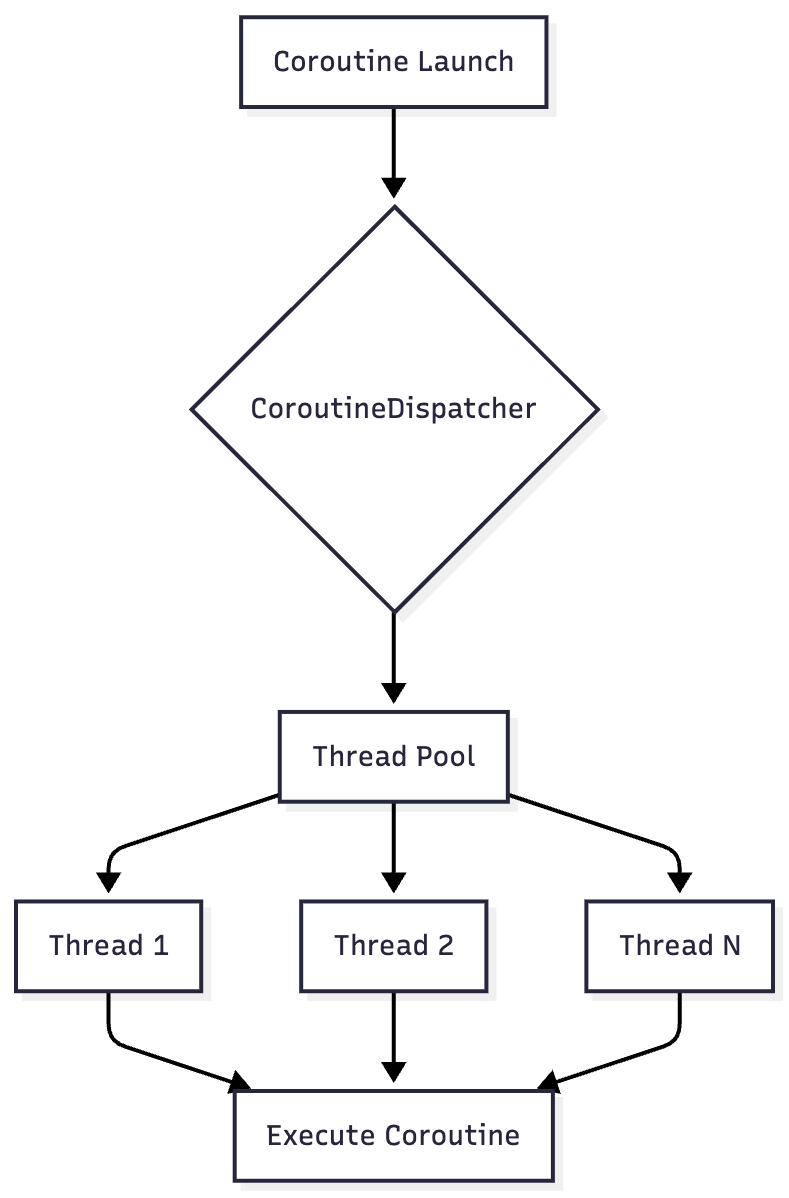
The Four Main Dispatchers
Kotlin provides four built-in dispatchers through the Dispatchers object, each optimized for different use cases.
1. Dispatchers.Default
Purpose: CPU-intensive computations
The Default dispatcher is backed by a shared pool of threads whose size equals the number of CPU cores (with a minimum of 2). It’s optimized for CPU-bound work that doesn’t block threads.
Use Cases:
Complex calculations
Data processing
Sorting large collections
Image manipulation
JSON parsing
Example:
launch(Dispatchers.Default) {
    val result = performHeavyComputation()
    println(”Computation complete: $result”)
}

Thread Pool Size: Defaults to the number of CPU cores, configurable via system property kotlinx.coroutines.default.parallelism.
2. Dispatchers.IO
Purpose: I/O operations and blocking tasks
The IO dispatcher is designed for offloading blocking I/O operations to a shared pool of threads. It has elastic scaling capabilities and can create additional threads on demand.
Use Cases:
Network requests
Database operations
File I/O
Blocking API calls
Reading/writing to disk
Example:
withContext(Dispatchers.IO) {
    val data = database.query()
    val file = File(”output.txt”).readText()
}
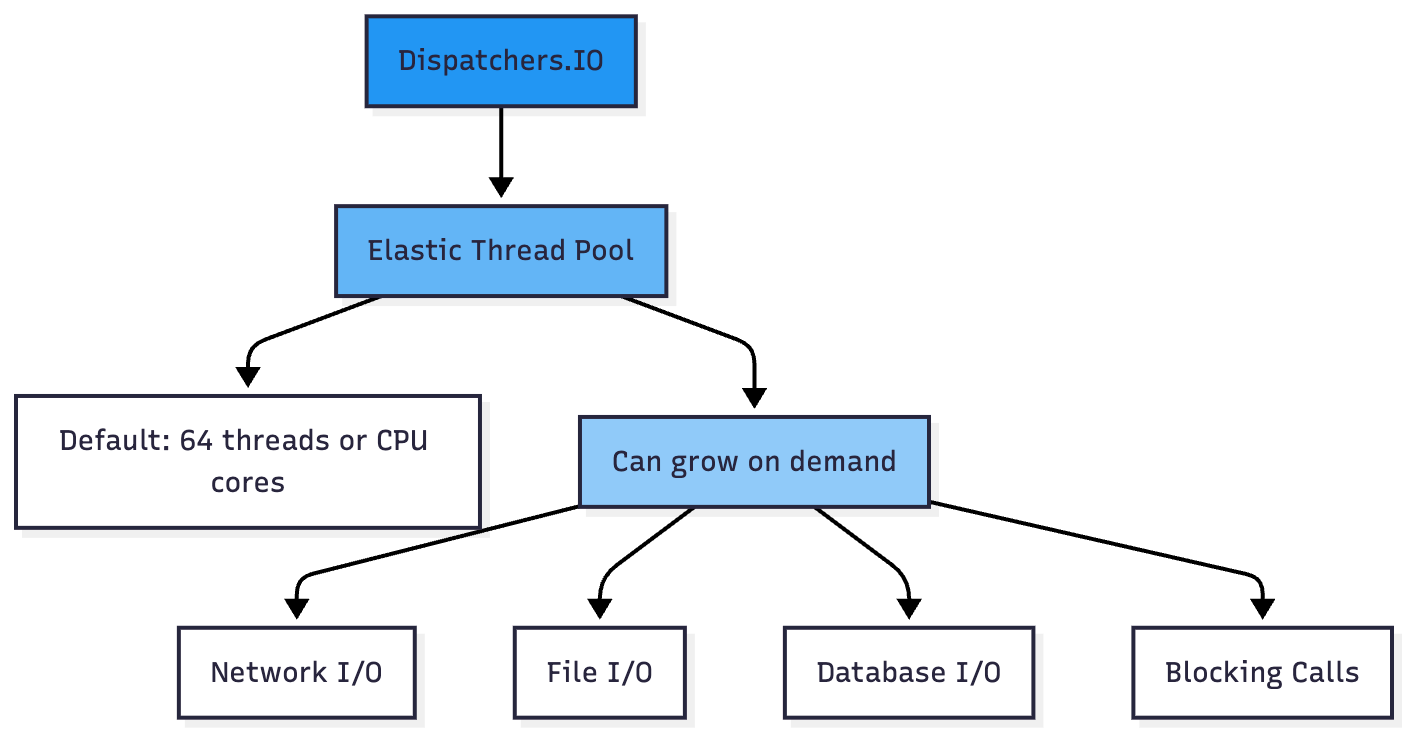
Key Features:
Default parallelism: 64 threads or number of CPU cores (whichever is larger)
Configurable via
kotlinx.coroutines.io.parallelismsystem propertyShares threads with Dispatchers.Default
Elastic: can exceed default parallelism when using
limitedParallelism()
3. Dispatchers.Main
Purpose: UI operations (Android, JavaFX, Swing)
The Main dispatcher is confined to the main/UI thread. It’s primarily used in UI applications where updates must occur on the main thread.
Use Cases:
Updating UI components
Handling user interactions
Animation updates
View modifications
Example (Android):
launch(Dispatchers.Main) {
    val data = withContext(Dispatchers.IO) {
        fetchDataFromNetwork()
    }
    textView.text = data // Update UI on Main thread
}

Platform-Specific:
Android: Uses the UI thread looper
JavaFX: Uses JavaFX Application thread
Swing: Uses Swing EDT (Event Dispatch Thread)
4. Dispatchers.Unconfined
Purpose: Special dispatcher that doesn’t confine coroutine execution
The Unconfined dispatcher starts coroutine execution in the caller thread, but only until the first suspension point. After suspension, it resumes in whatever thread the suspending function resumed in.
Use Cases:
Advanced scenarios requiring specific threading behavior
Performance-critical code where thread switching overhead matters
Testing scenarios
Example:
launch(Dispatchers.Unconfined) {
    println(”Thread 1: ${Thread.currentThread().name}”)
    delay(100)
    println(”Thread 2: ${Thread.currentThread().name}”) // Likely different!
}

Warning: Not recommended for general use. Can lead to unpredictable threading behavior and stack overflow in certain cases.
Thread Sharing Between Dispatchers
One of the key implementation details is that Dispatchers.Default and Dispatchers.IO share threads for efficiency.
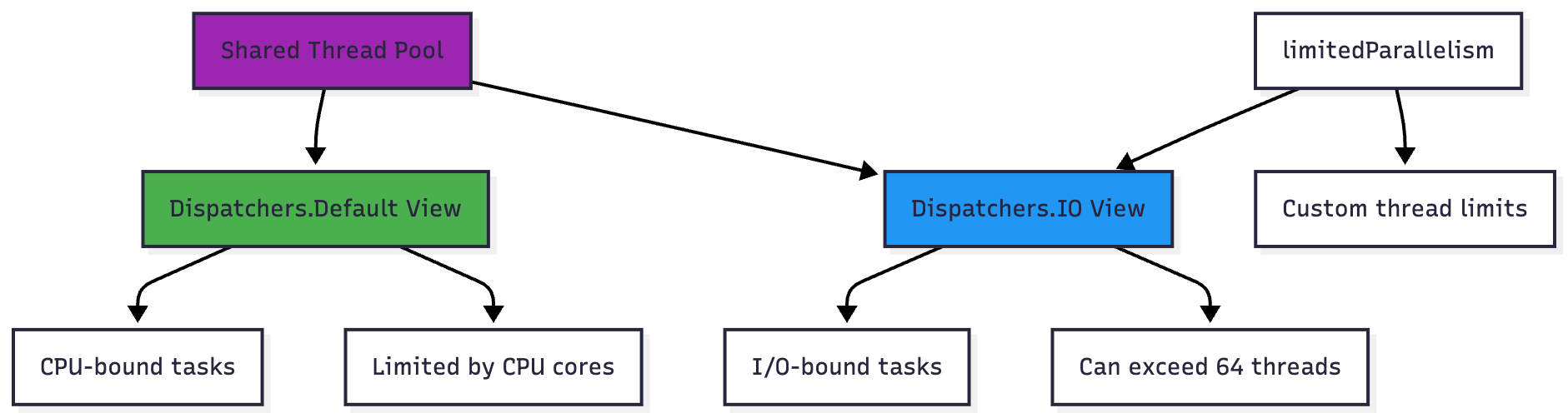
This means switching from Default to IO context often doesn’t result in actual thread switching, which is an optimization for performance.
Advanced: limitedParallelism()
The limitedParallelism() extension function creates a view of a dispatcher with limited parallelism, useful for resource-constrained operations.
// Create a dispatcher limited to 100 threads for MySQL
val mysqlDispatcher = Dispatchers.IO.limitedParallelism(100)

// Create a dispatcher limited to 60 threads for MongoDB
val mongoDbDispatcher = Dispatchers.IO.limitedParallelism(60)

// These share resources with Dispatchers.IO but have their own limits
launch(mysqlDispatcher) {
    // MySQL operations with up to 100 concurrent threads
}
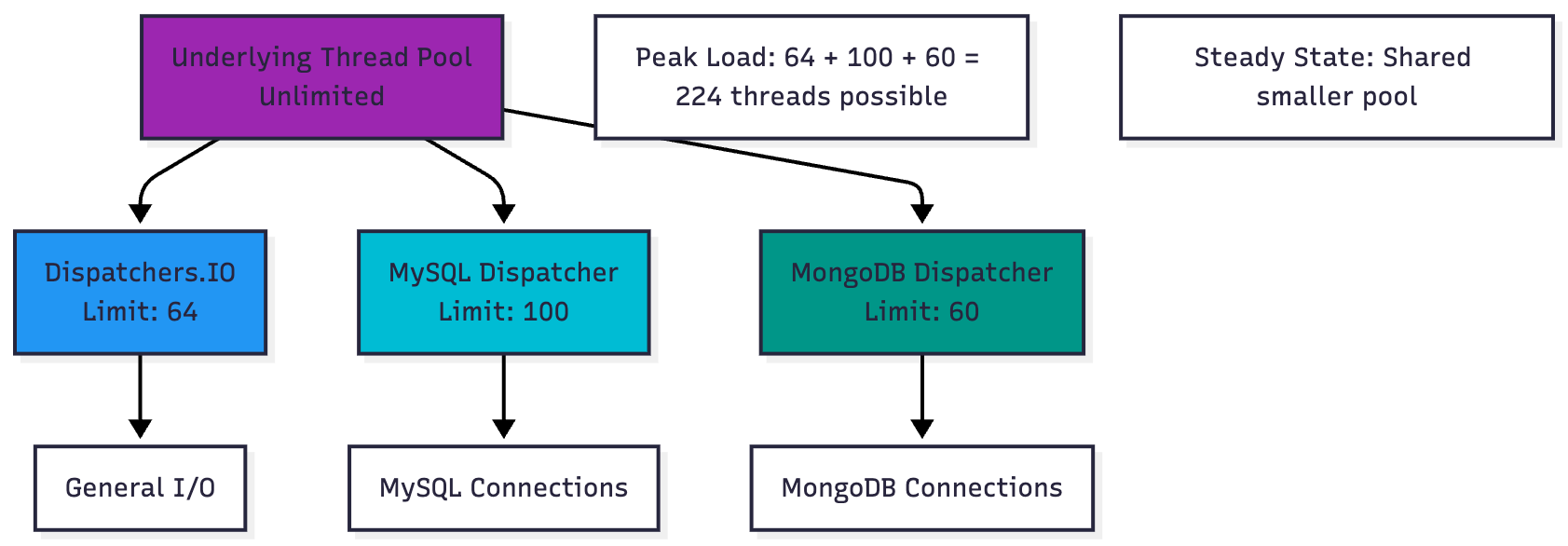
Elasticity Property
Dispatchers.IO has a unique elasticity property: views created with limitedParallelism() are not restricted by the IO dispatcher’s default parallelism limit. This allows for fine-grained control over resource allocation while still sharing the underlying thread pool.
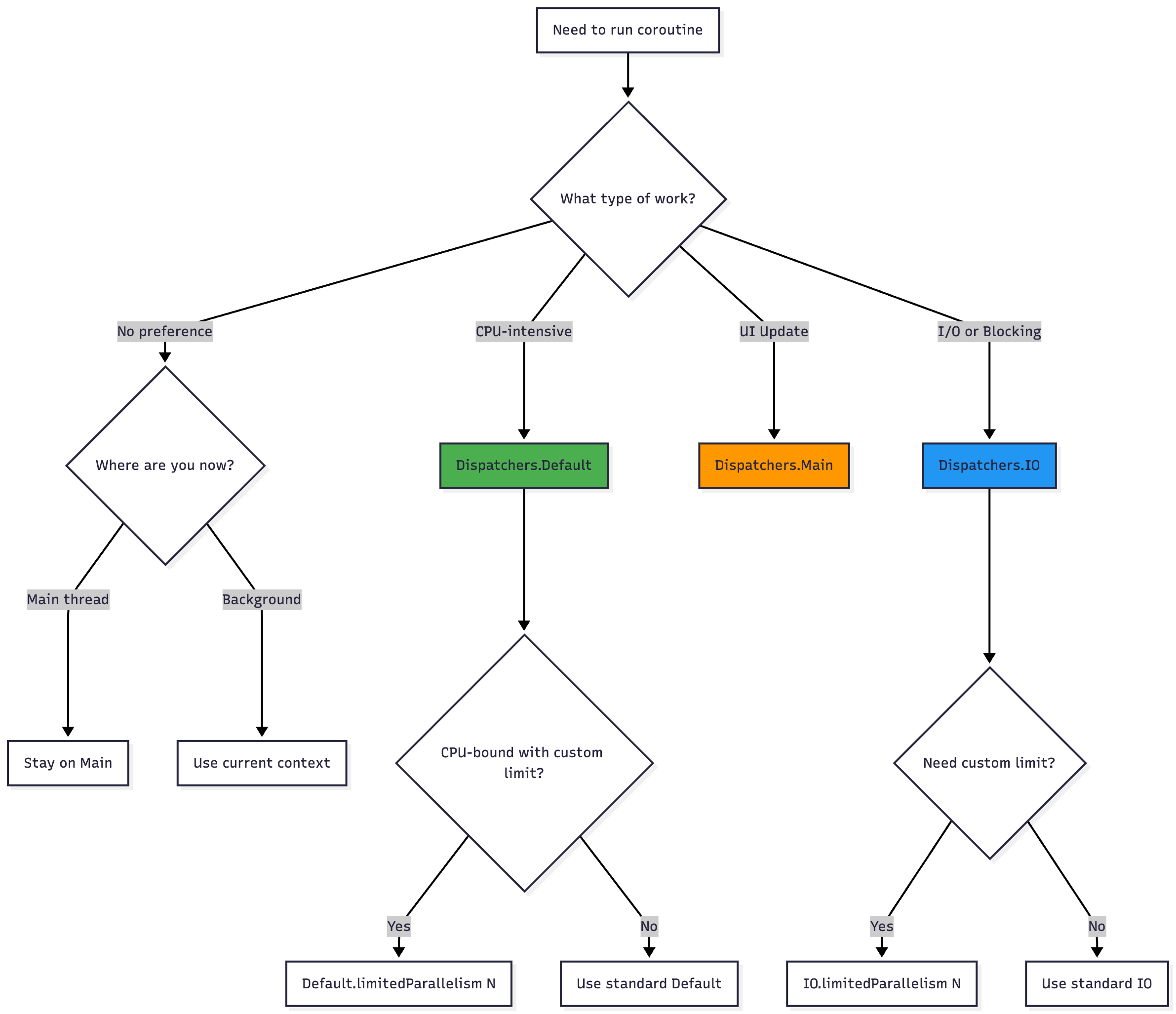
Dispatcher Selection Decision Tree
Best Practices
1. Choose the Right Dispatcher
// ❌ Wrong: CPU-intensive work on IO
launch(Dispatchers.IO) {
    val result = (1..1000000).map { it * it }.sum()
}

// ✅ Correct: CPU-intensive work on Default
launch(Dispatchers.Default) {
    val result = (1..1000000).map { it * it }.sum()
}

// ❌ Wrong: Blocking I/O on Default
launch(Dispatchers.Default) {
    val file = File(”large.txt”).readText()
}

// ✅ Correct: Blocking I/O on IO
launch(Dispatchers.IO) {
    val file = File(”large.txt”).readText()
}
2. Minimize Dispatcher Switching
// ❌ Inefficient: Multiple context switches
suspend fun loadData() = withContext(Dispatchers.IO) {
    val data1 = withContext(Dispatchers.Default) {
        process1()
    }
    val data2 = withContext(Dispatchers.Default) {
        process2()
    }
    combine(data1, data2)
}

// ✅ Better: Batch context switches
suspend fun loadData() = withContext(Dispatchers.IO) {
    val processedData = withContext(Dispatchers.Default) {
        val data1 = process1()
        val data2 = process2()
        listOf(data1, data2)
    }
    combine(processedData[0], processedData[1])
}
3. Use limitedParallelism for Resource Control
class DatabaseManager {
    // Limit concurrent database connections
    private val dbDispatcher = Dispatchers.IO.limitedParallelism(10)

    suspend fun query(sql: String) = withContext(dbDispatcher) {
        // Only 10 concurrent queries allowed
        database.execute(sql)
    }
}
4. Don’t Block Dispatchers.Default
// ❌ Wrong: Blocking Default dispatcher
launch(Dispatchers.Default) {
    Thread.sleep(1000) // Blocks a worker thread!
}

// ✅ Correct: Use delay or move to IO
launch(Dispatchers.Default) {
    delay(1000) // Suspends without blocking
}

// Or for actual blocking:
launch(Dispatchers.IO) {
    Thread.sleep(1000) // OK on IO dispatcher
}
Dispatcher Lifecycle

Shutdown
The Dispatchers.shutdown() function is a delicate API that stops all built-in dispatchers:
@DelicateCoroutinesApi
Dispatchers.shutdown()
Important:
Irreversible operation
Should only be called when no coroutines are running
Primarily for containerized environments (OSGi, IDE plugins)
Makes coroutines framework inoperable
Enables proper class unloading by JVM
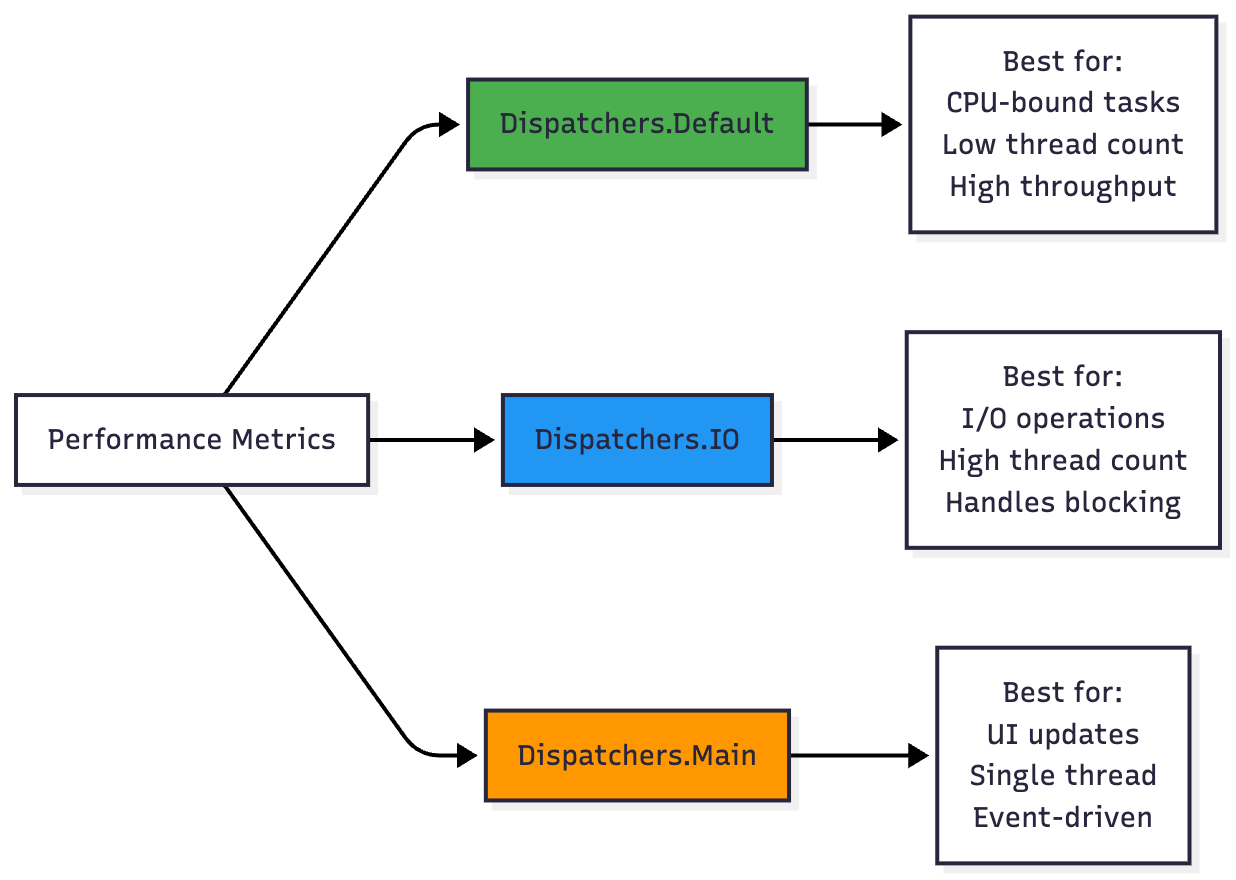
Performance Comparison
Common Patterns
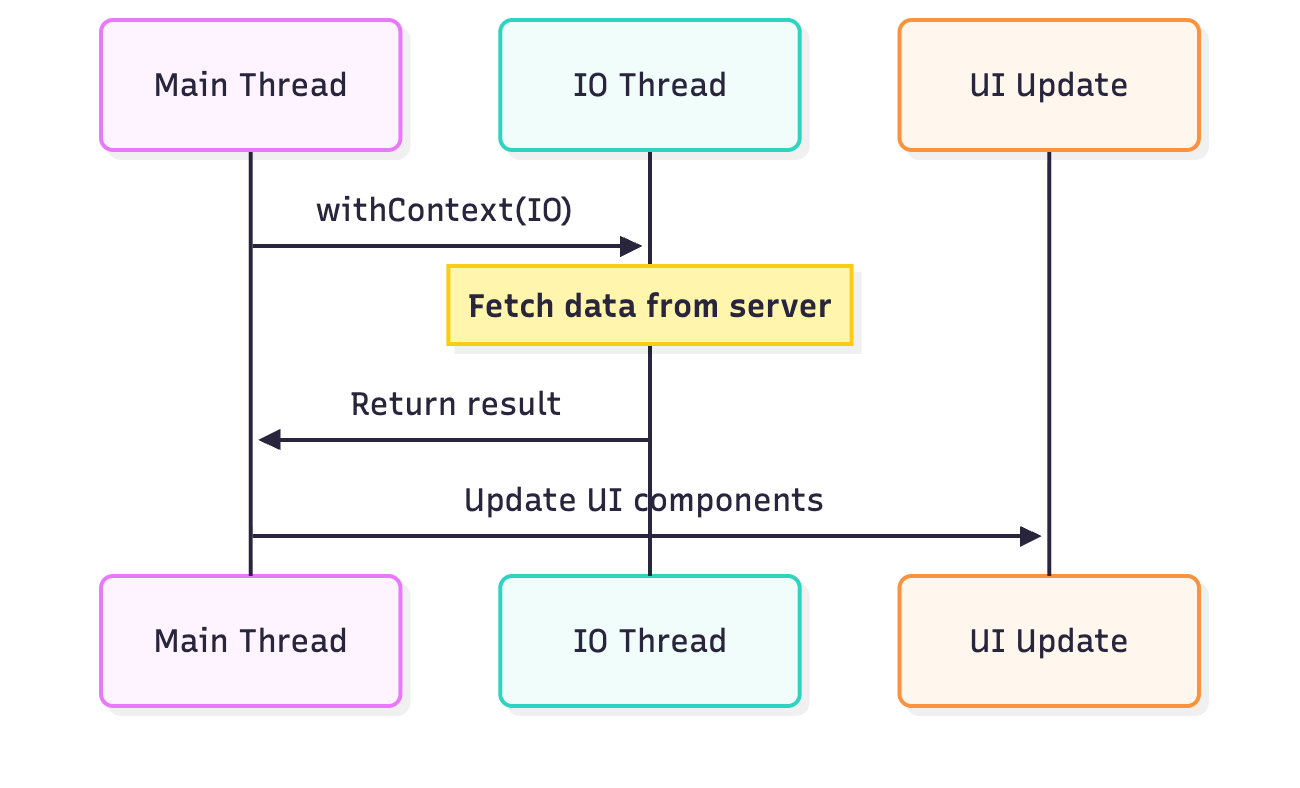
Pattern 1: Background Work with UI Update
launch {
    val result = withContext(Dispatchers.IO) {
        // Network or database operation
        fetchDataFromServer()
    }
    // Automatically back on the original context (often Main)
    updateUI(result)
}
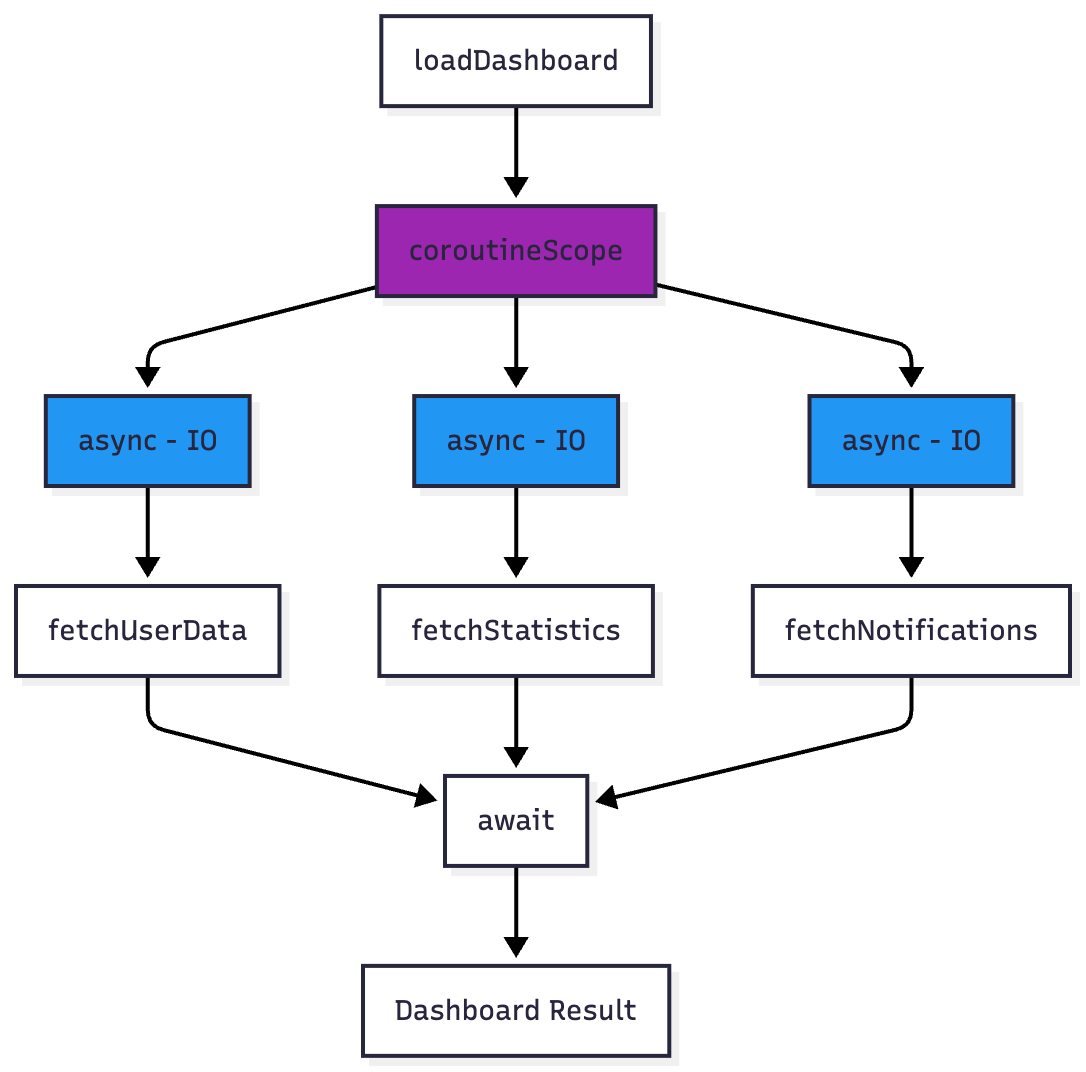
Pattern 2: Parallel Decomposition
suspend fun loadDashboard() = coroutineScope {
    val userData = async(Dispatchers.IO) { fetchUserData() }
    val stats = async(Dispatchers.IO) { fetchStatistics() }
    val notifications = async(Dispatchers.IO) { fetchNotifications() }

    Dashboard(
        user = userData.await(),
        stats = stats.await(),
        notifications = notifications.await()
    )
}
Pattern 3: Resource-Specific Dispatchers
class ApiClient {
    private val networkDispatcher = Dispatchers.IO.limitedParallelism(50)

    suspend fun makeRequest(url: String) = withContext(networkDispatcher) {
        // Limited to 50 concurrent network requests
        httpClient.get(url)
    }
}

class ImageProcessor {
    private val processingDispatcher = Dispatchers.Default.limitedParallelism(4)

    suspend fun processImage(image: Bitmap) = withContext(processingDispatcher) {
        // Limited to 4 concurrent image processing tasks
        applyFilters(image)
    }
}
Testing with Dispatchers
// Use TestDispatcher for testing
@Test
fun testCoroutine() = runTest {
    val dispatcher = StandardTestDispatcher()

    launch(dispatcher) {
        // Test code
    }

    advanceUntilIdle() // Execute all pending coroutines
}
Conclusion
Understanding Kotlin coroutine dispatchers is essential for writing efficient concurrent code. Key takeaways:
Dispatchers.Default for CPU-intensive work
Dispatchers.IO for blocking I/O operations
Dispatchers.Main for UI updates
Dispatchers.Unconfined for advanced scenarios (use sparingly)
Use
limitedParallelism()for fine-grained resource controlMinimize unnecessary dispatcher switching
Never block Dispatchers.Default threads
Choose dispatchers based on the nature of your work, not arbitrary preference
By following these guidelines and understanding the threading model, you can build responsive, efficient, and maintainable coroutine-based applications.