
Complete Guide to Android Services: Architecture, Implementation, and Best Practices

Introduction
Services are fundamental Android components designed to perform long-running operations in the background without a user interface. Understanding services is crucial for building robust Android applications that handle tasks like music playback, file downloads, network operations, and data synchronization.
What Are Services?
A Service is an application component that can perform operations in the background without direct user interaction. Unlike Activities, services don’t have a UI and can continue running even when users switch to different applications.
Key Characteristics
No User Interface: Services operate silently in the background
Independent Lifecycle: Can run independently of the component that started them
Application Context: Run in the main thread of the hosting process
Flexible Priority: System manages their lifecycle based on available resources
Types of Services
1. Foreground Services
Foreground services perform operations noticeable to users and must display a persistent notification. They receive higher priority and are less likely to be killed by the system.
Common Use Cases:
Music or audio playback
Fitness tracking applications
Navigation and location tracking
File downloads with progress indication
Real-time data sync operations
Key Requirements:
Must display a persistent notification (cannot be dismissed by user)
Requires
FOREGROUND_SERVICEpermission in manifestStarting from Android 14, requires specific foreground service types
Must call
startForeground()within 5 seconds of service creation
2. Background Services
Background services perform operations not directly noticed by users. Starting from Android 8.0 (API 26), background execution limits severely restrict their use.
Important Limitations:
Cannot run when app is in background (Android 8.0+)
System may terminate them when resources are needed
Replaced by WorkManager for most use cases
Subject to Doze mode and App Standby restrictions
3. Bound Services
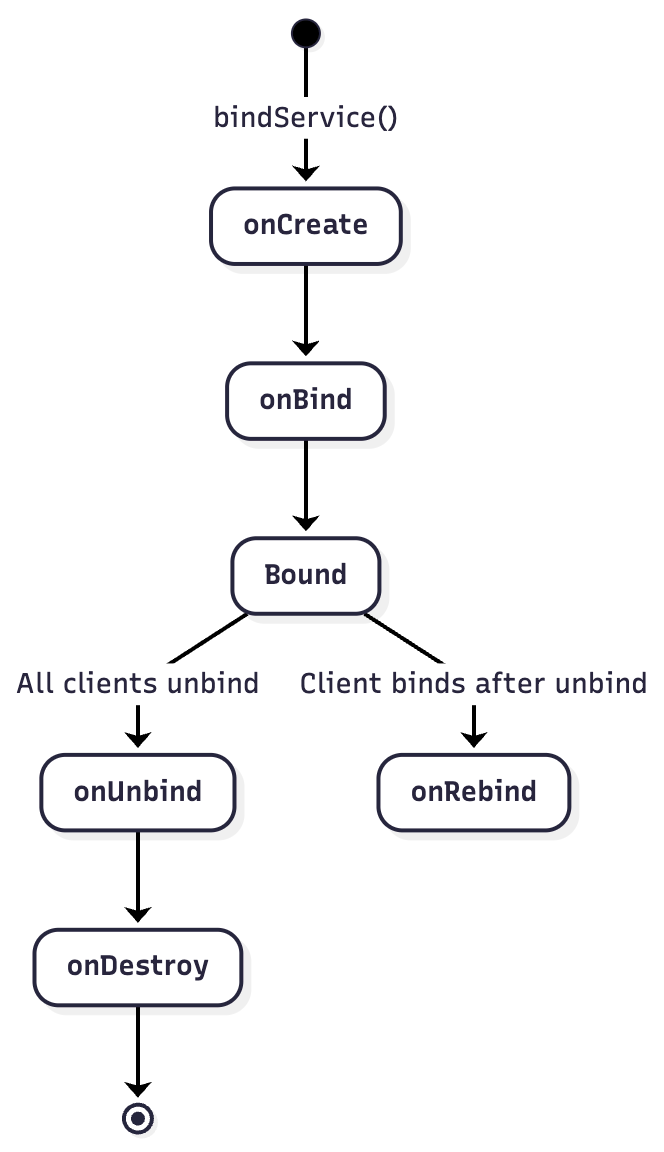
Bound services offer a client-server interface, allowing components to interact with the service, send requests, receive results, and perform interprocess communication (IPC).
Characteristics:
Lives only as long as components are bound to it
Multiple components can bind simultaneously
Destroyed when all clients unbind
Can be combined with started services
Service Lifecycle
Started Service Lifecycle

Bound Service Lifecycle
Combined Service Lifecycle

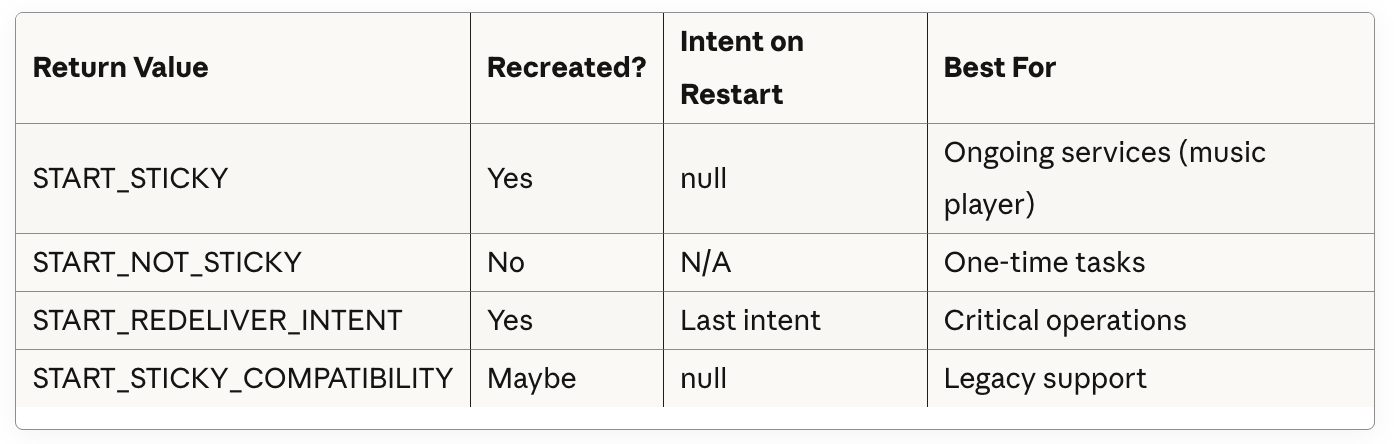
Understanding onStartCommand Return Values
The onStartCommand() method’s return value determines how the system handles service restart after it’s killed. This is crucial for service reliability.
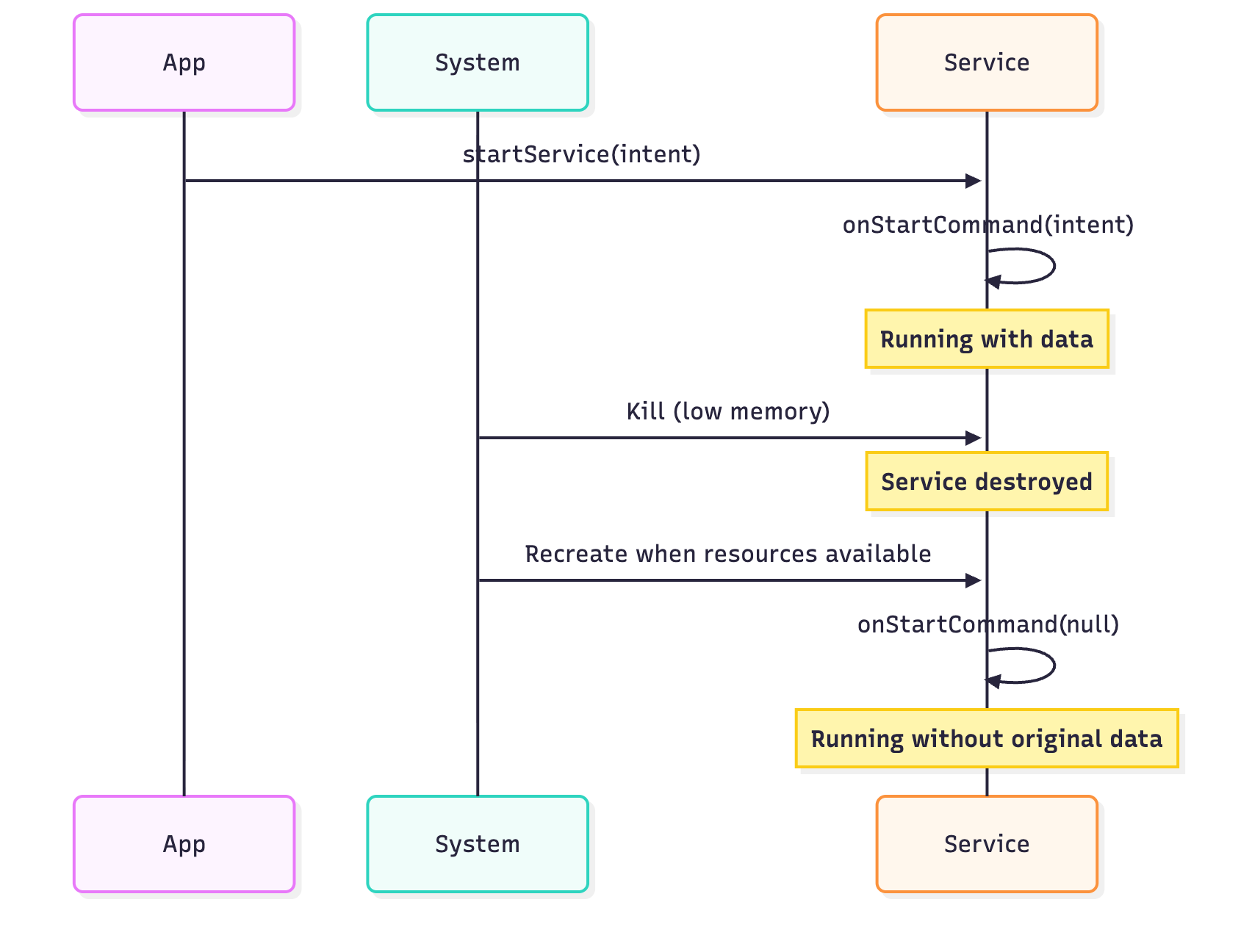
START_STICKY
Behavior: Service is recreated but with a null intent.
kotlin
override fun onStartCommand(intent: Intent?, flags: Int, startId: Int): Int {
    // IMPORTANT: intent can be null on restart!
    val data = intent?.getStringExtra(”DATA”) ?: “default_value”

    startWork(data)

    return START_STICKY
}
Use Cases:
Music players that continue playing
Services that maintain state independently of intent data
Services that run indefinitely (like monitoring services)
Flow Diagram:
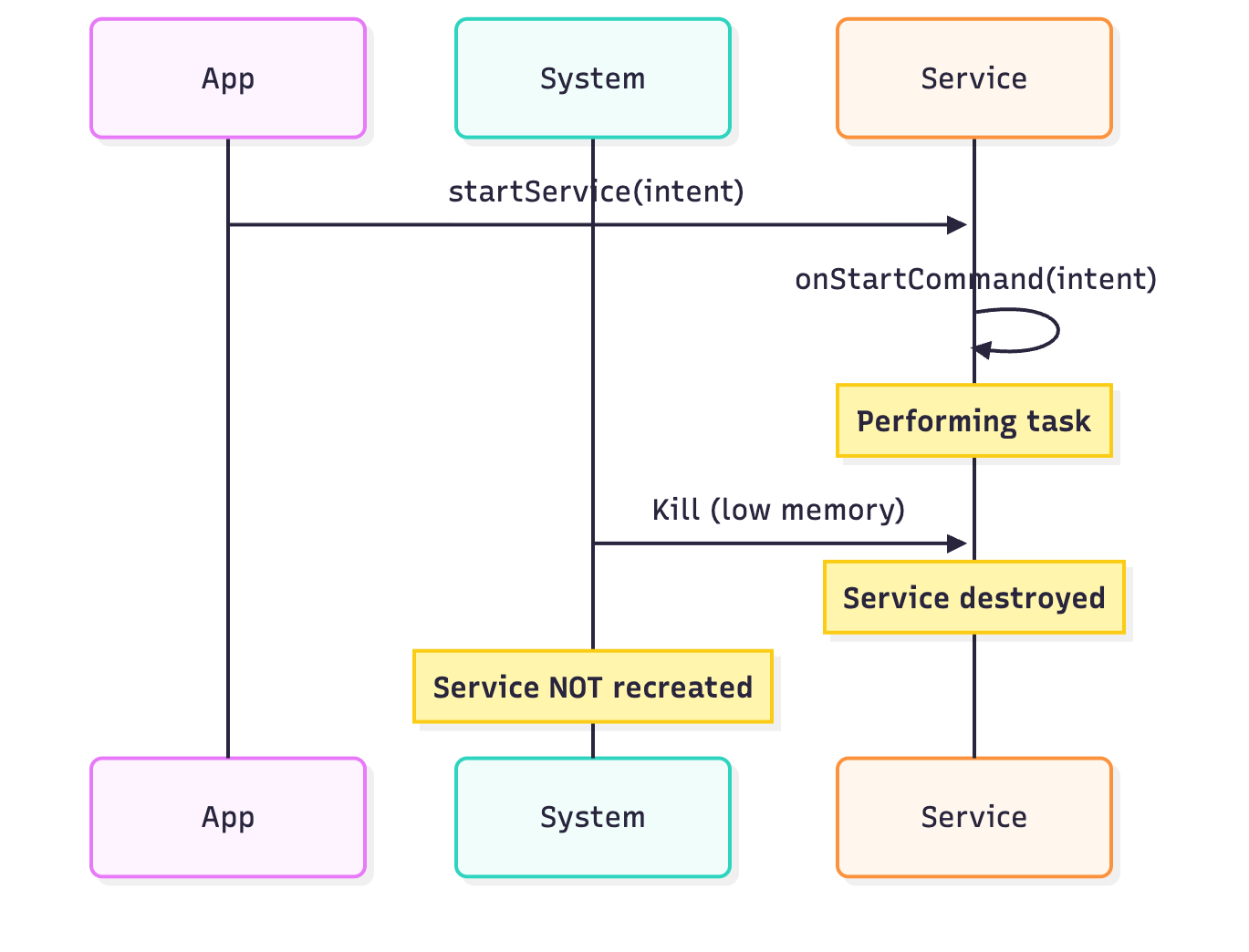
START_NOT_STICKY
Behavior: Service is not recreated unless there are pending intents.
override fun onStartCommand(intent: Intent?, flags: Int, startId: Int): Int {
    val taskId = intent?.getIntExtra(”TASK_ID”, -1) ?: return START_NOT_STICKY

    // Perform one-time task
    performTask(taskId)
    stopSelf(startId)

    return START_NOT_STICKY
}
Use Cases:
One-off tasks (single download, upload)
Tasks where recreation without original data is meaningless
Short-lived operations
Flow Diagram:
START_REDELIVER_INTENT
Behavior: Service is recreated with the last delivered intent.
override fun onStartCommand(intent: Intent?, flags: Int, startId: Int): Int {
    // Intent is guaranteed to be non-null on restart
    val fileUrl = intent?.getStringExtra(”FILE_URL”)
    val downloadId = intent?.getLongExtra(”DOWNLOAD_ID”, -1L)

    if (fileUrl != null && downloadId != null) {
        downloadFile(fileUrl, downloadId)
    }

    return START_REDELIVER_INTENT
}

private fun downloadFile(url: String, downloadId: Long) {
    // If service is killed during download,
    // it will restart with the same intent
    try {
        // Download logic
    } finally {
        stopSelf(startId)
    }
}
Use Cases:
File downloads that must complete
Database synchronization
Critical data upload operations
Any operation that must finish
Flow Diagram:
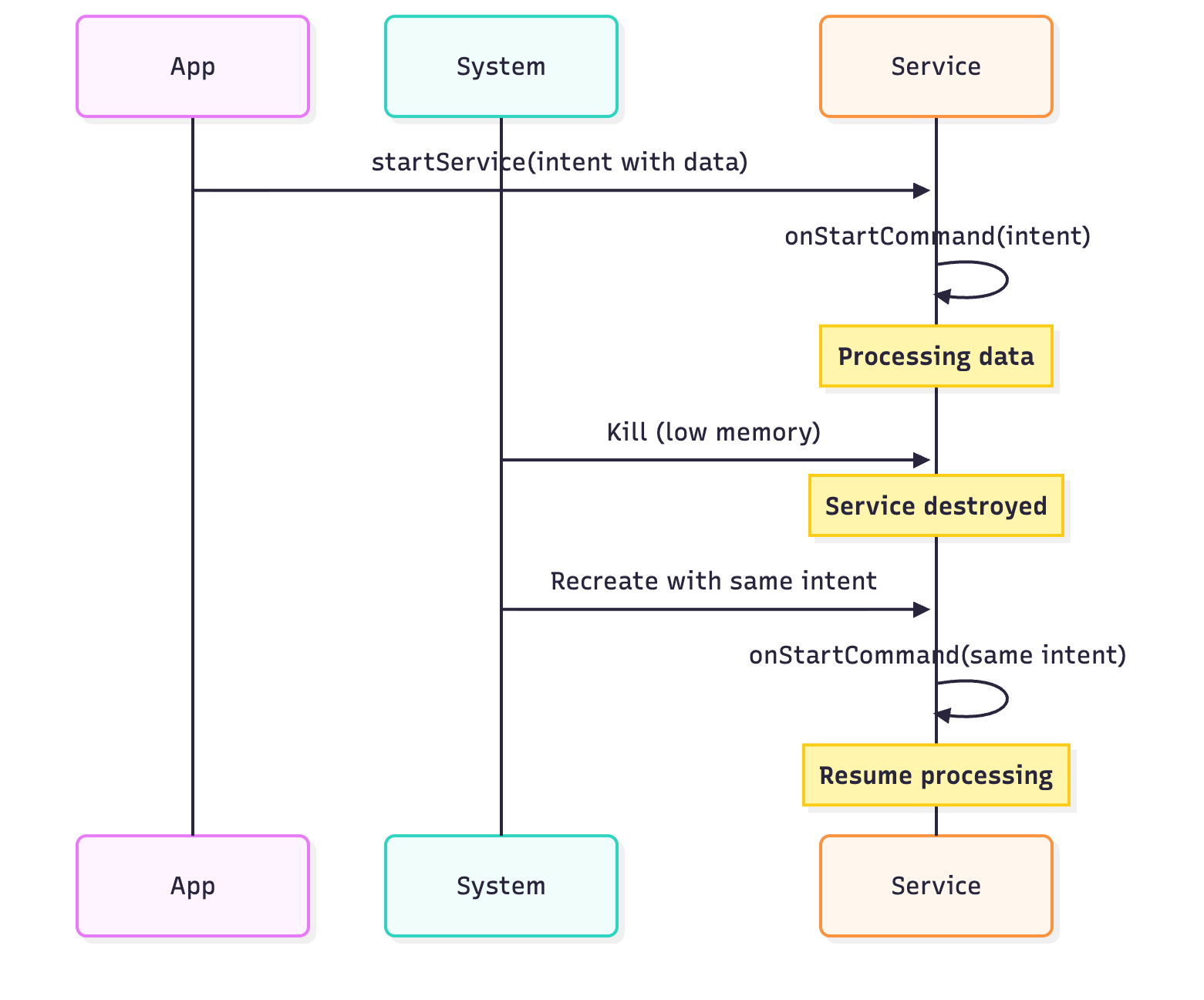
START_STICKY_COMPATIBILITY
Behavior: Like START_STICKY but doesn’t guarantee recreation on older Android versions.
kotlin
override fun onStartCommand(intent: Intent?, flags: Int, startId: Int): Int {
    // Fallback for compatibility
    return START_STICKY_COMPATIBILITY
}
Use Cases:
Rarely used in modern apps
Only for backward compatibility with Android 2.0 and below
Comparison Table
Implementation Guide
Basic Started Service
class MyDownloadService : Service() {

    private var serviceLooper: Looper? = null
    private var serviceHandler: ServiceHandler? = null

    private inner class ServiceHandler(looper: Looper) : Handler(looper) {
        override fun handleMessage(msg: Message) {
            // Perform work here
            performDownload(msg.arg1)
            // Stop the service using the startId
            stopSelf(msg.arg1)
        }
    }

    override fun onCreate() {
        super.onCreate()
        // Create HandlerThread for background work
        HandlerThread(”ServiceThread”, Process.THREAD_PRIORITY_BACKGROUND).apply {
            start()
            serviceLooper = looper
            serviceHandler = ServiceHandler(looper)
        }
    }

    override fun onStartCommand(intent: Intent?, flags: Int, startId: Int): Int {
        // Extract data from intent
        val downloadUrl = intent?.getStringExtra(”URL”)

        // Send work to handler
        serviceHandler?.obtainMessage()?.also { msg ->
            msg.arg1 = startId
            serviceHandler?.sendMessage(msg)
        }

        // Return appropriate restart behavior
        return START_STICKY
    }

    override fun onBind(intent: Intent?): IBinder? {
        return null // Not a bound service
    }

    override fun onDestroy() {
        super.onDestroy()
        serviceLooper?.quit()
    }

    private fun performDownload(taskId: Int) {
        // Implement download logic
        Thread.sleep(5000) // Simulate work
    }
}
Foreground Service Implementation
class MusicPlayerService : Service() {

    private val CHANNEL_ID = “music_playback_channel”
    private val NOTIFICATION_ID = 1

    override fun onCreate() {
        super.onCreate()
        createNotificationChannel()
    }

    override fun onStartCommand(intent: Intent?, flags: Int, startId: Int): Int {
        val notification = createNotification()

        // Promote to foreground service
        startForeground(NOTIFICATION_ID, notification)

        // Start playback logic
        startMusicPlayback()

        return START_STICKY
    }

    private fun createNotificationChannel() {
        if (Build.VERSION.SDK_INT >= Build.VERSION_CODES.O) {
            val channel = NotificationChannel(
                CHANNEL_ID,
                “Music Playback”,
                NotificationManager.IMPORTANCE_LOW
            ).apply {
                description = “Controls for music playback”
            }

            val notificationManager = getSystemService(NotificationManager::class.java)
            notificationManager.createNotificationChannel(channel)
        }
    }

    private fun createNotification(): Notification {
        val pendingIntent = PendingIntent.getActivity(
            this,
            0,
            Intent(this, MainActivity::class.java),
            PendingIntent.FLAG_IMMUTABLE
        )

        return NotificationCompat.Builder(this, CHANNEL_ID)
            .setContentTitle(”Music Playing”)
            .setContentText(”Song Title - Artist Name”)
            .setSmallIcon(R.drawable.ic_music_note)
            .setContentIntent(pendingIntent)
            .addAction(R.drawable.ic_pause, “Pause”, getPauseIntent())
            .addAction(R.drawable.ic_stop, “Stop”, getStopIntent())
            .setOngoing(true)
            .build()
    }

    private fun getPauseIntent(): PendingIntent {
        val intent = Intent(this, MusicPlayerService::class.java).apply {
            action = “ACTION_PAUSE”
        }
        return PendingIntent.getService(this, 0, intent, PendingIntent.FLAG_IMMUTABLE)
    }

    private fun getStopIntent(): PendingIntent {
        val intent = Intent(this, MusicPlayerService::class.java).apply {
            action = “ACTION_STOP”
        }
        return PendingIntent.getService(this, 0, intent, PendingIntent.FLAG_IMMUTABLE)
    }

    private fun startMusicPlayback() {
        // Initialize MediaPlayer or ExoPlayer
    }

    override fun onBind(intent: Intent?): IBinder? = null
}
Bound Service Implementation
class LocalBinder : Binder() {
    fun getService(): LocationService = this@LocationService
}

class LocationService : Service() {

    private val binder = LocalBinder()
    private var locationCallback: ((Location) -> Unit)? = null

    override fun onBind(intent: Intent?): IBinder {
        return binder
    }

    fun getCurrentLocation(): Location? {
        // Return current location
        return null
    }

    fun registerLocationCallback(callback: (Location) -> Unit) {
        locationCallback = callback
        startLocationUpdates()
    }

    fun unregisterLocationCallback() {
        locationCallback = null
        stopLocationUpdates()
    }

    private fun startLocationUpdates() {
        // Start listening to location updates
    }

    private fun stopLocationUpdates() {
        // Stop listening to location updates
    }

    private fun onLocationChanged(location: Location) {
        locationCallback?.invoke(location)
    }
}

// Usage in Activity
class MainActivity : AppCompatActivity() {

    private var locationService: LocationService? = null
    private var bound = false

    private val connection = object : ServiceConnection {
        override fun onServiceConnected(name: ComponentName?, service: IBinder?) {
            val binder = service as LocalBinder
            locationService = binder.getService()
            bound = true

            locationService?.registerLocationCallback { location ->
                updateUI(location)
            }
        }

        override fun onServiceDisconnected(name: ComponentName?) {
            bound = false
            locationService = null
        }
    }

    override fun onStart() {
        super.onStart()
        Intent(this, LocationService::class.java).also { intent ->
            bindService(intent, connection, Context.BIND_AUTO_CREATE)
        }
    }

    override fun onStop() {
        super.onStop()
        if (bound) {
            locationService?.unregisterLocationCallback()
            unbindService(connection)
            bound = false
        }
    }

    private fun updateUI(location: Location) {
        // Update UI with location data
    }
}
Deep Dive: Binder and IPC (Inter-Process Communication)
The Binder is Android’s primary mechanism for Inter-Process Communication (IPC). It enables communication between different processes and components.
Understanding Binder Architecture
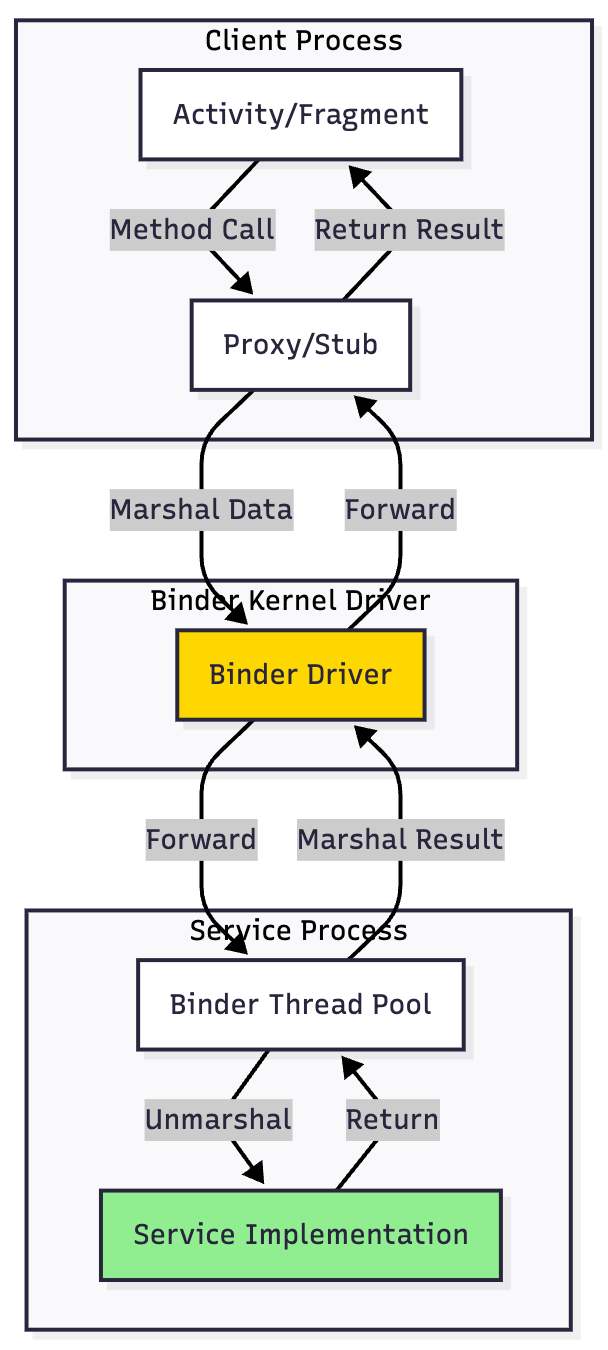
Types of Binder Communication
1. Local Binder (Same Process)
When client and service are in the same process, binder returns the service instance directly.
2. AIDL (Android Interface Definition Language) - Remote Binder
For cross-process communication, use AIDL to define the interface.
3. Messenger - Simplified IPC
For simpler cross-process communication without AIDL.
Binder has a 1MB transaction buffer limit shared across all concurrent transactions.
Service Communication Patterns
1. Broadcast Receivers
class DownloadService : Service() {

    companion object {
        const val ACTION_DOWNLOAD_COMPLETE = “com.app.DOWNLOAD_COMPLETE”
    }

    private fun notifyDownloadComplete(fileId: String) {
        val intent = Intent(ACTION_DOWNLOAD_COMPLETE).apply {
            putExtra(”FILE_ID”, fileId)
        }
        sendBroadcast(intent)
    }
}

// In Activity
class MainActivity : AppCompatActivity() {

    private val downloadReceiver = object : BroadcastReceiver() {
        override fun onReceive(context: Context?, intent: Intent?) {
            val fileId = intent?.getStringExtra(”FILE_ID”)
            // Handle download completion
        }
    }

    override fun onResume() {
        super.onResume()
        registerReceiver(
            downloadReceiver,
            IntentFilter(DownloadService.ACTION_DOWNLOAD_COMPLETE)
        )
    }

    override fun onPause() {
        super.onPause()
        unregisterReceiver(downloadReceiver)
    }
}
2. LocalBroadcastManager (Deprecated but still in use)
// Modern alternative: Use LiveData or Flow
class DownloadService : Service() {

    companion object {
        val progressLiveData = MutableLiveData<Int>()
    }

    private fun updateProgress(progress: Int) {
        progressLiveData.postValue(progress)
    }
}

// In Activity
class MainActivity : AppCompatActivity() {

    override fun onCreate(savedInstanceState: Bundle?) {
        super.onCreate(savedInstanceState)

        DownloadService.progressLiveData.observe(this) { progress ->
            updateProgressBar(progress)
        }
    }
}
3. ResultReceiver Pattern
class DownloadService : Service() {

    companion object {
        const val RESULT_CODE_PROGRESS = 1
        const val RESULT_CODE_COMPLETE = 2
        const val KEY_PROGRESS = “progress”
    }

    override fun onStartCommand(intent: Intent?, flags: Int, startId: Int): Int {
        val receiver = intent?.getParcelableExtra<ResultReceiver>(”RECEIVER”)

        performDownload { progress ->
            val bundle = Bundle().apply {
                putInt(KEY_PROGRESS, progress)
            }
            receiver?.send(RESULT_CODE_PROGRESS, bundle)
        }

        return START_NOT_STICKY
    }

    private fun performDownload(onProgress: (Int) -> Unit) {
        // Download logic with progress callbacks
    }
}

// In Activity
class MainActivity : AppCompatActivity() {

    private val receiver = object : ResultReceiver(Handler(Looper.getMainLooper())) {
        override fun onReceiveResult(resultCode: Int, resultData: Bundle?) {
            when (resultCode) {
                DownloadService.RESULT_CODE_PROGRESS -> {
                    val progress = resultData?.getInt(DownloadService.KEY_PROGRESS) ?: 0
                    updateProgressBar(progress)
                }
                DownloadService.RESULT_CODE_COMPLETE -> {
                    showCompletionMessage()
                }
            }
        }
    }

    private fun startDownload() {
        val intent = Intent(this, DownloadService::class.java).apply {
            putExtra(”RECEIVER”, receiver)
        }
        startService(intent)
    }
}
Decision Flow: When to Use What
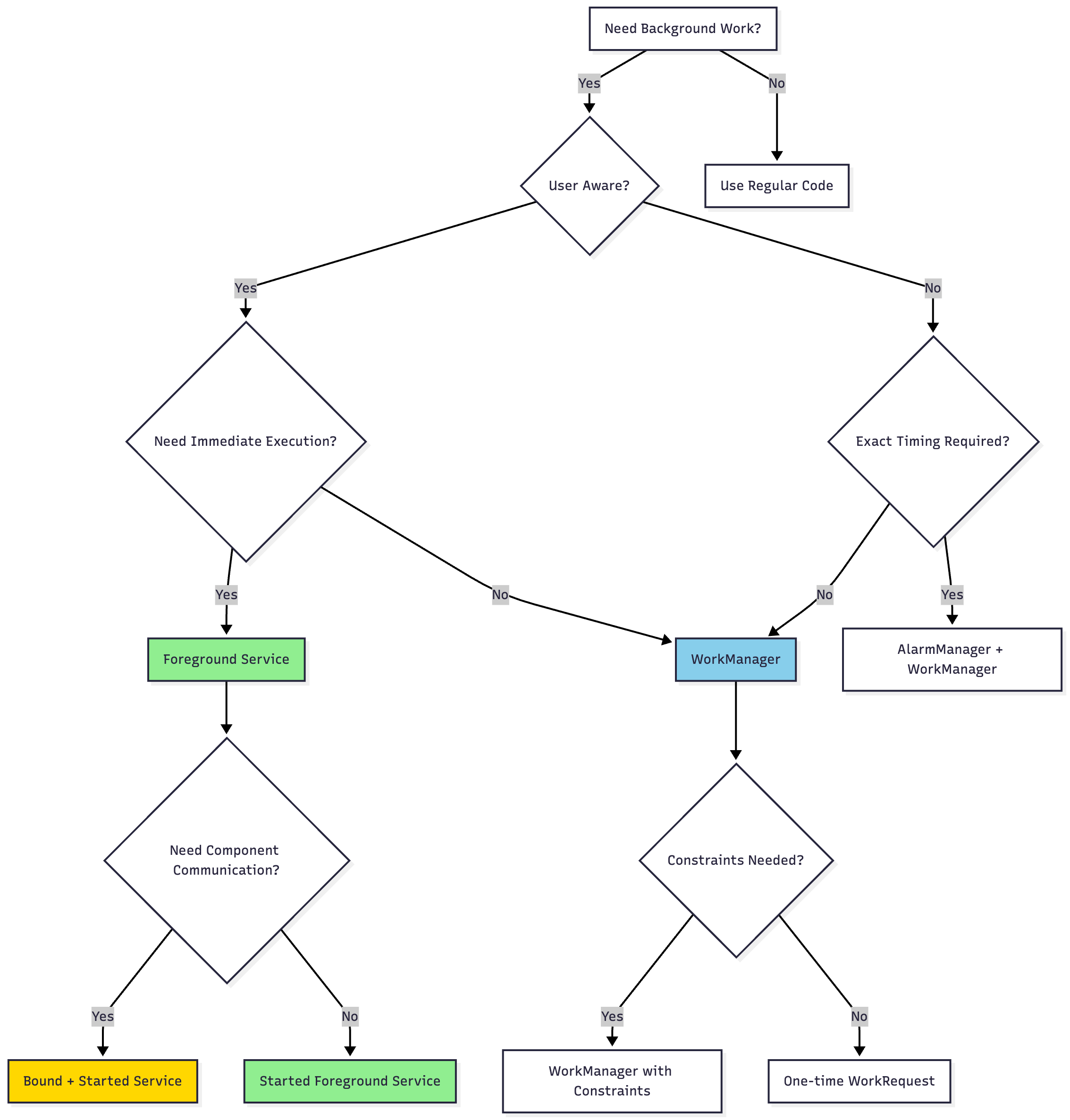
Common Pain Points and Solutions
Pain Point 1: Background Execution Limits
Problem: Starting from Android 8.0, apps cannot freely run background services when the app is in the background.
Solution:
// DON’T: Start background service when app is in background
startService(Intent(this, MyService::class.java))

// DO: Use WorkManager for deferrable work
val workRequest = OneTimeWorkRequestBuilder<MyWorker>()
    .setConstraints(
        Constraints.Builder()
            .setRequiredNetworkType(NetworkType.CONNECTED)
            .build()
    )
    .build()

WorkManager.getInstance(context).enqueue(workRequest)

// DO: Use Foreground Service for immediate, noticeable work
if (Build.VERSION.SDK_INT >= Build.VERSION_CODES.O) {
    startForegroundService(Intent(this, MyForegroundService::class.java))
} else {
    startService(Intent(this, MyForegroundService::class.java))
}
Pain Point 2: Service Killed by System
Problem: System can kill services when memory is needed, causing data loss or incomplete operations.
Solution:
override fun onStartCommand(intent: Intent?, flags: Int, startId: Int): Int {
    // Handle the work
    handleIntent(intent)

    // Choose appropriate return value:

    // START_STICKY: Service recreated without intent (for stateless services)
    // return START_STICKY

    // START_REDELIVER_INTENT: Service recreated with last intent (for stateful work)
    return START_REDELIVER_INTENT

    // START_NOT_STICKY: Don’t recreate (for one-off tasks)
    // return START_NOT_STICKY
}

// Also implement proper state persistence
override fun onDestroy() {
    super.onDestroy()
    saveCurrentState() // Persist important data
}
Pain Point 3: Memory Leaks from Context
Problem: Holding references to Activity context in services causes memory leaks.
Solution:
class MyService : Service() {

    // DON’T: Hold Activity reference
    // private var activity: Activity? = null

    // DO: Use Application context
    private val appContext: Context
        get() = applicationContext

    // DO: Use weak references if you must hold Activity reference
    private var activityRef: WeakReference<Activity>? = null

    fun setActivity(activity: Activity) {
        activityRef = WeakReference(activity)
    }

    private fun updateUI() {
        activityRef?.get()?.let { activity ->
            if (!activity.isFinishing) {
                // Update UI
            }
        }
    }
}
Pain Point 4: ANR (Application Not Responding)
Problem: Performing long operations on main thread in services causes ANR.
Solution:
class MyService : Service() {

    private val serviceScope = CoroutineScope(
        SupervisorJob() + Dispatchers.IO
    )

    override fun onStartCommand(intent: Intent?, flags: Int, startId: Int): Int {
        // DON’T: Block main thread
        // performLongRunningOperation()

        // DO: Use coroutines
        serviceScope.launch {
            try {
                performLongRunningOperation()
            } finally {
                stopSelf(startId)
            }
        }

        return START_NOT_STICKY
    }

    override fun onDestroy() {
        super.onDestroy()
        serviceScope.cancel() // Cancel all coroutines
    }

    private suspend fun performLongRunningOperation() {
        withContext(Dispatchers.IO) {
            // Heavy work here
        }
    }
}
Pain Point 5: Foreground Service Notification Dismissal
Problem: Users accidentally dismiss foreground service notifications on Android 13+.
Solution:
private fun createNotification(): Notification {
    return NotificationCompat.Builder(this, CHANNEL_ID)
        .setContentTitle(”Service Running”)
        .setContentText(”Description”)
        .setSmallIcon(R.drawable.ic_notification)
        .setOngoing(true) // Makes notification non-dismissible
        .setForegroundServiceBehavior(NotificationCompat.FOREGROUND_SERVICE_IMMEDIATE)
        .setPriority(NotificationCompat.PRIORITY_LOW) // Less intrusive
        .build()
}
Pain Point 6: Foreground Service Type Requirements (Android 14+)
Problem: Android 14 requires specific foreground service types, causing crashes if not declared.
Solution:
<!-- AndroidManifest.xml -->
<service
    android:name=”.LocationTrackingService”
    android:foregroundServiceType=”location”
    android:exported=”false” />

<service
    android:name=”.MusicPlayerService”
    android:foregroundServiceType=”mediaPlayback”
    android:exported=”false” />

<!-- Available types:
    - camera
    - connectedDevice
    - dataSync
    - health
    - location
    - mediaPlayback
    - mediaProjection
    - microphone
    - phoneCall
    - remoteMessaging
    - shortService
    - specialUse
    - systemExempted
-->
class LocationTrackingService : Service() {

    override fun onStartCommand(intent: Intent?, flags: Int, startId: Int): Int {
        val notification = createNotification()

        if (Build.VERSION.SDK_INT >= Build.VERSION_CODES.UPSIDE_DOWN_CAKE) {
            startForeground(
                NOTIFICATION_ID,
                notification,
                ServiceInfo.FOREGROUND_SERVICE_TYPE_LOCATION
            )
        } else {
            startForeground(NOTIFICATION_ID, notification)
        }

        return START_STICKY
    }
}
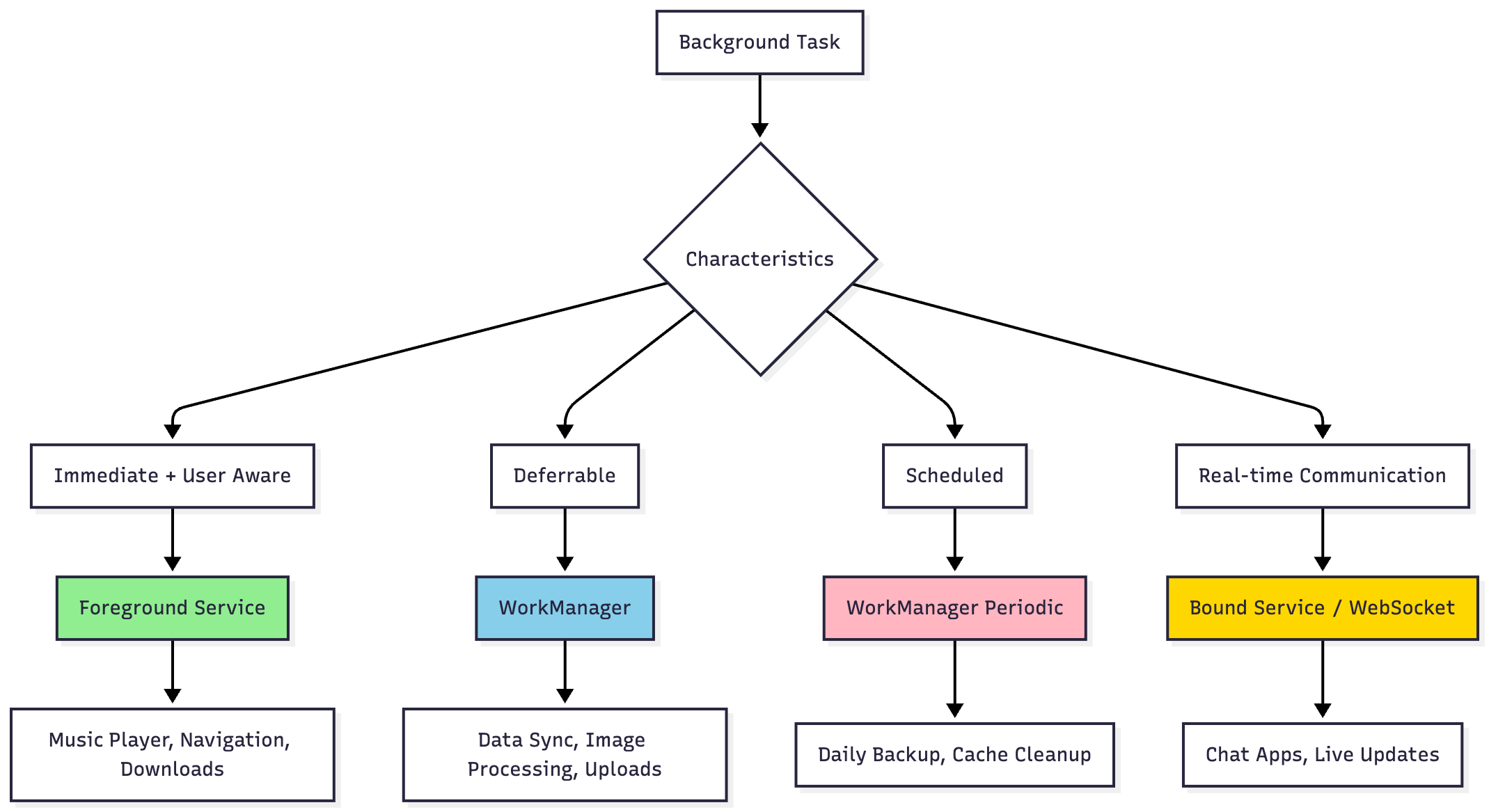
Service vs Modern Alternatives
When NOT to Use Services
Short-lived operations: Use coroutines or threads
Deferrable background work: Use WorkManager
Periodic tasks: Use WorkManager’s PeriodicWorkRequest
Scheduled tasks: Use AlarmManager with WorkManager
Data loading: Use ViewModels with coroutines/RxJava
Push notifications: Use Firebase Cloud Messaging
Best Practices
1. Resource Management
class OptimizedService : Service() {

    private var wakeLock: PowerManager.WakeLock? = null
    private var wifiLock: WifiManager.WifiLock? = null

    private fun acquireLocks() {
        // Acquire WakeLock only when needed
        val powerManager = getSystemService(Context.POWER_SERVICE) as PowerManager
        wakeLock = powerManager.newWakeLock(
            PowerManager.PARTIAL_WAKE_LOCK,
            “MyApp::MyWakeLockTag”
        ).apply {
            acquire(10 * 60 * 1000L) // 10 minutes timeout
        }

        // Acquire WiFi lock for network operations
        val wifiManager = applicationContext.getSystemService(Context.WIFI_SERVICE) as WifiManager
        wifiLock = wifiManager.createWifiLock(
            WifiManager.WIFI_MODE_FULL_HIGH_PERF,
            “MyApp::MyWifiLockTag”
        ).apply {
            acquire()
        }
    }

    private fun releaseLocks() {
        wakeLock?.let {
            if (it.isHeld) {
                it.release()
            }
        }

        wifiLock?.let {
            if (it.isHeld) {
                it.release()
            }
        }
    }

    override fun onDestroy() {
        super.onDestroy()
        releaseLocks()
    }
}
2. Proper Error Handling
class RobustService : Service() {

    private val serviceScope = CoroutineScope(SupervisorJob() + Dispatchers.IO)

    override fun onStartCommand(intent: Intent?, flags: Int, startId: Int): Int {
        serviceScope.launch {
            try {
                performWork()
            } catch (e: Exception) {
                handleError(e)
                // Log to analytics
                FirebaseCrashlytics.getInstance().recordException(e)
            } finally {
                cleanup()
                stopSelf(startId)
            }
        }

        return START_REDELIVER_INTENT
    }

    private suspend fun performWork() {
        withContext(Dispatchers.IO) {
            // Work implementation with timeout
            withTimeout(30_000) {
                // Actual work
            }
        }
    }

    private fun handleError(error: Exception) {
        when (error) {
            is IOException -> notifyNetworkError()
            is TimeoutCancellationException -> notifyTimeout()
            else -> notifyGenericError()
        }
    }

    private fun cleanup() {
        // Release resources
    }
}
3. Battery Optimization
class BatteryFriendlyService : Service() {

    private fun shouldPerformWork(): Boolean {
        val powerManager = getSystemService(Context.POWER_SERVICE) as PowerManager

        // Check if device is in Doze mode
        if (Build.VERSION.SDK_INT >= Build.VERSION_CODES.M) {
            if (powerManager.isDeviceIdleMode) {
                // Defer non-critical work
                return false
            }
        }

        // Check battery level
        val batteryManager = getSystemService(Context.BATTERY_SERVICE) as BatteryManager
        val batteryLevel = batteryManager.getIntProperty(BatteryManager.BATTERY_PROPERTY_CAPACITY)

        if (batteryLevel < 15) {
            // Reduce work frequency or defer
            return false
        }

        return true
    }

    private fun adjustWorkBasedOnPowerState() {
        val powerManager = getSystemService(Context.POWER_SERVICE) as PowerManager

        if (Build.VERSION.SDK_INT >= Build.VERSION_CODES.M) {
            if (powerManager.isPowerSaveMode) {
                // Reduce sync frequency
                reduceSyncFrequency()
            }
        }
    }

    private fun reduceSyncFrequency() {
        // Implementation
    }
}
Testing Services
Unit Testing
@RunWith(RobolectricTestRunner::class)
class MyServiceTest {

    private lateinit var service: MyService
    private lateinit var controller: ServiceController<MyService>

    @Before
    fun setUp() {
        controller = Robolectric.buildService(MyService::class.java)
        service = controller.create().get()
    }

    @Test
    fun `service performs work on start`() = runTest {
        val intent = Intent().apply {
            putExtra(”TASK_ID”, “123”)
        }

        controller.startCommand(0, 0)

        // Verify work was performed
        // Use test doubles or mocks for dependencies
    }

    @After
    fun tearDown() {
        controller.destroy()
    }
}
Integration Testing
@RunWith(AndroidJUnit4::class)
class ServiceIntegrationTest {

    @get:Rule
    val serviceRule = ServiceTestRule()

    @Test
    fun testBoundService() {
        val serviceIntent = Intent(
            ApplicationProvider.getApplicationContext(),
            LocationService::class.java
        )

        val binder = serviceRule.bindService(serviceIntent)
        val service = (binder as LocalBinder).getService()

        // Test service methods
        val location = service.getCurrentLocation()
        assertNotNull(location)
    }
}
Migration Strategies
From IntentService to Service with Coroutines
// Old IntentService (Deprecated)
class OldDownloadService : IntentService(”DownloadService”) {
    override fun onHandleIntent(intent: Intent?) {
        val url = intent?.getStringExtra(”URL”)
        downloadFile(url)
    }
}

// New Service with Coroutines
class NewDownloadService : Service() {

    private val serviceScope = CoroutineScope(
        SupervisorJob() + Dispatchers.IO
    )

    override fun onStartCommand(intent: Intent?, flags: Int, startId: Int): Int {
        val url = intent?.getStringExtra(”URL”)

        serviceScope.launch {
            try {
                downloadFile(url)
            } finally {
                stopSelf(startId)
            }
        }

        return START_REDELIVER_INTENT
    }

    override fun onBind(intent: Intent?): IBinder? = null

    override fun onDestroy() {
        super.onDestroy()
        serviceScope.cancel()
    }

    private suspend fun downloadFile(url: String?) {
        // Download implementation
    }
}
Conclusion
Android Services remain a powerful tool for background operations, but modern Android development emphasizes using them judiciously:
Use Foreground Services for operations users should be aware of
Use WorkManager for deferrable background work
Use Bound Services for component communication
Avoid Background Services due to system restrictions
Key takeaways:
Always respect battery life and system resources
Handle service lifecycle properly to prevent leaks
Use appropriate communication patterns for your use case
Test thoroughly on different Android versions
Monitor and handle errors gracefully
Consider modern alternatives before implementing services
The Android ecosystem continues evolving toward more battery-efficient and user-friendly background execution models. Services should be your last resort after considering WorkManager, coroutines, and other modern approaches.