
Building a Custom Image Loader with Disk Caching for Android
A Deep Dive into Memory Management, DiskLruCache, and Coroutine-Based Image Loading Without Third-Party Dependencies


As Android engineers, we often reach for battle-tested libraries like Glide or Coil when handling image loading. But have you ever wondered what’s happening under the hood? In this deep dive, we’ll build a production-ready image loading system from scratch with proper disk caching, memory management, and lifecycle awareness.
Why Build Your Own?
Before we start, let me be clear: for most production apps, you should use Glide or Coil. However, understanding how to build an image loader teaches you:
Low-level bitmap handling and memory management
Disk caching strategies with DiskLruCache
Thread management and coroutines best practices
Lifecycle-aware component architecture
Plus, sometimes you need a lightweight solution for specific use cases or have unique requirements that don’t fit standard libraries.
Architecture Overview
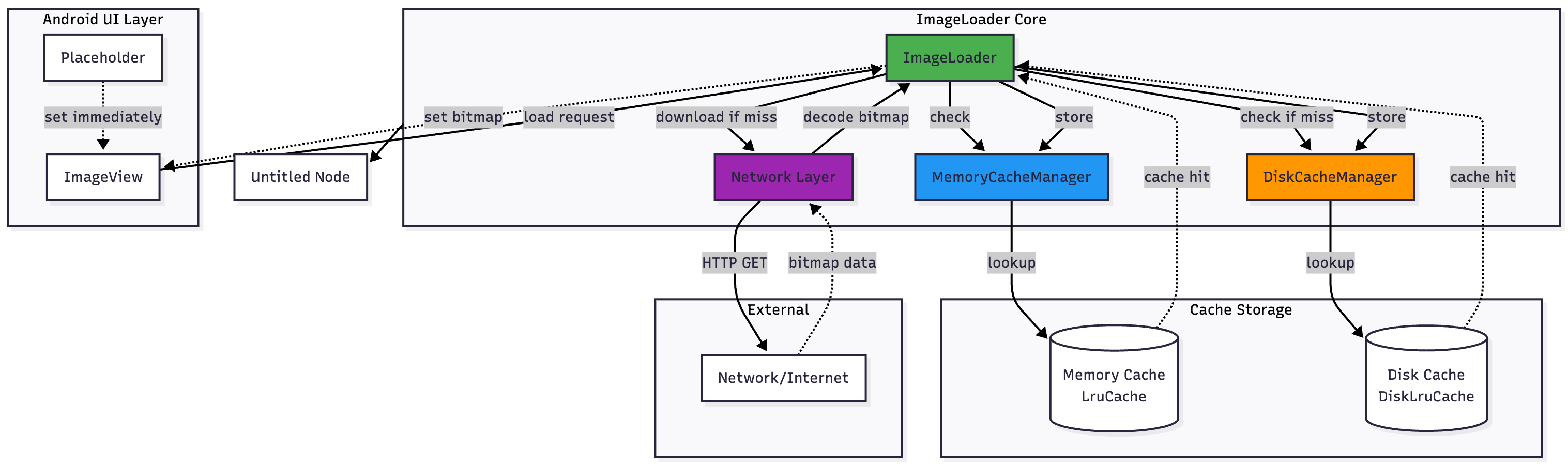
Our image loader will have three key layers:
Memory Cache - LruCache for instant bitmap retrieval
Disk Cache - DiskLruCache for persistent storage
Network Layer - Coroutine-based downloading with proper cancellation
Request Flow:
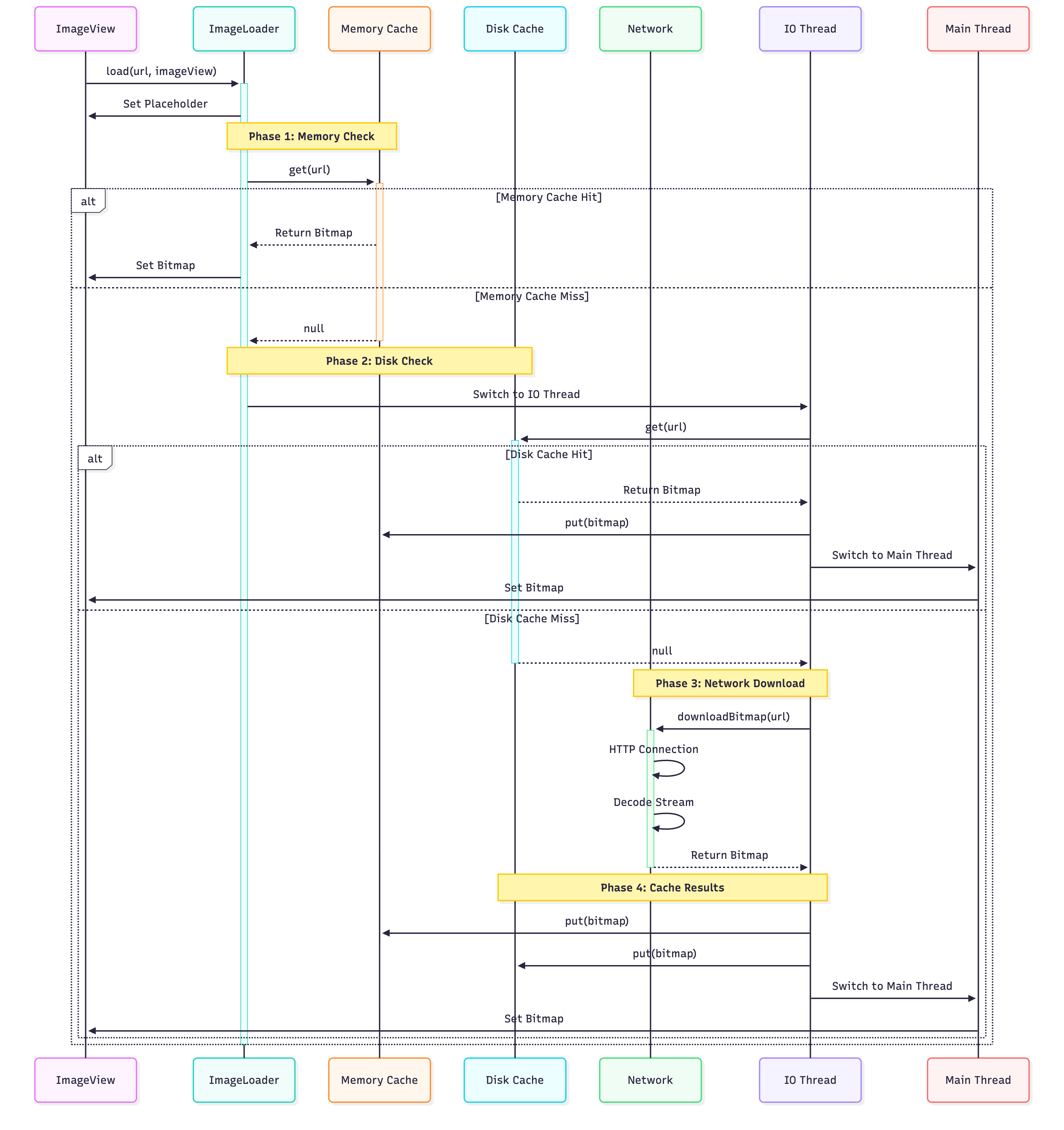
Memory Cache → Disk Cache → Network → Decode → Cache → Display
Implementation
1. Setting Up the Disk Cache
First, let’s create a disk cache manager using DiskLruCache:
class DiskCacheManager(private val context: Context) {
    private val diskCache: DiskLruCache
    private val cacheDir: File = File(context.cacheDir, “image_cache”)

    companion object {
        private const val APP_VERSION = 1
        private const val VALUE_COUNT = 1
        private const val MAX_SIZE = 50L * 1024 * 1024 // 50MB
    }

    init {
        if (!cacheDir.exists()) {
            cacheDir.mkdirs()
        }
        diskCache = DiskLruCache.open(cacheDir, APP_VERSION, VALUE_COUNT, MAX_SIZE)
    }

    fun get(key: String): Bitmap? {
        return try {
            val snapshot = diskCache.get(key.toMd5()) ?: return null
            val inputStream = snapshot.getInputStream(0)
            BitmapFactory.decodeStream(inputStream).also {
                snapshot.close()
            }
        } catch (e: Exception) {
            e.printStackTrace()
            null
        }
    }

    fun put(key: String, bitmap: Bitmap) {
        try {
            val editor = diskCache.edit(key.toMd5()) ?: return
            val outputStream = editor.newOutputStream(0)
            bitmap.compress(Bitmap.CompressFormat.PNG, 100, outputStream)
            outputStream.close()
            editor.commit()
            diskCache.flush()
        } catch (e: Exception) {
            e.printStackTrace()
        }
    }

    fun clear() {
        diskCache.delete()
    }

    private fun String.toMd5(): String {
        val md = MessageDigest.getInstance(”MD5”)
        val digest = md.digest(this.toByteArray())
        return digest.joinToString(”“) { “%02x”.format(it) }
    }
}
Key Points:
We use MD5 hashing for cache keys to avoid filesystem issues with URLs
DiskLruCacheautomatically handles LRU eviction when size limit is reachedAlways flush after commits to ensure data is persisted
2. Memory Cache with LruCache
class MemoryCacheManager {
    private val maxMemory = (Runtime.getRuntime().maxMemory() / 1024).toInt()
    private val cacheSize = maxMemory / 8 // Use 1/8th of available memory

    private val memoryCache = object : LruCache<String, Bitmap>(cacheSize) {
        override fun sizeOf(key: String, bitmap: Bitmap): Int {
            return bitmap.byteCount / 1024 // Size in KB
        }
    }

    fun get(key: String): Bitmap? = memoryCache.get(key)

    fun put(key: String, bitmap: Bitmap) {
        if (get(key) == null) {
            memoryCache.put(key, bitmap)
        }
    }

    fun clear() {
        memoryCache.evictAll()
    }
}
Memory Management Best Practices:
Calculate cache size based on available heap memory
Override
sizeOf()to properly measure bitmap memory usageUse
bitmap.byteCountwhich accounts for bitmap configuration and dimensions
3. The Image Loader Core
Now let’s create the main image loader with proper coroutine handling:
class ImageLoader private constructor(private val context: Context) {
    private val memoryCache = MemoryCacheManager()
    private val diskCache = DiskCacheManager(context)
    private val ioDispatcher = Dispatchers.IO
    private val mainDispatcher = Dispatchers.Main

    companion object {
        @Volatile
        private var instance: ImageLoader? = null

        fun getInstance(context: Context): ImageLoader {
            return instance ?: synchronized(this) {
                instance ?: ImageLoader(context.applicationContext).also {
                    instance = it
                }
            }
        }
    }

    fun load(url: String, imageView: ImageView, placeholder: Drawable? = null) {
        // Set placeholder immediately
        imageView.setImageDrawable(placeholder)

        // Cancel any existing job for this ImageView
        (imageView.tag as? Job)?.cancel()

        // Check memory cache first
        memoryCache.get(url)?.let {
            imageView.setImageBitmap(it)
            return
        }

        // Launch coroutine for loading
        val job = CoroutineScope(ioDispatcher).launch {
            try {
                val bitmap = loadBitmap(url)

                withContext(mainDispatcher) {
                    // Check if this ImageView is still waiting for this URL
                    if (imageView.tag == coroutineContext[Job]) {
                        imageView.setImageBitmap(bitmap)
                    }
                }
            } catch (e: Exception) {
                e.printStackTrace()
                withContext(mainDispatcher) {
                    // Handle error - could set error drawable here
                }
            }
        }

        // Store job reference to enable cancellation
        imageView.tag = job
    }

    private suspend fun loadBitmap(url: String): Bitmap {
        // Check disk cache
        diskCache.get(url)?.let {
            memoryCache.put(url, it)
            return it
        }

        // Download from network
        val bitmap = downloadBitmap(url)

        // Cache the result
        memoryCache.put(url, bitmap)
        diskCache.put(url, bitmap)

        return bitmap
    }

    private suspend fun downloadBitmap(url: String): Bitmap = withContext(ioDispatcher) {
        val connection = URL(url).openConnection() as HttpURLConnection
        try {
            connection.doInput = true
            connection.connect()

            val inputStream = connection.inputStream
            BitmapFactory.decodeStream(inputStream)
                ?: throw IOException(”Failed to decode bitmap”)
        } finally {
            connection.disconnect()
        }
    }

    fun clearCache() {
        memoryCache.clear()
        diskCache.clear()
    }
}
4. Handling Bitmap Sampling for Large Images
A critical optimization is downsampling large images to prevent OOM errors:
fun decodeSampledBitmap(
    inputStream: InputStream,
    reqWidth: Int,
    reqHeight: Int
): Bitmap {
    // First decode with inJustDecodeBounds=true to check dimensions
    val options = BitmapFactory.Options().apply {
        inJustDecodeBounds = true
    }
    BitmapFactory.decodeStream(inputStream, null, options)

    // Calculate inSampleSize
    options.inSampleSize = calculateInSampleSize(options, reqWidth, reqHeight)

    // Decode bitmap with inSampleSize set
    options.inJustDecodeBounds = false

    // Note: You’ll need to reset the inputStream here
    // In production, you might read to byte array first
    return BitmapFactory.decodeStream(inputStream, null, options)!!
}

private fun calculateInSampleSize(
    options: BitmapFactory.Options,
    reqWidth: Int,
    reqHeight: Int
): Int {
    val (height: Int, width: Int) = options.outHeight to options.outWidth
    var inSampleSize = 1

    if (height > reqHeight || width > reqWidth) {
        val halfHeight: Int = height / 2
        val halfWidth: Int = width / 2

        while (halfHeight / inSampleSize >= reqHeight &&
               halfWidth / inSampleSize >= reqWidth) {
            inSampleSize *= 2
        }
    }

    return inSampleSize
}
5. Lifecycle-Aware Loading
To prevent memory leaks, integrate with lifecycle:
class LifecycleAwareImageLoader(
    private val imageLoader: ImageLoader,
    private val lifecycleOwner: LifecycleOwner
) : DefaultLifecycleObserver {

    private val activeJobs = mutableSetOf<Job>()

    init {
        lifecycleOwner.lifecycle.addObserver(this)
    }

    fun load(url: String, imageView: ImageView, placeholder: Drawable? = null) {
        val job = CoroutineScope(Dispatchers.Main).launch {
            imageLoader.load(url, imageView, placeholder)
        }
        activeJobs.add(job)

        job.invokeOnCompletion {
            activeJobs.remove(job)
        }
    }

    override fun onDestroy(owner: LifecycleOwner) {
        activeJobs.forEach { it.cancel() }
        activeJobs.clear()
    }
}
Usage Example
class MainActivity : AppCompatActivity() {
    private lateinit var imageLoader: ImageLoader

    override fun onCreate(savedInstanceState: Bundle?) {
        super.onCreate(savedInstanceState)
        setContentView(R.layout.activity_main)

        imageLoader = ImageLoader.getInstance(this)

        val imageView = findViewById<ImageView>(R.id.imageView)
        val placeholder = ContextCompat.getDrawable(this, R.drawable.placeholder)

        imageLoader.load(
            url = “https://example.com/image.jpg”,
            imageView = imageView,
            placeholder = placeholder
        )
    }
}

Performance Optimizations
1. Use RGB_565 for Lower Memory Usage
val options = BitmapFactory.Options().apply {
    inPreferredConfig = Bitmap.Config.RGB_565 // Uses 2 bytes per pixel instead of 4
}
2. Implement Request Coalescing
If multiple ImageViews request the same URL simultaneously, load it only once:
private val activeDownloads = ConcurrentHashMap<String, Deferred<Bitmap>>()

private suspend fun loadBitmapWithCoalescing(url: String): Bitmap {
    val existingDownload = activeDownloads[url]
    if (existingDownload != null) {
        return existingDownload.await()
    }

    val deferred = CoroutineScope(ioDispatcher).async {
        try {
            downloadBitmap(url)
        } finally {
            activeDownloads.remove(url)
        }
    }

    activeDownloads[url] = deferred
    return deferred.await()
}
3. Add Bitmap Pooling
Reuse bitmap memory to reduce GC pressure:
private val bitmapPool = BitmapPool()

val options = BitmapFactory.Options().apply {
    inBitmap = bitmapPool.get(width, height, config)
    inMutable = true
}
Common Pitfalls to Avoid
Memory Leaks: Always cancel coroutines when views are destroyed
Main Thread Blocking: Never do disk I/O or network on main thread
Bitmap Recycling: Don’t manually call
bitmap.recycle()if bitmap is cachedMissing Error Handling: Always handle network failures gracefully
ImageView Recycling: In RecyclerView, always cancel previous loads
Testing Considerations
@Test
fun `test disk cache stores and retrieves bitmap`() = runTest {
    val context = InstrumentationRegistry.getInstrumentation().targetContext
    val diskCache = DiskCacheManager(context)
    val testBitmap = Bitmap.createBitmap(100, 100, Bitmap.Config.ARGB_8888)
    val testKey = “test_key”

    diskCache.put(testKey, testBitmap)
    val retrieved = diskCache.get(testKey)

    assertNotNull(retrieved)
    assertEquals(testBitmap.width, retrieved?.width)
    assertEquals(testBitmap.height, retrieved?.height)
}
Conclusion
Building a custom image loader gives you deep insights into Android’s bitmap handling, caching strategies, and memory management. While libraries like Glide offer more features (transformations, GIF support, lifecycle integration), this foundation can be extended based on your specific needs.
The complete solution handles:
✅ Three-tier caching (memory, disk, network)
✅ Proper coroutine cancellation
✅ Memory-efficient bitmap loading
✅ Thread safety
✅ Basic lifecycle awareness
Next Steps: Consider adding transformations (rounded corners, blur), animated GIF support, or progressive JPEG loading for a more complete solution.
Code samples are simplified for clarity. In production, add comprehensive error handling, logging, and metrics.