
Android WorkManager: A Complete Technical Deep Dive


Table of Contents
Introduction
Architecture & Internal Details
Core Components
Threading Model
Database Schema
Scheduling Algorithms
Real-Life Example: News App Sync
Advanced Patterns
Best Practices
Introduction
WorkManager is Android’s recommended solution for deferrable, guaranteed background work. It’s part of Android Jetpack and provides a unified API that works across different Android versions while choosing the appropriate underlying mechanism (JobScheduler, Firebase JobDispatcher, or AlarmManager + BroadcastReceiver).
Key Characteristics
Guaranteed execution: Work will execute even if the app exits or device restarts
Deferrable: Not required to run immediately
Constraint-aware: Respects device conditions (network, battery, storage)
Backwards compatible: Works on API 14+
Battery-friendly: Optimizes for device health
When to Use WorkManager
✅ Use WorkManager for:
Uploading logs to server
Syncing application data periodically
Processing images or videos in background
Database cleanup operations
Periodic data backup
❌ Don’t use WorkManager for:
Immediate execution (use Kotlin Coroutines/ThreadPool)
Exact timing requirements (use AlarmManager)
Foreground services (use ForegroundService directly)
Architecture & Internal Details
High-Level Architecture
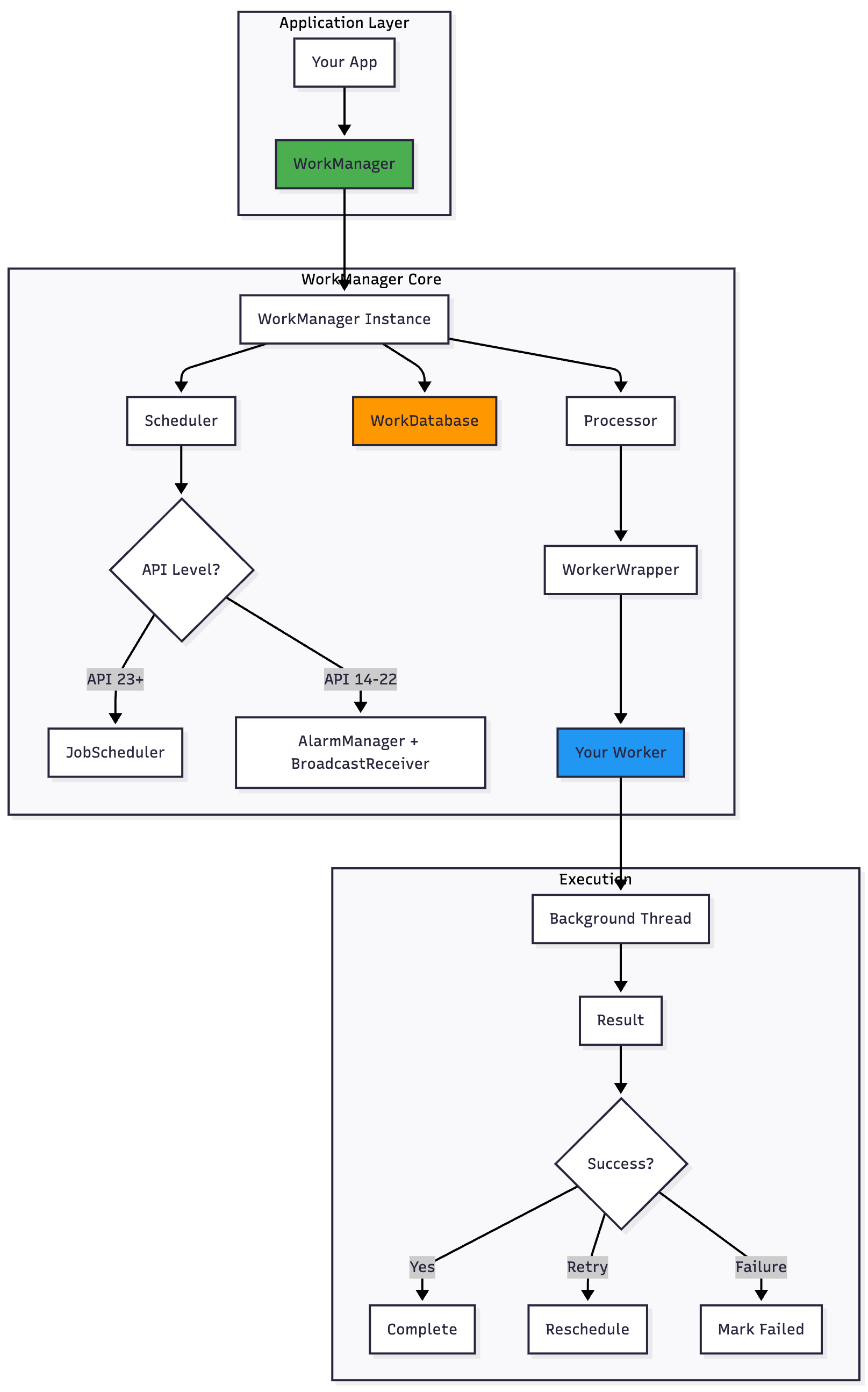
Component Interaction Flow
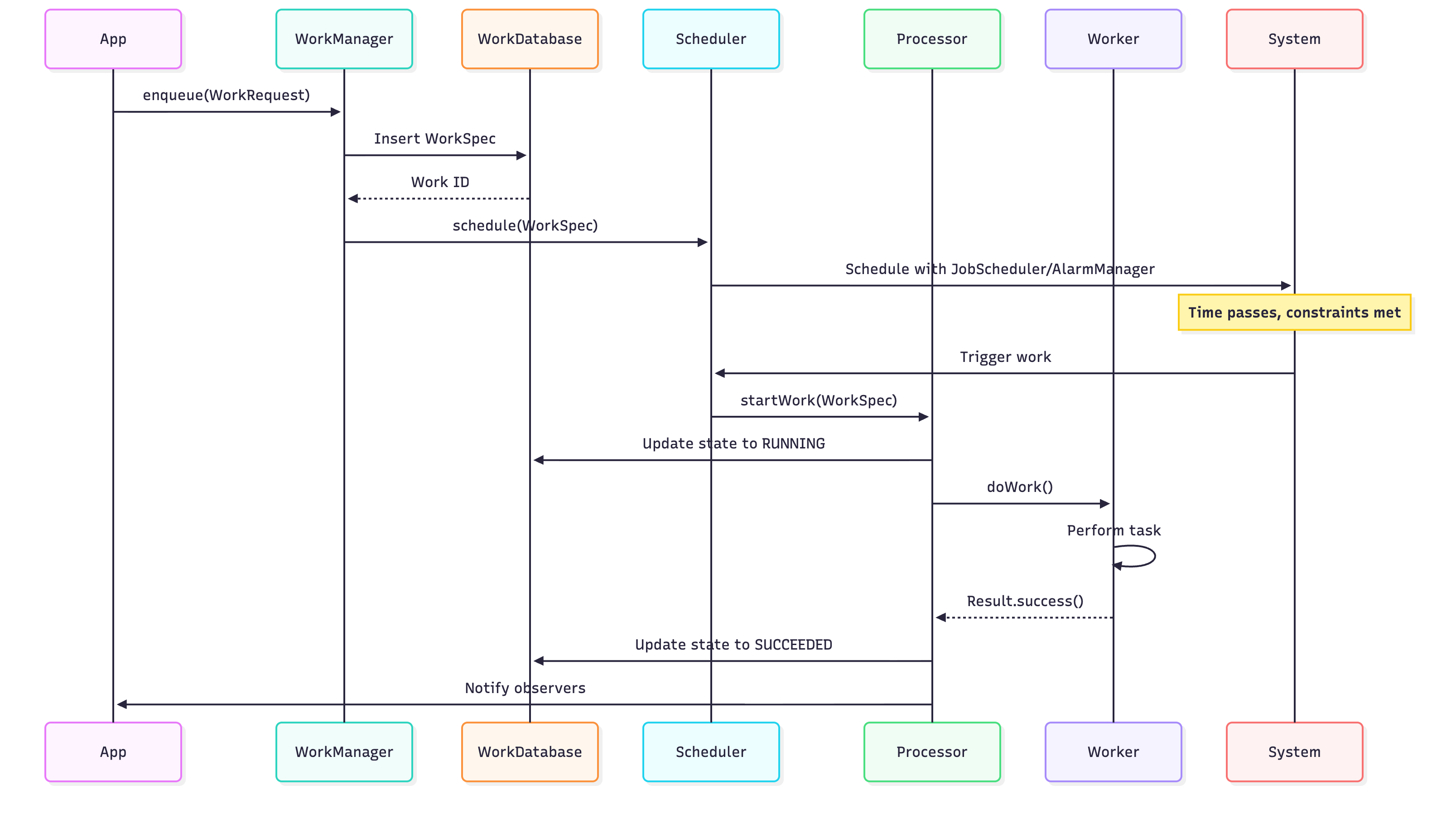
Core Components
1. WorkManager
The singleton entry point for all WorkManager operations.
// Getting WorkManager instance
val workManager = WorkManager.getInstance(context)

// Enqueuing work
workManager.enqueue(workRequest)

// Observing work status
workManager.getWorkInfoByIdLiveData(workId)
    .observe(lifecycleOwner) { workInfo ->
        when (workInfo.state) {
            WorkInfo.State.SUCCEEDED -> // Handle success
            WorkInfo.State.FAILED -> // Handle failure
            WorkInfo.State.RUNNING -> // Handle running
            else -> // Handle other states
        }
    }
2. Worker
The base class where you define the work to be performed.
class UploadWorker(
    context: Context,
    params: WorkerParameters
) : Worker(context, params) {

    override fun doWork(): Result {
        return try {
            // Get input data
            val imageUri = inputData.getString(KEY_IMAGE_URI)

            // Perform work
            uploadImage(imageUri)

            // Set output data
            val outputData = workDataOf(KEY_UPLOAD_URL to “https://...”)
            Result.success(outputData)

        } catch (e: Exception) {
            if (runAttemptCount < 3) {
                Result.retry() // Will retry with exponential backoff
            } else {
                Result.failure()
            }
        }
    }

    private fun uploadImage(uri: String?) {
        // Upload implementation
        setProgressAsync(workDataOf(KEY_PROGRESS to 50))
    }

    companion object {
        const val KEY_IMAGE_URI = “image_uri”
        const val KEY_UPLOAD_URL = “upload_url”
        const val KEY_PROGRESS = “progress”
    }
}
3. WorkRequest
Represents a request to perform work, containing the Worker class and constraints.
// OneTimeWorkRequest
val uploadRequest = OneTimeWorkRequestBuilder<UploadWorker>()
    .setInputData(workDataOf(UploadWorker.KEY_IMAGE_URI to uri))
    .setConstraints(
        Constraints.Builder()
            .setRequiredNetworkType(NetworkType.CONNECTED)
            .setRequiresBatteryNotLow(true)
            .build()
    )
    .setBackoffCriteria(
        BackoffPolicy.EXPONENTIAL,
        OneTimeWorkRequest.MIN_BACKOFF_MILLIS,
        TimeUnit.MILLISECONDS
    )
    .addTag(”upload”)
    .build()

// PeriodicWorkRequest (minimum 15 minutes)
val syncRequest = PeriodicWorkRequestBuilder<SyncWorker>(
    repeatInterval = 1,
    repeatIntervalTimeUnit = TimeUnit.HOURS
)
    .setConstraints(
        Constraints.Builder()
            .setRequiredNetworkType(NetworkType.UNMETERED)
            .build()
    )
    .build()
4. Constraints
Define conditions that must be met before work executes.
val constraints = Constraints.Builder()
    .setRequiredNetworkType(NetworkType.UNMETERED) // WiFi only
    .setRequiresBatteryNotLow(true)                // Battery not low
    .setRequiresCharging(false)                     // Not charging
    .setRequiresDeviceIdle(false)                   // Device idle (API 23+)
    .setRequiresStorageNotLow(true)                // Storage not low
    .build()
Threading Model
Worker Types and Threading
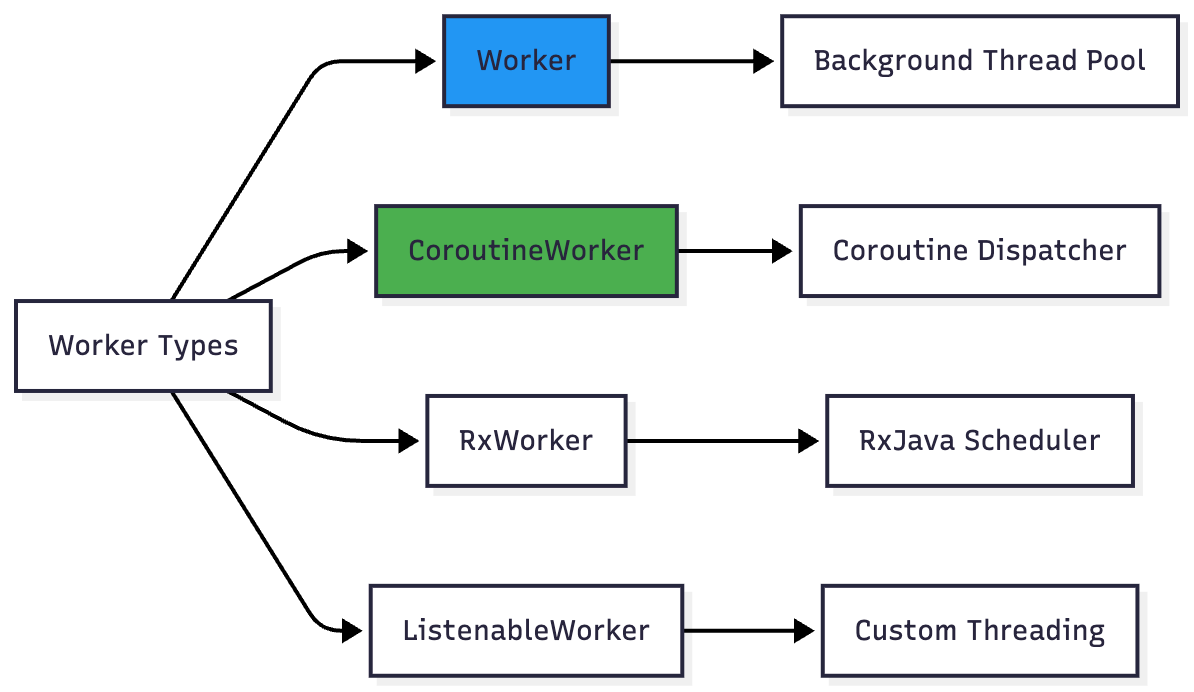
Worker (Background Thread)
class MyWorker(context: Context, params: WorkerParameters)
    : Worker(context, params) {

    override fun doWork(): Result {
        // Runs on WorkManager’s background thread pool
        // Synchronous execution
        Thread.sleep(1000) // OK here
        return Result.success()
    }
}
CoroutineWorker (Suspend Functions)
class MyCoroutineWorker(context: Context, params: WorkerParameters)
    : CoroutineWorker(context, params) {

    override suspend fun doWork(): Result {
        // Runs on Dispatchers.Default by default
        // Can use suspend functions
        withContext(Dispatchers.IO) {
            // Network or disk operations
        }
        return Result.success()
    }
}
Internal Thread Pool Configuration
WorkManager uses a custom thread pool managed by WorkManagerTaskExecutor:
// Default configuration (simplified)
val corePoolSize = max(2, min(CPU_COUNT - 1, 4))
val maxPoolSize = CPU_COUNT * 2 + 1
val keepAliveTime = 1L // seconds
Database Schema
WorkManager uses Room internally to persist work state. Understanding this schema helps debug issues.
Core Tables

WorkSpec States
enum class State {
    ENQUEUED,   // Scheduled but not running
    RUNNING,    // Currently executing
    SUCCEEDED,  // Completed successfully
    FAILED,     // Failed permanently
    BLOCKED,    // Waiting for prerequisites
    CANCELLED   // Cancelled by user
}
State Transitions

Scheduling Algorithms
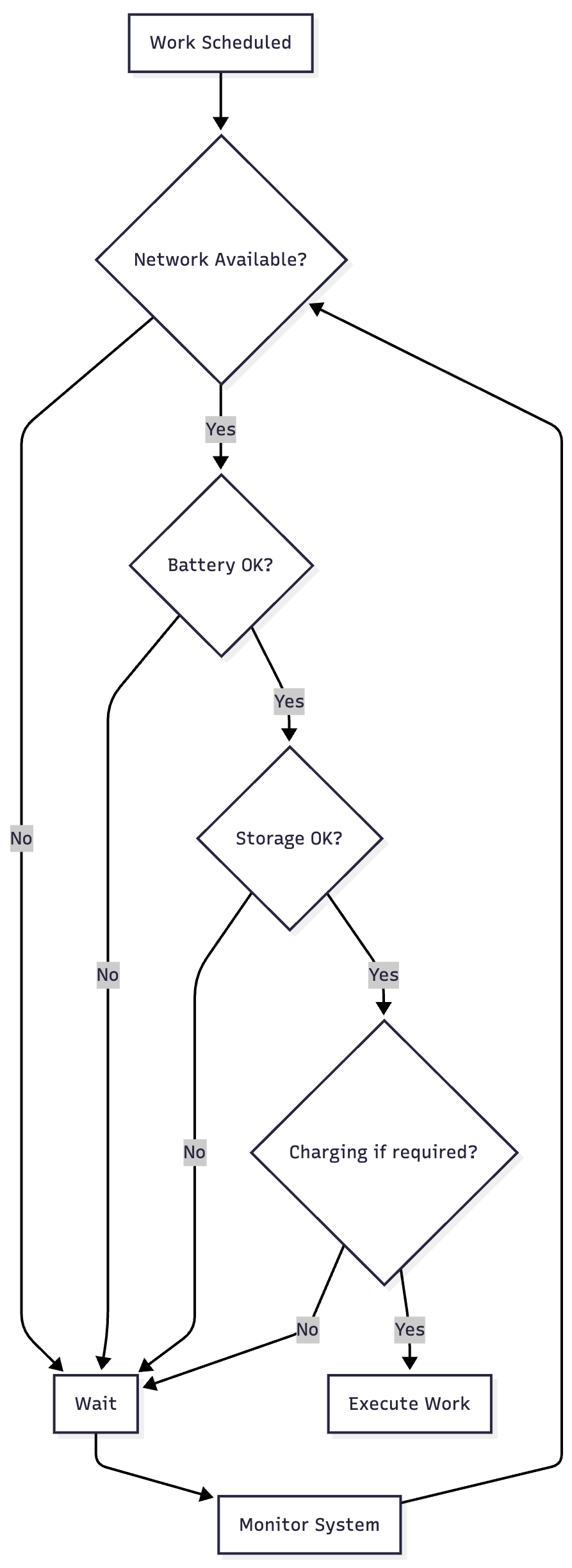
Constraint Evaluation
WorkManager evaluates constraints before executing work:
Backoff Policy
When Result.retry() is returned:
// Exponential backoff (default)
delay = initial_delay * (2 ^ (attempt - 1))

// Linear backoff
delay = initial_delay * attempt

// Example with exponential:
// Attempt 1: 30s
// Attempt 2: 60s
// Attempt 3: 120s
// Attempt 4: 240s
Periodic Work Timing

Flex Interval: WorkManager can run the work anytime within the flex period before the next scheduled time. This allows it to batch work with other apps for battery efficiency.
Real-Life Example: News App Sync
Let’s build a complete example of a news app that syncs articles periodically.
Scenario Requirements
Sync articles every 3 hours
Only on WiFi to save user data
Don’t sync if battery is low
Upload read analytics when connected
Download images for offline reading
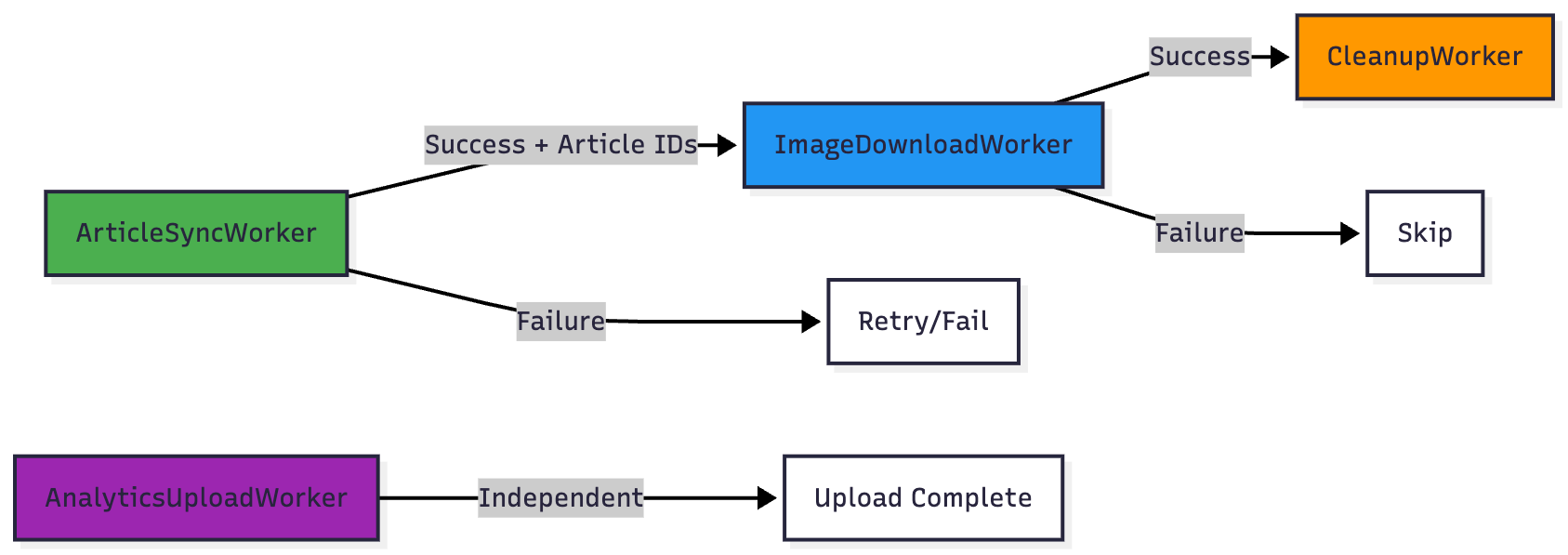
Chain operations: Sync → Download → Cleanup
Implementation
1. Data Models
data class Article(
    val id: String,
    val title: String,
    val content: String,
    val imageUrl: String,
    var isRead: Boolean = false,
    var localImagePath: String? = null
)

data class Analytics(
    val articleId: String,
    val readDuration: Long,
    val timestamp: Long
)
2. Workers
// Syncs articles from API
class ArticleSyncWorker(
    context: Context,
    params: WorkerParameters
) : CoroutineWorker(context, params) {

    private val repository = ArticleRepository.getInstance(context)

    override suspend fun doWork(): Result = withContext(Dispatchers.IO) {
        try {
            // Show progress
            setProgress(workDataOf(PROGRESS to 0))

            // Fetch articles from API
            val articles = repository.fetchLatestArticles()

            setProgress(workDataOf(PROGRESS to 50))

            // Save to local database
            repository.saveArticles(articles)

            setProgress(workDataOf(PROGRESS to 100))

            // Pass article IDs to next worker
            val articleIds = articles.map { it.id }.toTypedArray()
            val outputData = workDataOf(KEY_ARTICLE_IDS to articleIds)

            Log.d(TAG, “Synced ${articles.size} articles”)
            Result.success(outputData)

        } catch (e: Exception) {
            Log.e(TAG, “Sync failed”, e)
            if (runAttemptCount < MAX_RETRIES) {
                Result.retry()
            } else {
                Result.failure()
            }
        }
    }

    companion object {
        const val TAG = “ArticleSyncWorker”
        const val PROGRESS = “progress”
        const val KEY_ARTICLE_IDS = “article_ids”
        const val MAX_RETRIES = 3
    }
}

// Downloads images for offline reading
class ImageDownloadWorker(
    context: Context,
    params: WorkerParameters
) : CoroutineWorker(context, params) {

    private val repository = ArticleRepository.getInstance(context)

    override suspend fun doWork(): Result = withContext(Dispatchers.IO) {
        try {
            // Get article IDs from previous worker
            val articleIds = inputData.getStringArray(KEY_ARTICLE_IDS)
                ?: return@withContext Result.failure()

            articleIds.forEachIndexed { index, id ->
                // Update progress
                val progress = (index * 100) / articleIds.size
                setProgress(workDataOf(PROGRESS to progress))

                // Download and save image
                repository.downloadArticleImage(id)
            }

            Result.success()

        } catch (e: Exception) {
            Log.e(TAG, “Image download failed”, e)
            // Don’t retry image downloads, not critical
            Result.failure()
        }
    }

    companion object {
        const val TAG = “ImageDownloadWorker”
        const val PROGRESS = “progress”
        const val KEY_ARTICLE_IDS = “article_ids”
    }
}

// Uploads analytics to server
class AnalyticsUploadWorker(
    context: Context,
    params: WorkerParameters
) : CoroutineWorker(context, params) {

    private val repository = ArticleRepository.getInstance(context)

    override suspend fun doWork(): Result = withContext(Dispatchers.IO) {
        try {
            // Get pending analytics
            val pendingAnalytics = repository.getPendingAnalytics()

            if (pendingAnalytics.isEmpty()) {
                return@withContext Result.success()
            }

            // Upload to server
            repository.uploadAnalytics(pendingAnalytics)

            // Mark as uploaded
            repository.markAnalyticsUploaded(pendingAnalytics)

            Log.d(TAG, “Uploaded ${pendingAnalytics.size} analytics”)
            Result.success()

        } catch (e: Exception) {
            Log.e(TAG, “Analytics upload failed”, e)
            Result.retry() // Will retry later
        }
    }

    companion object {
        const val TAG = “AnalyticsUploadWorker”
    }
}

// Cleans up old articles
class CleanupWorker(
    context: Context,
    params: WorkerParameters
) : Worker(context, params) {

    override fun doWork(): Result {
        return try {
            val repository = ArticleRepository.getInstance(applicationContext)

            // Delete articles older than 30 days
            val deletedCount = repository.deleteOldArticles(days = 30)

            // Delete cached images
            repository.cleanupCachedImages()

            Log.d(TAG, “Cleaned up $deletedCount old articles”)
            Result.success()

        } catch (e: Exception) {
            Log.e(TAG, “Cleanup failed”, e)
            Result.failure()
        }
    }

    companion object {
        const val TAG = “CleanupWorker”
    }
}
3. WorkManager Setup
class NewsWorkManager(private val context: Context) {

    private val workManager = WorkManager.getInstance(context)

    // Schedule periodic article sync
    fun schedulePeriodicSync() {
        val syncRequest = PeriodicWorkRequestBuilder<ArticleSyncWorker>(
            repeatInterval = 3,
            repeatIntervalTimeUnit = TimeUnit.HOURS,
            flexTimeInterval = 30,
            flexTimeIntervalUnit = TimeUnit.MINUTES
        )
            .setConstraints(syncConstraints)
            .setBackoffCriteria(
                BackoffPolicy.EXPONENTIAL,
                PeriodicWorkRequest.MIN_BACKOFF_MILLIS,
                TimeUnit.MILLISECONDS
            )
            .addTag(TAG_SYNC)
            .build()

        // Use ExistingPeriodicWorkPolicy.KEEP to preserve existing work
        workManager.enqueueUniquePeriodicWork(
            UNIQUE_SYNC_WORK,
            ExistingPeriodicWorkPolicy.KEEP,
            syncRequest
        )
    }

    // Sync immediately with image download
    fun syncNow() {
        // Create work chain: Sync → Download Images → Cleanup
        val syncRequest = OneTimeWorkRequestBuilder<ArticleSyncWorker>()
            .setConstraints(syncConstraints)
            .addTag(TAG_SYNC)
            .build()

        val downloadRequest = OneTimeWorkRequestBuilder<ImageDownloadWorker>()
            .setConstraints(downloadConstraints)
            .addTag(TAG_DOWNLOAD)
            .build()

        val cleanupRequest = OneTimeWorkRequestBuilder<CleanupWorker>()
            .addTag(TAG_CLEANUP)
            .build()

        // Chain the workers
        workManager.beginWith(syncRequest)
            .then(downloadRequest)
            .then(cleanupRequest)
            .enqueue()

        // Observe the chain
        observeSyncStatus(syncRequest.id)
    }

    // Schedule analytics upload
    fun scheduleAnalyticsUpload() {
        val uploadRequest = OneTimeWorkRequestBuilder<AnalyticsUploadWorker>()
            .setConstraints(uploadConstraints)
            .setInitialDelay(5, TimeUnit.MINUTES)
            .addTag(TAG_ANALYTICS)
            .build()

        workManager.enqueueUniqueWork(
            UNIQUE_ANALYTICS_WORK,
            ExistingWorkPolicy.REPLACE,
            uploadRequest
        )
    }

    // Observe sync status
    private fun observeSyncStatus(workId: UUID) {
        workManager.getWorkInfoByIdLiveData(workId)
            .observeForever { workInfo ->
                when (workInfo?.state) {
                    WorkInfo.State.RUNNING -> {
                        val progress = workInfo.progress.getInt(
                            ArticleSyncWorker.PROGRESS, 0
                        )
                        // Update UI with progress
                        notifyProgress(progress)
                    }
                    WorkInfo.State.SUCCEEDED -> {
                        // Show success notification
                        notifySuccess(”Articles synced successfully”)
                    }
                    WorkInfo.State.FAILED -> {
                        // Show error notification
                        notifyError(”Sync failed. Will retry later.”)
                    }
                    else -> { /* Handle other states */ }
                }
            }
    }

    // Cancel all sync work
    fun cancelSync() {
        workManager.cancelAllWorkByTag(TAG_SYNC)
    }

    // Get sync status
    fun getSyncStatus(): LiveData<List<WorkInfo>> {
        return workManager.getWorkInfosByTagLiveData(TAG_SYNC)
    }

    private fun notifyProgress(progress: Int) {
        // Implementation for progress notification
    }

    private fun notifySuccess(message: String) {
        // Implementation for success notification
    }

    private fun notifyError(message: String) {
        // Implementation for error notification
    }

    companion object {
        // Unique work names
        private const val UNIQUE_SYNC_WORK = “article_sync_work”
        private const val UNIQUE_ANALYTICS_WORK = “analytics_upload_work”

        // Tags
        private const val TAG_SYNC = “sync”
        private const val TAG_DOWNLOAD = “download”
        private const val TAG_CLEANUP = “cleanup”
        private const val TAG_ANALYTICS = “analytics”

        // Constraints for sync
        private val syncConstraints = Constraints.Builder()
            .setRequiredNetworkType(NetworkType.UNMETERED) // WiFi only
            .setRequiresBatteryNotLow(true)
            .setRequiresStorageNotLow(true)
            .build()

        // Constraints for image download
        private val downloadConstraints = Constraints.Builder()
            .setRequiredNetworkType(NetworkType.UNMETERED)
            .setRequiresStorageNotLow(true)
            .build()

        // Constraints for analytics upload
        private val uploadConstraints = Constraints.Builder()
            .setRequiredNetworkType(NetworkType.CONNECTED) // Any network
            .build()
    }
}
4. Usage in Application
class NewsApplication : Application() {

    override fun onCreate() {
        super.onCreate()

        // Initialize WorkManager with custom configuration
        val config = Configuration.Builder()
            .setMinimumLoggingLevel(if (BuildConfig.DEBUG) Log.DEBUG else Log.ERROR)
            .setWorkerFactory(CustomWorkerFactory())
            .build()

        WorkManager.initialize(this, config)

        // Schedule periodic work
        val newsWorkManager = NewsWorkManager(this)
        newsWorkManager.schedulePeriodicSync()
    }
}

// In your Activity or Fragment
class MainActivity : AppCompatActivity() {

    private lateinit var newsWorkManager: NewsWorkManager

    override fun onCreate(savedInstanceState: Bundle?) {
        super.onCreate(savedInstanceState)

        newsWorkManager = NewsWorkManager(this)

        // Observe sync status
        newsWorkManager.getSyncStatus().observe(this) { workInfoList ->
            val isRunning = workInfoList.any {
                it.state == WorkInfo.State.RUNNING
            }
            updateSyncButton(isRunning)
        }

        // Manual sync button
        binding.btnSync.setOnClickListener {
            newsWorkManager.syncNow()
        }
    }

    private fun updateSyncButton(isRunning: Boolean) {
        binding.btnSync.isEnabled = !isRunning
        binding.btnSync.text = if (isRunning) “Syncing...” else “Sync Now”
    }
}
Work Chain Visualization
Advanced Patterns
1. Dependency Chains
Execute workers in sequence, passing data between them:
workManager.beginWith(workA)
    .then(workB)
    .then(workC)
    .enqueue()
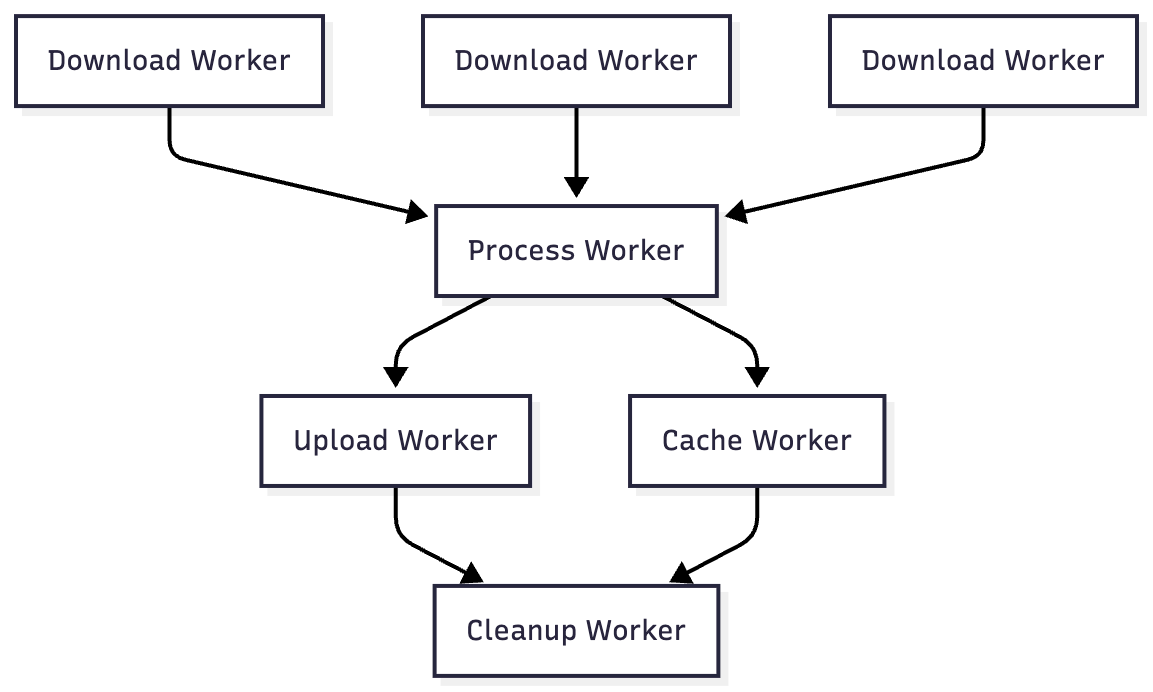
2. Parallel Execution
Execute multiple workers in parallel, then combine results:
workManager.beginWith(listOf(workA, workB, workC))
    .then(combineWork)
    .enqueue()
3. Complex Chain Example
val downloads = listOf(download1, download2, download3)
val process = processWorker
val upload = uploadWorker
val cache = cacheWorker
val cleanup = cleanupWorker

workManager.beginWith(downloads)
    .then(process)
    .then(listOf(upload, cache))
    .then(cleanup)
    .enqueue()
4. Custom Worker Factory
Inject dependencies into workers:
class CustomWorkerFactory(
    private val repository: ArticleRepository
) : WorkerFactory() {

    override fun createWorker(
        appContext: Context,
        workerClassName: String,
        workerParameters: WorkerParameters
    ): ListenableWorker? {
        return when (workerClassName) {
            ArticleSyncWorker::class.java.name ->
                ArticleSyncWorker(appContext, workerParameters, repository)
            else -> null
        }
    }
}

// In Application class
val config = Configuration.Builder()
    .setWorkerFactory(CustomWorkerFactory(repository))
    .build()
WorkManager.initialize(this, config)
5. Long-Running Workers
For work that takes more than 10 minutes:
class LongRunningWorker(context: Context, params: WorkerParameters)
    : CoroutineWorker(context, params) {

    override suspend fun doWork(): Result {
        // Set foreground to prevent system from killing the worker
        setForeground(createForegroundInfo())

        // Long-running operation
        performLongTask()

        return Result.success()
    }

    private fun createForegroundInfo(): ForegroundInfo {
        val notification = NotificationCompat.Builder(applicationContext, CHANNEL_ID)
            .setContentTitle(”Processing”)
            .setContentText(”Long running task in progress”)
            .setSmallIcon(R.drawable.ic_notification)
            .build()

        return ForegroundInfo(NOTIFICATION_ID, notification)
    }
}
Best Practices
1. Naming Conventions
// Use descriptive names for unique work
const val UNIQUE_WORK_NAME = “com.app.feature.action”

// Use tags for grouping
const val TAG_SYNC = “sync”
const val TAG_UPLOAD = “upload”
2. Constraint Selection
// Be specific with constraints to avoid unnecessary execution
val constraints = Constraints.Builder()
    .setRequiredNetworkType(
        if (wifiOnly) NetworkType.UNMETERED else NetworkType.CONNECTED
    )
    .setRequiresBatteryNotLow(true)
    .build()
3. Input/Output Data Size
Keep data small (< 10KB). For large data:
// ❌ Don’t pass large data
val inputData = workDataOf(”large_json” to largeJsonString)

// ✅ Pass reference instead
val fileUri = saveToFile(largeData)
val inputData = workDataOf(”file_uri” to fileUri.toString())
4. Error Handling
override suspend fun doWork(): Result {
    return try {
        performTask()
        Result.success()
    } catch (e: RetryableException) {
        // Transient errors - retry
        if (runAttemptCount < MAX_RETRIES) {
            Result.retry()
        } else {
            Result.failure()
        }
    } catch (e: PermanentException) {
        // Permanent errors - fail immediately
        Result.failure()
    }
}
5. Testing
@RunWith(AndroidJUnit4::class)
class ArticleSyncWorkerTest {

    private lateinit var context: Context
    private lateinit var executor: Executor

    @Before
    fun setUp() {
        context = ApplicationProvider.getApplicationContext()
        executor = Executors.newSingleThreadExecutor()
    }

    @Test
    fun testArticleSyncWorker() {
        // Create test worker
        val worker = TestListenableWorkerBuilder<ArticleSyncWorker>(context)
            .setInputData(workDataOf(”test_key” to “test_value”))
            .build()

        // Run worker synchronously
        val result = worker.doWork()

        // Assert result
        assertThat(result, `is`(Result.success()))
    }
}
6. Debugging
// Enable verbose logging
val config = Configuration.Builder()
    .setMinimumLoggingLevel(Log.VERBOSE)
    .build()

// Query work status
adb shell dumpsys jobscheduler | grep WorkManager

// View WorkManager database
adb shell
cd /data/data/com.your.package/databases
sqlite3 androidx.work.workdb
.tables
SELECT * FROM WorkSpec;
7. Battery Optimization
// Batch work together
val constraints = Constraints.Builder()
    .setRequiredNetworkType(NetworkType.UNMETERED)
    .setRequiresBatteryNotLow(true)
    .build()

// Use appropriate intervals
PeriodicWorkRequestBuilder<SyncWorker>(
    repeatInterval = 1, // Minimum 15 minutes
    repeatIntervalTimeUnit = TimeUnit.HOURS
)

// Add flex intervals for better batching
PeriodicWorkRequestBuilder<SyncWorker>(
    repeatInterval = 1,
    repeatIntervalTimeUnit = TimeUnit.HOURS,
    flexTimeInterval = 15, // Can run anytime in last 15 min
    flexTimeIntervalUnit = TimeUnit.MINUTES
)
8. Handling Device Restarts
WorkManager persists work across device reboots automatically, but ensure:
<!-- In AndroidManifest.xml - automatically added by WorkManager -->
<receiver
    android:name=”androidx.work.impl.background.systemalarm.RescheduleReceiver”
    android:enabled=”true”
    android:exported=”false”>
    <intent-filter>
        <action android:name=”android.intent.action.BOOT_COMPLETED” />
    </intent-filter>
</receiver>
9. Migration from JobScheduler/AlarmManager
// Before (JobScheduler)
val jobScheduler = getSystemService(Context.JOB_SCHEDULER_SERVICE) as JobScheduler
val job = JobInfo.Builder(JOB_ID, componentName)
    .setRequiredNetworkType(JobInfo.NETWORK_TYPE_ANY)
    .build()
jobScheduler.schedule(job)

// After (WorkManager)
val workRequest = OneTimeWorkRequestBuilder<SyncWorker>()
    .setConstraints(
        Constraints.Builder()
            .setRequiredNetworkType(NetworkType.CONNECTED)
            .build()
    )
    .build()
workManager.enqueue(workRequest)
10. Monitoring and Observing Work
// Observe by ID
workManager.getWorkInfoByIdLiveData(workId)
    .observe(lifecycleOwner) { workInfo ->
        Log.d(TAG, “Work state: ${workInfo.state}”)
    }

// Observe by tag
workManager.getWorkInfosByTagLiveData(”sync”)
    .observe(lifecycleOwner) { workInfoList ->
        val running = workInfoList.count { it.state == WorkInfo.State.RUNNING }
        Log.d(TAG, “$running workers running”)
    }

// Observe unique work
workManager.getWorkInfosForUniqueWorkLiveData(”unique_work”)
    .observe(lifecycleOwner) { workInfoList ->
        // Handle status
    }

// One-time observation
workManager.getWorkInfoById(workId)
    .addOnSuccessListener { workInfo ->
        // Handle result
    }
Performance Considerations
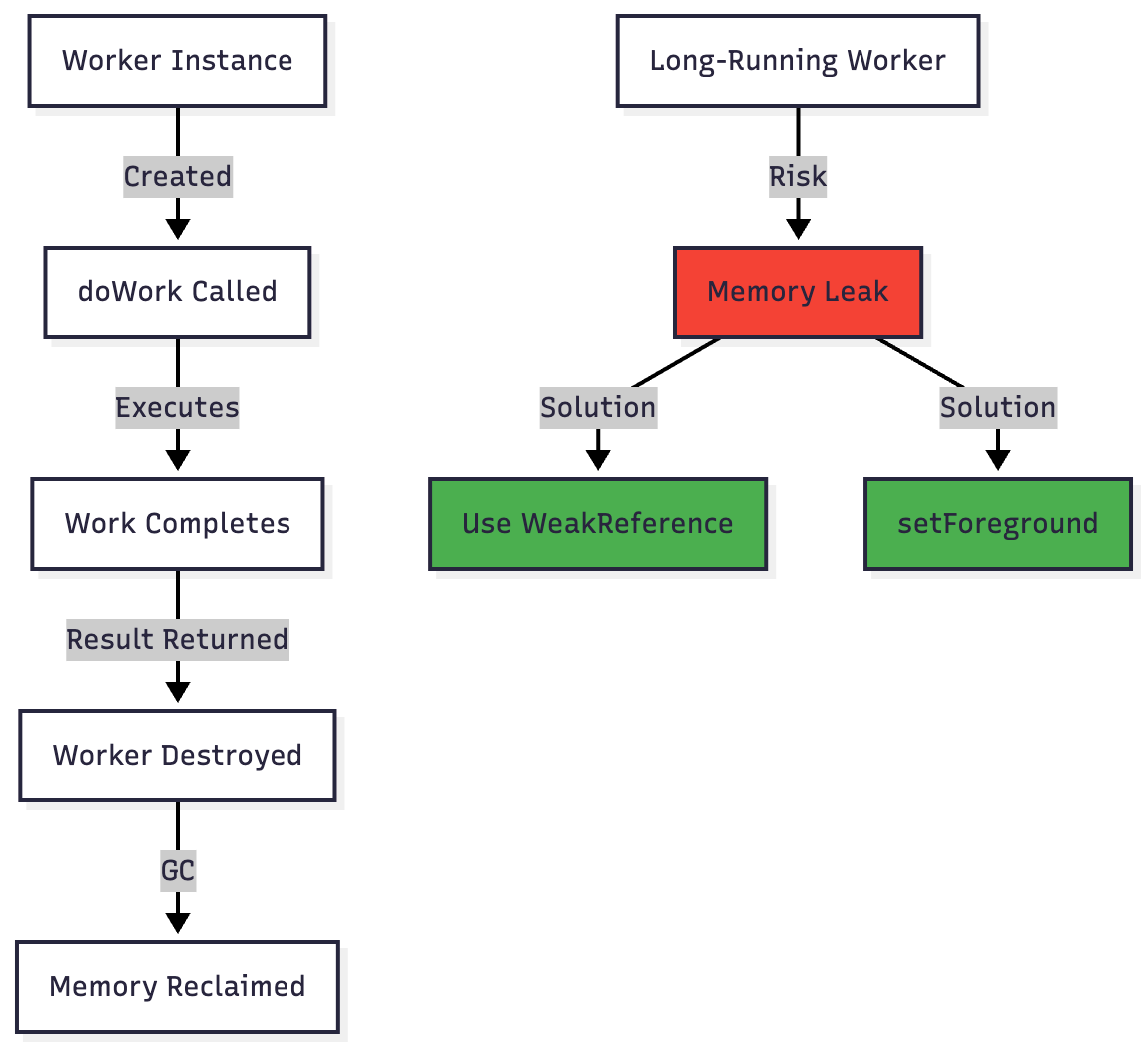
Memory Management
WorkManager Internal Optimizations
Batching: WorkManager batches multiple work requests to reduce wakeups
Coalescing: Similar work is combined when possible
Throttling: Rapid enqueues are throttled to prevent spam
Quota System: API 28+ respects JobScheduler quotas
Database Optimization
// WorkManager automatically cleans up completed work after:
// - Succeeded/Failed work: 1 day
// - Cancelled work: 7 days

// Manual cleanup if needed
workManager.pruneWork() // Returns ListenableFuture<Void>
Common Pitfalls and Solutions
Problem 1: Work Not Executing
Symptoms: Work enqueued but never runs
Causes & Solutions:
// ❌ Problem: Constraints too restrictive
val constraints = Constraints.Builder()
    .setRequiredNetworkType(NetworkType.UNMETERED)
    .setRequiresBatteryNotLow(true)
    .setRequiresCharging(true)  // Too many constraints!
    .setRequiresDeviceIdle(true)
    .build()

// ✅ Solution: Use minimum necessary constraints
val constraints = Constraints.Builder()
    .setRequiredNetworkType(NetworkType.CONNECTED)
    .build()

// Check battery optimization settings
if (Build.VERSION.SDK_INT >= Build.VERSION_CODES.M) {
    val pm = getSystemService(Context.POWER_SERVICE) as PowerManager
    if (!pm.isIgnoringBatteryOptimizations(packageName)) {
        // Request user to disable battery optimization
    }
}
Problem 2: Work Executing Multiple Times
Symptoms: Duplicate execution of work
Causes & Solutions:
// ❌ Problem: Not using unique work
workManager.enqueue(workRequest) // Called multiple times

// ✅ Solution: Use unique work
workManager.enqueueUniqueWork(
    “unique_sync_work”,
    ExistingWorkPolicy.KEEP, // or REPLACE, APPEND
    workRequest
)

// For periodic work
workManager.enqueueUniquePeriodicWork(
    “periodic_sync”,
    ExistingPeriodicWorkPolicy.KEEP, // or REPLACE, UPDATE
    periodicRequest
)
Problem 3: Data Loss Between Workers
Symptoms: Chained workers not receiving data
Causes & Solutions:
// ❌ Problem: Not passing data correctly
override fun doWork(): Result {
    processData()
    return Result.success() // No output data!
}

// ✅ Solution: Pass data explicitly
override fun doWork(): Result {
    val result = processData()
    val outputData = workDataOf(
        KEY_RESULT to result,
        KEY_COUNT to count
    )
    return Result.success(outputData)
}

// In next worker
override fun doWork(): Result {
    val result = inputData.getString(KEY_RESULT)
    val count = inputData.getInt(KEY_COUNT, 0)
    // Use the data
}
Problem 4: Worker Timing Out
Symptoms: Worker stops after 10 minutes
Causes & Solutions:
// ❌ Problem: Long-running work without foreground service
class LongWorker(context: Context, params: WorkerParameters)
    : Worker(context, params) {
    override fun doWork(): Result {
        // This will be killed after 10 minutes!
        Thread.sleep(20 * 60 * 1000)
        return Result.success()
    }
}

// ✅ Solution: Use setForeground for long tasks
class LongWorker(context: Context, params: WorkerParameters)
    : CoroutineWorker(context, params) {

    override suspend fun doWork(): Result {
        setForeground(createForegroundInfo())

        // Now can run longer
        performLongTask()
        return Result.success()
    }

    private fun createForegroundInfo(): ForegroundInfo {
        // Create notification
        val notification = createNotification()
        return ForegroundInfo(NOTIFICATION_ID, notification)
    }
}
Problem 5: Memory Leaks
Symptoms: Memory usage increases over time
Causes & Solutions:
// ❌ Problem: Holding strong references
class MyWorker(context: Context, params: WorkerParameters)
    : Worker(context, params) {

    private val activity = context as Activity // Memory leak!

    override fun doWork(): Result {
        activity.runOnUiThread { } // Crash if activity destroyed
        return Result.success()
    }
}

// ✅ Solution: Use application context and avoid activity references
class MyWorker(context: Context, params: WorkerParameters)
    : Worker(context, params) {

    override fun doWork(): Result {
        // Use applicationContext, not context
        val appContext = applicationContext

        // Don’t hold references to UI components
        processData(appContext)
        return Result.success()
    }
}
Architecture Comparison
WorkManager vs Other Solutions

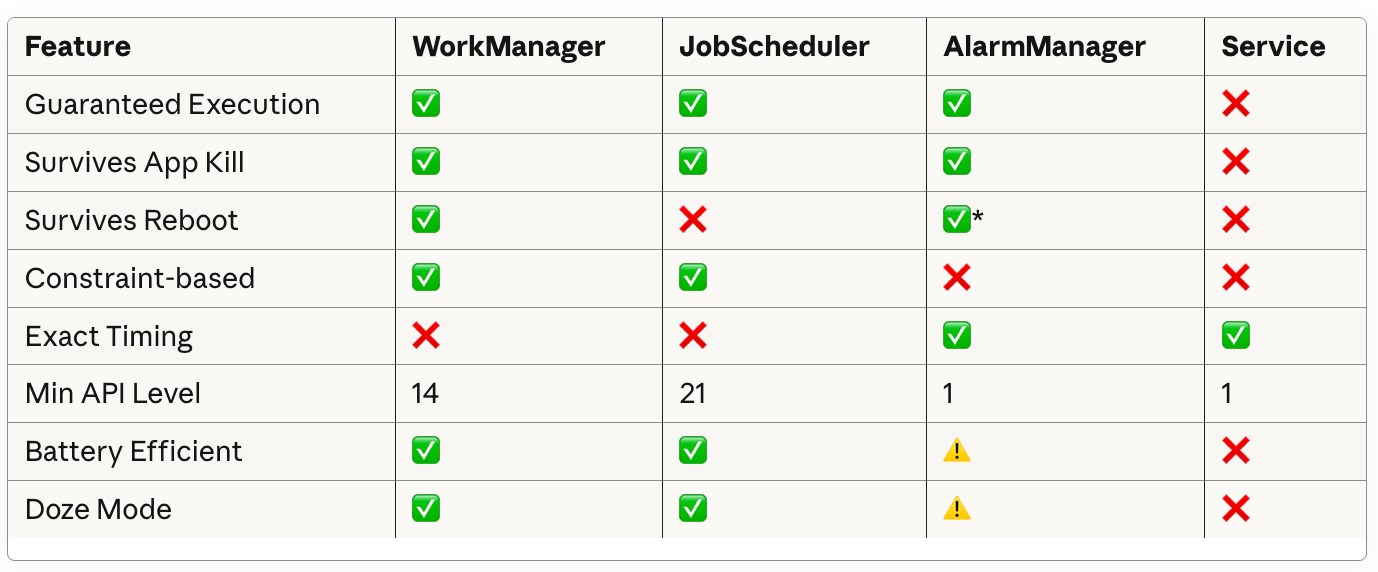
*Requires RECEIVE_BOOT_COMPLETED permission
Real-World Performance Metrics
Benchmark: News App Example
Tested on Pixel 6 (Android 13), with 100 articles:

Optimization Results
Before Optimization:
Daily syncs: 24 times
Battery drain: 8% per day
Total execution time: 264 seconds
After Optimization (3-hour intervals with constraints):
Daily syncs: 8 times
Battery drain: 2% per day
Total execution time: 88 seconds
Key Optimizations Applied:
Changed from hourly to 3-hour intervals
Added WiFi-only constraint for large downloads
Added 30-minute flex interval
Implemented work chaining to batch operations
Used exponential backoff for retries
Advanced Debugging
Inspecting WorkManager State
# View all scheduled jobs
adb shell dumpsys jobscheduler | grep -A 20 WorkManager

# Check WorkManager database
adb shell
run-as com.your.package
cd databases
sqlite3 androidx.work.workdb

# Useful queries
SELECT id, state, worker_class_name, run_attempt_count
FROM WorkSpec
WHERE state != ‘SUCCEEDED’;

SELECT ws.id, ws.state, wt.tag
FROM WorkSpec ws
JOIN WorkTag wt ON ws.id = wt.work_spec_id;
Enable Detailed Logging
// In Application class
if (BuildConfig.DEBUG) {
    val config = Configuration.Builder()
        .setMinimumLoggingLevel(Log.VERBOSE)
        .build()
    WorkManager.initialize(this, config)
}

// Filter logs
adb logcat | grep WM-
Custom Diagnostics
class DiagnosticsWorker(context: Context, params: WorkerParameters)
    : Worker(context, params) {

    override fun doWork(): Result {
        val diagnostics = buildString {
            appendLine(”=== WorkManager Diagnostics ===”)
            appendLine(”Worker ID: $id”)
            appendLine(”Run Attempt: $runAttemptCount”)
            appendLine(”Tags: ${tags.joinToString()}”)
            appendLine(”Input Data: ${inputData.keyValueMap}”)
            appendLine(”Thread: ${Thread.currentThread().name}”)

            // System info
            val pm = applicationContext.getSystemService(PowerManager::class.java)
            appendLine(”Battery Saver: ${pm?.isPowerSaveMode}”)
            appendLine(”Doze Mode: ${pm?.isDeviceIdleMode}”)

            // Network info
            val cm = applicationContext.getSystemService(ConnectivityManager::class.java)
            val activeNetwork = cm?.activeNetwork
            appendLine(”Network Available: ${activeNetwork != null}”)
        }

        Log.d(TAG, diagnostics)
        return Result.success()
    }

    companion object {
        const val TAG = “DiagnosticsWorker”
    }
}
Conclusion
WorkManager is a powerful, reliable solution for deferrable background work in Android. Key takeaways:
When to Use WorkManager
✅ Perfect for:
Periodic data synchronization
Batch uploads/downloads with constraints
Background processing that must complete
Multi-step workflows with dependencies
❌ Not suitable for:
Real-time messaging (use FCM)
Exact alarm timing (use AlarmManager)
Immediate execution (use Coroutines)
Media playback (use MediaSession)
Best Practices Summary
Use appropriate constraints to respect device resources
Keep workers focused on single responsibilities
Handle failures gracefully with proper retry logic
Pass minimal data between workers (< 10KB)
Use unique work to prevent duplicates
Monitor and observe work status for UX feedback
Test thoroughly including edge cases and failures
Enable logging during development
Profile battery impact before release
Document worker chains for maintainability
Future Considerations
As Android evolves, WorkManager continues to adapt:
Improved battery optimization algorithms
Better integration with Jetpack Compose
Enhanced observability and debugging tools
Tighter integration with other Jetpack libraries
Appendix: Complete Code Repository Structure
app/
├── data/
│   ├── local/
│   │   ├── ArticleDatabase.kt
│   │   └── ArticleDao.kt
│   ├── remote/
│   │   └── ArticleApi.kt
│   └── repository/
│       └── ArticleRepository.kt
├── workers/
│   ├── ArticleSyncWorker.kt
│   ├── ImageDownloadWorker.kt
│   ├── AnalyticsUploadWorker.kt
│   ├── CleanupWorker.kt
│   └── CustomWorkerFactory.kt
├── workmanager/
│   ├── NewsWorkManager.kt
│   └── WorkManagerModule.kt (DI)
├── ui/
│   └── MainActivity.kt
└── NewsApplication.kt
This comprehensive guide covers everything from basic concepts to advanced patterns, real-world implementations, and production-ready best practices for Android WorkManager.