
Android OS Architecture: From Kernel to Apps
Android Architecture Fundamentals

Introduction
Imagine Android as a sophisticated high-rise building. The foundation (kernel) supports the structure, the mechanical systems (HAL) connect utilities to different floors, the management offices (framework) coordinate services, and finally, the penthouse apartments (apps) are where residents actually live and interact. Each layer depends on the one below, creating a robust, scalable architecture.
In this comprehensive guide, we’ll explore Android’s layered architecture, understanding how each component works together to power billions of devices worldwide.
The Four-Layer Architecture Overview

Layer 1: Linux Kernel - The Foundation
What is it?
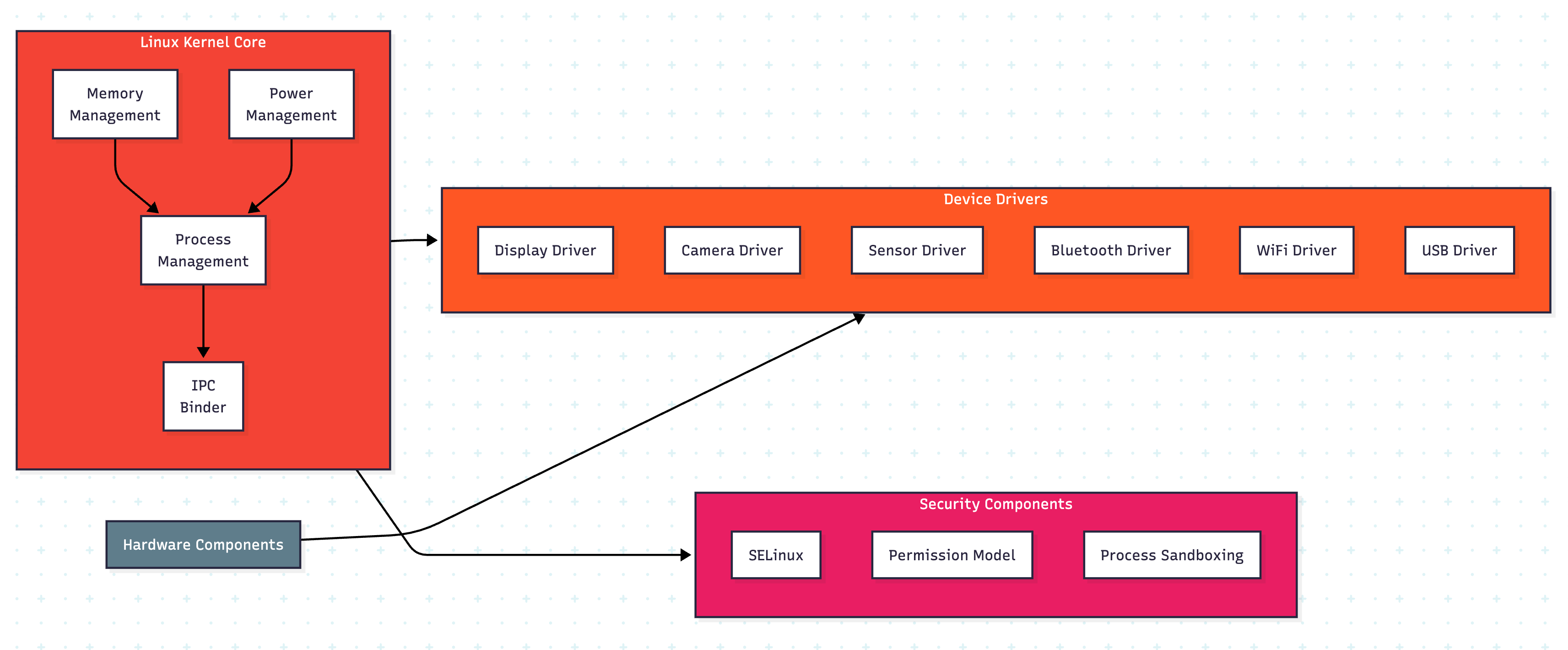
The Linux Kernel is the core of Android OS. It’s a modified version of the Linux kernel that provides essential system services and acts as an abstraction layer between hardware and software.
Key Responsibilities
Process Management: Scheduling and managing process lifecycles
Memory Management: Allocating and deallocating memory for processes
Device Drivers: Interfacing with hardware components (display, camera, sensors)
Security: Enforcing permissions and sandboxing applications
Power Management: Managing battery usage and power states
Network Stack: Handling network communications
Think of the kernel as the building’s foundation and utility infrastructure. Just as a building’s foundation supports everything above it and utilities (water, electricity, sewage) are managed by the infrastructure, the kernel manages core resources that everything else depends on.
#include <linux/module.h>
#include <linux/kernel.h>
#include <linux/init.h>
#include <linux/fs.h>
#include <linux/device.h>
#include <linux/uaccess.h>

#define DEVICE_NAME “android_display”
#define CLASS_NAME “display”

MODULE_LICENSE(”GPL”);
MODULE_AUTHOR(”Android System”);
MODULE_DESCRIPTION(”Simple Android Display Driver”);

static int major_number;
static struct class* display_class = NULL;
static struct device* display_device = NULL;

// Function prototypes
static int dev_open(struct inode*, struct file*);
static int dev_release(struct inode*, struct file*);
static ssize_t dev_write(struct file*, const char*, size_t, loff_t*);

// Initialize the driver
static int __init display_driver_init(void) {
    printk(KERN_INFO “DisplayDriver: Initializing\n”);
    ...
    printk(KERN_INFO “DisplayDriver: Registered correctly\n”);
    return 0;
}

module_init(display_driver_init);
module_exit(display_driver_exit);
Layer 2: Hardware Abstraction Layer (HAL)
What is it?
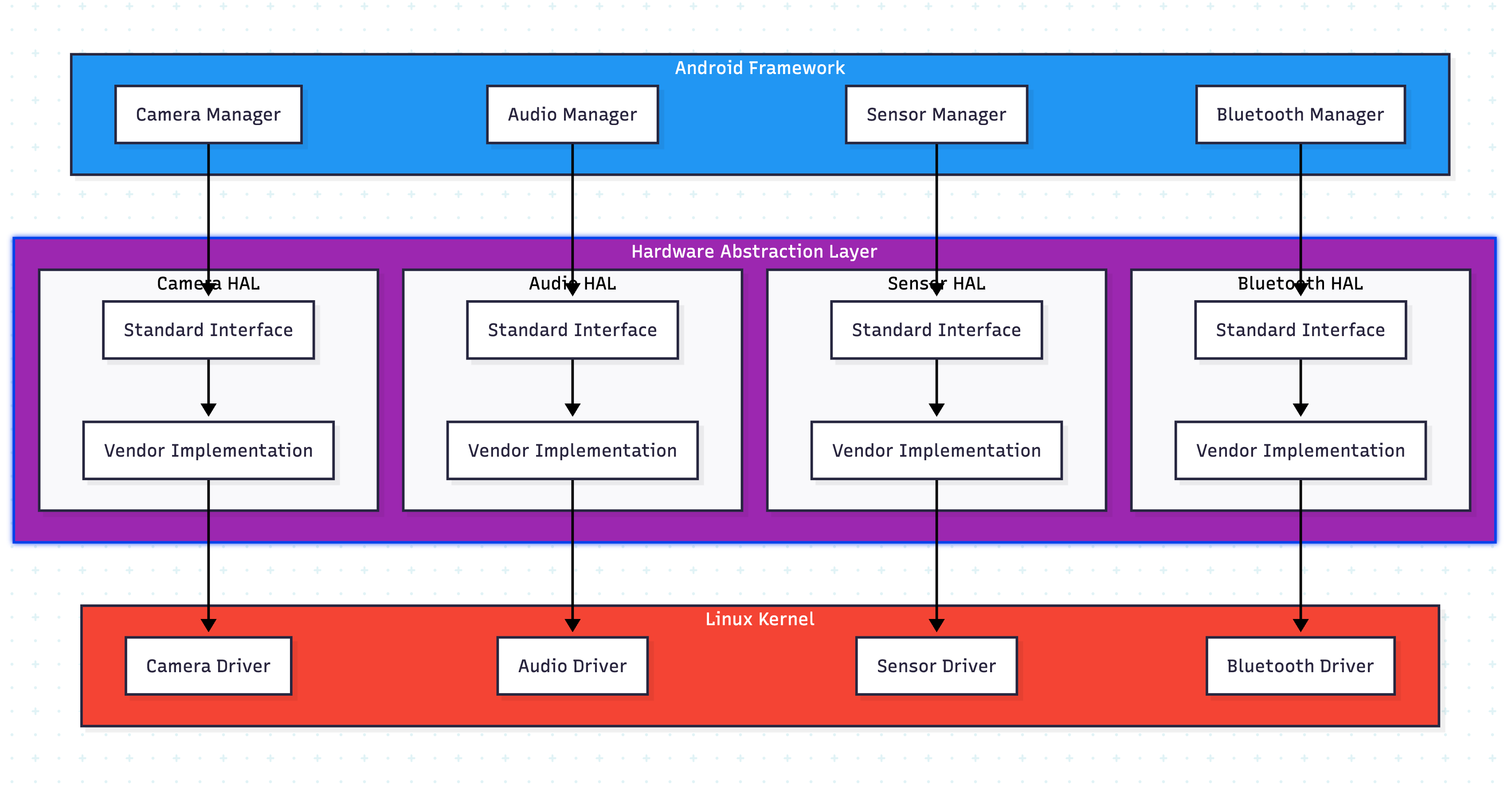
The HAL provides a standard interface between Android’s framework and hardware-specific drivers. It allows Android to be hardware-agnostic, meaning the same framework code can work with different hardware implementations.
Why HAL Exists
The HAL solves a critical problem: hardware vendors need proprietary drivers, but Android is open-source. HAL creates a boundary where vendors can implement their drivers without exposing proprietary code to the open-source framework.
Think of HAL as a universal adapter system. Just as a universal power adapter lets you plug any device into any outlet worldwide, HAL lets Android’s framework communicate with any hardware, regardless of the manufacturer.
// Example usage
int main() {
    printf(”=== Camera HAL Demo ===\n\n”);

    camera_device_t *camera = create_camera_device();
    camera_info_t info;

    camera->get_camera_info(camera, &info);
    printf(”Camera facing: %d, orientation: %d\n\n”,
           info.facing, info.orientation);

    camera->open_camera(camera);
    camera->set_parameters(camera, “resolution=1920x1080;flash=auto”);
    camera->start_preview(camera);
    camera->take_picture(camera);
    camera->close_camera(camera);

    free(camera->priv);
    free(camera);

    return 0;
}
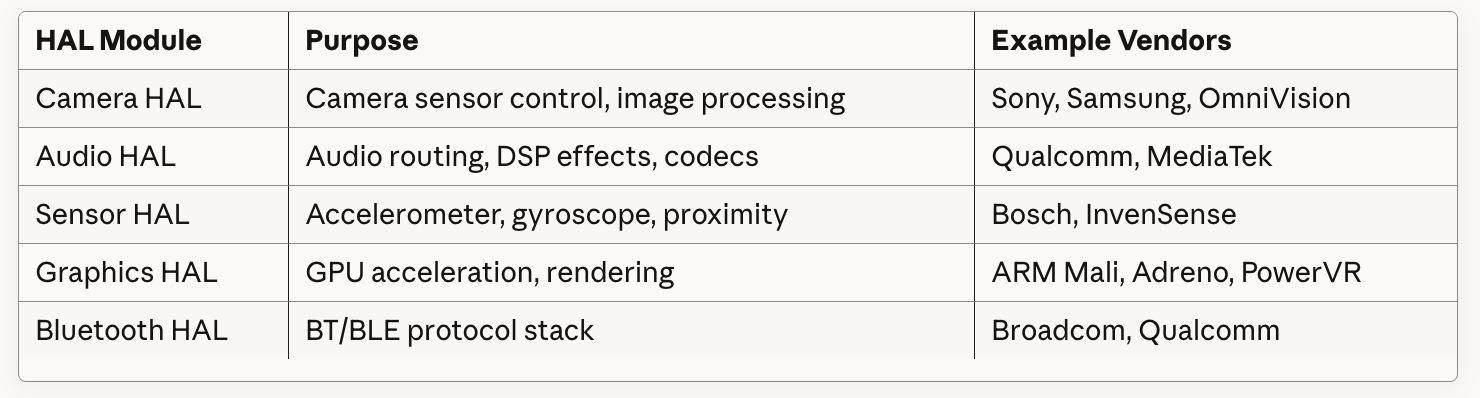
Key HAL Components
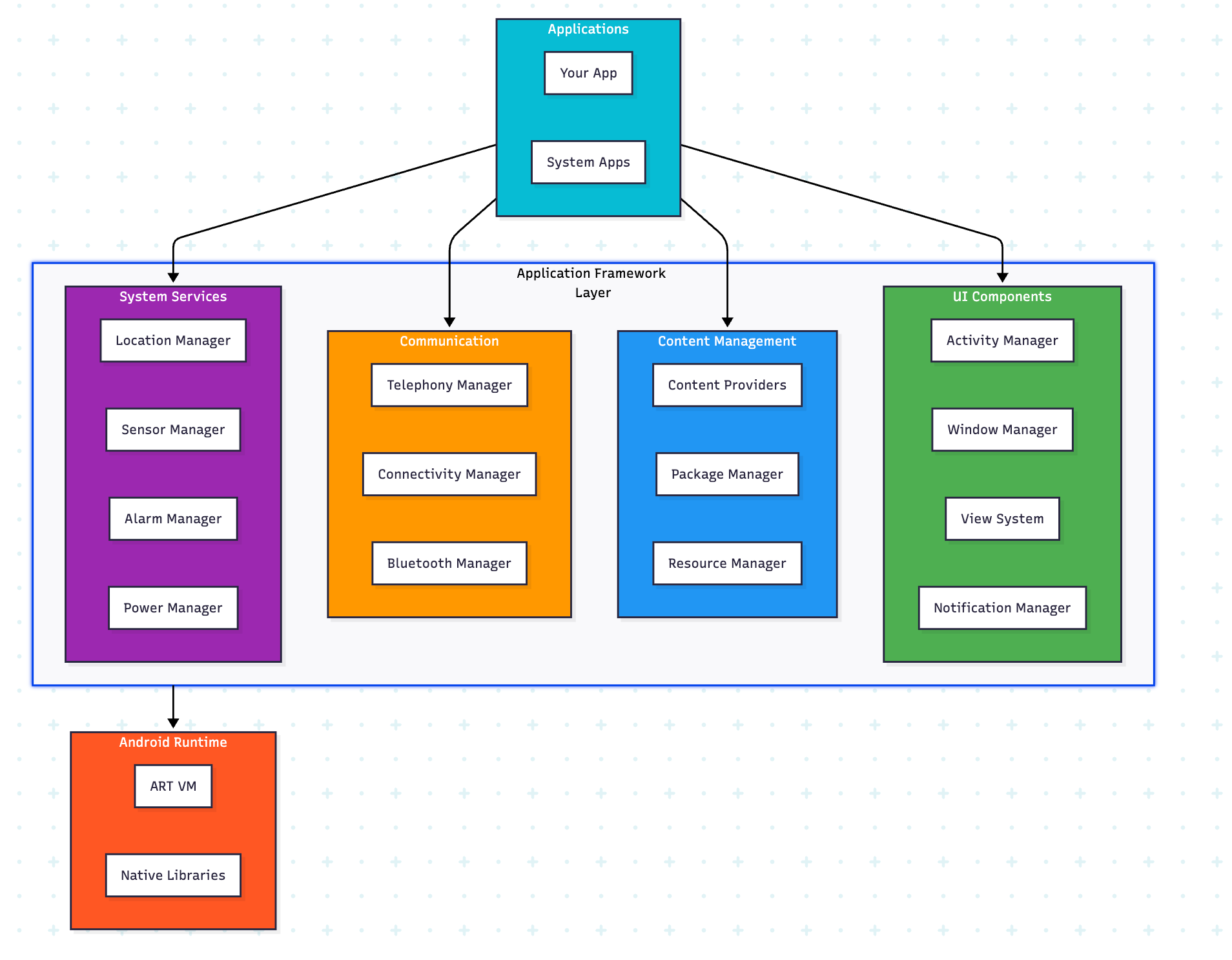
Layer 3: Application Framework
What is it?
The Application Framework is a rich set of Java/Kotlin APIs that developers use to build applications. It provides high-level building blocks and services that handle common tasks.
Think of the framework as a comprehensive toolbox and management office. Just as a building’s management handles utilities, security, and maintenance so residents don’t have to, the framework manages system services so app developers can focus on their app’s unique features.
Key Framework Components
1. Activity Manager
Manages the lifecycle of activities (screens) and the back stack.
2. Window Manager
Controls window placement, animation, and input events.
3. Content Providers
Enable apps to share data securely (contacts, media, etc.).
4. Package Manager
Handles app installation, updates, and permissions.
5. View System
The UI toolkit for building user interfaces.
 override fun onCreate(savedInstanceState: Bundle?) {
   super.onCreate(savedInstanceState)
   setContentView(R.layout.activity_main)

   // Initialize Framework Services
   initializeServices()

   // Demonstrate various framework features
   demonstratePackageManager()
   demonstrateSensorManager()
   demonstrateConnectivityManager()
   demonstrateLocationManager()
   demonstrateTelephonyManager()
   demonstrateNotificationManager()
   demonstrateBluetoothManager()
}
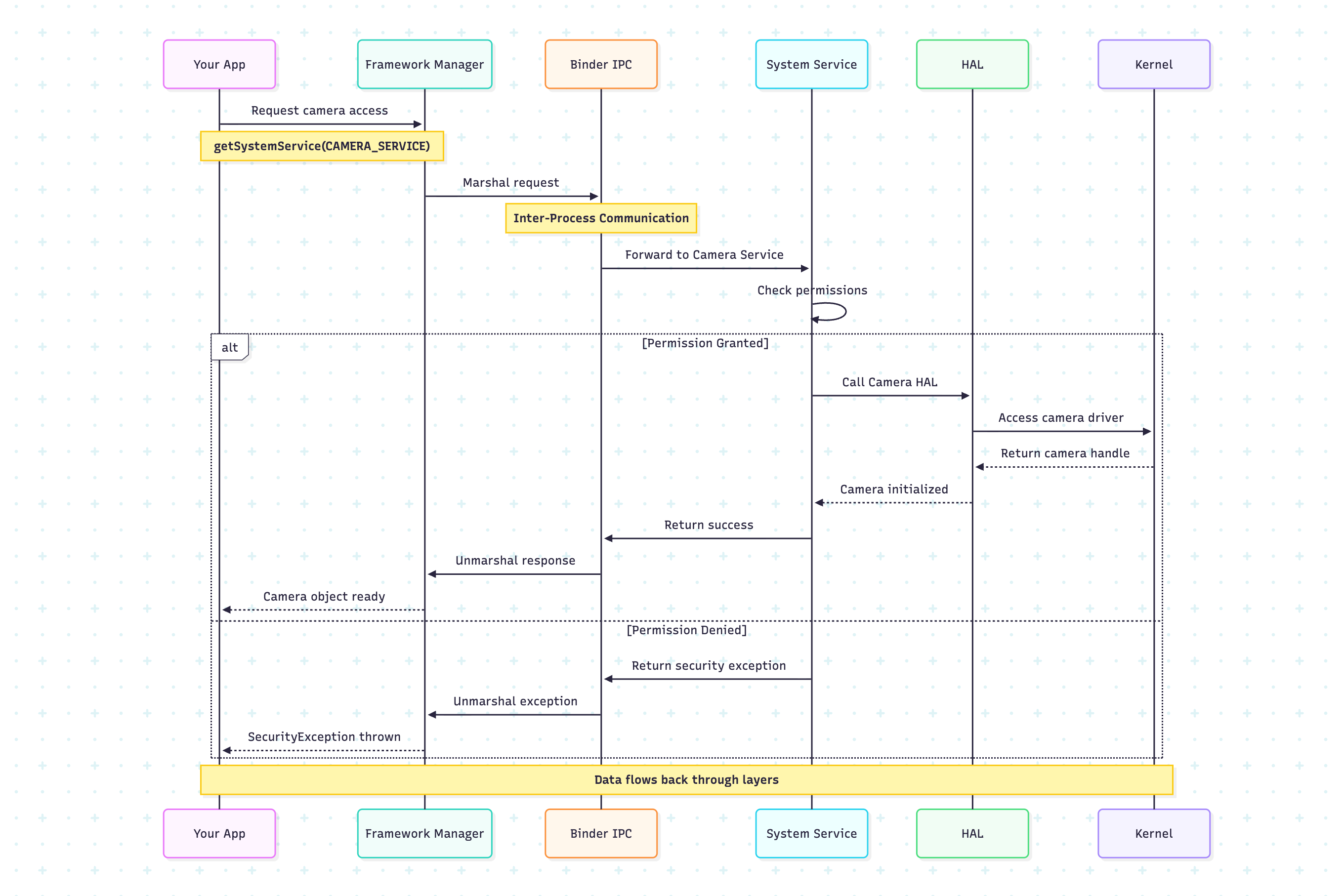
Framework Service Communication Flow
Layer 4: Application Layer
What is it?
The Application Layer is where all apps live - both system apps (Phone, Contacts, Settings) and third-party apps from developers. This is the layer users directly interact with.
Types of Applications
System Apps: Pre-installed apps (Phone, Messages, Camera)
Third-Party Apps: Installed from Play Store or other sources
Background Services: Apps running without UI (music players, sync services)
Applications are like apartments in the building. Each apartment (app) is isolated from others for security, but can request access to building services (framework) through proper channels, and ultimately depends on the building’s foundation (kernel).
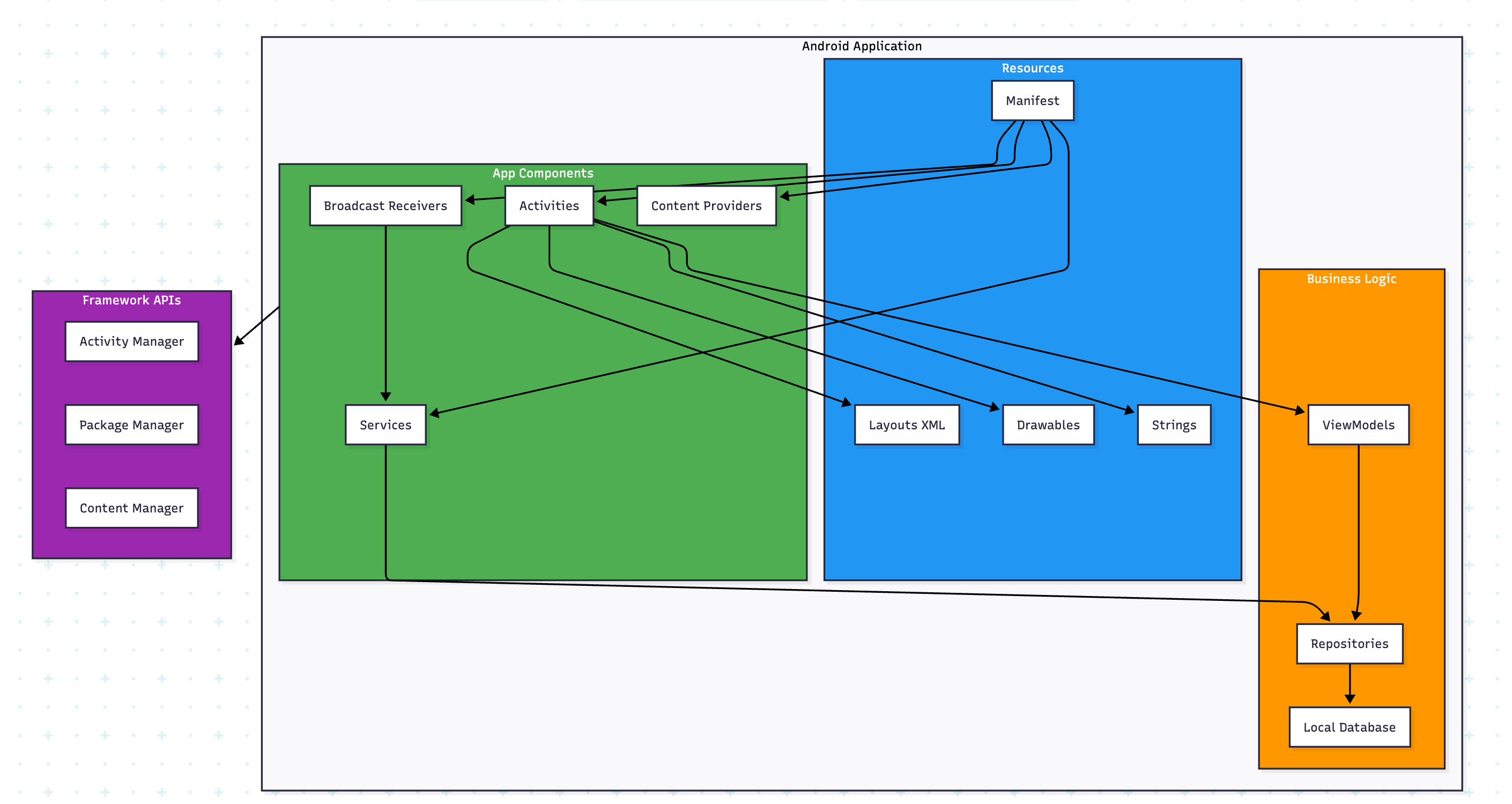
Application Components
    override fun onCreate(savedInstanceState: Bundle?) {
        super.onCreate(savedInstanceState)
        setContentView(R.layout.activity_weather)

        // Initialize ViewModel
        viewModel = ViewModelProvider(this)[WeatherViewModel::class.java]

        // Get LocationManager from Framework
        locationManager = getSystemService(Context.LOCATION_SERVICE) as LocationManager

        // Check permissions (Framework permission system)
        checkLocationPermission()

        // Observe weather data
        observeWeatherData()
    }
How All Layers Work Together
Let’s trace a real-world scenario: Taking a photo with the camera app.
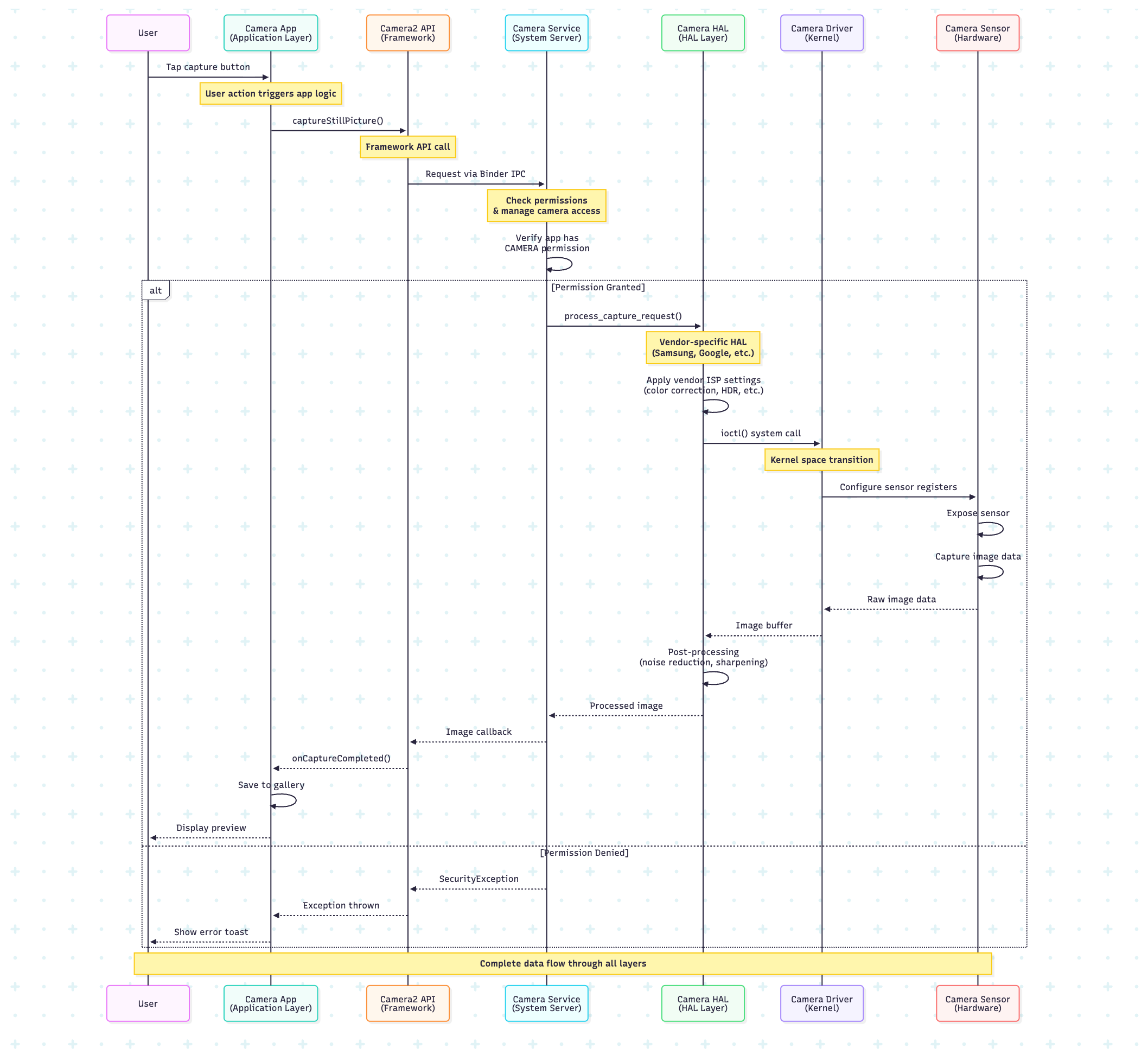
Step-by-Step Breakdown
Application Layer: User taps button → Camera app calls Camera2 API
Framework Layer: CameraManager validates permissions, manages camera lifecycle
HAL Layer: Vendor-specific camera HAL applies image processing algorithms
Kernel Layer: Camera driver communicates with sensor hardware via I2C/SPI
Hardware: Physical camera sensor captures light, converts to digital data
Return Path: Data flows back up through all layers to the app
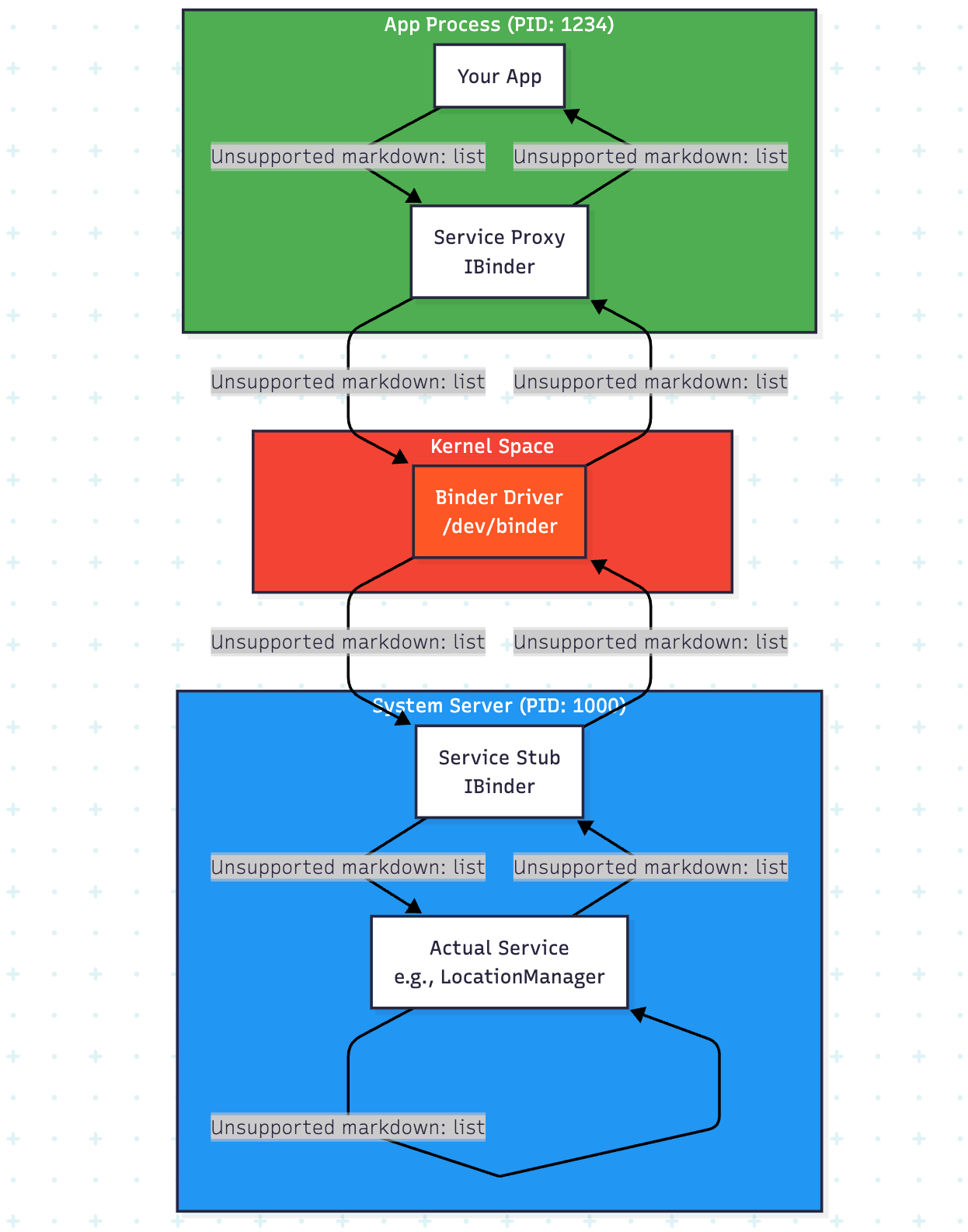
Inter-Process Communication (IPC): Binder
What is Binder?
Binder is Android’s custom IPC (Inter-Process Communication) mechanism. It’s how apps communicate with system services across process boundaries.
Why Binder?
Security: Each app runs in its own process with separate memory
Efficiency: Fast communication between processes
Reference Counting: Automatic cleanup of shared resources
Android Runtime (ART)
What is ART?
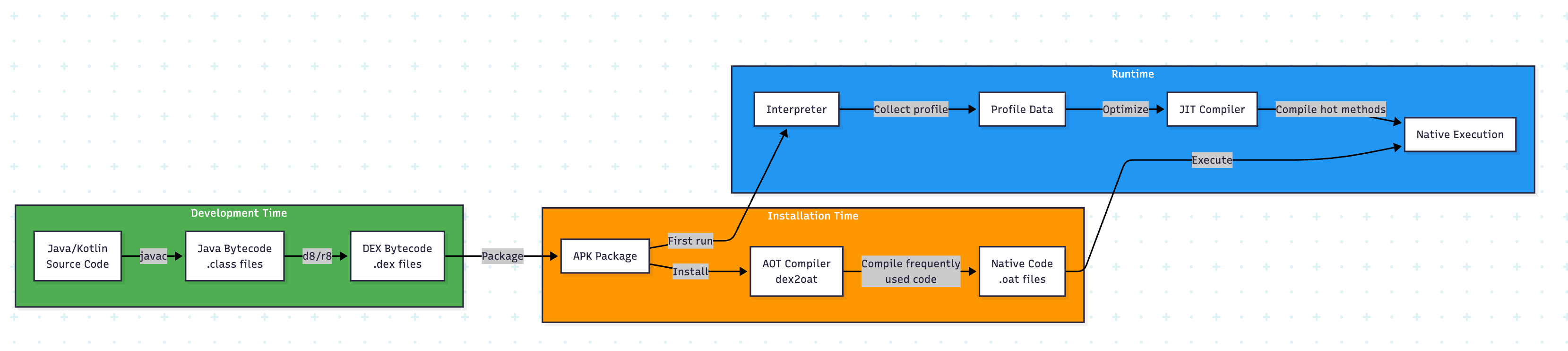
ART (Android Runtime) is the managed runtime that executes app code. It replaced Dalvik in Android 5.0.
Key Features
AOT Compilation: Apps compiled to native code during installation
JIT Compilation: Just-in-time compilation for faster execution
Garbage Collection: Automatic memory management
DEX Format: Optimized bytecode format for mobile devices
class Calculator {
    fun add(a: Int, b: Int): Int {
        return a + b
    }

    fun multiply(a: Int, b: Int): Int {
        return a * b
    }
}

COMPILATION PROCESS:

1. Kotlin Compiler (kotlinc) converts to Java Bytecode:
   - Creates .class files
   - Standard JVM bytecode instructions

2. D8/R8 Compiler converts to DEX:
   - Optimizes for mobile (smaller file size)
   - Converts to Dalvik instructions
   - Creates .dex file

DEX BYTECODE (simplified representation):

class Calculator {
    method add(II)I {
        // I = integer type
        0000: iget v0, p1      // Get parameter 1 into register v0
        0002: iget v1, p2      // Get parameter 2 into register v1
        0004: add-int v2, v0, v1   // Add v0 and v1, store in v2
        0006: return v2        // Return value in v2
    }

    method multiply(II)I {
        0000: iget v0, p1
        0002: iget v1, p2
        0004: mul-int v2, v0, v1   // Multiply instead of add
        0006: return v2
    }
}

fun main() {
    println(”=== Android Runtime (ART) Demo ===\n”)

    // Example APK analysis
    println(”Note: To analyze a real APK, provide the path:”)
    println(”analyzeAPK(\”/path/to/app.apk\”)\n”)

    // Demonstrate compilation
    val compiler = ARTCompiler()
    compiler.demonstrateCompilation()
    compiler.compareAOTvsJIT()

    // Demonstrate memory management
    val memoryDemo = ARTMemoryDemo()
    memoryDemo.demonstrateGarbageCollection()
}
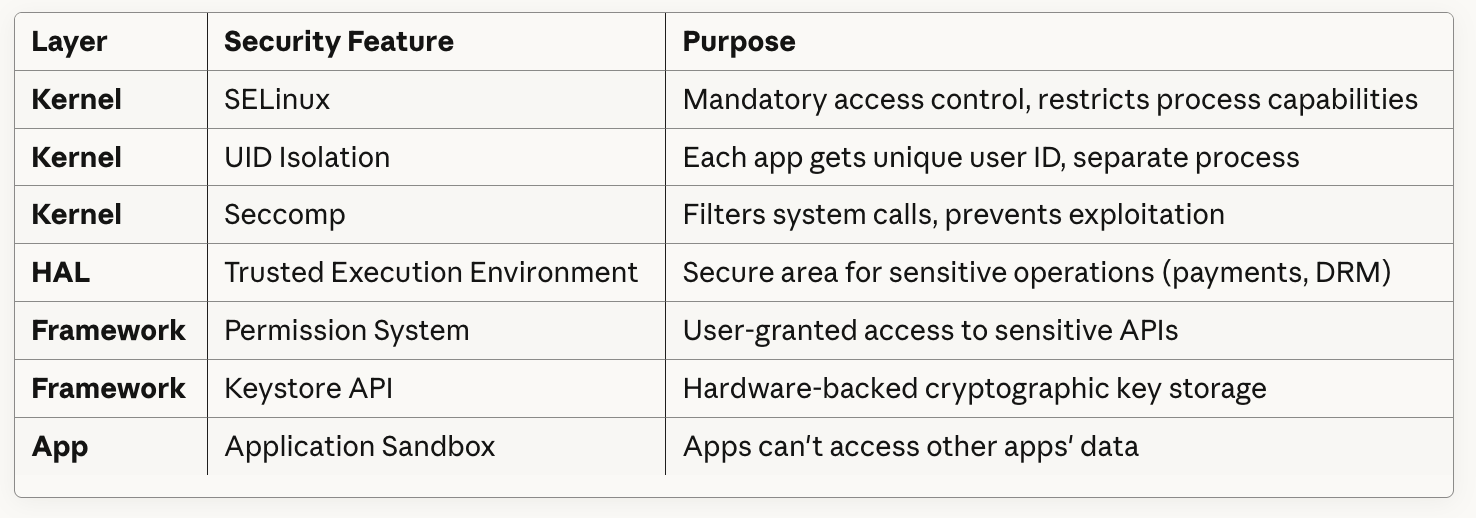
Security Architecture Across Layers
Android’s security is implemented at every layer:

Security Features by Layer
Performance Optimization Across Layers

Complete System Architecture Diagram

Real-World Architecture Examples
Example 1: Google Pixel Camera
User Action: Take photo
│
├─ Camera App (Application Layer)
│  └─ Uses Camera2 API
│
├─ CameraManager (Framework)
│  ├─ Permission check
│  ├─ Camera session management
│  └─ Binder IPC to Camera Service
│
├─ Camera Service (System Server)
│  ├─ Arbitrates camera access
│  └─ Routes to Camera HAL
│
├─ Google Camera HAL (HAL Layer)
│  ├─ HDR+ processing
│  ├─ Night Sight algorithm
│  ├─ Portrait mode depth calculation
│  └─ Calls kernel driver
│
├─ Camera Driver (Kernel)
│  ├─ I2C commands to sensor
│  ├─ DMA for image transfer
│  └─ ISP configuration
│
└─ Sony IMX Sensor (Hardware)
   └─ Captures photons → digital data
Example 2: Location Services Flow
App requests location
│
├─ LocationManager.requestLocationUpdates()
│  └─ Framework API call
│
├─ Location System Service
│  ├─ Check ACCESS_FINE_LOCATION permission
│  ├─ Fusion of multiple sources:
│  │  ├─ GPS HAL
│  │  ├─ WiFi signals
│  │  └─ Cell tower triangulation
│  └─ Battery optimization logic
│
├─ GPS HAL
│  └─ Vendor-specific positioning algorithms
│
├─ GPS Driver
│  └─ UART communication with GPS chip
│
└─ GPS Hardware
   └─ Receives satellite signals
Key Takeaways
1. Layered Architecture Benefits
Modularity: Each layer can be updated independently
Security: Multiple security boundaries
Portability: Same framework works on different hardware
Maintainability: Clear separation of concerns
2. Communication Patterns
Vertical: Apps → Framework → HAL → Kernel → Hardware
Horizontal: Binder IPC for process communication
Asynchronous: Callbacks and listeners for events
3. Design Principles
Abstraction: Each layer hides complexity from above
Encapsulation: Implementation details stay hidden
Standard Interfaces: HAL provides consistent API
Security by Design: Multiple protection layers
References and Further Reading
Official Documentation
Android Open Source Project (AOSP): https://source.android.com/
Complete Android platform source code
Architecture documentation
Android Developers Guide: https://developer.android.com/guide
Framework APIs and best practices
Architecture components
HAL Interface Definitions: https://source.android.com/devices/architecture/hal
Camera HAL, Audio HAL specifications
Vendor implementation guidelines
Technical Deep Dives
Binder IPC Mechanism:
“Android Binder: Open-source IPC in Android” - Android Developers Blog
Source:
frameworks/native/libs/binder/
ART Internals:
“ART and Dalvik” - Android Open Source Documentation
Source:
art/directory in AOSP
Linux Kernel for Android:
“Android Linux Kernel” - kernel.org
Key additions: Binder, Ashmem, Low Memory Killer
Books
“Embedded Android” by Karim Yaghmour
Deep dive into Android internals
Kernel modifications and system architecture
“Android Security Internals” by Nikolay Elenkov
Security at every layer
Practical exploitation and defense
Research Papers
“Understanding Android Security” by Enck et al.
Academic analysis of Android security architecture
“A Study of Android Application Security” - USENIX
Real-world security analysis
Conclusion
Android’s four-layer architecture is a masterpiece of software engineering that balances flexibility, security, and performance. By understanding how each layer works and interacts, developers can:
Build more efficient applications
Debug issues across the entire stack
Optimize for specific hardware
Implement better security practices
Contribute to AOSP development
The kernel provides the foundation, the HAL enables hardware diversity, the framework offers rich APIs, and applications deliver user value. Together, they create the robust ecosystem that powers billions of devices worldwide.