
10 Mistakes You Should Avoid in Jetpack Compose

Jetpack Compose has fundamentally shifted how we build UI on Android. It is declarative, powerful, and fun. However, as with any potent tool, it is easy to cut yourself if you don’t respectful of its internal mechanics.
In my years architecting large-scale mobile applications in Silicon Valley, I’ve seen teams migrate to Compose and fall into the same traps repeatedly. These aren’t just syntax errors; they are fundamental misunderstandings of the Compose Lifecycle, Recomposition, and State Management.
Here are the 10 critical mistakes I see in code reviews, and how to fix them.
1. Breaking Skippability with Unstable Types
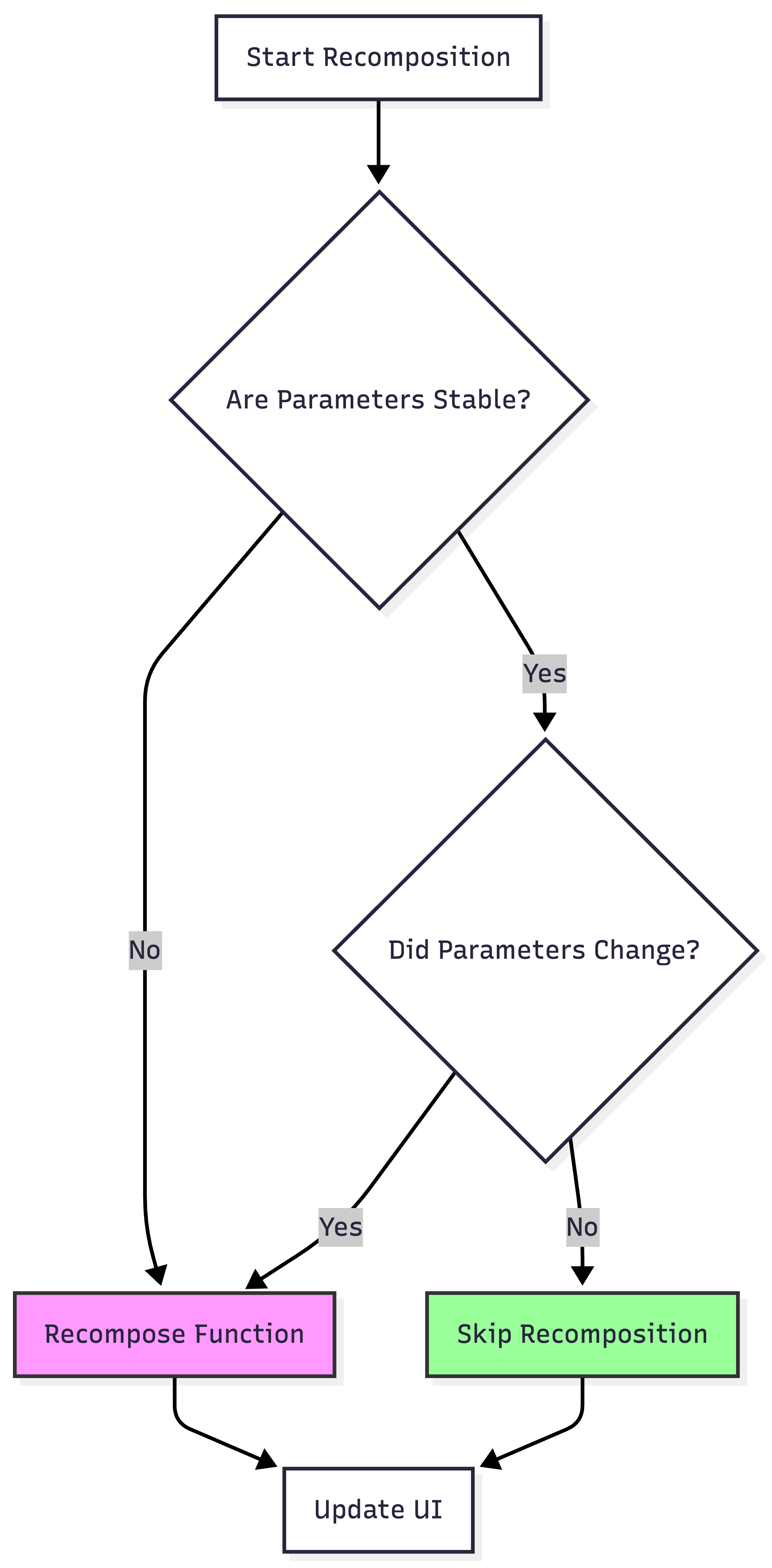
This is the #1 performance killer in Compose. Compose tries to be smart; if a Composable’s parameters haven’t changed, it skips recomposition. But “changed” isn’t simple. It relies on Stability.
If you pass a class that Compose considers “Unstable” (like a plain class with `var` properties or a List from an external module), Compose always recomposes that function, cascading down the tree.
The Mistake: Passing unstable data classes or `List<T>` directly to composables.
// BAD: This class is unstable because of ‘var’

data class User(var name: String)

@Composable

fun Profile(user: User) { // Will always recompose

    Text(user.name)

}
The Fix: Use `@Immutable` or `@Stable` annotations, or map to stable types.
// GOOD: Stable

@Immutable

data class User(val name: String)
Skippability Flow
2. Reading State in the Wrong Phase
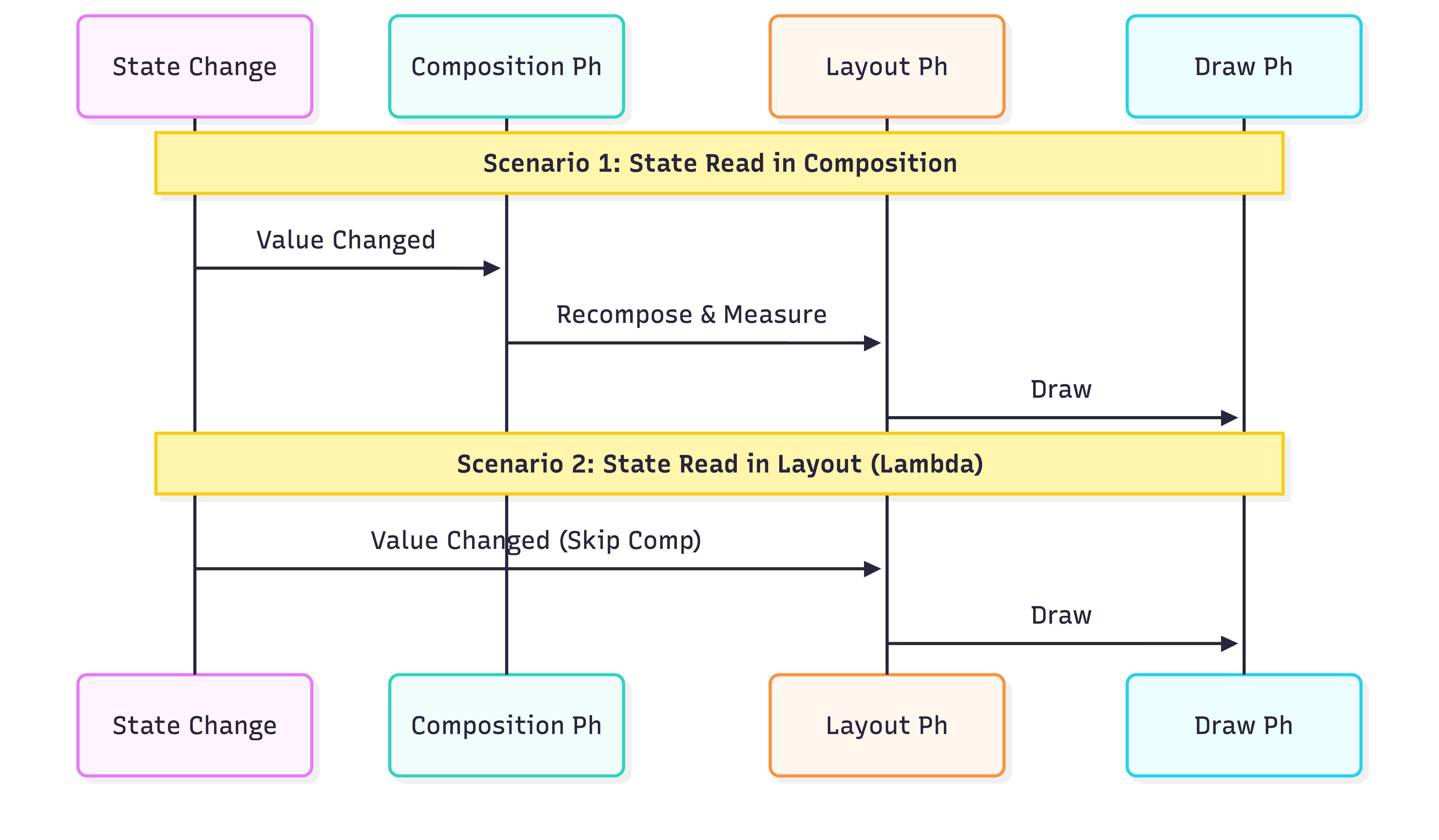
Compose has three phases: Composition, Layout, and Drawing. Reading state in the Composition phase (the function body) generally triggers a full recomposition. Reading it in Layout or Draw phases only minimizes work.
The Mistake: Reading strictly visual state (like scroll offset) in the composition body to update a modifier.
// BAD: Reads state in Composition phase

@Composable

fun BadParallax(scrollState: ScrollState) {

    Box(

        Modifier.offset(y = with(LocalDensity.current) { -scrollState.value.toDp() }) // Triggers Recomposition on every pixel scroll

    )

}
The Fix: specific lambda modifiers utilize the Layout phase.
// GOOD: Reads state in Layout phase

@Composable

fun GoodParallax(scrollState: ScrollState) {

    Box(

        Modifier.offset { IntOffset(0, -scrollState.value) } // Only triggers Layout/Draw

    )

}
Compose Phases
3. Forgetting `key` in Lazy Lists
By default, `LazyColumn` uses the item’s position as its key. If you add an item to the top of the list, every item below it shifts index. Compose thinks *all* of them changed, losing local state (like scroll position or text input) inside those items.
The Mistake: relying on index/default keys for dynamic lists.
// BAD

items(users) { user -> UserRow(user) }
The Fix: Provide a stable, unique key.
// GOOD

items(items = users, key = { user -> user.id }) { user -> UserRow(user) }
4. Derived State Neglect (The “Filter” Problem)
When you listen to a rapidly changing state (like scroll position) to calculate a boolean (e.g., “show scroll-to-top button”), you don’t want to recompose on every pixel.
The Mistake: Using raw state comparison in composition.
// BAD: Recomposes on EVERY scroll pixel change

val showButton = listState.firstVisibleItemIndex > 0
The Fix: Use `derivedStateOf`. It buffers the rapid changes and only notifies when the *result* changes.
// GOOD: Recomposes only when the boolean flips

val showButton by remember {

    derivedStateOf { listState.firstVisibleItemIndex > 0 }

}
Signal Filtering

5. Heavy Computations in Composition Body
Composable functions can run *frequently*—essentially every frame animations run. Any logic directly in the function body runs every time.
The Mistake: Sorting or filtering lists directly in the function.
@Composable

fun UserList(users: List<User>) {

    // BAD: Sorts on every recomposition

    val sortedUsers = users.sortedBy { it.name }

    LazyColumn { ... }

}
The Fix: Use `remember` or move it to a `ViewModel`.
@Composable

fun UserList(users: List<User>) {

    // GOOD: Only sorts if ‘users’ changes

    val sortedUsers = remember(users) { users.sortedBy { it.name } }

    LazyColumn { ... }

}
6. Recursive Recomposition
This is a subtle bug where a state update requests a recomposition, and that recomposition immediately triggers the state update again. Infinite loop.
The Mistake: Unconditional side effects or logic that writes to state purely read in the same scope.
// BAD

@Composable

fun BadCounter() {

    var count by remember { mutableStateOf(0) }

    count++ // SIDE EFFECT IN COMPOSITION!

    Text(”Count: $count”)

}
The Fix: Use `SideEffect` or `LaunchedEffect` for things that *must* happen, but ideally, state updates should come from callbacks/events, not composition itself.
7. Misunderstanding `LaunchedEffect` Keys
`LaunchedEffect` restarts when its key changes. Using `Unit` or `true` means “run once”. Using dynamic keys means “restart when this changes”.
The Mistake: Passing a key that changes too often (restarting the job unnecessarily) or `Unit` when you actually *needed* it to restart.
// BAD: If userId changes, this DOES NOT re-fetch.

LaunchedEffect(Unit) {

    viewModel.fetchData(userId)

}
The Fix: Pass the relevant dependency as the key.
// GOOD: Reference the variable that dictates the work

LaunchedEffect(userId) {

    viewModel.fetchData(userId)

}
8. Overusing `ConstraintLayout`
In the XML View system, `ConstraintLayout` was necessary to avoid nested layouts (double taxation). In Compose, layout measurement is single-pass. Deep nesting of `Row` and `Column` is efficient and generally preferred for readability.
The Mistake: Using `ConstraintLayout` for simple linear UIs just out of habit.
The Fix: Default to `Column`, `Row`, and `Box`. Use `ConstraintLayout` only when you have complex referenced constraints that are hard to express hierarchically.
9. Leaking Objects with `DisposableEffect`
Sometimes you need to hook into legacy systems or Android lifecycles (like registering a broadcast receiver).
The Mistake: Using `LaunchedEffect` for things that need cleanup.
// BAD: Listener is never removed

LaunchedEffect(Unit) {

    val listener = ...

    system.addListener(listener)

}
The Fix: Use `DisposableEffect` and provide an `onDispose` block.
// GOOD

DisposableEffect(Unit) {

    val listener = ...

    system.addListener(listener)

    onDispose {

        system.removeListener(listener)

    }

}
10. Neglecting `rememberSaveable`
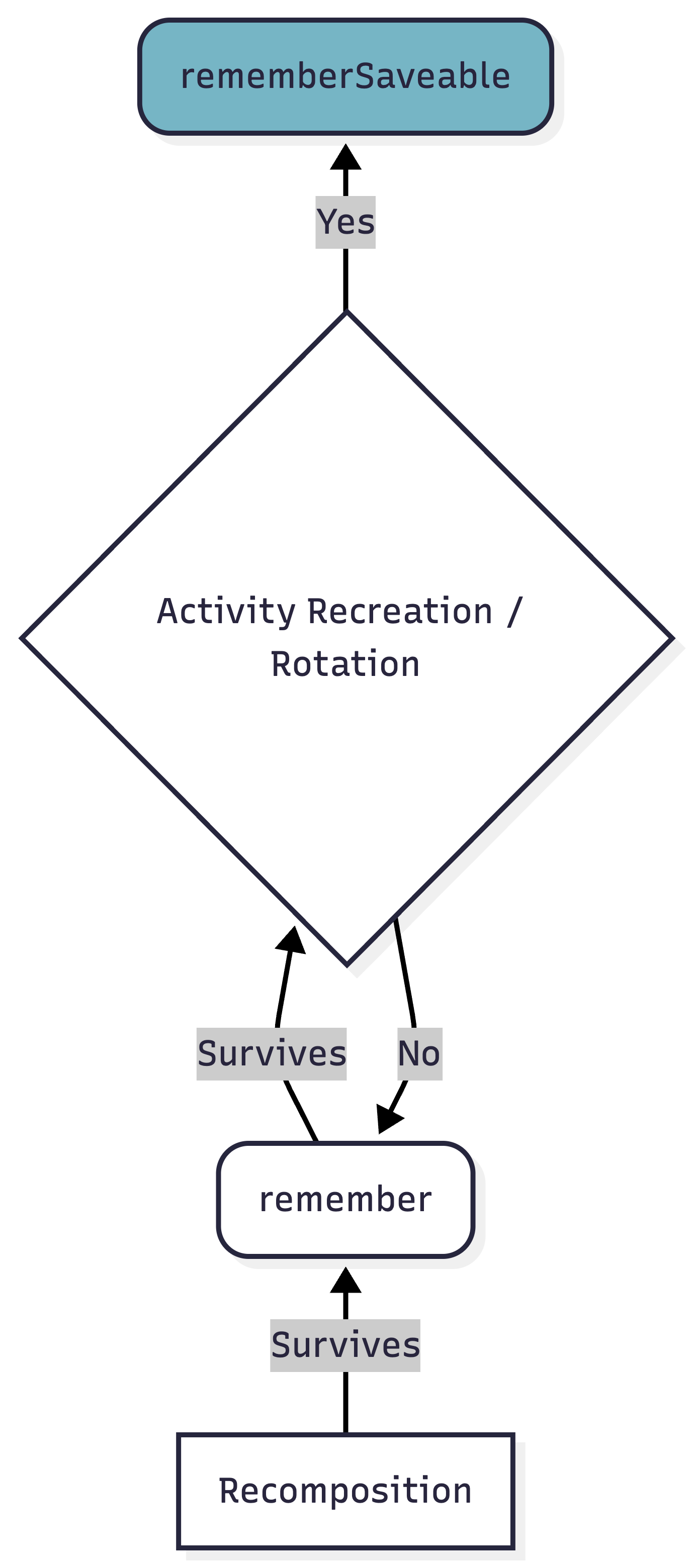
`remember` survives recomposition. It does **not** survive configuration changes (rotation, dark mode switch) or process death.
The Mistake: User types a long form, rotates the phone, and everything is gone.
// BAD: Lost on rotation

var text by remember { mutableStateOf(”“) }
The Fix: `rememberSaveable` bundles the data into the SavedInstanceState bundle.
// GOOD: Survives rotation

var text by rememberSaveable { mutableStateOf(”“) }
Memory Hierarchy
Conclusion
Jetpack Compose relies heavily on the concept of “Positional Memoization”. If you fight the system by breaking stability/skippability or ignoring the lifecycle phases, you will end up with a janky app.
Mastering these 10 points moves you from “Writing Compose” to “Architecting Compose”.
Happy Coding
I'm learning more from this article than in campus..
This breakdown of stabiltiy is spot-on, especially the unstable types trap. The cascading recomps from that one mistake can tank frame rates faster than anyone expects. I've seen production apps where simply marking data classes as @Immutable saved like 40% of unnecessary work duirng scrolling. The visual flow diagrams here make it way clearer than the official docs imo.